ATOLL ELECTRONIQUE
OWNER’S MANUAL ~ AMPLIFIER
ATOLL ELECTRONIQUE
AM400 EVO
Page 5Page 4
BRIDGE MONO MODE
CONNECTIONS
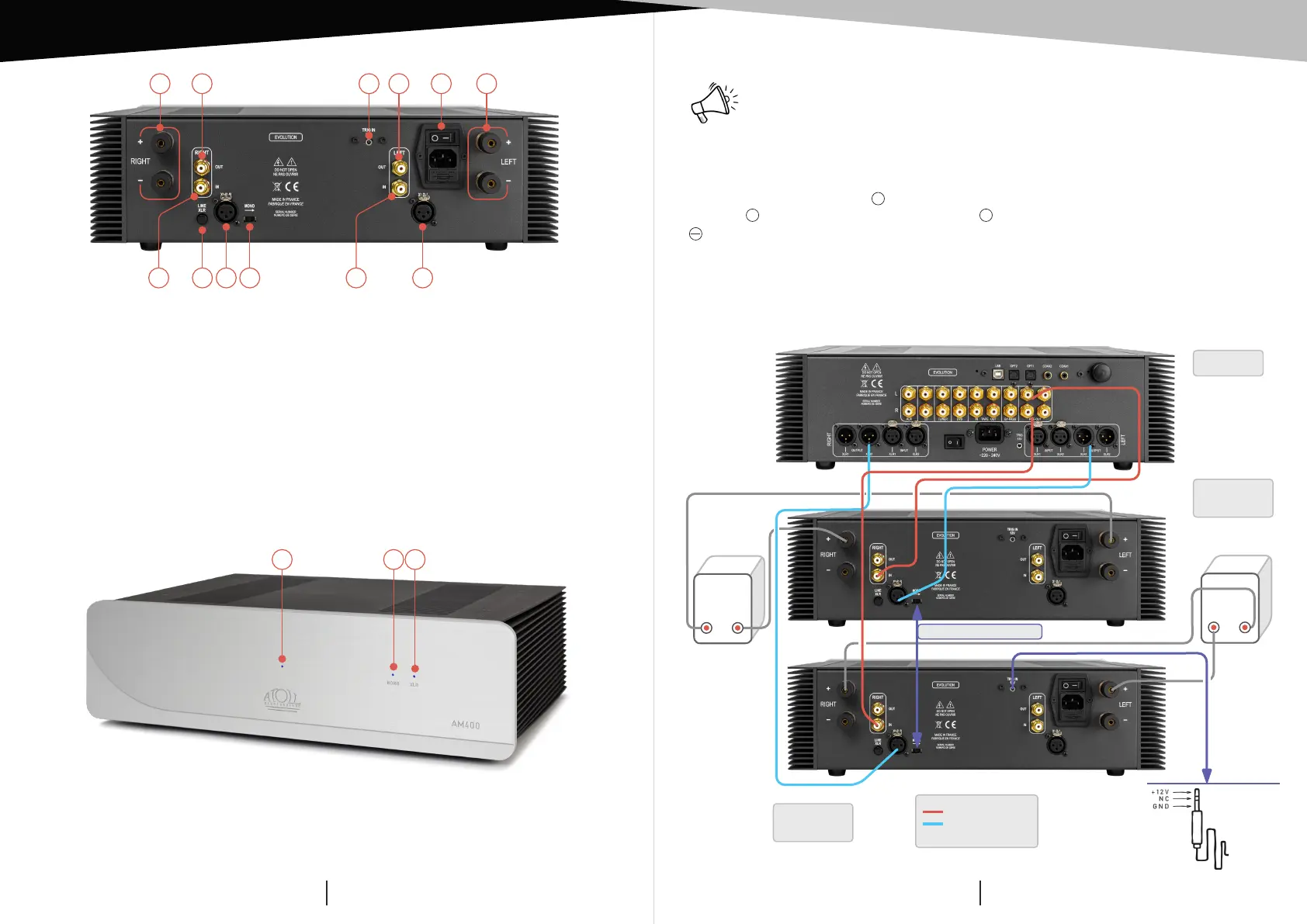
You can transform your AM400 Signature power amplifier into a mono bridge amplifier.
Activate the input (11) at the rear of the appliance on MONO. PRE-OUT outputs of the
preamp must be connected to the Right inputs of each Amplifier.
For each Amplifier, terminal
+
(red) of the Right output (1) has to be connected to the
terminal
+
(red) of the speaker and terminal
+
(red) of the Left output (2) to the terminal
(black) of the speaker.
The wiring of the speakers will be the same while using RCA or XLR cables.
(Configuration: 1 Preamp and 2 Power Amplifiers mono bridged).
Warning: be sure that your amplier is unplugged and that no other appliance
is plug-in during this operation.
13) Led indicator of ON/SLEEP switch.
14) Led indicator of mono bridge: the led is ON when the power amplifier has
been activated on MONO before general switch on.
15) Led indicator of XLR input mode: the LED switches ON if the button (8) on the
rear of the AM is on XLR position.
CONNECTINGS + TRIGGER
DETAILS OF FUNCTIONS
(1)
This input allows the control ON/OFF of your amplifier simultaneously to any device with
a 12V Trigger outlet. For the system to operate, the ON/OFF button on your AM400 Signature
must remain in the OFF position (0). If the switch is in the ON position (I), the amplifier will
work but not the Trigger function.
13
14 15
1) Right speaker outputs.
2) Left speaker outputs.
3) General power plug and ON/OFF
switch (with internal fuse).
4) Right line output.
5) Left line output.
6) Right line input.
7) Input type selector:
– Line: button up.
– XLR: button down.
8) Right XLR input.
9) MONO bridge switch.
10) Left line input.
11) Left XLR input.
12) 12V Trigger input
(1)
.
6 107 9
4 5 31 212
8 11
Interrupteur sur MONO
RCA links
XLR links
(Optionally)
PR400 EVO
Left
Speaker
Right
Speaker
+
+
–
–
AM400 EVO
left channel
AM400 EVO
right channel
Jack
Ø 3,5 mm