Crestron GLS-OIR-C-NS Manual


Læs gratis den danske manual til Crestron GLS-OIR-C-NS (2 sider) i kategorien Bevægelsesdetektor. Denne vejledning er vurderet som hjælpsom af 11 personer og har en gennemsnitlig bedømmelse på 4.3 stjerner ud af 6 anmeldelser. Har du et spørgsmål om Crestron GLS-OIR-C-NS, eller vil du spørge andre brugere om produktet?

Side 1/2
Crestron Electronics, Inc. Installation Guide - DOC. 7530A
15 Volvo Drive Rockleigh, NJ 07647 (2036481)
Tel: 888.CRESTRON 06.14
Fax: 201.767.7576 Specifications subject to
www.crestron.com change without notice.
Crestron GLS-OIR-C-NS
Passive Infrared Ceiling Mount Occupancy Sensor
Installation Guide
This product is Listed to applicable UL Standards and requirements by Underwriters Laboratories Inc.
As of the date of manufacture, the GLS-OIR-C-NS has been tested and found to comply with specifications for CE marking.
Regulatory Compliance
Federal Communications Commission (FCC) Compliance Statement
This device complies with part 15 of the FCC Rules. Operation is subject to the following conditions:
(1) This device may not cuase harmful interference and (2) this device must accept any interference received, including
interference that may cause undesired operation.
CAUTION: Changes or modifications not expressly approved by the manufacturer responsible for compliance could void the
user’s authority to operate the equipment.
NOTE: This equipment has been tested and found to comply with the limits for a Class B digital device, pursuant to part 15 of
the FCC Rules. These limits are designed to provide reasonable protection against harmful interference in a residential
installation. This equipment generates, uses, and can radiate radio frequency energy and, if not installed and used in
accordance with the instructions, may cause harmful interference to radio communications. However, there is no guarantee that
interference will not occur in a particular installation. If this equipment does cause harmful interference to radio or television
reception, which can be determined by turning the equipment off and on, the user is encouraged to try to correct the interference
by one or more of the following measures:
Reorient or relocate the receiving antenna
Increase the separation between the equipment and receiver
Connect the equipment into an outlet on a circuit different from that to which the receiver is connected
Consult the dealer or an experienced radio/TV technician for help
Industry Canada (IC) Compliance Statement
CAN ICES-3(B)/NMB-3(B)
DESCRIPTION
The Crestron
®
GLS-OIR-C-NS is a low-profile, ceiling-mount occupancy sensor that delivers
a powerful and cost-effective solution for reducing energy costs and enhancing the
functionality of standalone lighting systems. It is designed for small- to medium-sized areas
up to 2,000 square feet to detect when the room is occupied, making it great for use in
conference rooms, hallways, and private offices. Passive infrared motion sensing affords
excellent reliability for control of lighting, HVAC, and other devices in the room, while also
providing superior immunity to false triggering. For power and control, the GLS-OIR-C-NS
can connect directly to a GLPP, GLPAC, or GL-IPAC-SW8 (all sold separately). The
GLS-SIM Sensor Integration Module (sold separately) gives the option to interface with a
control system via Cresnet
®
.
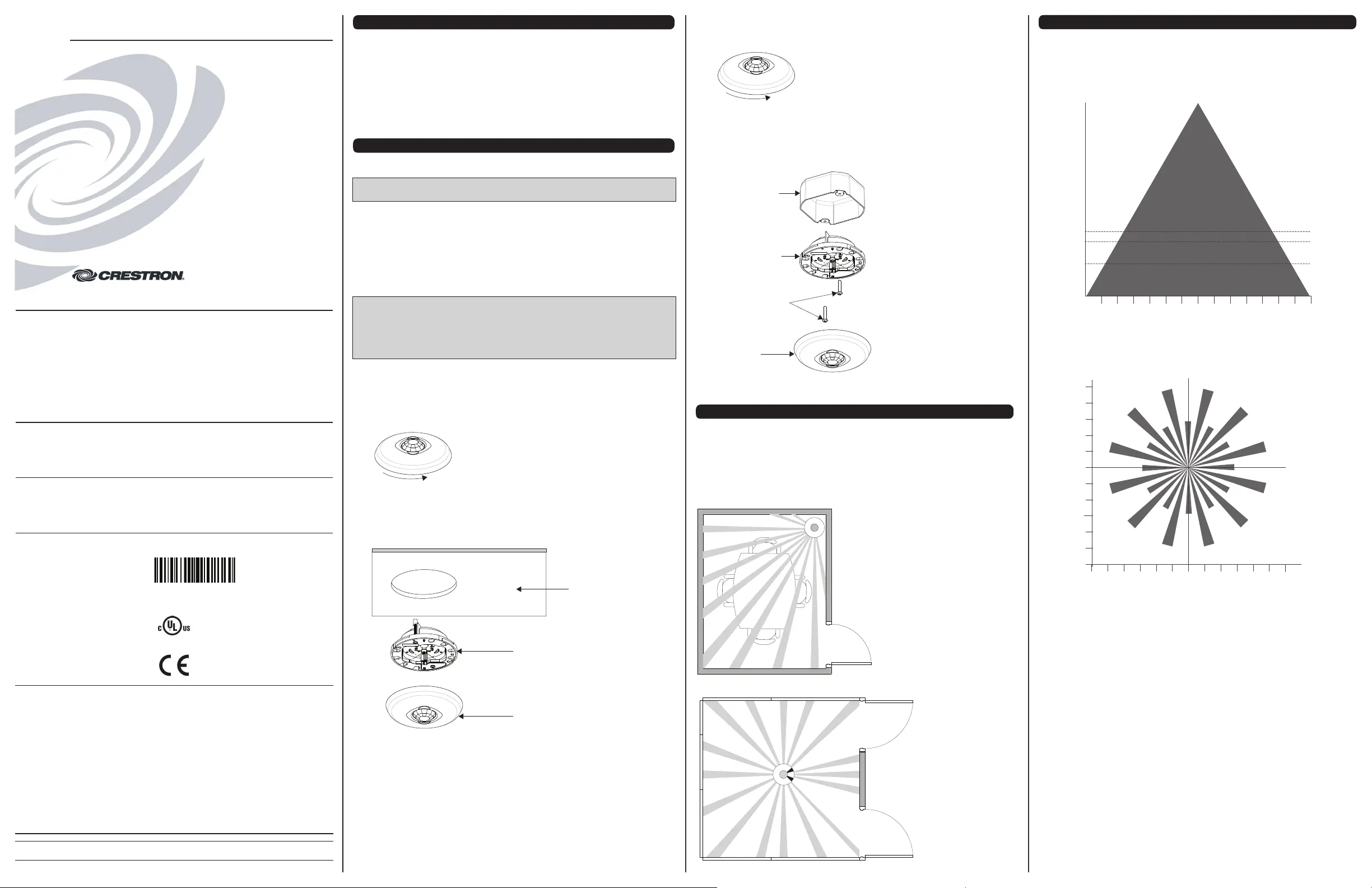
MOUNTING AND MASKING LOCATION DIAGRAM
The supplied masks mount in the sensor cover to block the PIR sensor. The half mask is
supplied to allow half of the sensor to be masked. The perforated mask has twelve 30º
removable segments that allow the masking of particular areas to prevent undesireable
triggers from affecting the sensor operation.
Masking is not required in the corner mounting application shown below because it cannot
detect motion through a door. By masking a portion of the sensor, traffic through a hallway
can be ignored as in the second example. The following illustrations provide typical
application examples.
INSTALLATION
These instructions include procedures for installation into a drop ceiling or drywall (preferred)
and installation into an octagon electrical box.
NOTE: The sensor’s Class 2/SELV wiring and connector need to be adequately separated
from line voltage circuit conductors or uninsulated live parts of different circuits.
The following items are included with the GLS-OIR-C-NS for installation:
1/2 solid PIR mask (1)
1/12 perforated PIR mask (1)
Hole cutout template (1)
The following items are required for installation:
Slotted or Phillips screwdriver
Pencil
Cutting tools
NOTE: Before securing the sensor to the ceiling, rotate the device to ensure it faces the
desired direction. Refer to the “Mounting and Masking Location Diagram” and “Detection
Range” sections to choose the best orientation. Avoid areas where false tripping may
occur due to outside motion such as an open door. Identify and avoid areas of possible
vibrations and air currents (e.g., projectors, fans, vents) and mount the sensor at least 5
feet (2 meters) away from these items.
Install into a Drop Ceiling or Drywall
1. Select the location for mounting the sensor and proper masking for the application.
2. Use the supplied hole cutout template to mark the ceiling where the sensor is to be
mounted.
3. Use cutting tools appropriate for the surface to create a hole in the ceiling.
4. Turn the sensor cover counter-clockwise to separate it from the GLS-OIR-C-NS.
Install Into Octagon Electrical Box
1. Select the location for mounting the sensor and proper masking for the application.
2. Turn the sensor cover counter-clockwise to separate it from the device.
3. Using a Phillips screwdriver, unscrew the the pre-installed screws from the plastic
wings and remove them from the sensor.
4. Mount the GLS-OIR-C-NS to the octagon electrical box using two screws (not
supplied). The GLS-OIR-C-NS has several mounting holes that allow proper
orientation of the sensor.
Mounting to Octagon Electrical Box
5. Place the GLS-OIR-C-NS into the hole and secure the sensor to the drywall or ceiling
tile using the pre-installed screws. The pre-installed screws have plastic “wings” that
secure the occupancy sensor to the ceiling. When the screws are tightened the wings
open and clamp against the surface of the ceiling. Refer to the illustration below for a
typical mounting scenario.
Mount GLS-OIR-C-NS to Drywall or Drop Ceiling
6. Align the arrows on the device with the arrows under the cover. Place the cover on the
device and twist to secure. The cover snaps into place.
5. Align the arrows on the device with the arrows under the cover. Place the cover on the
device and twist to secure. The cover snaps into place.
Octagon
Electrical
Box
GLS-OIR-C-NS
(Cover Removed)
Mounting Screws
(Not Supplied)
Cover
GLS-OIR-C-NS
(Cover Removed)
Cover
Ceiling
Further Inquiries
To locate specific information or resolve questions after reviewing this guide, contact Crestron's True Blue Support at
1-888-CRESTRON [1-888-273-7876] or, for assistance within a particular geographic region, refer to the listing of
Crestron worldwide offices at www.crestron.com/offices.
To post a question about Crestron products, log onto Crestron’s Online Help at www.crestron.com/onlinehelp.
First-time users must establish a user account to fully benefit from all available features.
Future Updates
As Crestron improves functions, adds new features, and extends the capabilities of the GLS-OIR-C-NS, additional
information may be made available as manual updates. These updates are solely electronic and serve as
intermediary supplements prior to the release of a complete technical documentation revision.
Check the Crestron website periodically for manual update availability and its relevance. Updates are identified as
an “Addendum” in the Download column.
WARNING: To avoid fire, shock, or death; turn off power at circuit breaker or fuse and test that power is off before
wiring!
NOTES: Observe the following points.
To be installed and/or used in accordance with appropriate electrical codes and regulations.
This product should be installed by a qualified electrician.
Sensors must be mounted on a vibration free surface.
PREPARING AND CONNECTING WIRES
Strip the ends of the wires approximately 1/4 in (6 mm). Use care to avoid nicking the conductors. Twist together
the ends of the wires that share a connection. Apply solder only to the ends of the twisted wires. Avoid tinning too
far up the wires or the end becomes brittle.
0
(0)
5
(2)
10
(3)
15
(5)
20
(6)
25
(8)
5
(2)
10
(3)
15
(5)
20
(6)
25
(8)
30
(10)
(m)
0 (0)
5 (2)
10 (3)
15 (5)
5 (2)
10 (3)
15 (5)
(m)
20 (6)
25 (8)
20 (6)
25 (8)
30
(10)
30 (10)
Top View
8.5 ft (2.6 m)
Ceiling Height
DETECTION RANGE
High PIR Sensitivity Setting
The detection pattern for the high PIR sensitivity setting is shown in the illustrations below.
The first illustration shows the side view of the detection range and the second illustration
shows the top view of the sensor’s detection range.
0 ft (0 m)
8 ft (2.4 m)
8.5 ft (2.6 m)
10 ft (3 m)
12 ft (4 m)
0
(0)
5
(2)
10
(3)
15
(5)
20
(6)
25
(8)
5
(2)
10
(3)
15
(5)
20
(6)
25
(8)
30
(10)
30
(10)
ft
(m)
SIDE VIEW


Produkt Specifikationer

Mærke: Crestron
Kategori: Bevægelsesdetektor
Model: GLS-OIR-C-NS
Dybde: 59 mm
Vægt: 144 g
Produktfarve: Hvid
Indbygget skærm: Ingen
Relativ luftfugtighed ved drift (H-H): 10 - 90 %
Driftstemperatur (T-T): 32 - 104 °C
Husmateriale: Plast
Forbindelsesteknologi: Ledningsført
Certificering: UL60730-1
LED-indikatorer: Ja
Strømkilde type: DC
Nem at installere: Ja
Diameter: 122 mm
Bæredygtighedscertifikater: C-TICK, CE, Federal Communications Commission (FCC)
Indgangsspænding: 24 V
Overholdelse af bæredygtighed: Ja
Maksimal driftstilstand: 30 m

Har du brug for hjælp?

Hvis du har brug for hjælp til Crestron GLS-OIR-C-NS stil et spørgsmål nedenfor, og andre brugere vil svare dig


Bevægelsesdetektor Crestron Manualer

Bevægelsesdetektor Manualer

Nyeste Bevægelsesdetektor Manualer

Heath Zenith

Heath Zenith 4170 Manual

11 December 2025
Heath Zenith

Heath Zenith 5846 Manual

10 December 2025
Heath Zenith

Heath Zenith 4305 Manual

10 December 2025
Heath Zenith

Heath Zenith 7163 Manual

9 December 2025
Heath Zenith

Heath Zenith 7161 Manual

9 December 2025
MDT

MDT SCN-P360R306.01 Manual

8 December 2025
MDT

MDT PSE-PMC06.01S Manual

7 December 2025
MDT

MDT SCN-KP360R306.01 Manual

6 December 2025
MDT

MDT SCN-P360R406.01 Manual

6 December 2025
MDT

MDT ZMESF Manual

6 December 2025