ENTES EVM-05C-DIN Manual


Læs gratis den danske manual til ENTES EVM-05C-DIN (8 sider) i kategorien Ikke kategoriseret. Denne vejledning er vurderet som hjælpsom af 84 personer og har en gennemsnitlig bedømmelse på 4.5 stjerner ud af 42.5 anmeldelser. Har du et spørgsmål om ENTES EVM-05C-DIN, eller vil du spørge andre brugere om produktet?

Side 1/8
1
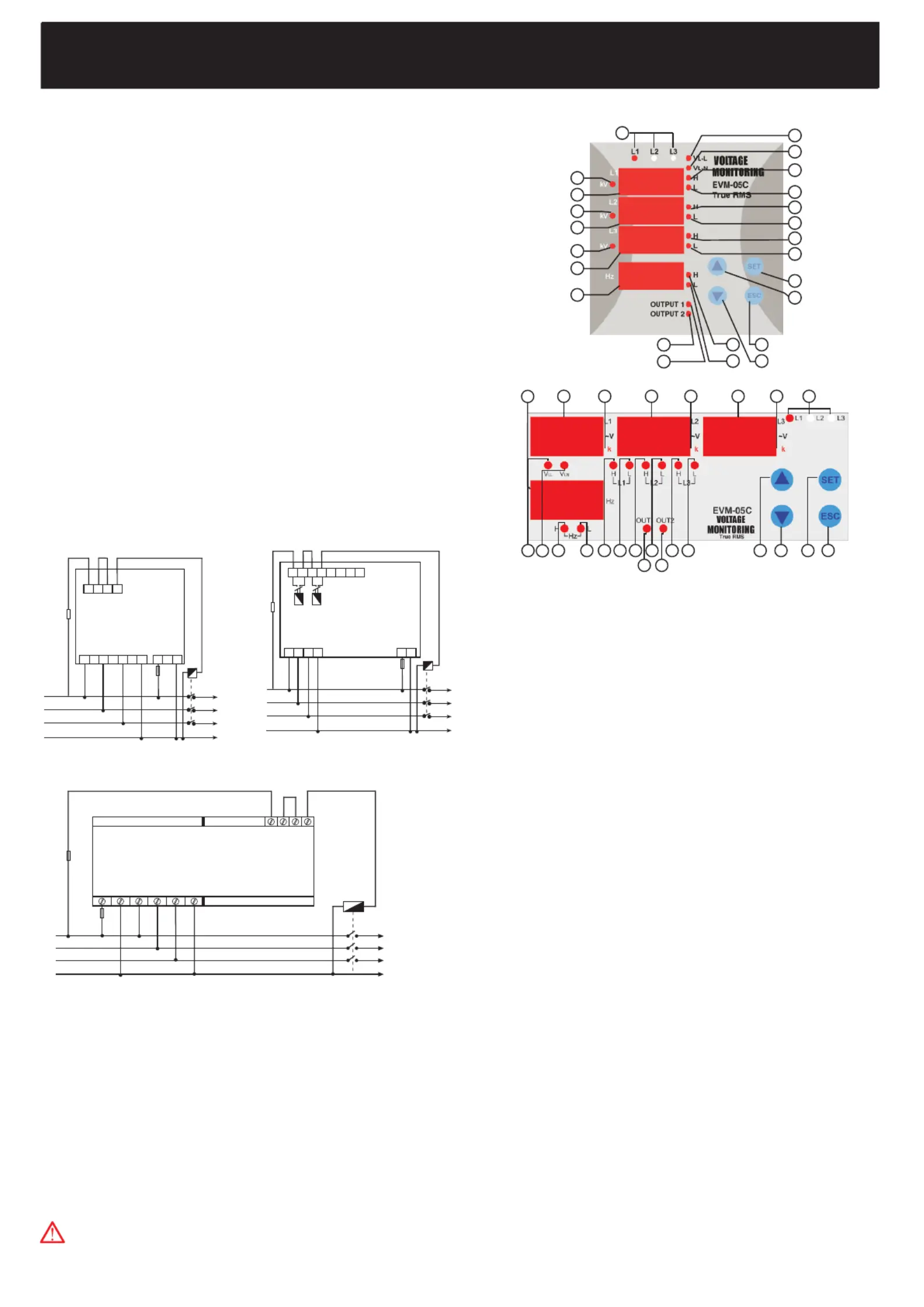
Connection Diagram
1
1
1
2
2
2
2
2
3
3
3
3
4
4
5
6
6
7
7
7
7
8
8
VOLTAGE MONITORING
EVM-05C
1... Phase LEDs:The LEDs turn on when all phases are connected to
the system and correct phase sequence.(If phase sequence warning
is activated and there is a false phase sequence,these LEDs blink.)
3... Display of L-1 Phase:It shows L-1 phase-neutral voltage and L1-L2
phase-phase voltage.
5... Display of L-2 Phase:It shows L-2 phase-neutral voltage and L2-L3
phase-phase voltage.
7... Display of L-3 Phase:It shows L-3 phase-neutral voltage and L3-L1
phase-phase voltage.
8... Frequency Display:The frequency is measured from L-1 phase
9... Output Relay 2 LED
10...Output Relay 1 LED
11...Low Frequency Warning LED
12...High Frequency Warning LED
13...ESC Button
14...DOWN Button
15...SET Button
16...UP Button
17...Low Voltage Warning LED of L-3 Phase (Low voltage warning of L3-
L1 when phase-phase measurement is selected)
18...High Voltage Warning LED of L-3 Phase (High voltage warning of L3-
L1 when phase-phase measurement is selected)
19...Low Voltage Warning LED of L-2 Phase (Low voltage warning of L2-
L3 when phase-phase measurementis selected)
20...High Voltage Warning LED of L-2 Phase (High voltage warning of L2-
L3 when phase-phase measurementis selected)
21...Low Voltage Warning LED of L-1 Phase(Low voltage warning of L1-
L2 when phase-phase measurement is selected)
22...High Voltage Warning LED of L-1 Phase(High voltage warning of L1-
L2 when phase-phase measurement is selected)
23...V L-N LED: Phase-Neutral Voltage
24...V L-L LED: Phase-Phase Voltage
Precautions For Installation And Safe Use
- Failure to follow those instructions will result in death or serious injury.
- Disconnect all power before working on equipment.
- When the device connected to the network, do not remove the front panel
- Do not try to clean the device with solvent or the like.Only clean the device
with dried cloth.
- Verity correct terminal connections when wiring.
- Electrical equipment should be serviced only by your component seller.
- Only for rack panel mounting.
- The fuse should be used F type and should be 1A
INDEX
Connection Diagram................................................................................
Precautions For Installation And Safe Use...................................................
Front Panel And Usage of Buttons............................................................
General Information...............................................................................
Properties..............................................................................................
Specific Functions of Buttons...............................................................
Setpoints
(SP Menu) ................................................................................
High And Low Setpoints
(SP Hi, SP Lo Menu) ..............................................
High And Low Setpoints For 1st Phase
(Hi L-1, Lo L-1 Menus) .............................
High And Low Setpoints For 2nd Phase
(Hi L-2, Lo L-2 Menus) ..........................
High And Low Setpoints For 3rd Phase
(Hi L-3, Lo L-3 Menus).............................
Hysteresis Values For High And Low Setpoints
(Hi Hys, Lo Hys Menus).......
Delay-On Time For High And Low Setpoints
(Hi ond, Lo ond Menus)...........
Delay-Off Time For High And Low Setpoints
(Hi ofd, Lo ofd Menus).....................
Frequency Setpoints Menu
(SP Frq Menüsü) ..................................................
Phase Sequence Menu........................................................................
Latch Function Menu.............................................................................
Instant Tripping Menu............................................................................
Voltage Transformer Ratio Menu...........................................................
Connection Type Settings Menu...........................................................
Clearing Max And Min.Values Menu......................................................
User Password Menu............................................................................
Technical Specifications...........................................................................
Front Panel And Usage of Buttons
~
U
n
Out 1 Out 2
16 15
1
8
6742 53
23
24 22 211112 20 19
10 9
18 17
13
14
1
2
3
4
5
6
7
8
9
10
11
12 13
14
16
15
17
18
19
20
21
22
23
24
N
L1
L2
L3
~
U
n
NO
Out 1
NO
Out 2
PR-16PR-19
PK-26
Out 1
Out 2
N
L1
L2
L3
~
U
n
No responsibility is assured by the manufacturer or any of its
subsidiaries for any consequences arising out of the use of this
material.
Relay Output
Voltage Measuring
Input
Auxiliary
Supply
5
L1
L2
L3
N
6 7 8
1 A
9 10
System
1 2
3 4
Choose according to
contactor current
Choose according to
contactor current
Relay Output
Voltage Measuring
Input
Auxiliary
Supply
1
L1
L2
L3
N
2 3 4
1 A
13 14
System
32 31
30 29 28 27 26 25
System
N
L1
L2
L3
L1
L2
L3
N
Voltage Measuring
Input
Auxiliary
Supply
Relay Output
Choose according to
contactor current
1 A


Produkt Specifikationer

Mærke: ENTES
Kategori: Ikke kategoriseret
Model: EVM-05C-DIN

Har du brug for hjælp?

Hvis du har brug for hjælp til ENTES EVM-05C-DIN stil et spørgsmål nedenfor, og andre brugere vil svare dig