ILive ISB202 Manual

ILive Højttaler ISB202

Læs gratis den danske manual til ILive ISB202 (2 sider) i kategorien Højttaler. Denne vejledning er vurderet som hjælpsom af 63 personer og har en gennemsnitlig bedømmelse på 4.4 stjerner ud af 32 anmeldelser. Har du et spørgsmål om ILive ISB202, eller vil du spørge andre brugere om produktet?

Side 1/2
Bluetooth Speaker
Users Guide for Model ISB202 v2892-01
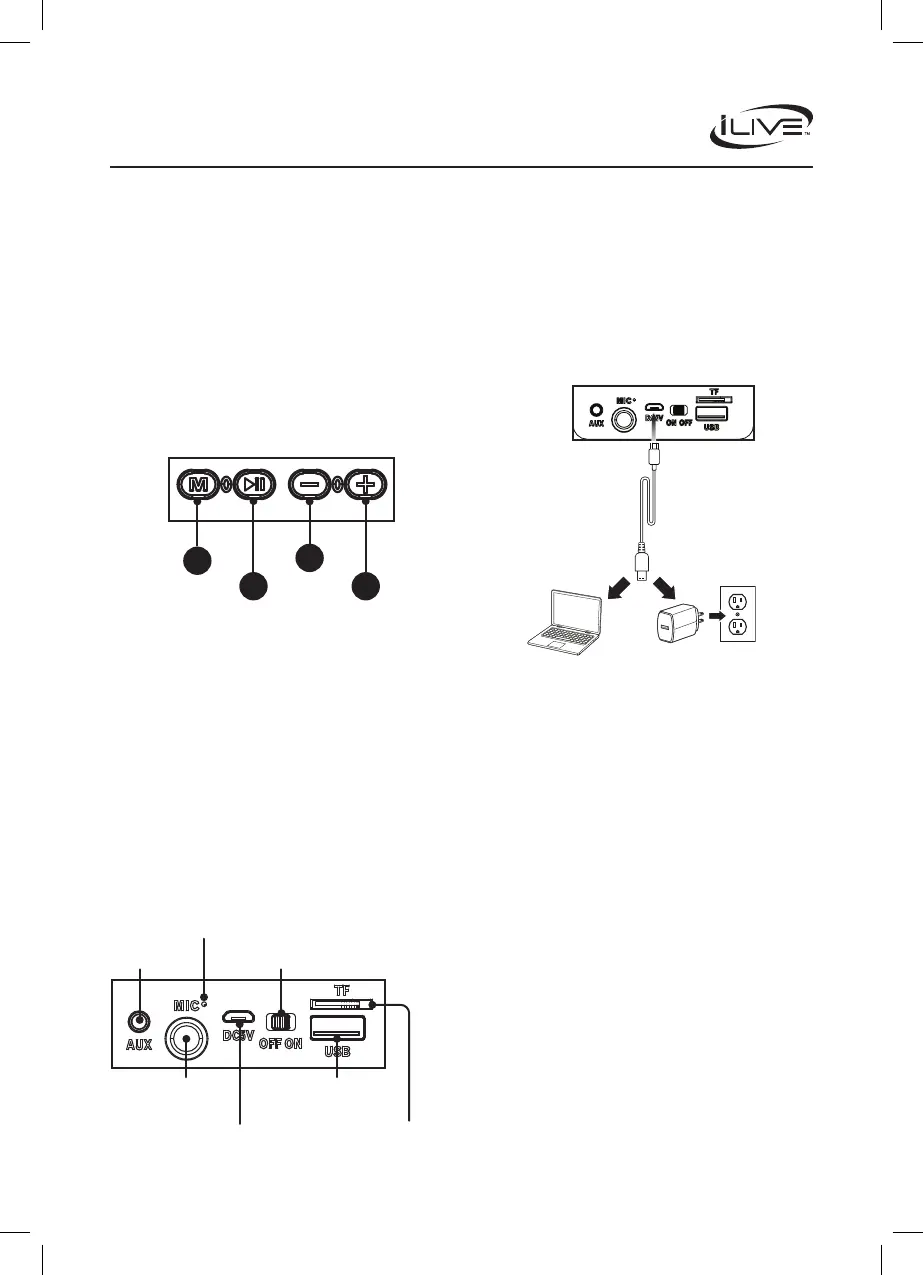
Controls
Inputs
Charging the Battery
To charge the internal battery, plug the USB charging cable
into the DC Power Input on the speaker and a powered on
computer or USB power adapter (not included) and standard
power outlet. Charging time is approximately 4 hours.
When the battery is low a voice will announce “Low Battery,
then the unit will automatically power OFF.
While the unit is charging the LED Indicator will display a
solid red light. When the battery is fully charged the light will
turn o.
Features
Bluetooth wireless 5.0: range 59 ft.
Micro SD card port
Digital volume control
Voice prompts
Built-in rechargeable battery: approximately 7 hrs of
playtime at 50% volume
Micro-USB port for battery recharge
Includes
User’s Guide
Micro-USB to USB charging cable
1. Mode: Press to change source modes to Bluetooth, Aux,
USB or Micro SD/TF. Press and hold to turn LED lights
ON/OFF.
2. Volume-/Previous: Press to decrease volume level. Press
and hold to play previous track. In FM mode, press to
change stations.
3. Play/Pair: While playing music, press to play/pause
tracks. Press and hold for 3 seconds to pair Bluetooth
device manually.
4. Volume+/Next: Press to increase volume level. Press and
hold to play the next track. In FM mode, press to change
stations.
Note: To turn voice prompts ON/OFF, press and hold both the
Volume+ / Volume- buttons for 3 seconds.
4
1
3
2
USB Port
Aux In
Microphone
Input
Power Switch
Indicator LED
DC Power Input
TF/Micro SD
Pairing & Playing Bluetooth Audio
1. When rst powered on, the speaker defaults to Bluetooth
Mode and is ready to pair automatically. When pairing,
remain within 3 feet of the Bluetooth device.
2. Using the controls on your Bluetooth device, select
ISB202 in the Bluetooth Settings to pair. If need be, refer
to the user’s manual for your specic device for more
information.
3. When successfully paired, a voice will announce,
“Bluetooth is connected. The LED Indicator will display
a solid blue light. Your Bluetooth device will now be
heard through the speaker.
4. Use the controls on the connected Bluetooth device to
select and play audio. Use the speaker controls or the
connected Bluetooth device to play, pause, and adjust
the volume level.
5. After initial pairing, the speaker will automatically
connect to the last Bluetooth device used whenever it is
in Bluetooth Mode. Note: If your device should become
unpaired or you nd it is unable to connect, press and
hold the Play/Pair button to enter to Pairing Mode. A
voice will announce, “Bluetooth is connecting, and you
can connect to the speaker manually.


Produkt Specifikationer

Mærke: ILive
Kategori: Højttaler
Model: ISB202

Har du brug for hjælp?

Hvis du har brug for hjælp til ILive ISB202 stil et spørgsmål nedenfor, og andre brugere vil svare dig


Højttaler ILive Manualer
ILive

ILive Platinum ISWFV387 Manual

26 September 2025
ILive

ILive ITPW891B Manual

26 September 2025
ILive

ILive ISB380 Manual

26 September 2025
ILive

ILive ISB199 Manual

26 September 2025
ILive

ILive ISB214W Manual

3 September 2024
ILive

ILive IBDJ883 Manual

1 September 2024
ILive

ILive ISB352 Manual

1 September 2024
ILive

ILive ISBW519 Manual

1 September 2024
ILive

ILive ISBW157 Manual

1 September 2024

Højttaler Manualer

Nyeste Højttaler Manualer

RCF

RCF C 5215-W MKIII Manual

10 December 2025
RCF

RCF X 28 L Manual

10 December 2025
Fostex

Fostex PM0.4d Manual

8 December 2025
Amphion

Amphion Argon 3LX Manual

8 December 2025
Amphion

Amphion Argon 7LX Manual

8 December 2025
Fostex

Fostex PM0.3 Manual

8 December 2025
Fostex

Fostex US300 Manual

8 December 2025
JBL

JBL 8128 Manual

7 December 2025
FiiO

FiiO SP5 Manual

7 December 2025