MODEL LN-ELIR: EXTENDED RANGE LASER
INFRARED ILLUMINATOR
Thank you for purchasing a quality LUNA product. The model LN-ELIR is
a very popular accessory to your night vision unit. It provides longer
viewing distance than the standard built-in IR illuminator or even
optional extended range LED IR illuminators by utilizing a much more focused laser beam. The LN-ELIR is a
Class-I laser, eye-safe during normal use and operation. Please read the entire manual prior to
use and please pay special attention to the IMPORTANT messages and WARNINGS
in this manual.
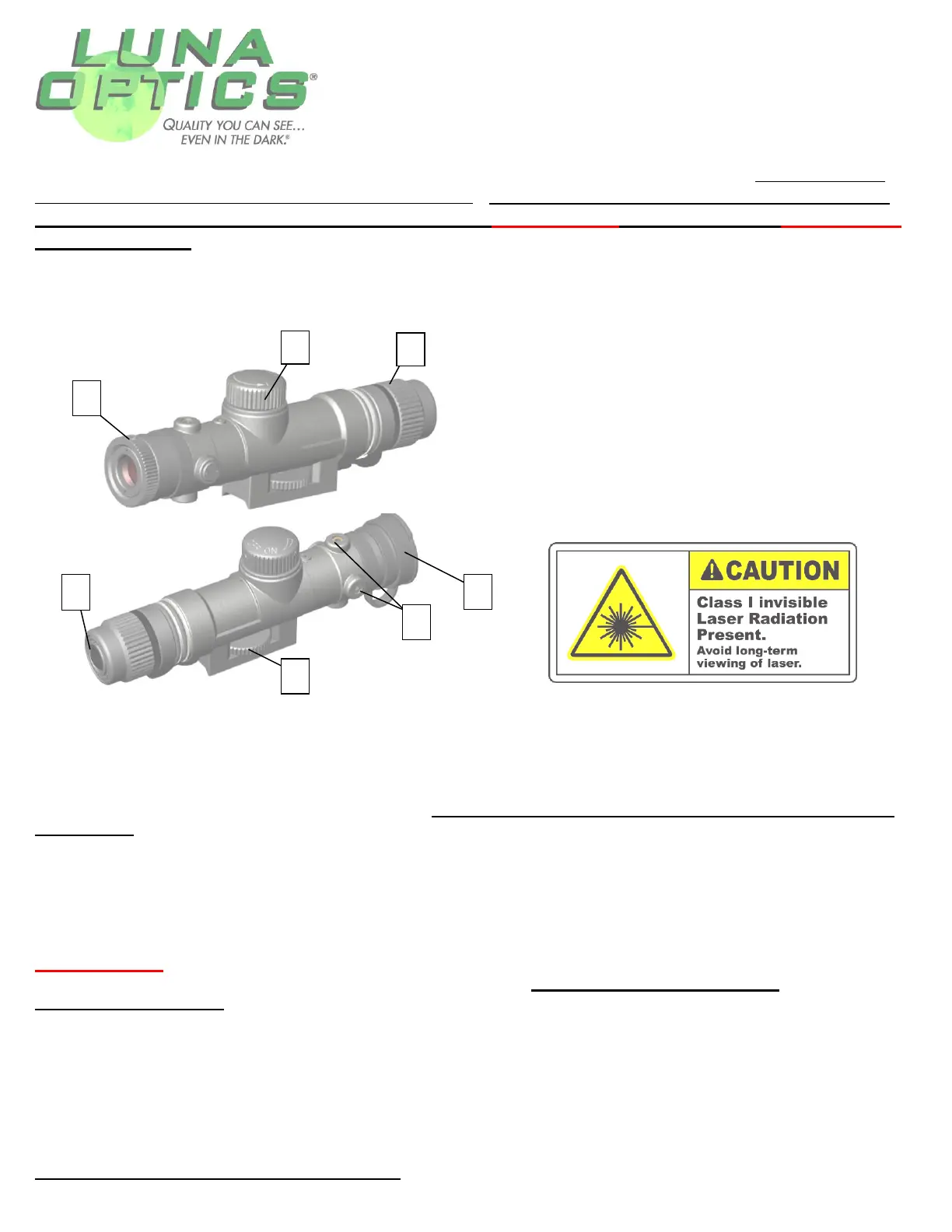
Please refer to the image below to identify the parts of the illuminator:
Glossary:
1 – Focusing Ring
2 – ON/OFF Power Switch
3 – Battery Compartment Cover
4 – Push ON/OFF Button
5 – Mounting Wheel
6 – Horizontal and Vertical adjustments
7 – Protective Cap
To install the battery please unscrew the battery compartment cover (3) counterclockwise. It is easier to
open and close the battery cover by gently holding the attachment rubber string with your finger while
rotating the cover. Once the battery compartment is opened, please insert one 3V Lithium battery, CR123-
type as shown on the body of the illuminator according to (+) and (-) polarity. Replace the battery
compartment cover. The IR is now ready for use. Only remove the protective lens cap (7) immediately
before use!
Please be aware that the IR illuminator has dual Power Controls: an ON/OFF Power Switch (2) and a Push
Button (4). In order to turn the illuminator on, you must first rotate the ON/OFF switch (2) clockwise until
you hear a slight click and then continue rotating the switch to increase the power of the illuminator. Then
you need to push the ON/OFF power button (4) and the IR will light up.
IMPORTANT: WHEN TURNING THE ON/OFF POWER SWITCH ON – ROTATE ONLY CLOCKWISE!
ROTATING COUNTERCLOCKWISE IS NOT POSSIBLE AND DO NOT FORCE THE SWITCH
COUNTERCLOCKWISE, AS THIS WILL ALTER THE OPERATION OF THE IR ILLUMINATOR AND WILL
VOID THE WARRANTY.
The IR is now working. To adjust the intensity of the IR beam, rotate the ON/OFF switch (2) clockwise until
complete stop. To turn the illuminator off either rotate the ON/OFF switch (4) counterclockwise until you hear
the same click, which indicates the IR is now OFF or simply push the ON/OFF button (4). You may choose to
leave the ON/OFF switch (2) at the pre-set level and simply push the ON/OFF button to turn the illuminator
ON and OFF for future operation.
Always replace the lens cap after use!


