Savage RGB Light Painter Pro Manual
Savage Lys RGB Light Painter Pro

Læs gratis den danske manual til Savage RGB Light Painter Pro (4 sider) i kategorien Lys. Denne vejledning er vurderet som hjælpsom af 3 personer og har en gennemsnitlig bedømmelse på 4.7 stjerner ud af 2 anmeldelser. Har du et spørgsmål om Savage RGB Light Painter Pro, eller vil du spørge andre brugere om produktet?

Side 1/4
RGB LIGHT PAINTER PRO LED WAND
USAGE INSTRUCTIONS
®
®
Battery Installation
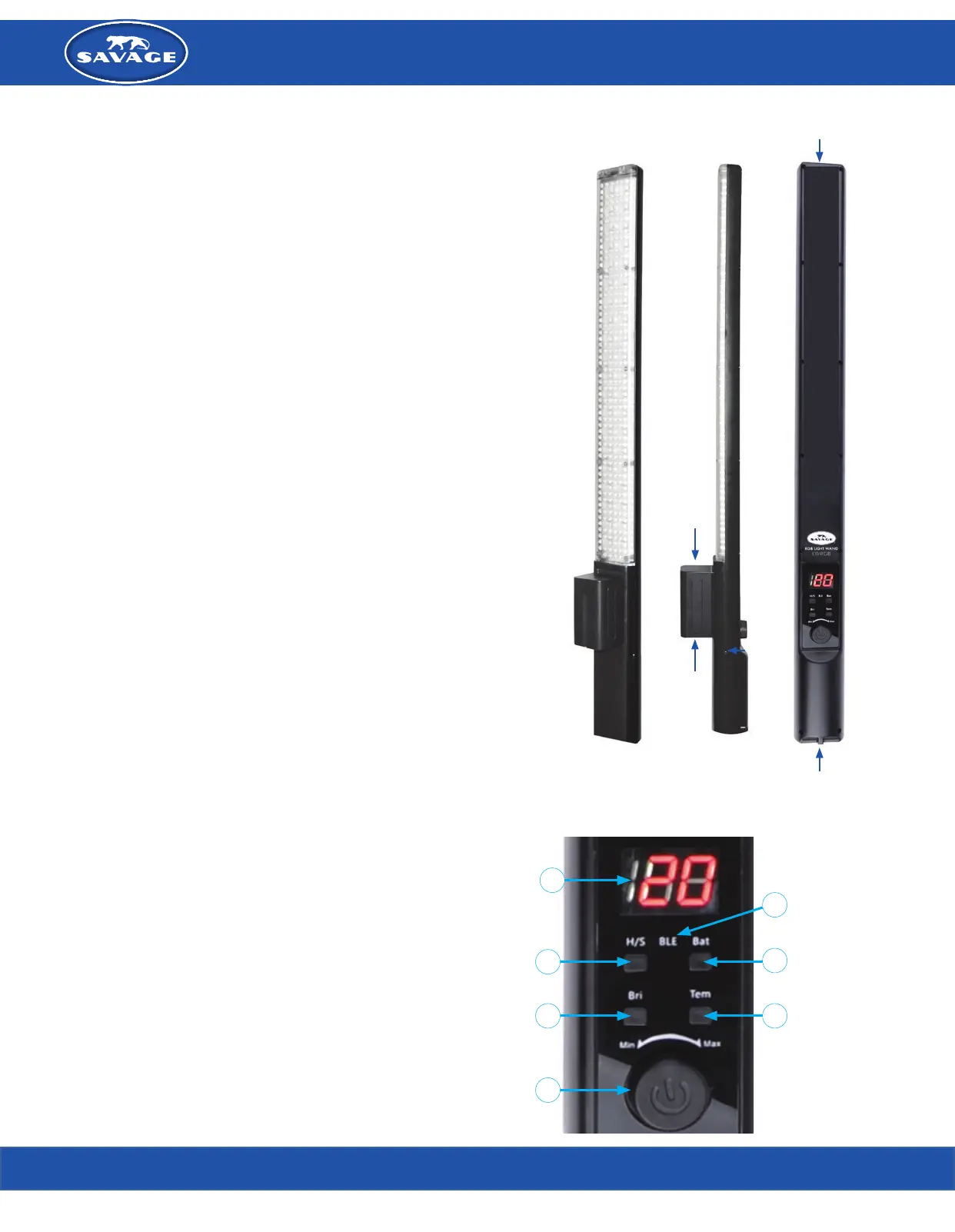
Insert included Sony style NP-F750 battery by setting it into the top of the battery compartment and
sliding it down until it snaps in place.
Note: The max run time for the Savage RGB Light Painter Pro LED Wand is approximately 3.5
hours at full power. For longer desired run times, a Sony style high-power battery such as Savage’s
BNP-F970 battery can be purchased separately to extend the run time up to 140 minutes at full
power.
To remove, simply push up on the battery until it releases.
The light wand comes with a wall charger. A fully drained battery will take
approximately 6 hours to restore to a full charge.
AC Power Option
Your Savage RGB Light Painter Pro LED Wand can also be used with the included AC power supply
for continuous use. Insert cord into the AC plug located on the left side of the light when display is
visible. Remove battery when using AC cord as the light will not recharge the battery when both are
attached.
Wand Control Settings
On/Off: Press the color selector knob (5) to control power.
RGB MODE
Press the Hue/Saturation Selector (2) marked “H/S”.
If the “H/S’ indicator light is green, press again and it will turn red.
With the red light on, you will now be able to select from 200 unique colors by
turning the color selector knob (5).
If you wish to change the hue and saturation of the selected color, press the “H/S” button back to
green, then use the color selector knob (5) to increase/decrease the color intensity and saturation.
To select another color, press the “H/S” button back to red, and repeat the above steps as desired.
DAYLIGHT MODE
ADJUST COLOR TEMPERATURE
Press bi-color selector (7) marked “Tem” to activate the 5600K/3200K LEDs. Turn the selector knob
(5) to adjust the color temperature from 30 (3200K/Tungsten) to 50 (5500K/daylight).
Span through the temperature options with the selector knob (5), to blend the Tungsten and
daylight LEDs to match the available light in the room or to warm/cool your subject.
ADJUST BRIGHTNESS
Press the power level selector marked “Bri” (4).
Rotate the selector knob (5) clockwise to brighten or counterclockwise to dim the light output
at the selected color temperature. Power level adjusts from 20% - 100%.
CHECK BATTERY LEVEL
Press the battery level indicator marked “Bat” (6).
P9 indicates a battery level between 90%-100%.
P8 indicates a battery level between 80%-89%.
The pattern continues to P1, indicating a 10% or lower battery level.
Features
MOUNT
Mount the wand to a light stand or boom arm using the 1/4”-20 female thread on
the bottom of the wand.
HANG
Screw the included metal hook into the female thread at the
top of the wand to hang it from another accessory.
(1) LED Display
(2) Hue/Saturation Selector
(3) Bluetooth Indicator
(4) Power Level Selector
(5) On/Off-Color Selector Knob
(6) Battery Level Indicator
(7) Bi-Color Selector
INSERT BATTERY
REMOVE BATTERY
MOUNT THREADS
HANGING HOOK THREADS
AC POWER
2
4
1
6
3
7
5
professional photography made simple
800.624.8891 savageUniversal.com


Produkt Specifikationer

Mærke: Savage
Kategori: Lys
Model: RGB Light Painter Pro

Har du brug for hjælp?

Hvis du har brug for hjælp til Savage RGB Light Painter Pro stil et spørgsmål nedenfor, og andre brugere vil svare dig


Lys Savage Manualer

Savage

Savage R13 Manual

2 December 2025

Lys Manualer

Nyeste Lys Manualer

Vevor

Vevor SH-162 Manual

2 December 2025
Eden

Eden 415 Manual

1 December 2025
Vevor

Vevor KJ-1267 Manual

1 December 2025
Elation

Elation Stage Desk 16 Manual

30 November 2025
Lume Cube

Lume Cube Strobe Manual

30 November 2025
Eisemann

Eisemann LS HSE 7 LED Manual

29 November 2025
Eden

Eden 425 Manual

29 November 2025