SkyRC SCWS2000 Manual


Læs gratis den danske manual til SkyRC SCWS2000 (2 sider) i kategorien Ikke kategoriseret. Denne vejledning er vurderet som hjælpsom af 3 personer og har en gennemsnitlig bedømmelse på 5.0 stjerner ud af 2 anmeldelser. Har du et spørgsmål om SkyRC SCWS2000, eller vil du spørge andre brugere om produktet?

Side 1/2
1/6 2/6
INTRODUCTION
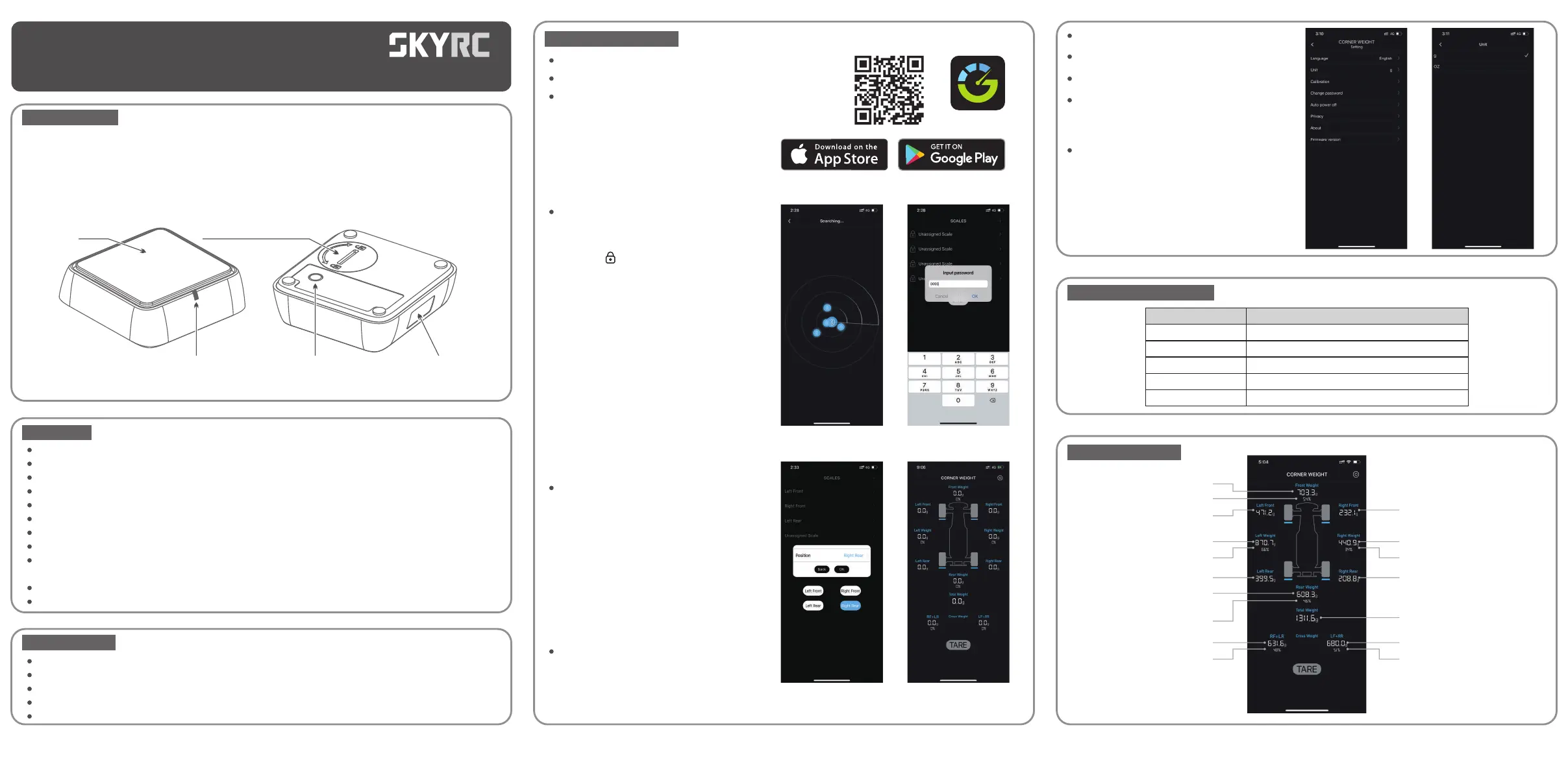
SkyRC SCWS2000 is a smart Bluetooth-enabled Corner Weight System specially designed for RC drivers. It is
applicable to drift, touring cars, and so on.
It can help the driver easily measure and view the RC car's corner weight distribution through the App.
Therefore, RC drivers can accurately adjust their car's weight at each corner to the best balance to win the
race. It consists of four separate scales. The maximum weight limit of each scale is 2000 grams(8000 grams
totally).
FEATURES
PRECAUTIONS
Place the scale on a level and firm surface while using.
Do not place an object over 2000 grams on the scale.
Remove all the dirt on the scale before using it to ensure an accurate reading.
Avoid direct exposure to strong sunlight and collision with other objects.
Never allow water, moisture, oil, or other foreign materials to get inside the scale.
INSTRUCTIONMANUAL
SK-500036
Corner Weight System
SCWS2000
LED Indicator
Scale
Position sticker
Power Button:
short-press to turn ON/OFF,
long-press for 5 seconds to reset
Battery Compartment
(CR2450 button cell included)
App-enabled and data display in realtime via Bluetooth.
Measure the car's corner weight, front and rear distribution and make adjustment if necessary.
Highlight selected cross weight in orange.
Unit switchable between grams and ounce.
Maximum weight limit of 2000 grams for each scale(8000 grams totally).
Selected CR2450 button cell endures for 30h continuously.
App in 4 languages: Chinese, English, Japanese, German.
Auto-connect to bound scales.
Auto power off if no connection or no load within five minutes.
(adjustable from one to thirty minutes via App)
Applicable to drift, touring cars, and so on.
Calibratable via App.
3/6
Remove the sway bar, if any.
Select the preferred unit in Setting/Unit
Place the tires on the scales.
If the car is unbalanced, you may rewire
or add a counterweight to achieve the
ideal distribution.
Short-press the button on the bottom to
turn off the scale after using.
LED STATUS EXPLAINED
Device
Ready to connect
Connected
Selected
Calibrating
Reset
LED status
Flashing blue
Solid Blue
Flashing blue five times
Pulsing Blue
Flashing blue after turning off for 3 seconds
SCALE IN THE APP
Front Weight
Front Weight Percentage
Left Front Weight
Left Weight
Left Rear Weight
Left Weight Percentage
Rear Weight
Rear Weight Percentage
Total Weight
RF+LR Weight
RF+LR Percentage
LF+RR Weight
LF+RR Percentage
Right Rear Weight
Right Front Weight
Right Weight
Right Weight Percentage
GENERAL OPERATION
Short-press the button at the bottom to power on the scale.
Place the scale on a level and firm surface.
Scan the QR code on the right side or on the gift box to
download the RC Gears app.
The LED of the selected scale will blink five
times. Assign a position (left front, left rear,
right front, right rear) to each. You can only
use the app when four scales are connected
with the location name assigned. Please
paste the sticker onto the scales respectively!
Click TARE to reset.
After installation, enable Bluetooth on the
smartphone and launch the app to search
the scales.
Click the “ ” to input the default password
of 0000 to unlock the scale.
RC Gears


Produkt Specifikationer

Mærke: SkyRC
Kategori: Ikke kategoriseret
Model: SCWS2000

Har du brug for hjælp?

Hvis du har brug for hjælp til SkyRC SCWS2000 stil et spørgsmål nedenfor, og andre brugere vil svare dig


Ikke kategoriseret SkyRC Manualer

SkyRC

SkyRC SCWS2000 Manual

9 December 2025
SkyRC

SkyRC Progbox Manual

8 December 2025
SkyRC

SkyRC T6755 Manual

8 December 2025
SkyRC

SkyRC Ultimate 1400W Manual

8 December 2025
SkyRC

SkyRC BD200 Manual

8 December 2025
SkyRC

SkyRC Q200 Manual

8 December 2025
SkyRC

SkyRC Immersion GO Manual

7 December 2025
SkyRC

SkyRC e660 Manual

7 December 2025
SkyRC

SkyRC SK-500026 Manual

7 December 2025

Ikke kategoriseret Manualer

Nyeste Ikke kategoriseret Manualer

Opticis

Opticis OHD14 Manual

9 December 2025
SmallRig

SmallRig 2896C Manual

9 December 2025
PITSOS

PITSOS PTI8E66G Manual

9 December 2025
Homedics

Homedics EYE-100-EU Manual

9 December 2025
Siemens

Siemens LZ11ITB14 Manual

9 December 2025
MDT

MDT BE-TA55T606.02 Manual

8 December 2025
JET

JET RCB-25 Manual

8 December 2025