SkyRC SK-500039 Manual


Læs gratis den danske manual til SkyRC SK-500039 (2 sider) i kategorien Ikke kategoriseret. Denne vejledning er vurderet som hjælpsom af 3 personer og har en gennemsnitlig bedømmelse på 4.3 stjerner ud af 2 anmeldelser. Har du et spørgsmål om SkyRC SK-500039, eller vil du spørge andre brugere om produktet?
Side 1/2
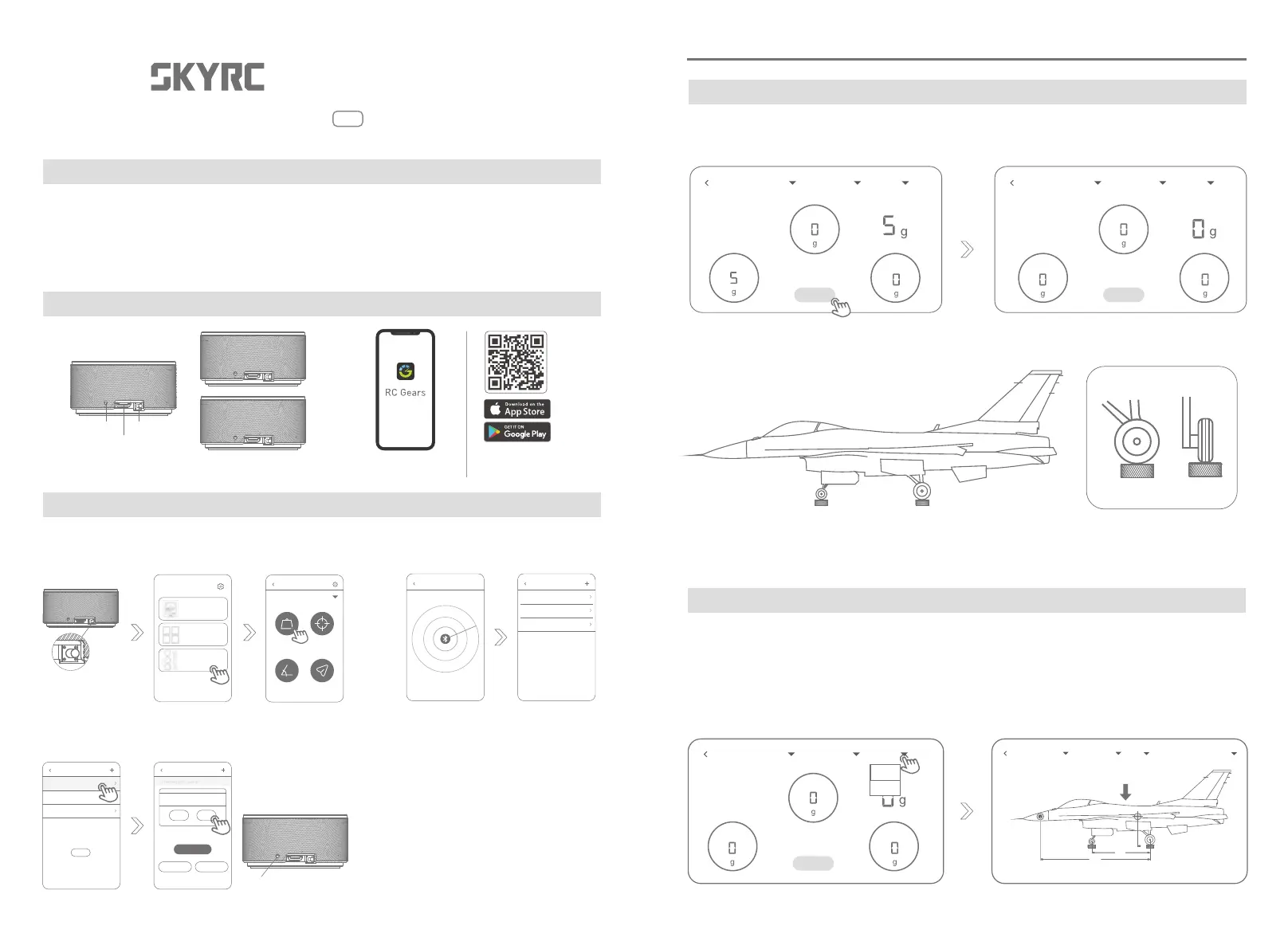
4. Switch to the interface of the center of gravity
weight
CG
0
0
0
Total Weight 0g
Caution: Check that the plane is leveled!
(Unit : mm)
1. Connecting the modules
2. Click to tare
3. Place the model airplane on the weighing modules and make sure its wheels are located
in the middle.
Center of Gravity Adjustment
CG GAUGE
Instruction Manual
v1.0
SK - 500039
1. SKYRC CG Gauge
Congratulations on the purchase of the SkyRC CG Gauge!
SkyRC CG Gauge consists of three weighing modules, which are wirelessly controlled through
Bluetooth. It measures the model airplane's weight and center of gravity with a maximum load of 20kg.
Download the RC Gears app to get started to measure the real-time measuring data.
1. Please enable Bluetooth on your smartphone and open
the app. Long press the switch to turn on the modules.
3. Assign the modules to Nose/tail, Main-left wheel, Main-right wheel. The corresponding
module flashes in blue when you are setting it in the app.
2. Search to connect the
modules to the app.
RC GearsCG Gauge *3pcs
LED Indicator
Switch
Charging Port
Connecting
What is inside the box
Introduction
Weight CG
Angle Throw
GNSS Performance Analyzer
GSM020
Corner Weight System
SCWS2000
Center of Gravity Gauge
CGG-020 & SAM-020
RC Gears
Unassigned Scale
Unassigned Scale
Unassigned Scale
Unassigned Scale
Unassigned Scale
Unassigned Scale
进入
Unassigned Scale
未分配位置
未分配位置
进入
Position Nose/tail wheel
Nose/tail wheel
Main-left wheel Main-right wheel
* Long press the switch
to turn on
* The module flashes in blue
Model 1
Name
Center of Gravity Gauge
Searching....
CG-meter
CG-meter CG-meter
SKYRC CG Gauge Instruction Manual
SKYRC CG Gauge 2.
1. Connecting the modules
2. Click to tare
2. Place the model airplane on the weighing modules and
make sure its wheels are located in the middle.
4. Read the measuring data
Weighing
Nose/tail wheel
Total Weight
Main-right wheelMain-left wheel
Nose/tail wheel
Total Weight
Main-right wheelMain-left wheel
ZERO
Model 1 Taildragger Weight
Name
Model 1 Taildragger Weight
Name
Back OK
ZERO
Model 1 Taildragger Weight
Name
Model 1 Taildragger CG CG parameter setting
Name
ZERO
* Please scan the QR code
to download the RC Gears app
from App Store or Google Play!
Nose/tail wheel
Main-right wheelMain-left wheel
Main-left wheel


Produkt Specifikationer

Mærke: SkyRC
Kategori: Ikke kategoriseret
Model: SK-500039
Højde: 33 mm
Vægt: 160 g
Brugervejledning: Ja
Produktfarve: Grå
Produkttype: Stikmåler
Opbevaringstemperatur (T-T): 5 - 90 °C
Relativ luftfugtighed ved drift (H-H): -10 - 50 %
Relativ luftfugtighed ved opbevaring (H-H): 1 - 75 %
Driftstemperatur (T-T): 0 - 50 °C
Kabler inkluderet: USB Type-C
Normal brug: Fly
Spænding: 5 V
Strøm (maks.): 300 A

Har du brug for hjælp?

Hvis du har brug for hjælp til SkyRC SK-500039 stil et spørgsmål nedenfor, og andre brugere vil svare dig


Ikke kategoriseret SkyRC Manualer

SkyRC

SkyRC SK-500040 Manual

7 December 2025
SkyRC

SkyRC eFuel 1200W Manual

7 December 2025
SkyRC

SkyRC SK-600066 Manual

7 December 2025
SkyRC

SkyRC RTS001 Manual

7 December 2025
SkyRC

SkyRC SK-500039 Manual

7 December 2025
SkyRC

SkyRC SK-500009 Manual

6 August 2024

Ikke kategoriseret Manualer

Nyeste Ikke kategoriseret Manualer

Opticis

Opticis DPOC-14N Manual

7 December 2025
FiiO

FiiO BR15 R2R Manual

7 December 2025
Fostex

Fostex FE83NV2 Manual

7 December 2025
Fostex

Fostex EN15 Manual

7 December 2025
Advantech

Advantech iDAQ-731D Manual

7 December 2025
Bosch

Bosch MAF462C0 Manual

7 December 2025
Thor

Thor TG32CT Manual

7 December 2025
Bosch

Bosch BEL653MB4A Manual

7 December 2025
MDT

MDT BE-TAL550206.D1 Manual

7 December 2025