Congratulations on the purchase of SkyRC Angle Gauge!
The gauge consists of three sensing modules, which are wirelessly controlled through Bluetooth. It
measures the surface angle and relative angle difference.
Download the RC Gears app to get started to measure the real-time measuring data.
Measuring Angles
SKYRC Angle Gauge Instruction Manual
SKYRC Angle Gauge x3
LED Indicator
* Actual angle to measure * The right-angle side is the reference side for
measuring
Switch
ChargePort
GNSS Performance Analyzer
GSM020
Corner Weight System
SCWS2000
Center of Gravity Gauge
CGG-020 & SAM-020
RC Gears
Model oneName
Center of Gravity Gauge
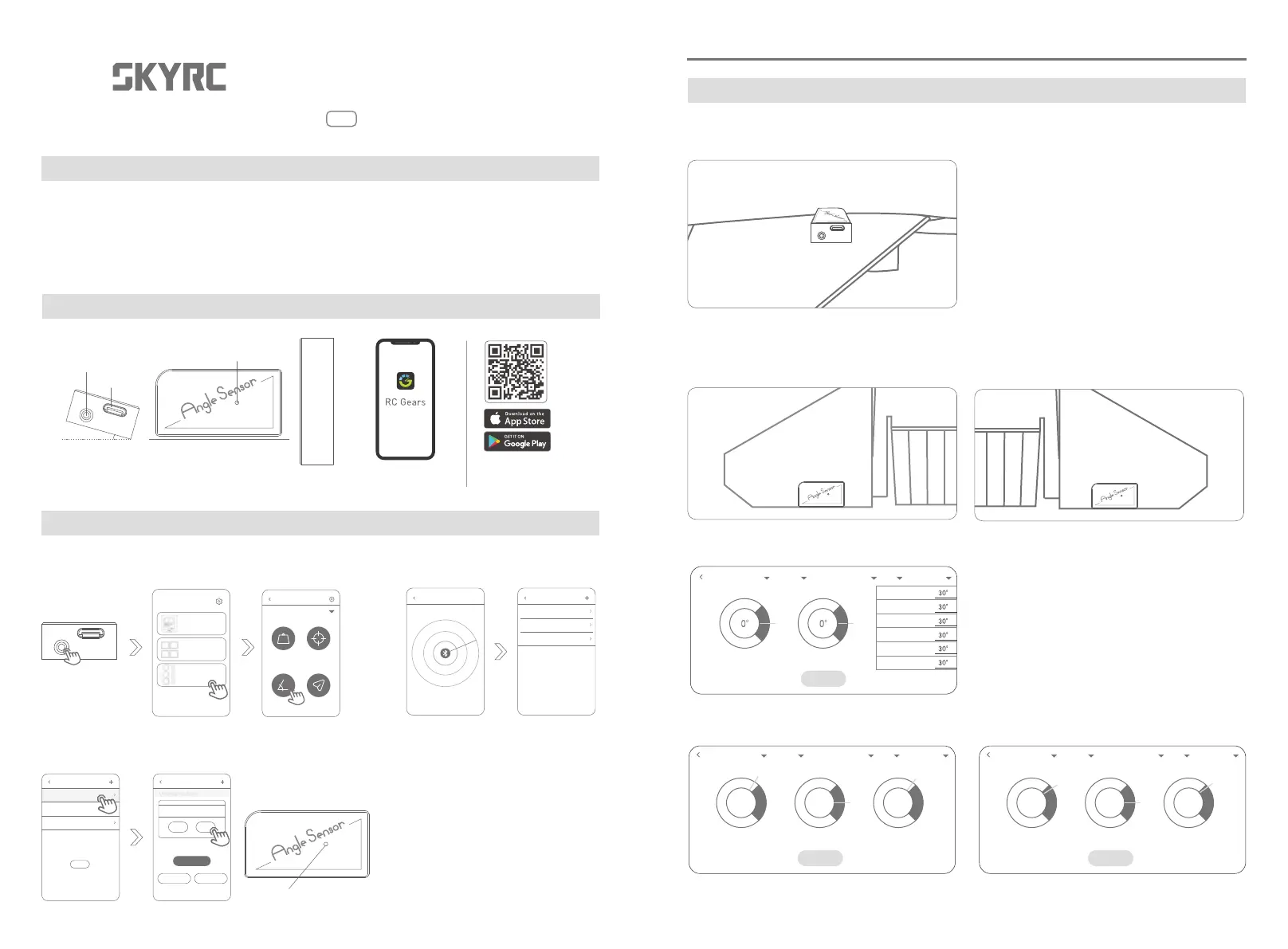
4. Set and input the angle in reference to the model aircraft manual.
5. Set the angle to the maximum with the remote control, and check whether the calibration range
meets the requirements indicated in the manual.
ZERO
Reference angle
Up aileron
Name
Model one Elevator Reference: sensor - relative Angle Set angle
Down aileron
Up elevator
Down elevator
Up flap
Down flap
Left angle
ZERO
37.5° 0° 35.6° 27.2° 0° 28.5°
1. SKYRC Angle Gauge SKYRC Angle Gauge 2.
1. Connect the modules.
2. Fix the reference module to the position where the surface of the model aircraft is referenced.
3. Fix the left and right modules on the rudder surface to measure.
Note: The right-angle must face the outside of the rudder surface and be parallel to the edge of
the rudder surface.
Instruction Manual
v1.0
SK - 500040
ANGLE GAUGE
Connecting
What is inside the box
Introduction
RC Gears
* Please scan the QR code
to download the RC Gears app
from App Store or Google Play!
* Long press the switch
to turn on the modules.
1. Long press to turn on. Enable the Bluetooth on your
smartphone and open the APP.
2. Search to connect
Weight CG
Angle Throw
Unassigned Scale
Unassigned Scale
Unassigned Scale
Searching...
Angle-meter
Unassigned Scale
Unassigned Scale
Unassigned Scale
进入
Position Reference
Reference
Left Right
Angle meter Angle meter
Back OK
3. Set up the reference surface, left and right. The corresponding module flashes blue during
the setting.
* The module flashes in blue
RED warns that the maximum adjustable angle of the
corresponding wing is greater than the calibration range
GREEN indicates that the maximum adjustable angle of the
corresponding wing is within the calibration range
Name
Model one Elevator Reference: sensor - relative Angle Set angle
Name
Model one Elevator Reference: sensor - relative Angle Set angle
Reference angle Right angleLeft angle Reference angle Right angleLeft angle
ZERO