ACTi Q83 Manual


Læs gratis den danske manual til ACTi Q83 (2 sider) i kategorien Overvågningskamera. Denne vejledning er vurderet som hjælpsom af 28 personer og har en gennemsnitlig bedømmelse på 4.9 stjerner ud af 14.5 anmeldelser. Har du et spørgsmål om ACTi Q83, eller vil du spørge andre brugere om produktet?

Side 1/2
This guide is for the quick installation of Q83 Outdoor Multi-Imager 360-Degree Dome Camera. For more details,
please refer to the Users Manual.
Installation Notices
This camera must be installed by qualified personnel and the installation should conform to all local codes.
Do not replace the batteries of the camera. Risks of explosion may occur if the battery is replaced by an incorrect
type.
To use an external power supply, please contact the camera manufacturer to confirm that the power supply
complies with the requirements and shares the same power specifications with the camera.
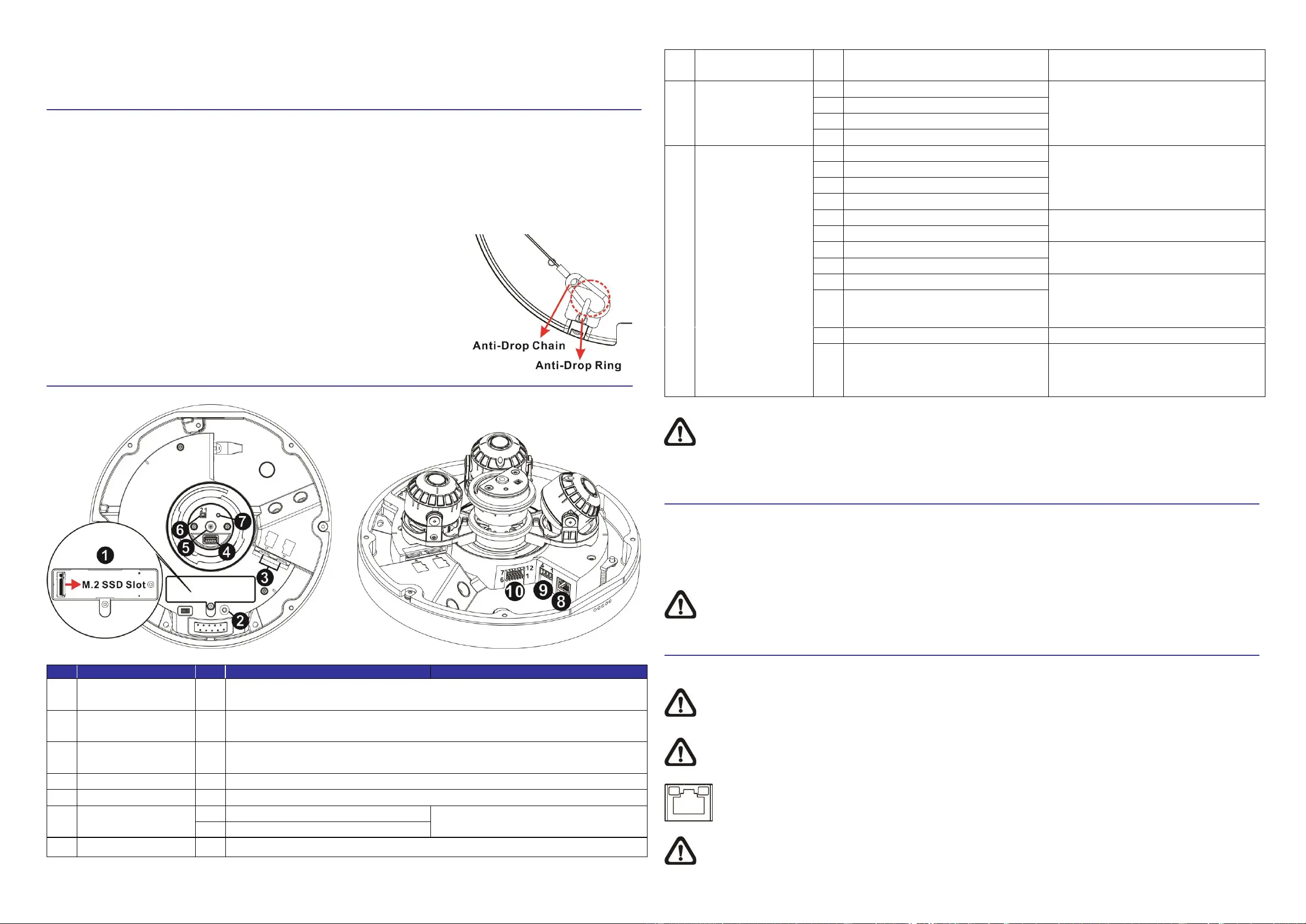
For safety concerns, please hook up the camera with the anti-drop chain of the
pendant when installing the camera. For more information about pendant and
anti-drop chain, please contact the camera manufacturer.
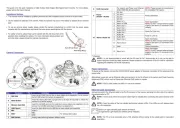
Camera Connectors
No.
Connector
Pin
Definition
Remarks
1
SSD Slot
-
Insert the M.2 SSD into the slot to store videos and snapshots. Do not remove
the M.2 SSD when the camera is powered on.
2
Reset Button
-
Press the reset button with a proper tool for at least 20 seconds to restore the
camera to its default settings.
3
Memory Card Slot
-
Insert the microSD card into the card slot to store videos and snapshots. Do not
remove the microSD card when the camera is powered on.
4
USB Type-A
-
Insert the flash drive into the USB slot to store videos and snapshots.
5
MIC
-
Audio in
6
BNC*
1
BNC
For analog video output.
2
GND
7
BNC Button
-
Analog video switching between different shots.
8
RJ45 Connector
-
For network and Power over Ethernet
(PoE) IEEE 802.3bt connections
NOTE: Please contact the manufacturer
for compatible PoE injector.
9
Power
(DC24V / AC24V)
1
DC 24V-
Power connection
2
DC 24V+
3
AC 24V
4
AC 24V
10
Alarm & Audio I/O
1
Alarm In 1+
Alarm Connection
NOTE: Do NOT connect external power
supply to the alarm I/O connector of the
camera.
2
Alarm In COM
3
Alarm Out 1+
4
Alarm Out 1-
5
Audio Out R
Audio Out (Line out)
6
Audio Out L
7
Audio IN L
Audio In (Line In)
8
Audio IN R
9
Alarm Out 2-
Alarm Connection
NOTE: Do NOT connect external power
supply to the alarm I/O connector of the
camera.
10
Alarm Out 2+
11
GND
Ground connection
12
Alarm In 2+
Alarm Connection
NOTE: Do NOT connect external power
supply to the alarm I/O connector of the
camera.
(*) Optional
NOTE: It is not recommended to record with the SD card for 24/7 continuously, as it may not be able to
support long term continuous data read/write. Please contact the manufacturer of the SD card for information
regarding the reliability and the life expectancy.
Power Connection
To power up the camera, connect the DC24V/AC24V power adaptor to the power connector of the camera and the
power outlet.
Alternatively, users can use an Ethernet cable and connect it to the RJ-45 port of the camera and Power Sourcing
Equipment (PSE) switch, such as Power-over-Ethernet (PoE) switch or injector.
NOTE: If PoE is used, make sure PSE is in use in the network.
Ethernet Cable Connection
Connect one end of the Ethernet cable to the RJ-45 connector of the camera; and plug the other end of the cable to
the network switch or PC.
NOTE: In some cases, Ethernet crossover cable might be needed when connecting the camera directly to the
PC.
NOTE: Check the status of the link indicator and activity indicator LEDs. If the LEDs are unlit, please check
the LAN connection.
Green Link Light indicates good network connection.
Orange Activity Light flashes for network activity indication.
NOTE: The ITE is to be connected only to PoE networks without routing to the outside plant or equivalent
description.


Produkt Specifikationer

Mærke: ACTi
Kategori: Overvågningskamera
Model: Q83

Har du brug for hjælp?

Hvis du har brug for hjælp til ACTi Q83 stil et spørgsmål nedenfor, og andre brugere vil svare dig


Overvågningskamera ACTi Manualer
ACTi

ACTi A213 Manual

28 September 2025
ACTi

ACTi E64A Manual

24 September 2025
ACTi

ACTi E71A Manual

23 September 2025
ACTi

ACTi D52 Manual

23 September 2025
ACTi

ACTi E418 Manual

23 September 2025
ACTi

ACTi E72A Manual

23 September 2025
ACTi

ACTi B912 Manual

23 September 2025
ACTi

ACTi Q83 Manual

23 September 2025
ACTi

ACTi E919 Manual

23 September 2025
ACTi

ACTi Q12 Manual

23 September 2025

Overvågningskamera Manualer

Nyeste Overvågningskamera Manualer

Telycam

Telycam Vision+ N3 Manual

7 December 2025
FLIR

FLIR FC-690 AI Manual

5 December 2025
FLIR

FLIR FH-625 R Manual

5 December 2025
FLIR

FLIR FC-644 AI-R Manual

5 December 2025
FLIR

FLIR F-608 ID Manual

4 December 2025
Axis

Axis TF9902 Manual

4 December 2025
FLIR

FLIR FB-393 ID Manual

4 December 2025
FLIR

FLIR FB-349-O Manual

3 December 2025
FLIR

FLIR FB-632 ID Manual

3 December 2025
FLIR

FLIR FC-632 AI Manual

3 December 2025