Quick Start Guide
HPX-AV101-DP-R DisplayPort Module with Retractable Cable
Overview
Hydraport Retractable Cable Modules are designed to be used in conjunction
with the HPX-600/900/1200 Connection Port base assembly, to provide the
convenience of various types of cables in a Hydraport System.
The HPX-AV101-DP-R DisplayPort Module with Retractable Cable (FG552-28)
provides a user-accessible Display cable in a retractable spool that mounts into
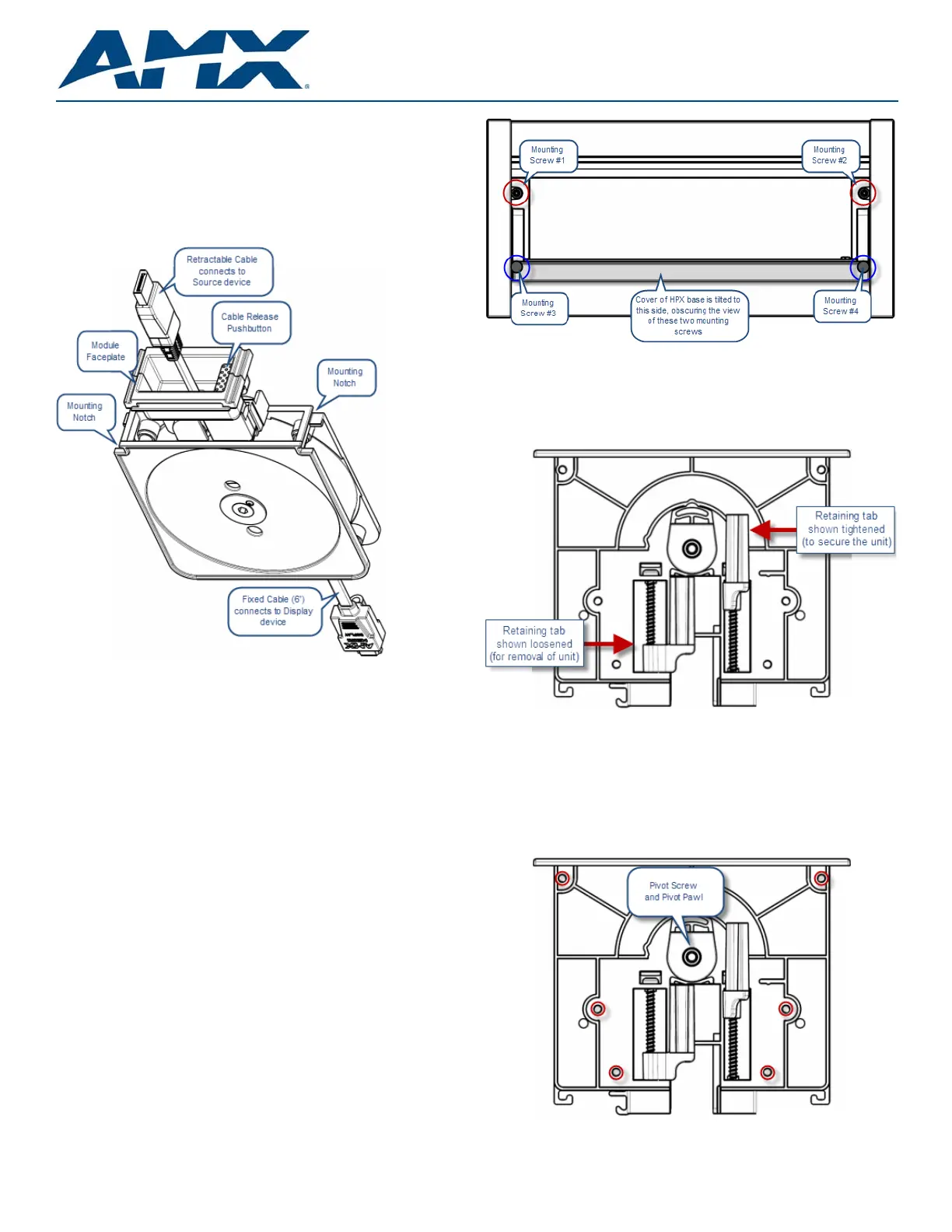
the Hydraport base assembly (FIG. 1).
The HPX-AV101-DP-R features Dual Mode DisplayPort (DP++) compatibility.
Installation
Warning! - Do not attempt to open the retractable cable module enclosure.
There are no serviceable parts inside the module.
Opening the module enclosure may result in an uncontrolled release of spring
forces which could cause serious injury and/or equipment damage.
Opening the module enclosure will void the product warranty.
Caution: Only use a hand-held screw driver for the mounting instructions in this
document. Over-tightening the screws can hinder performance or damage the
product.
1. For Existing HPX Installations, First Unmount the HPX Base
For new HPX installations, skip to Step 2.
For existing HPX installations, the HPX Base Assembly must be un-mounted
from the surface before the Retractable Cable Modules can be installed:
1. Cut/remove any cable ties that would restrict the removal of the HPX Base
Assembly.
2. Loosen the four mounting screws (located inside and at each end of the
HPX base assembly), in order to rotate the retaining tabs from under the
mounting surface.
Note that when the cover of the HPX base is open, only two of these
screws are visible. To access the other two mounting screws, tip the cover
over to the opposite open position (see FIG. 2).
3. Once the retaining tabs have been rotated out from under the mounting
surface, the HPX assembly can be be lifted away from the mounting
surface.
FIG. 3 provides a cutaway view of the End Cap, showing the retaining tabs
in both the loose position and the tightened (secure) position:
2. Remove the End Cap and Existing Modules
Remove the End Cap as well as existing modules (as necessary, depending on
how you want the modules arranged) from one end of the HPX base assembly.
1. Remove the (silver) pivot screw and pivot pawl assembly in the center of
the End Cap (FIG. 4).
2. Remove the six (black) sheet metal screws that secure the End Cap to the
HPX assembly (locations circled in red below).
3. Gently slide the End Cap out of the HPX base assembly.
FIG. 1 HPX-AV101-DP-R DisplayPort Module with Retractable Cable
FIG. 2 HPX Base Assembly (shown mounted) - Mounting Screws Locations
FIG. 3 HPX Base Assembly (shown mounted) - Mounting Screws Locations
FIG. 4 HPX Base Assembly (shown mounted) - Mounting/Pivot Screw Locations