Atoll DAC200 Signature Manual

Atoll Audio/video konverter DAC200 Signature
Læs gratis den danske manual til Atoll DAC200 Signature (4 sider) i kategorien Audio/video konverter. Denne vejledning er vurderet som hjælpsom af 5 personer og har en gennemsnitlig bedømmelse på 4.3 stjerner ud af 3 anmeldelser. Har du et spørgsmål om Atoll DAC200 Signature, eller vil du spørge andre brugere om produktet?

Side 1/4
ATOLL ELECTRONIQUE
OWNER’S MANUAL ~ CONVERTER
DAC200 Sig
ATOLL ELECTRONIQUEPage 5Page 4
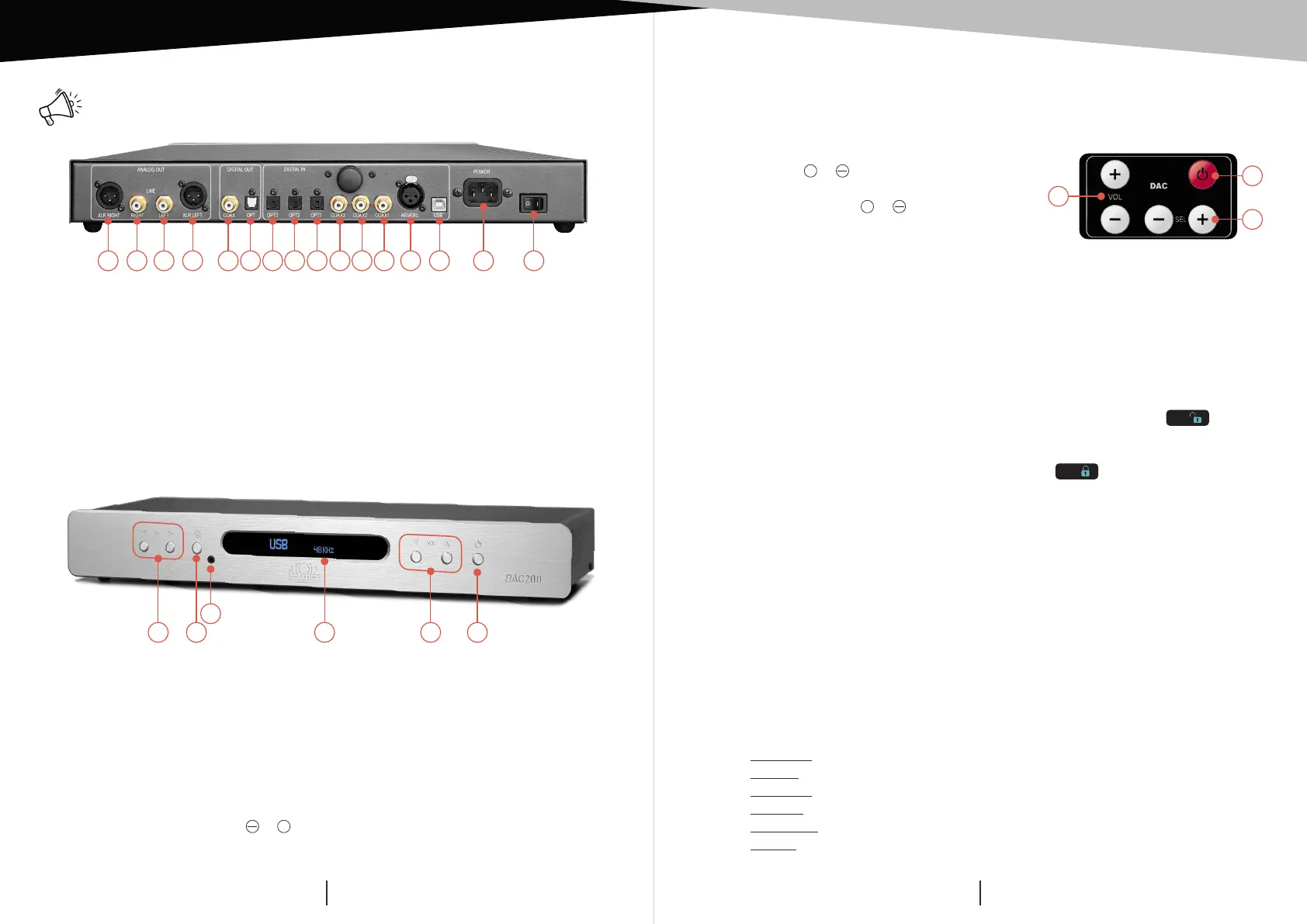
1) XLR output (Right).
2) Analog output (Right).
3) Analog output (Left).
4) XLR output (Left).
5) Digital output (coaxial).
6) Digital output (optical).
7) Digital input 3 (optical).
8) Digital input 2 (optical).
9) Digital input 1 (optical).
10) Digital input 3 (coaxial).
11) Digital input 2 (coaxial).
12) Digital input 1 (coaxial).
13) AES input.
14) USB input (type B).
15) Power input.
16) ON/SLEEP power switch.
CONNECTING REMOTE CONTROL
DETAILS OF FUNCTIONS
Reminder: do not make any connections when your device is turned on.
17) Sources selection keys.
18) Filters setup keys (see details beside): selection is made with keys (17).
19) Headphones output (jack 3,5mm) (linking the headphones shut down
the Output signals).
NB : When you connect a headphones, regardless of the BY-PASS
mode, you’ll switch to volume management mode (BY-PASS OFF) in
order to manage the volume level of the headphones.
20) Display: selected source shows on the left and frequency sampling on
the right. When no signal is detected display shows UNLOCK.
21) Volume control keys &
+
(when BY-PASS OFF) from 0 to 80
22) ON/SLEEP key.
The remote control is equipped with 2 Lithium CR2025 batteries. This remote control
is also able to drive all others ATOLL’s products: CD players; Tuner; Integrated or
Preamplifier. (See those manuals for details).
23) Volume keys
+
&
(*)
.
24) ON/SLEEP key.
25) Source selection keys
+
& .
23
24
25
(*)
Volume control is possible only when BY-PASS OFF. When changing the volume, level
is displayed shortly, then the display shows the sampling frequency.
BLUETOOTH®
FILTERS SETUP
Your appliance allows the reception of audio signals sent since any devices having a
Bluetooth transmitter (Smartphone, tab, computer…).
First time association:
Activate the Bluetooth® connectivity of your emitter device.
Select the Bluetooth® (BT) input of DAC200 Sig: unlock symbol
BT
appears.
Select your appliance on the list of possible receiver (named DAC200 Sig).
Once the connection is made, the lock symbol
BT
appears.
The whole audio signals of your device source will then be transmitted towards your
DAC200 Sig. Your emitter device will remain associated until you unlock the DAC200
Sig with your Smartphone or switch off your amplifier.
Association of another emitter:
To connect another emitter, you’ll need to disconnect the first emitter. The quality
of reception of the signal depends on the power of the Bluetooth emitter and
the distance between the 2 devices.
Avoid being more than 5 meters of your DAC200 Sig for a correct reception without
any risks of signal cuts.
While pressing key (18) you can choose different kinds of digital filters which you can select
with the 17’s keys:
Standard: fast roll-off, minimum phase filter
Fast lin: fast roll-off, linear phase filter
Slow min: soft roll-off, minimum phase filter
Slow lin: soft roll-off, linear phase filter
Apodizing: fast roll-off by apodizing and linear phase filter
Hybrid: fast roll-off and minimum phase filter
1 2 3 4 5 6 7 8 9 10 11 12 13 14 15 16
17 18
19
20 21 22


Produkt Specifikationer

Mærke: Atoll
Kategori: Audio/video konverter
Model: DAC200 Signature

Har du brug for hjælp?

Hvis du har brug for hjælp til Atoll DAC200 Signature stil et spørgsmål nedenfor, og andre brugere vil svare dig


Audio/video konverter Atoll Manualer

Atoll

Atoll DAC300 Manual

6 December 2025

Audio/video konverter Manualer

Nyeste Audio/video konverter Manualer

Fostex

Fostex FS-3DA Manual

7 December 2025
BirdDog

BirdDog FLEX 4K BP Manual

5 December 2025
BirdDog

BirdDog 4K SDI Si2 Manual

4 December 2025
BirdDog

BirdDog PLAY Manual

3 December 2025
BirdDog

BirdDog FLEX 4K OUT Manual

3 December 2025
BirdDog

BirdDog 4K Quad Manual

2 December 2025
BirdDog

BirdDog OG4 Manual

2 December 2025
BirdDog

BirdDog 4K HDMI Si2 Manual

2 December 2025
MuxLab

MuxLab 500427 Manual

1 December 2025
MuxLab

MuxLab 500425 Manual

1 December 2025