Canon PowerShot S400 Manual

Canon Videokamera PowerShot S400
Læs gratis den danske manual til Canon PowerShot S400 (2 sider) i kategorien Videokamera. Denne vejledning er vurderet som hjælpsom af 22 personer og har en gennemsnitlig bedømmelse på 4.8 stjerner ud af 11.5 anmeldelser. Har du et spørgsmål om Canon PowerShot S400, eller vil du spørge andre brugere om produktet?

Side 1/2
CDI-E083
This guide explains the required operations the first time the camera is used, how to download images
to a computer, as well as connecting a printer for direct printing. For more information about handling
precautions and detailed instructions, please refer to the manuals listed above.
Please refer to the section of the if you have trouble installing the software or downloadingTroubleshooting Software Starter Guide
images.
Do not connect the camera to the computer before the software is installed.
Handling precautions
Cameras detailed operations
Camera User Guide
Software operations
Software Starter Guide
Detailed software operations
ZoomBrowser EX Software User Guide (Windows®)
ImageBrowser Software User Guide (Macintosh)
(These PDF format manuals are available on the Canon
website. Please download them from the following URL:
http://www.canon.co.jp/Imaging/information-e.html)
CDI-E083-010 XX02XXXX © 2003 CANON INC. PRINTED IN JAPAN
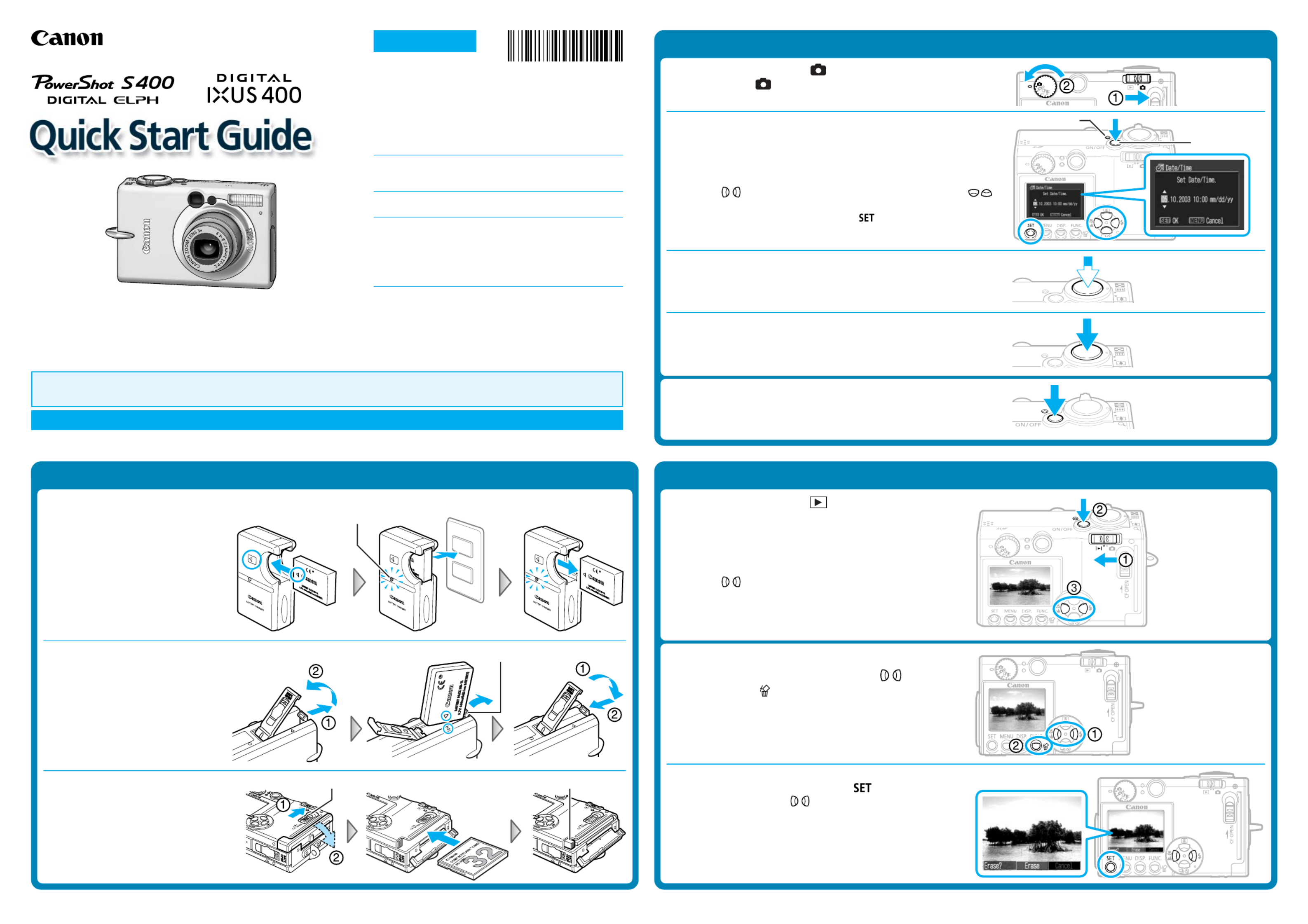
Step 1 Preparing the Camera
1. Charge the battery pack. (Battery charger types vary by region.)
Place the battery pack in the battery
charger and plug the charger into a
power outlet. The charge indicator
lights red while charging and
changes to green when the battery
pack is charged.
Charging the battery pack takes
approximately 130 minutes.
2. Install the battery pack.
Slide the battery cover open. Press
the battery lock while inserting the
battery pack all the way in, aligning
the arrows on the camera and
battery pack. Slide the battery cover
closed.
3. Install the CF card.
Slide the lock and open the CF card
slot cover. Insert the CF card with its
label facing upward until the CF
card eject button fully extends.
Close the CF card slot cover.
CF Card Eject Button
Step 2 Shooting
1. Set the mode switch to (Shooting) and the shooting
mode dial to (Auto).
2. Turn on the power.
Press the ON/OFF button until the power lamp lights.
The Date/Time menu will appear on the LCD monitor when the camera
is first turned on.
3. Set the date and time (First time the camera is powered on).
Use the buttons to select the items you wish to set, and the
buttons to change the value.
To put the settings into effect, press the button.
4. Focus.
Point the camera in the direction of the subject you wish to shoot and
press the shutter button halfway. The camera beeps twice when the
subject is in focus.
5. Shoot.
Press the shutter button fully. The shutter sound will sound once when
the shot has been taken. The recorded image is displayed on the LCD
monitor for approximately 2 seconds.
Turn off the power.
Press the ON/OFF button. Even if the ON/OFF button is not pressed, the
power will automatically shut down 3 minutes after the last control is
accessed.
Step 3 Reviewing an Image
1. Set the mode switch to (Replay).
2. Turn on the power.
Press the ON/OFF button until the power lamp lights.
The last recorded image appears in the LCD monitor.
3. View the images.
Use the buttons to display the image you wish to see.
To Delete an Unwanted Image
1. Select the unwanted image with the buttons
and press the button.
2. When the confirmation screen appears, check that
[Erase] is selected and press the button.
Select [Cancel] with the buttons to cancel without erasing.
Charge Indicator
Battery Lock
Lock
Power Lamp
ON/OFF Button
Continued on the reverse side.
ENGLISH


Produkt Specifikationer

Mærke: Canon
Kategori: Videokamera
Model: PowerShot S400

Har du brug for hjælp?

Hvis du har brug for hjælp til Canon PowerShot S400 stil et spørgsmål nedenfor, og andre brugere vil svare dig


Videokamera Canon Manualer

Canon

Canon EOS C50 Manual

9 November 2025
Canon

Canon MV800 Manual

8 August 2025
Canon

Canon MV5 Manual

8 August 2025
Canon

Canon MV730i Manual

8 August 2025
Canon

Canon MVX330i Manual

8 August 2025
Canon

Canon MV500 Manual

8 August 2025
Canon

Canon MVX10i Manual

8 August 2025
Canon

Canon MV650i Manual

8 August 2025
Canon

Canon MV750i Manual

8 August 2025

Videokamera Manualer

Nyeste Videokamera Manualer

Panasonic

Panasonic NV-RX10 Manual

27 December 2025
Panasonic

Panasonic NV-M40 Manual

25 December 2025
Panasonic

Panasonic NV-S70 Manual

25 December 2025
Panasonic

Panasonic NV-MC6 Manual

25 December 2025
Nilox

Nilox NXACCARRYCAM Manual

24 December 2025
Panasonic

Panasonic NV-R50 Manual

23 December 2025
Panasonic

Panasonic NV-RX1 Manual

23 December 2025
Panasonic

Panasonic NV-MS4 Manual

23 December 2025
Panasonic

Panasonic NV-R30 Manual

23 December 2025
Panasonic

Panasonic NV-G303 Manual

22 December 2025