Casio Baby-G BGA-190 Manual
Casio Ur Baby-G BGA-190

Læs gratis den danske manual til Casio Baby-G BGA-190 (5 sider) i kategorien Ur. Denne vejledning er vurderet som hjælpsom af 19 personer og har en gennemsnitlig bedømmelse på 4.6 stjerner ud af 10 anmeldelser. Har du et spørgsmål om Casio Baby-G BGA-190, eller vil du spørge andre brugere om produktet?

Side 1/5
Operation Guide 5382/5465/5508
E-9
Mode Reference Guide
The mode you should select depends on what you want to do.
To do this: Enter this mode: See:
x View the current time in the Home City
x View the current time in one of 48 cities
(31 time zones) around the globe
x View the current date in the Home City
x Confi gure Home City and daylight saving time (DST)
settings
x Confi gure time and date settings
Timekeeping Mode
E-15
E-17
E-20
x Confi gure World Time City and daylight saving time
(DST) settings
x Use the stopwatch to measure elapsed time Stopwatch Mode E-27
x Use the countdown timer Countdown Timer Mode E-30
x Set an alarm time Alarm Mode E-33
E-8
Adjusting Hand Positions . . . . . . . . . . . . . . . . . . . . . . . . . . . . . . . . . . . . . . . . . E-38
To adjust hand positions . . . . . . . . . . . . . . . . . . . . . . . . . . . . . . . . . . . . . . . . E-38
Button Operation Tone . . . . . . . . . . . . . . . . . . . . . . . . . . . . . . . . . . . . . . . . . . . E-40
To turn the button operation tone on and off . . . . . . . . . . . . . . . . . . . . . . . . . E-40
Troubleshooting . . . . . . . . . . . . . . . . . . . . . . . . . . . . . . . . . . . . . . . . . . . . . . . . . E-42
Main Indicators . . . . . . . . . . . . . . . . . . . . . . . . . . . . . . . . . . . . . . . . . . . . . . . . .E-43
Speci cations. . . . . . . . . . . . . . . . . . . . . . . . . . . . . . . . . . . . . . . . . . . . . . . . . . . E-44
E-7
Countdown Timer . . . . . . . . . . . . . . . . . . . . . . . . . . . . . . . . . . . . . . . . . . . . . . .E-30
To enter the Countdown Timer Mode . . . . . . . . . . . . . . . . . . . . . . . . . . . . . . . E-30
To confi gure the countdown timer . . . . . . . . . . . . . . . . . . . . . . . . . . . . . . . . . E-31
To perform a countdown timer operation . . . . . . . . . . . . . . . . . . . . . . . . . . . . E-32
To stop the alarm . . . . . . . . . . . . . . . . . . . . . . . . . . . . . . . . . . . . . . . . . . . . . E-32
Using the Alarm . . . . . . . . . . . . . . . . . . . . . . . . . . . . . . . . . . . . . . . . . . . . . . . . .E-33
To set an alarm time . . . . . . . . . . . . . . . . . . . . . . . . . . . . . . . . . . . . . . . . . . . E-33
To test the alarm . . . . . . . . . . . . . . . . . . . . . . . . . . . . . . . . . . . . . . . . . . . . . . E-34
To turn an alarm and the Hourly Time Signal on and off . . . . . . . . . . . . . . . . . E-35
To stop the alarm . . . . . . . . . . . . . . . . . . . . . . . . . . . . . . . . . . . . . . . . . . . . . E-35
Illumination . . . . . . . . . . . . . . . . . . . . . . . . . . . . . . . . . . . . . . . . . . . . . . . . . . . . . E-36
To turn on illumination . . . . . . . . . . . . . . . . . . . . . . . . . . . . . . . . . . . . . . . . . . E-36
To change the Illumination Duration . . . . . . . . . . . . . . . . . . . . . . . . . . . . . . . . E-36
E-6
Adjusting the Current Time and Date Settings . . . . . . . . . . . . . . . . . . . . . . . .E-20
To confi gure the digital time and date settings . . . . . . . . . . . . . . . . . . . . . . . . E-20
Checking the Current Time in a Different Time Zone . . . . . . . . . . . . . . . . . . . E-24
To enter the World Time Mode. . . . . . . . . . . . . . . . . . . . . . . . . . . . . . . . . . . . E-25
To view the time in another time zone . . . . . . . . . . . . . . . . . . . . . . . . . . . . . . E-25
To specify standard time or daylight saving time (DST) for a city . . . . . . . . . . . E-26
Using the Stopwatch . . . . . . . . . . . . . . . . . . . . . . . . . . . . . . . . . . . . . . . . . . . . . E-27
To enter the Stopwatch Mode . . . . . . . . . . . . . . . . . . . . . . . . . . . . . . . . . . . . E-27
To perform an elapsed time operation . . . . . . . . . . . . . . . . . . . . . . . . . . . . . . E-28
To pause at a split time . . . . . . . . . . . . . . . . . . . . . . . . . . . . . . . . . . . . . . . . . E-28
To measure two nishes . . . . . . . . . . . . . . . . . . . . . . . . . . . . . . . . . . . . . . . . E-28
E-5
Contents
About This Manual . . . . . . . . . . . . . . . . . . . . . . . . . . . . . . . . . . . . . . . . . . . . . . . . E-2
Things to check before using the watch . . . . . . . . . . . . . . . . . . . . . . . . . . . . . . E-4
Mode Reference Guide . . . . . . . . . . . . . . . . . . . . . . . . . . . . . . . . . . . . . . . . . . . . E-9
Timekeeping . . . . . . . . . . . . . . . . . . . . . . . . . . . . . . . . . . . . . . . . . . . . . . . . . . . . E-15
To swap your Home City and World Time City . . . . . . . . . . . . . . . . . . . . . . . . E-16
Confi guring Home City Settings . . . . . . . . . . . . . . . . . . . . . . . . . . . . . . . . . . . .E-17
To confi gure Home City settings . . . . . . . . . . . . . . . . . . . . . . . . . . . . . . . . . . E-17
To change the Daylight Saving Time (summer time) setting . . . . . . . . . . . . . . E-19
E-4
Things to check before using the watch
1. Check the Home City and the daylight saving time (DST) setting.
Use the procedure under “To confi gure Home City settings” (page E-17) to confi gure
your Home City and daylight saving time settings.
Important!
x Proper World Time Mode data depend on correct Home City, time, and date
settings in the Timekeeping Mode. Make sure you configure these settings
correctly.
2. Set the current time.
x See “Adjusting the Current Time and Date Settings” (page E-20).
The watch is now ready for use.
E-3
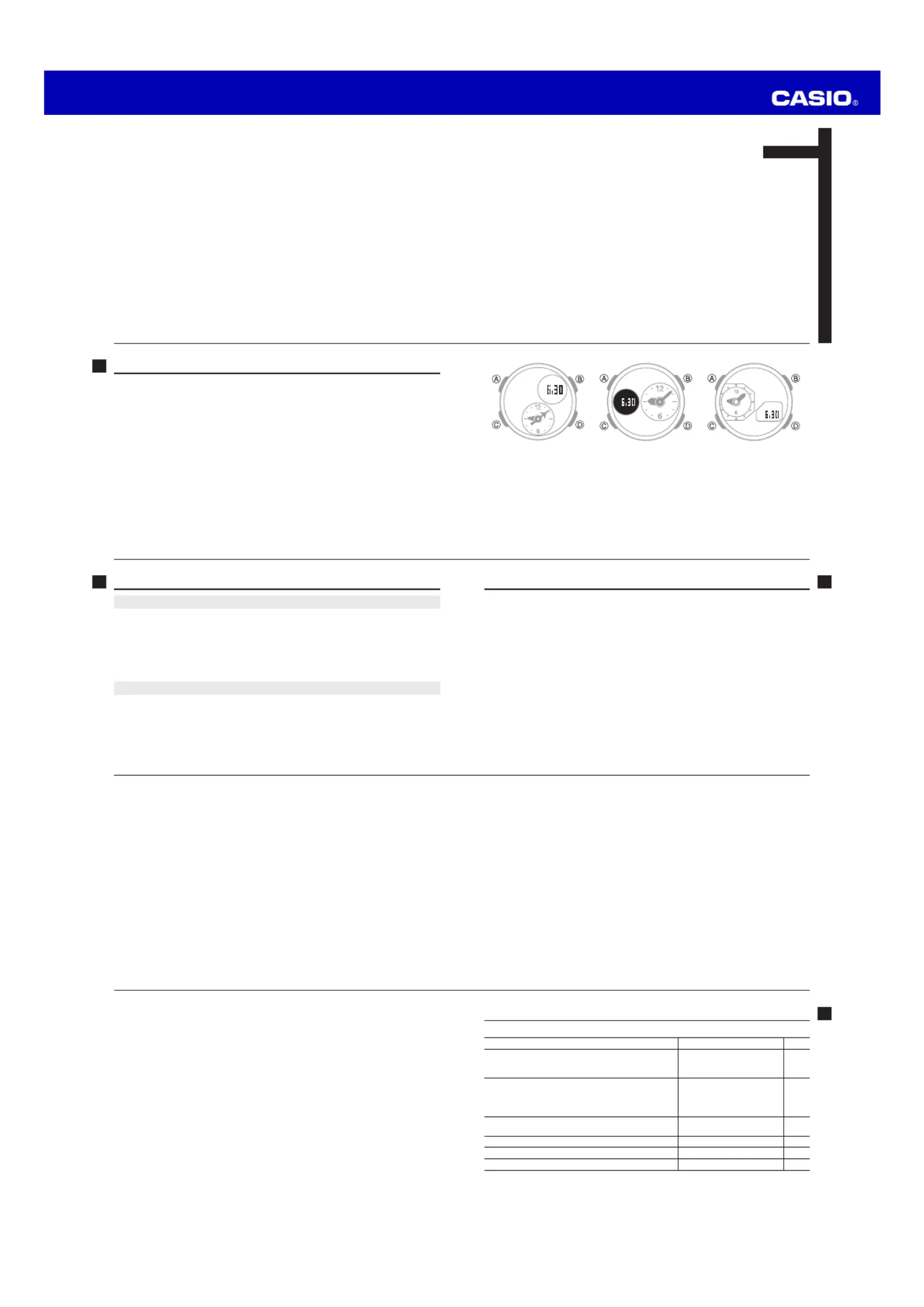
Module 5382 Module 5465 Module 5508
E-2
About This Manual
x The operational procedures for Modules 5382, 5465 and 5508 are identical. All of
the illustrations in this manual show Module 5382.
x Depending on the model of your watch, display text appears either as dark gures
on a light background, or light fi gures on a dark background. All sample displays in
this manual are shown using dark gures on a light background.
x Button operations are indicated using the letters shown in the illustration.
x Note that the product illustrations in this manual are intended for reference only,
and so the actual product may appear somewhat different than depicted by an
illustration.
E-1
ENGLISH
Congratulations upon your selection of this CASIO watch.
MA1608-EA
© 2015 CASIO COMPUTER CO., LTD.


Produkt Specifikationer

Mærke: Casio
Kategori: Ur
Model: Baby-G BGA-190

Har du brug for hjælp?

Hvis du har brug for hjælp til Casio Baby-G BGA-190 stil et spørgsmål nedenfor, og andre brugere vil svare dig