Geemarc SOS-PRO 595 Manual
Geemarc Telefon SOS-PRO 595

Læs gratis den danske manual til Geemarc SOS-PRO 595 (2 sider) i kategorien Telefon. Denne vejledning er vurderet som hjælpsom af 28 personer og har en gennemsnitlig bedømmelse på 4.5 stjerner ud af 14.5 anmeldelser. Har du et spørgsmål om Geemarc SOS-PRO 595, eller vil du spørge andre brugere om produktet?

Side 1/2
0 123
USER GUIDE
!!! Please refer to our website: www.geemarc.com for an
up to date user guide, as there may be important updates
and changes you need to be aware of !!!
Use only the adaptors and battery listed below.
Power adaptor information: Parent unit and baby
unit output: 5V DC 1A. Vtech Telecommunications Limited
Model: VT05EEU06045 (EU), VT05EUK06045 (UK)
Rechargeable Li-ion Battery: Model: GSP042535
3.7V, 320mAh, 1.184 Wh. Guangzhou Great Power Energy
& Technology CO., Ltd.
Alarm Pendant
Connection
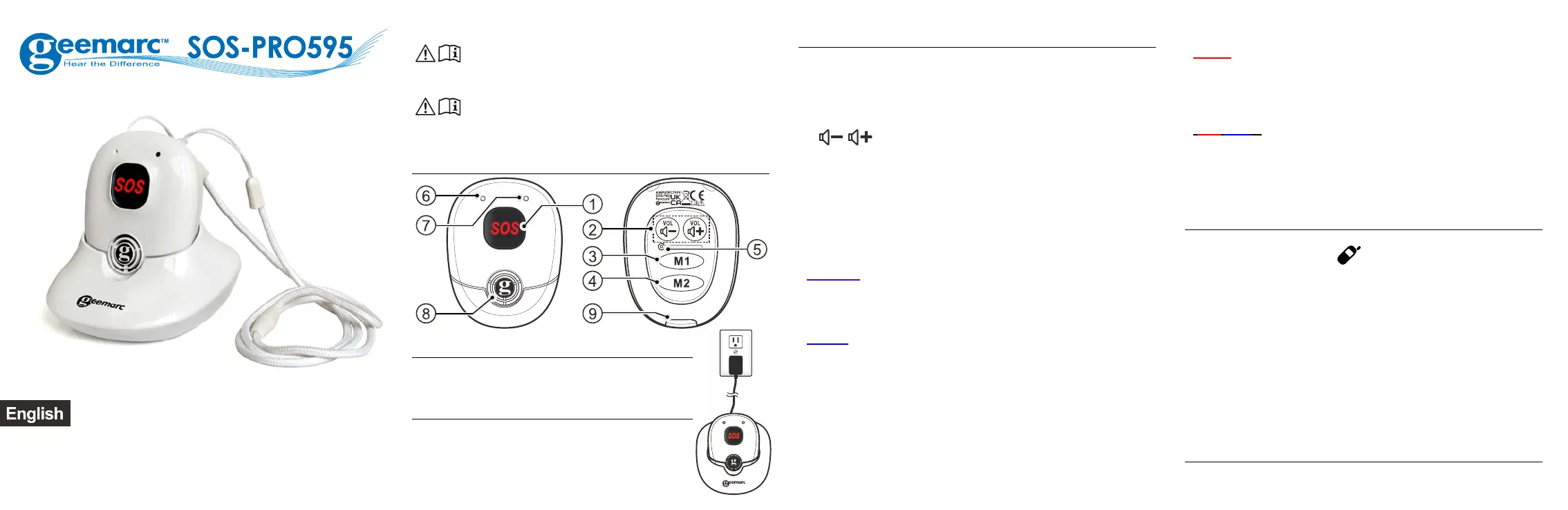
Charger: Plug the pendant’s power adaptor
into the mains power supply.
PACKAGE CONTENTS
1 cordless pendant SOS-PRO595,
1 power adaptor,
1 lanyard with breakout clip,
1 user guide.
ALARM PENDANT
1. SOS: When in idle mode, press to activate the SOS
function and start the automated dialing of your preset
emergency numbers.
When in call mode, press and hold for 2 seconds to cancel
the automated dialing of your emergency numbers.
2.
/
: When in a call: press to increase or decrease
the receiving volume. When it is ringing: press to increase
or decrease the ringer volume.
3. M1 dial the number saved in the direct memory key #1.
4. M2 dial the number saved In the direct memory key #2.
5. RESET
6. Microphone
7. Led indicator
(Purple)
- Steady: the alarm pendant is not paired with any phone.
- Flashes slowly: paired with a phone but its base is out
of range.
(Blue)
- Steady and the pendant is in the charging cradle: Fully
charged.
- Remains steady for 3s and a long beep is heard:
Successfully registered.
- Flashes twice: Off-hook.
- 3 beeps are heard in quick succession every 10s:
Off-hook and signal is weak.
- Flashes slowly: In idle mode and not in the charging
cradle, the pendant is in standby mode.
- Flashing continuously: The phone is ringing.
(Red)
- Steady and the pendant is in the charging cradle: The
battery is charging.
- Lights up at regular intervals and double beeps are heard:
The pendant is low on battery.
(Red/Bleu)
- The pendant is in pairing mode (after having pressed
and hold the Vol(+) and Vol(-) keys during 10sec).
8. LOUDSPEAKER
9. CHARGING CONNECTOR
Registering the Alarm pendant
For the AMPLIDECT 595 Photo or ULE: To enter the pairing
mode press and hold the
/HANDSET LOCATOR button
located on the phone’s main base until you hear a beep.
For the AMPLIDECT Combi 595 or CL595 : To enter the
pairing mode, press the Menu/OK key, and using the /
arrow keys select REGISTER then press the Menu/OK
key to confirm.
On the Alarm pendant: Press and hold the VOL+ and Vol-
keys until the LED indicator on the pendant flashes red
and blue.
You will hear a long beep and the LED indicator on the alarm
pendant will turn blue and stays on for 3 seconds, indicating
that
the registration process has been successfully completed.
USE YOUR PENDANT
SOS Emergency calls


Produkt Specifikationer

Mærke: Geemarc
Kategori: Telefon
Model: SOS-PRO 595

Har du brug for hjælp?

Hvis du har brug for hjælp til Geemarc SOS-PRO 595 stil et spørgsmål nedenfor, og andre brugere vil svare dig


Telefon Geemarc Manualer

Geemarc

Geemarc iLoop+ Manual

26 September 2025
Geemarc

Geemarc Serenties Manual

28 December 2024
Geemarc

Geemarc CL8510 Manual

11 December 2024
Geemarc

Geemarc TRIMLINE Manual

2 September 2024
Geemarc

Geemarc SOS-PRO 595 Manual

2 September 2024
Geemarc

Geemarc DALLAS10 Manual

1 September 2024

Telefon Manualer

Nyeste Telefon Manualer

Kensington

Kensington H3005 Manual

6 December 2025
HMD

HMD Barça 3210 Manual

4 December 2025
Panasonic

Panasonic KX-TS2350 Manual

29 November 2025
Huawei

Huawei nova 14i Manual

23 November 2025
Soundcore

Soundcore Life P2 Manual

22 November 2025
Panasonic

Panasonic KX-TGE260 Manual

16 November 2025
Gigaset

Gigaset N530 IP PRO Manual

16 November 2025
Gigaset

Gigaset SL850H PRO Manual

12 November 2025
LG

LG KG200 Manual

10 November 2025
Telycam

Telycam SONO Manual

9 November 2025