Hager TXB601B Manual


Læs gratis den danske manual til Hager TXB601B (2 sider) i kategorien Ikke kategoriseret. Denne vejledning er vurderet som hjælpsom af 8 personer og har en gennemsnitlig bedømmelse på 4.4 stjerner ud af 4.5 anmeldelser. Har du et spørgsmål om Hager TXB601B, eller vil du spørge andre brugere om produktet?

Side 1/2
TYB601B
Output 1gang 10 A,
flush mounted
TXB601B
Output 1gang 10 A,
flush mounted
Bn,.:
M
`
Safety instructions
Electrical equipment may only be installed and
assembled by a qualied electrician in accord-
ance with the relevant installation standards,
guidelines, regulations, directives, safety and
accident prevention regulations of the country.
Failure to comply with these installation in-
structions may result in damage to the device,
re or other hazards.
Hazard due to electric shock. Disconnect
before working on the device or load. Take into
account all circuit breakers that supply danger-
ous voltages to the device or load.
Hazard due to electric shock. The device is not
suited for safe disconnection of the mains sup-
ply.
Hazard due to electric shock on the SELV or
PELV installation. Do not connect any loads for
low voltage SELV, PELV or FELV together.
These instructions are an integral component
of the product and must be retained by the end
user.
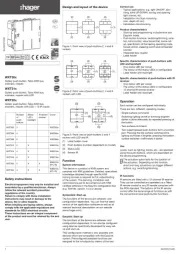
Design and layout of the device
S1
KNX+ /RD
KNX- /BK
(1)
(2)
(3)
Figure 1: device overview
(1) Illuminated button for manual operation/
programming button
(2) Connection of load(s)
(3) KNX bus connection cable
Function
System information
This device is a product of KNX system and corre-
sponds to the KNX guidelines. Detailed specialised
knowledge obtained from KNX training courses is
required for understanding. The planning, installa-
tion and commissioning of the device is carried out
with the help of KNX-certied software.
S-Mode start-up
The function of the device is software-depend-
ent. The software is to be taken from the product
database. You can nd the latest version of the
product database, technical descriptions as well as
conversion and additional support programmes on
our website.
E-Mode start-up
The function of the device is conguration-de-
pendent. The conguration can also be done using
devices developed specially for simple setting and
start-up.
This type of conguration is only possible with
devices of the easylink system. Easylink stands for
easy, visually supported start-up. Precongured
standard functions are assigned to the in/outputs
by means of a service module.
Functional description
The device receives telegrams from sensors or
other controllers via the KNX installation bus and
switches electrical loads with its relay contact.
Correct use
- Switching of electrical loads
potential-free contact.
- Installation into wall box according to
DIN 49073 (use deep box) or junction box sur-
face-mounted/ush-mounted.
Product characteristics
- Time switching functions.
- manual activation of the outputs on the device
possible, building site operation.
- Status display of the outputs on the device.
- Scene function.
- Forced position by higher-level controller.
Information for electricians
Installation and electrical connection
DANGER!
Touching live parts can result in an
electric shock!
An electric shock can be lethal!
Disconnect the connecting cables
before working on the device and
cover all live parts in the area!
ç
Connecting and installing the device
CAUTION!
Impermissible heating if the load of
the device is too high!
The device and the connected cables
may get damaged in the connection
area!
Do not exceed the maximum current
carrying capacity!
ç
CAUTION!
When connecting the bus/extension
units and mains voltage wires in a
common wall box, the KNX bus cable
might come into contact with the
mains voltage.
The safety of the entire KNX
installation is at risk. Persons could
also get an electric shock even on
remote devices.
Do not place bus/extension units and
mains voltage terminals in a common
terminal compartment. Use a wall box
with a rm partition or separate boxes
(Figure 2).
ç
S1
KNX+ /RD
KNX- /BK
S1
KNX+ /RD
KNX- /BK
S1
KNX+ /RD
KNX- /BK
SELV
Figure 2: installation with separate terminal com-
partment
6LE000363C1
6LE000363C
z
z
230 V v
230 V withv


Produkt Specifikationer

Mærke: Hager
Kategori: Ikke kategoriseret
Model: TXB601B

Har du brug for hjælp?

Hvis du har brug for hjælp til Hager TXB601B stil et spørgsmål nedenfor, og andre brugere vil svare dig


Ikke kategoriseret Hager Manualer
Hager

Hager WXF228 Manual

10 August 2025
Hager

Hager UKM340480 Manual

10 August 2025
Hager

Hager TRC301B Manual

10 August 2025
Hager

Hager GS20109011 Manual

10 August 2025
Hager

Hager AKB42000402 Manual

10 August 2025
Hager

Hager WXT312 Manual

10 August 2025
Hager

Hager BKSAN065110 Manual

10 August 2025
Hager

Hager VR10127011 Manual

10 August 2025
Hager

Hager UKM240280 Manual

10 August 2025
Hager

Hager ESR3336029 Manual

10 August 2025

Ikke kategoriseret Manualer

Nyeste Ikke kategoriseret Manualer

Waterstone

Waterstone 7800 Manual

11 December 2025
Kwikset

Kwikset 258 Manual

11 December 2025
Schlage

Schlage F170 Manual

11 December 2025
Moen

Moen Align 7565EV Manual

11 December 2025
ALNO

ALNO MC10244 Manual

11 December 2025
JET

JET TAK-ZX Manual

11 December 2025
Waterstone

Waterstone 1455 Manual

11 December 2025
Laica

Laica NE2015 Manual

11 December 2025