Hager WJC061B Manual


Læs gratis den danske manual til Hager WJC061B (2 sider) i kategorien Ikke kategoriseret. Denne vejledning er vurderet som hjælpsom af 3 personer og har en gennemsnitlig bedømmelse på 4.4 stjerner ud af 2 anmeldelser. Har du et spørgsmål om Hager WJC061B, eller vil du spørge andre brugere om produktet?

Side 1/2
1
Safety instructions
Electrical equipment may only be installed and
assembled by a qualied electrician in accor-
dance with the relevant installation standards,
guidelines, regulations, directives, safety and
accident prevention regulations of the country.
Failure to comply with these instructions may
hazards.
Hazard due to electric shock. Do not operate
the device without a cover.
Hazard due to electric shock. The device is not
suited for safe disconnection of the mains sup-
ply. Even when the device is switched o󰀨, the
load is not galvanically separated from the
mains supply.
Do not connect any non-dimmable lamps, their
transformers or operating devices. Observe
manufacturer's data.
Hazard of re. During operation with conventio-
nal transformers, fuse each transformer on the
primary side according to manufacturer's data.
Use safety transformers that comply with
EN 61558-2-6 only.
These instructions are an integral component
of the product and must be retained by the end
user.
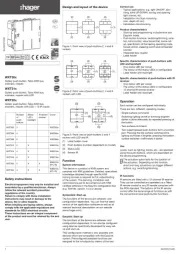
Design and layout of the device
(1)
(2)
(3)
(4)
(5)
(6)
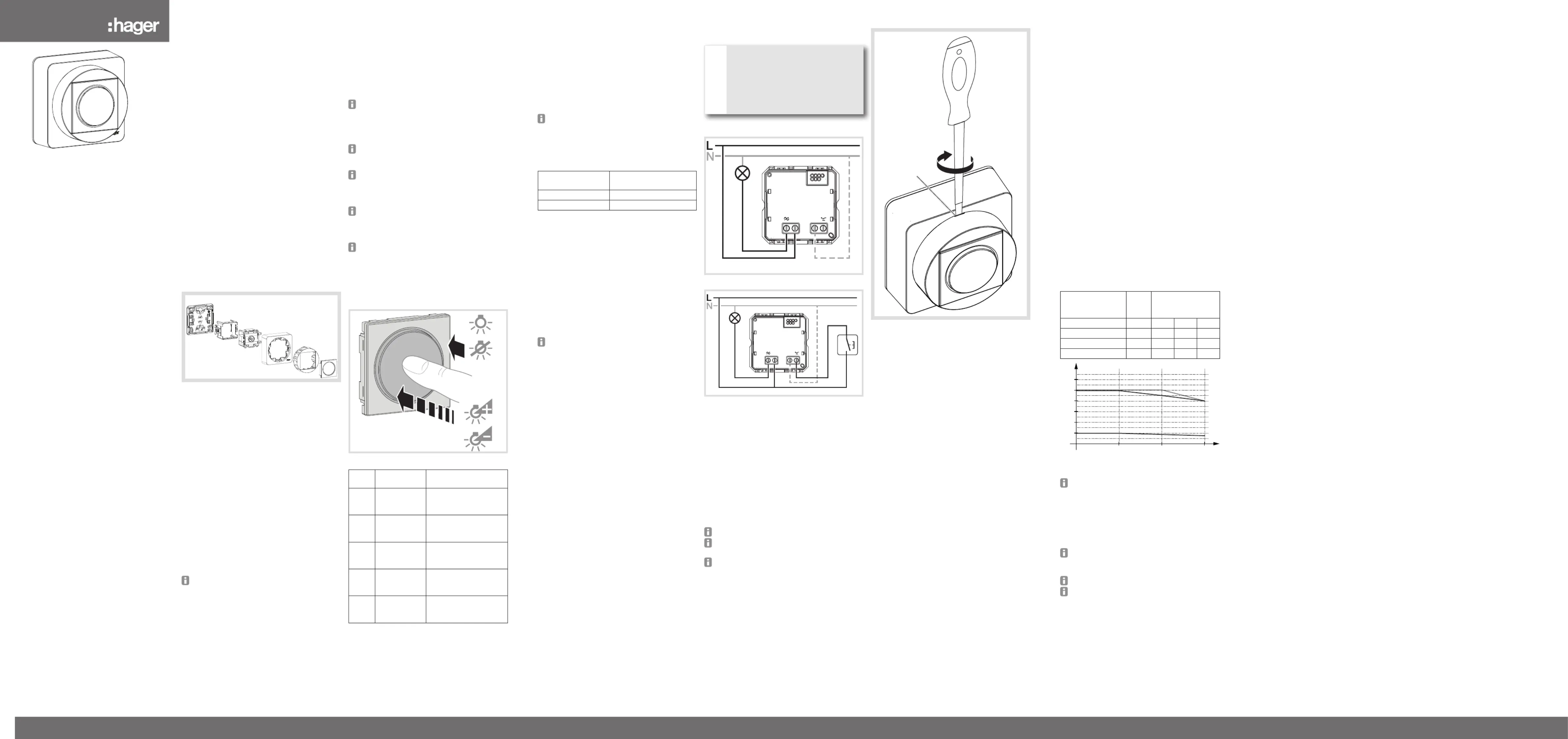
Figure 1: WJC061B touch dimmer
(1) Mounting plate
(2) Mounting adapter
(3) Touch dimmer
(4) Upper casing
(5) Mounting device cover
(6) Button
Function
Correct use
- Switching and dimming of incandescent lamps,
HV halogen lamps, dimmable 230 V LED
lamps, electronic and dual-mode transformers
or conventional transformers with low voltage
halogen lamps
- Only suitable for use in indoor areas with no
drip and no spray water
- Assembly on the wall
No mixed load operation of capacitive and
inductive loads possible at the output.
Product characteristics
- Automatic setting of load-dependent dimming
principle and optional ne setting of minimum
brightness via button, e.g. for 230 V LED lamps
- Automatic saving of switch-on brightness level
- Electronic short circuit protection
- Electronic overload and overheating protection
- Allows connection of extension units (push-
button, NO contact)
- Soft start/stop for bulb protection
6LE007525A
WJC061B ateha
Touch dimmer
Variateur à touches
z
a
09/2020 - 6LE007525AHager Controls S.A.S., 33 rue Saint-Nicolas, B.P. 10140, 67703 SAVERNE CEDEX, France - www.hager.com
Performance after mains breakdown
When power returns, the light is restored to the last
brightness level dened
Dimming principle
During commissioning, the dimmer performs
automatic load detection and applies the correct
dimming principle for the load connected (phase
cut-on, phase cut-o󰀨).
Flickering of connected lamps possible due to
the load falling below the specied minimum
level, ripple control pulses (tari󰀨 signals) from
power stations, or replacement of 230 V LED
lamps.
Short term ickering during load detection
possible. No operation is possible during load
detection. These are not defects of the device.
If the dimming performance of 230 V LED
lamps is unsatisfactory in factory setting, a load
setting must be carried out (see Setting the
load).
When circuiting several loads to one output
(parallel circuiting ) optimise dimming perfor-
mance via load setting if necessary (see Setting
the load).
After each replacement of the load (lamp) an
automatic load detection has to be carried out
(see Setting the load).
Operation
Touch dimmer operating concept
Figure 2: Switching and dimming
Load
status
Action Result
OFF Short press
of push-button
(< 400 ms)
Switch with saved ON
switch-on brightness
level.
> 0% Short press
of push-button
(< 400 ms)
Switch and save OFF
brightness as switch-on
brightness level.
> 0% Long press
of push-button
(> 400 ms)
Dim alternately down
and up each time the
push-button is pressed.
OFF Long press
of push-button
(> 10 s)
Select load type (see
Setting the load)
OFF Long press
of push-button
(> 15 s)
Fine setting of minimum
brightness (see corre-
sponding section)
Table 1: Touch dimmer operation
Setting the load
If the dimming and switching performance of loads
is unsatisfactory, especially when circuited to
energy-saving lamps and 230 V LED lamps, a load
setting must be carried out at the touch dimmer.
Switch o load.
Press the button for more than 10 but less than
15 seconds.
The connected load ashes once. The device is
now in setting mode.
If no further actions are performed within the
next 10 seconds, the dimmer switches to
normal operation.
Briey press the button repeatedly to activate
the desired mode (Table 1).
The load setting is executed.
Briey press the
button
Setting mode
1x Automatic load detection
2x LED phase cut-on
Table 2: Setting the load type
Fine setting of minimum brightness
To prevent poor switch-on behaviour or ickering of
the load in the lower dimming range, the dimming
angle for minimum brightness (phase cut-on/
cut-o󰀨) can be set individually for each load type.
Switch o load.
Hold the button down for more than
15 seconds.
The connected load will ash once after 10 s
and again after 15 s. The device is now in ne-
setting mode for the minimum brightness.
If no further actions are performed within the
next 10 seconds, the dimmer switches to
normal operation.
Briey press the button.
The device will switch repeatedly between the
various predened dimming angles (brightness
levels).
When the optimal setting is reached, hold the
button down (> 5 s).
This saves the selected dimming angle for the
minimum brightness.
The load is then switched o󰀨.
Information for electricians
Installation and electrical connection
DANGER!
Touching live parts can result in an
electric shock!
An electric shock can be lethal!
Disconnect the connecting cables
before working on the device and
cover all live parts in the area!
ç
Connection diagram
L
E
opt.
N
Figure 3: Connecting diagram (basic circuit)
L
E
opt.
N
Figure 4: Connection diagram with push-button,
NO contact as extension unit
Install a miniature circuit breaker of max. 16 A as
device protection.
Mount the mounting plate (1) correctly on a
suitable surface (fastening material not within
scope of delivery.
Connect touch dimmer (3), and extension units
is desired, according to the connection diagram.
Insert touch dimmer (3) into the mounting
adapter (2) and snap onto the mounting plate.
Snap upper casing (4) with mounting device
cover (5) and button (6) on the touch dimmer (3).
Do not mount dimmer on ammable surface.
Illuminated mechanical push-buttons must be
equipped with a separate N-terminal.
Connecting the optional N-conductor has
advantages for the switching/dimming
performance in the case of LED loads and
transformers.
Removing cover
(7)
Figure 5: Remove button
Insert the screwdriver into the opening (7)
and lever o the cover by slightly turning the
screwdriver.
Appendix
Technical data
Operating voltage 230 V~ +10 / -15 %
Frequency 50 Hz
MCB max. 16 A
Degree of protection IP 21
Protection class IK03
Power consumption in idle state < 0.2 W
230 V incandescent and halogen lamps 20 250 W
Dimmable conventional transformers 20 250 VA
Dimmable electronic and
dual-mode transformers 20 250 VA
Dimmable 230 V LED lamps 3 ... 50 W
Dimming speed 0 ... 100 %, approx. 4 s
Extension unit cable length max. 50 m
Load cable length max. 100 m
Operating temperature -5 45 °C
Storage temperature -20 60 °C
Relative humidity
(without condensation) 10 95 %
Connecting terminals conductor cross-sections
- rigid 1 x 1.5 ... 2.5 mm²
2 x 1.5 mm²
- exible 1 x 1.5 ... 2.5 mm²
Operating conditions
Loadtype Curve Maximum output
power
in Watt (W)
25°C 35°C 45°C
Ohmic loads A) 250 225 200
Transformers B) 250 250 200
LED lamps C) 50 45 40
25 35 45
°C
50
100
150
200
250
300
W
A)
B)
C)
Diagram 1: Maximum output power depending on
the ambient temperature
When connecting conventional transformers,
connect the optional N-conductor to obtain a
stable dimming performance. Conventional
transformers should be operated with at least
50 % nominal load. Nonetheless, 75% is
recommended because in individual cases,
depending on the transformer, unstable
dimming performance may occur.
Carry out loading of conventional, electronic
and dual-mode transformers according to
manufacturer's instructions.
Do not use non-dimmable 230 V LED lamps.
In the case of 230 V LED lamps, the power
supply to the dimmer can cause the lamp to
glow slightly even when it is switched o󰀨.
Troubleshooting
After some time the load dims down of its own
accord.
The electronic overload protection has tripped.
Execute load detection
Reduce total load.
Use another lamp.
The lamp cannot be dimmed down su󰀩ciently.
The dimming angle is set too high.
Decrease the value in ne-setting of the
minimum brightness.
The lamp switches o󰀨 while being dimmed
down.
The dimming angle is set too low.
Increase the value in ne-setting of the
minimum brightness.
Use another lamp.
The load does not switch on.
The dimming angle and brightness value are set
too low.
Increase the value in ne-setting of the
minimum brightness.
The electronic short-circuit protection has tripped
repeatedly.
Check electrical installation and disconnect
dimmer briey from mains.
LED lamp does not switch on.
Load setting mode not correct
Start automatic load detection or set LED phase
cut-on mode.
The load generates noise.
The load type is set incorrectly.
Set the load type to automatic load detection.
If the error persists, replace the lamp.
Dimmer switches o󰀨 of its own accord.
The electronic overload protection has tripped.
Check the load connected (maximum output
power).
The electronic short-circuit protection has tripped.
Check electrical installation and disconnect
dimmer briey from mains.
Load ickers while switched o󰀨.
LED load too low.
Increase LED load at output or use
compensation module LED.
The connected load cannot be dimmed.
Be sure always to use dimmable loads.
Dimming and switching performance is
unsatisfactory.
Start automatic load detection
Set dimmer to LED phase cut-on.
Connect neutral conductor or compensation
again
z


Produkt Specifikationer

Mærke: Hager
Kategori: Ikke kategoriseret
Model: WJC061B

Har du brug for hjælp?

Hvis du har brug for hjælp til Hager WJC061B stil et spørgsmål nedenfor, og andre brugere vil svare dig


Ikke kategoriseret Hager Manualer
Hager

Hager WXF228 Manual

10 August 2025
Hager

Hager UKM340480 Manual

10 August 2025
Hager

Hager TRC301B Manual

10 August 2025
Hager

Hager GS20109011 Manual

10 August 2025
Hager

Hager AKB42000402 Manual

10 August 2025
Hager

Hager WXT312 Manual

10 August 2025
Hager

Hager BKSAN065110 Manual

10 August 2025
Hager

Hager VR10127011 Manual

10 August 2025
Hager

Hager UKM240280 Manual

10 August 2025
Hager

Hager ESR3336029 Manual

10 August 2025

Ikke kategoriseret Manualer

Nyeste Ikke kategoriseret Manualer

Waterstone

Waterstone 7800 Manual

11 December 2025
Kwikset

Kwikset 258 Manual

11 December 2025
Schlage

Schlage F170 Manual

11 December 2025
Moen

Moen Align 7565EV Manual

11 December 2025
ALNO

ALNO MC10244 Manual

11 December 2025
JET

JET TAK-ZX Manual

11 December 2025
Waterstone

Waterstone 1455 Manual

11 December 2025
Laica

Laica NE2015 Manual

11 December 2025