Hotone Darkflux Manual


Læs gratis den danske manual til Hotone Darkflux (1 sider) i kategorien Ikke kategoriseret. Denne vejledning er vurderet som hjælpsom af 30 personer og har en gennemsnitlig bedømmelse på 4.7 stjerner ud af 15.5 anmeldelser. Har du et spørgsmål om Hotone Darkflux, eller vil du spørge andre brugere om produktet?
Side 1/1
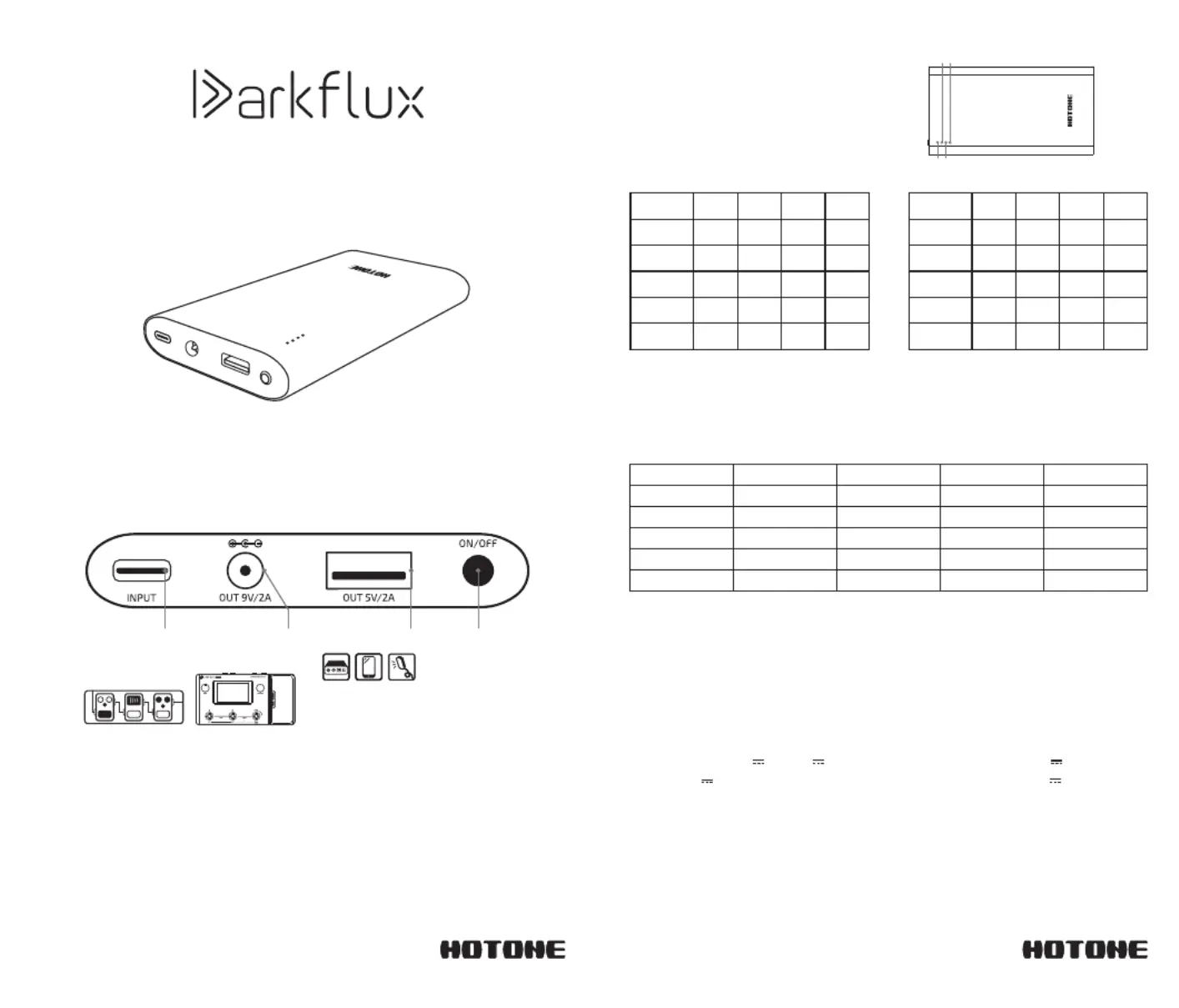
A Portable Power Bank
Designed for Musicians
Use the power adapter to charge the unit.
When charging, the display will
correspond with the power intake:
Charging
Power Output
Specifications
Input: (USB-C) 5V 2A 9V 2A
12V 1.5A
Dimensions: 140*75*14.1mm
Rated capacity: 6800mAh (5V/2A)
Connect a 5.5 x 2.1mm male-to-male DC cable or USB cable to your device
to power out. When powering, the display will correspond with the power
output:
Caution:
Keep this unit away from fire. Use and store in a dry environment, free of
water and moisture, which may cause a short circuit. The 9V interface is
an output interface and cannot be used for charging.
Power Level
LED 1
LED 2
LED 3 LED 4
Undervoltage
Off
0 25- %
25-50%
50-75%
75-100%
On
Model: XA-00009
Capacity: 37Wh 3.7V 10000mAh
Output: (USB-A) 5V 2A
(5.5-2.1) 9V 2A
Operating temperature: 5 C-35 C° °
Charging time: approx. 4 hrs (data cable included, 18W adapter)
*Rated energy less than 74Wh/3.7V, in line with international aviation standards.
Take it anywhere.
Blinking
1. When the output current is less than 100mA, the unit shuts down automatically to ensure safety and
power conservation.
2. Connect the output port to automatically start powering. Individual devices will only power when the
power button is turned on.
3. The USB 5V and 9V output ports support simultaneous powering when not charging.
LED 4 LED 2
LED 3
LED 1
Powel
Level
0 25- %
25-50%
50-75%
75 96- %
LED 1
LED 2
LED 3 LED 4
Blinking
Off
On
Fully
charged
0 25- %
25-50%
50-75%
75 96- %
LED 1
LED 2
LED 3 LED 4
Normal charging Fast charging
1. The 5V output can be used normally when charging The 9V output stops when charging . .
Turning ON OFF /
Turning on: Press the ON/OFF button to turn the unit on. The power
indicator light will come on.
Turning off: Press and hold the ON/OFF button for three seconds. The
power indicator light will go off.
User’s Manual
Thank you for purchasing a Hotone product
Please read this manual carefully to get the most out of your Darkflux
Product Overview
USBType-C 9V 2A Center Negative
DC Output, 5.5 x 2.1mm
USBType-A5V2A
Power ON/OFF
*The total current of the effects pedal group must be greater than 100mA, otherwise the unit
will automatically shut down to ensure safety and conserve power.
Powel
Level
Fully
charged
Blinking
Off Off
OffOff
Off
Blinking
Blinking
On On
OnOn On
OnOn On On OnOn On On
Blinking
Off Off Off
Off Off
Off
Blinking Blinking
Blinking Blinking Blinking
Blinking Blinking Blinking Blinking
Off Off
Off Off Off
Off Off
Off
On
On
On
On
On
On
On
On
On


Produkt Specifikationer

Mærke: Hotone
Kategori: Ikke kategoriseret
Model: Darkflux

Har du brug for hjælp?

Hvis du har brug for hjælp til Hotone Darkflux stil et spørgsmål nedenfor, og andre brugere vil svare dig


Ikke kategoriseret Hotone Manualer

Ikke kategoriseret Manualer

Nyeste Ikke kategoriseret Manualer

Waterstone

Waterstone 7800 Manual

11 December 2025
Kwikset

Kwikset 258 Manual

11 December 2025
Schlage

Schlage F170 Manual

11 December 2025
Moen

Moen Align 7565EV Manual

11 December 2025
ALNO

ALNO MC10244 Manual

11 December 2025
JET

JET TAK-ZX Manual

11 December 2025
Waterstone

Waterstone 1455 Manual

11 December 2025
Laica

Laica NE2015 Manual

11 December 2025