Insignia NS46L780A12 Manual
Læs gratis den danske manual til Insignia NS46L780A12 (2 sider) i kategorien TV. Denne vejledning er vurderet som hjælpsom af 22 personer og har en gennemsnitlig bedømmelse på 5.0 stjerner ud af 11.5 anmeldelser.
Har du et spørgsmål om Insignia NS46L780A12, eller vil du spørge andre brugere om produktet?
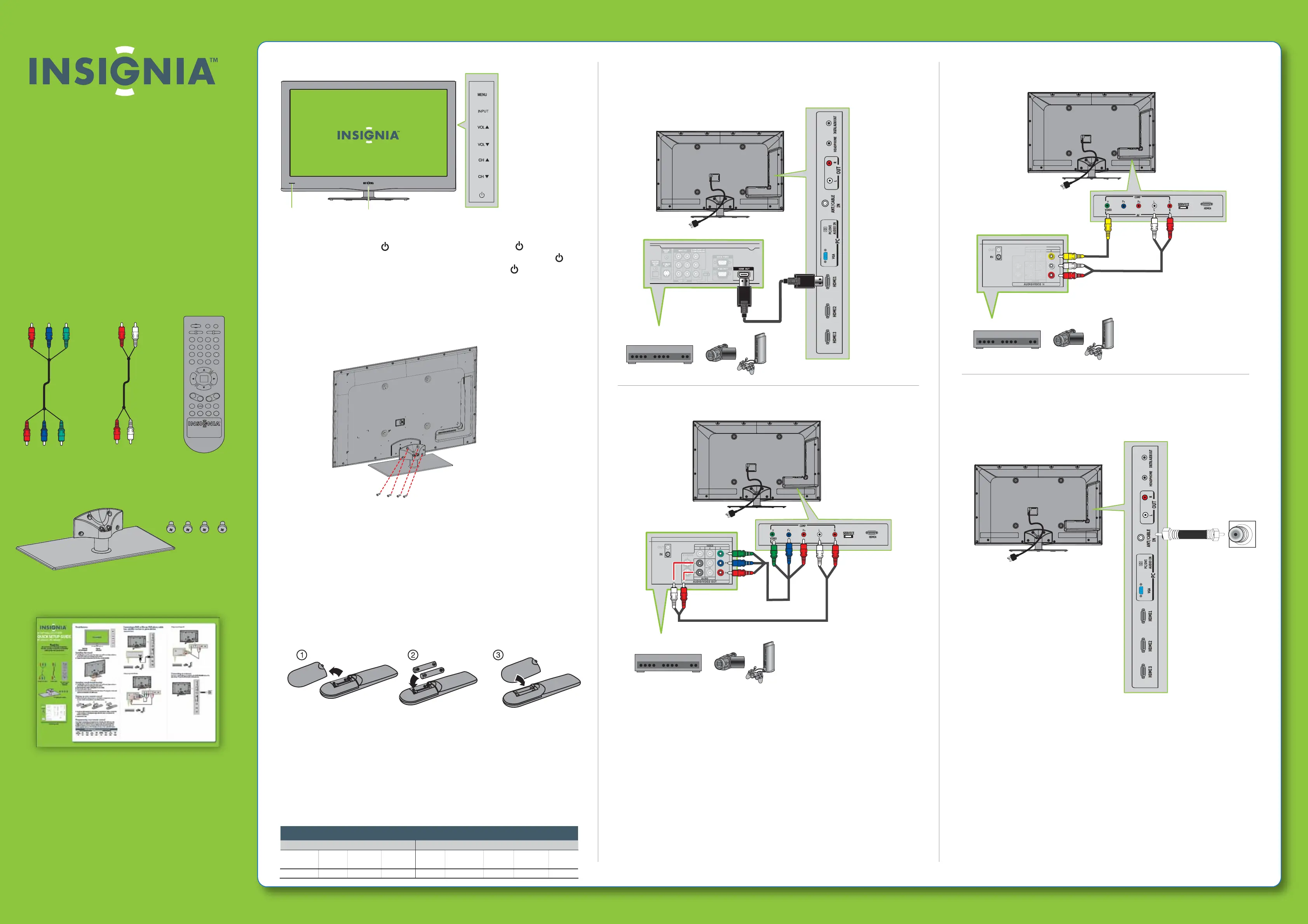
Produkt Specifikationer
| Mærke: | Insignia |
| Kategori: | TV |
| Model: | NS46L780A12 |
| Vekselstrømsindgangsspænding: | 120 V |
| Vekselstrømsindgangsfrekvens: | 60 Hz |
| Brugervejledning: | Ja |
| Produktfarve: | Sort |
| Skærm diagonal: | 46 " |
| Skærmopløsning: | 1920 x 1080 pixel |
| HD-type: | Fuld HD |
| Naturligt aspektforhold: | 16:9 |
| Skærmens lysstyrke: | 450 cd/m² |
| Synsvinkel, horisontal: | 178 ° |
| Synsvinkel, vertikal: | 178 ° |
| Understøttede videotilstande: | 1080p |
| LED-baggrundsbelysning type: | Edge-LED |
| 3D: | Ingen |
| Indbyggede højttaler(e): | Ja |
| Tuner type: | Analog & digital |
| Format til analogt signal: | NTSC |
| System for digitalt signalformat: | ATSC |
| Automatisk kanalsøgning: | Ja |
| Antal højttalere: | 2 |
| Udgangseffekt (RMS): | 20 W |
| Antal HDMI-porte: | 4 |
| DVI-port: | Ingen |
| Antal USB 2.0-porte: | 1 |
| Komponentvideo (YPbPr/YCbCr) indgang: | 1 |
| Udgange til hovedtelefoner: | 1 |
| Fælles grænseflade (CI +): | Ingen |
| Antal RF-porte: | 1 |
| Ethernet LAN: | Ingen |
| Elektronisk programguide (EPG): | Ingen |
| Skærmvisning (OSD): | Ja |
| Antal OSD sprog: | 3 |
| Slumretimer: | Ja |
| OSD-sprog: | ENG, ESP, FRE |
| Tekst-tv-funktioner: | Ingen |
| VESA montering: | Ja |
| Panel montering grænseflade: | 400 x 400 mm |
| Strømforbrug (typisk): | 140 W |
| Bredde (uden stativ): | 1128 mm |
| Dybde (uden stativ): | 34 mm |
| Højde (uden stativ): | 711 mm |
| Vægt (uden stativ): | 19479 g |
| Bredde (med stativ): | 1128 mm |
| Dybde (med stativ): | 284 mm |
| Højde (med stativ): | 770 mm |
| Vægt (med stativ): | 24280 g |
| Hurtig start guide: | Ja |
| Understøttede grafikopløsninger: | 1920 x 1080 (HD 1080) |
| Sammensat videoindgang: | 1 |
| Indgang til pc'en (D-Sub): | Ja |
| Fælles grænseflade (CI): | Ingen |
| Fjernbetjening inkluderet: | Ja |
| LED-indikatorer: | Ja |
| Justeringer af skærmformat: | 16:9 |
| Pc lydindgang: | Ja |
| Bæredygtighedscertifikater: | ENERGY STAR |
| Lydsystem: | SRS TruSurround |
| Kontrastforhold (typisk): | 4500:1 |
| Kontrastforhold (dynamisk): | 20000:1 |
| HDMI-version: | 1.3 |
| Digital koaksial lydudgang: | 1 |
| Kamfilter: | 3D |
Har du brug for hjælp?
Hvis du har brug for hjælp til Insignia NS46L780A12 stil et spørgsmål nedenfor, og andre brugere vil svare dig
TV Insignia Manualer
TV Manualer
- SYLVOX
- GoGen
- Westinghouse
- FOX Electronics
- Mystery
- Infiniton
- Onn
- Toshiba
- Vivo
- Strong
- Graetz
- Dyon
- Coocaa
- LG
- ITT
Nyeste TV Manualer


