Intek i-Talk T50 Manual
Intek Radio i-Talk T50

Læs gratis den danske manual til Intek i-Talk T50 (2 sider) i kategorien Radio. Denne vejledning er vurderet som hjælpsom af 25 personer og har en gennemsnitlig bedømmelse på 4.4 stjerner ud af 13 anmeldelser. Har du et spørgsmål om Intek i-Talk T50, eller vil du spørge andre brugere om produktet?

Side 1/2
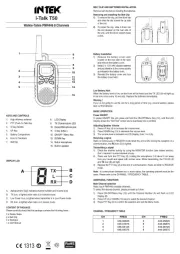
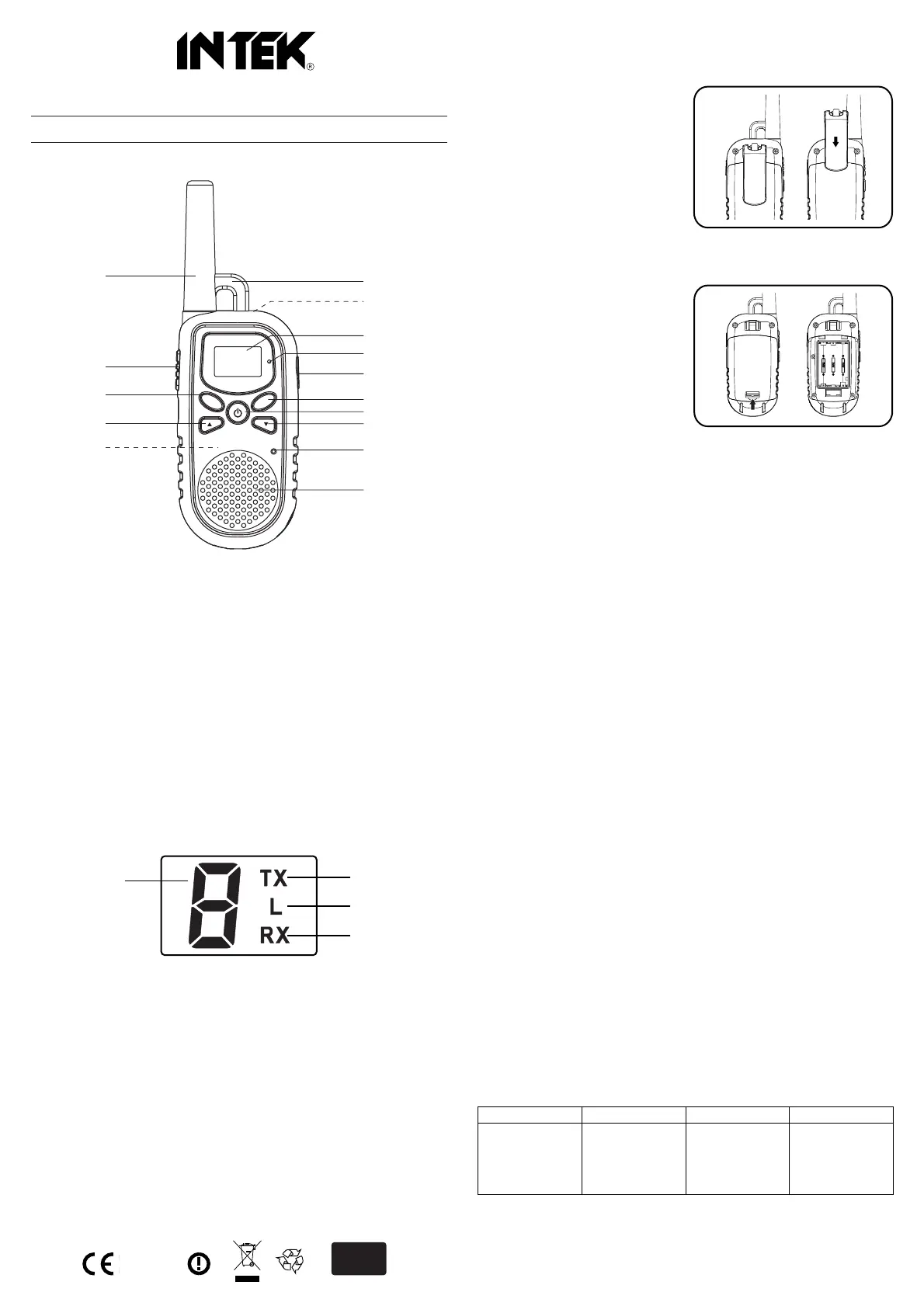
KEYS AND CONTROLS
1. High efficency antenna
2. PTT (Push-To-Talk) Key
3. S Key (SCAN)
4. UP Key
5. Battery Compartment
6. Hole for Necklace
7. Belt Clip
DISPLAY LCD
A. Alphanumeric Digit, indicates channel number and Volume level.
B. TX Icon, is lighted when radio is in transmit mode.
C. Low Power Icon, is lighted when transmitter is in Low Power mode.
D. RX Icon, is lighted when radio is in receive mode.
CONTENT OF PACKAGE
Please carefully check that the package contains the following items :
2 x Walkie-Talkie
2 x Belt Clip
2 x Necklace
1 x User Manual
BELT CLIP AND BATTERIES INSTALLATION
Remove belt clip before installing the batteries.
Removing and installing the Belt Clip
1) To remove the clip, pull the block tab
and slide the clip toward the up side
of the unit.
2) To install the clip, slide it down into
the slot situated on the rear side of
the unit, until the block system make
a click.
Battery installation
1) Release the battery cover latch
located on the rear side of the radio
and remove the battery cover.
2) Install 3 x 1.5V AAA alkaline batteries
and pay attention to the correct polarity
as indicated in the battery room.
3) Reinstall the battery cover and lock
the battery cover latch.
Low Battery Alert
When the battery level is low, an alert tone will be heard and the TX LED (9) will light up
in red color once every 15 seconds. Replace the batteries immediately.
Warning !
If you' re not going to use the unit for a long period of time (e.g. several weeks), please
take out the batteries.
BASIC OPERATION
Power ON/OFF
To power ON/OFF the unit, press and hold the ON-OFF/Menu Key (12), until the LCD
Display shows the "Self Test" screen and a dual-beep tone is emitted.
Adjusting Speaker Volume
1) Press UP Key (4) to increase the volume level.
2) Press DOWN Key (13) to decrease the volume level.
3) The volume level is indicated on LCD Display, from 1 to 8 (A).
Receiving a signal
Radio is continuously in RECEIVE mode when the unit is ON. During the reception of a
communication, the RX Icon (D) is lighted.
Transmitting a signal
1) Check the channel activity by using the MONITOR function (see related section).
Don' t transmit if current channel is busy.
2) Press and hold the PTT Key (2), holding the microphone (14) about 5 cm away
from your mouth and speak with normal voice. While transmitting, the TX LED (9)
and TX Icon (B) will light.
3) Release the PTT Key (2) at the end of communication. Radio will enter to RECEIVE
mode.
Note : to communicate between two or more radios, the operating channel must be the
same. Please refer to the CHANNEL / FREQUENCY TABLE.
ADDITIONAL FUNCTIONS
Main Channel selection
Radio has 8 PMR446 available channels.
To select the desired channel, please proceed as follow :
1) Press ON-OFF/Menu Key (12) until the Channel Number (A) will flash on LCD
Display (8).
2) Press UP (4) or DOWN (13) keys to select the desired channel.
3) Press PTT Key (2) to confirm the selection and exit the Menu mode.
CHANNEL / FREQUENCY TABLE
Walkie-Talkie PMR446 8 Channels
i-Talk T50
MENU
S
C
1
2
3
4
5
7
8
9
10
6
11
12
13
14
15
A
B
C
D
1313
RoHS
2002/95/EC
8. LCD Display
9. TX (Transmission) LED
10. Earset-Microphone jack.
11. C Key (CALL)
12. ON-OFF / Menu Key
13. DOWN Key
14. Buil-in microphone.
15. Built-in speaker.
CH
1
2
3
4
446.00625
446.01875
446.03125
446.04375
5
6
7
8
446.05625
446.06875
446.08125
446.09375
FREQ CH FREQ


Produkt Specifikationer

Mærke: Intek
Kategori: Radio
Model: i-Talk T50
Vægt: 115 g
Batteriteknologi: Alkaline
Dimensioner (BxDxH): 56 x 41 x 160 mm
Batteritype: AAA
Antal understøttede batterier: 3
Driftsfrekvens: 446 MHz
Maks. rækkevidde: - m
Antal kanaler (i alt): 8 kanaler

Har du brug for hjælp?

Hvis du har brug for hjælp til Intek i-Talk T50 stil et spørgsmål nedenfor, og andre brugere vil svare dig


Radio Intek Manualer
Intek

Intek SL-02 Manual

22 September 2025
Intek

Intek MT-3030M Manual

22 September 2025
Intek

Intek i-Talk T50 Manual

22 September 2025
Intek

Intek MT-174XPS Manual

21 September 2025
Intek

Intek MT-3030 Manual

21 September 2025
Intek

Intek M-100 Plus Manual

11 August 2024

Radio Manualer

Nyeste Radio Manualer

Pinell

Pinell Compact Manual

10 December 2025
Energy Sistem

Energy Sistem Urban 2 Manual

10 December 2025
Sencor

Sencor SRD 7760 Manual

8 December 2025
Sencor

Sencor SRD 216 Manual

7 December 2025
Raddy

Raddy RF320 Manual

5 December 2025
Ozito

Ozito PDRS-018 Manual

4 December 2025
Raddy

Raddy RE40 Manual

4 December 2025
Raddy

Raddy SW10 Manual

3 December 2025
TriSquare

TriSquare TSX300 Manual

29 November 2025