Netgear FA312 Manual


Læs gratis den danske manual til Netgear FA312 (2 sider) i kategorien Netværkskort/adapter. Denne vejledning er vurderet som hjælpsom af 6 personer og har en gennemsnitlig bedømmelse på 4.9 stjerner ud af 3.5 anmeldelser. Har du et spørgsmål om Netgear FA312, eller vil du spørge andre brugere om produktet?

Side 1/2
5. Fasten the card to the rear of the computer chassis by tightening the screw that is on the PC.
6. Replace the PC cover and reconnect the power cord to the PC.
Connect the Network Cables
Using the appropriate cable, connect the port on a network hub or switch to the port on the card. The port
on the card performs autonegotiation and supports full-duplex operation.
This section explains how to install the Network Driver in various Microsoft Windows Operating Systems.
Some versions of Microsoft Windows Operating System may respond with different dialog boxes, or the
dialog boxes may open in a different sequence than those shown in this guide, but should prompt you for the
same information.
Before you proceed with the installation steps, decide on a name for your network and for each PC. The
whole network must have the same workgroup name while each PC must have a unique name. These names
can be entered by going to Start>Settings>Control Panel>Network and clicking on the Identification tab.
You also need to have the Microsoft Windows Operating System CD-ROM and the GearBox for Adapters
CD ready to use in the installation process.
The installation screen uses FA311 as example.
Install the Windows XP Network Driver
Note: If the “Insert Disk” window opens and a message prompts you to insert your Windows CD-ROM at
any time during the installation process, insert the Windows CD-ROM in Drive D (the CD-ROM drive) and
click on “OK”. Then follow the next step in the instructions.
For FA311 and FA312 Adapters:
1. After installing the FA311 (or FA312) PCI Adapter, the Win XP will install the driver automatically.
2. You can go directly to section 4. “Test Your Network Connection”. Following the steps to check if the
driver is well installed.
For FA331 Adapters:
1. Turn on the power to the computer and start Windows XP.
2. Double-click “My Computer” on the desktop, double-click “Control panel” and then double-click
“System”.
3. Click “Hardware” and click “Device Manager” tab, then double-click Network adapters”.
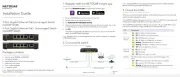
Installation Guide
Eve rybody s connecti ng.
32bit
10/100 Mbps Fast Ethernet FA311/FA312/FA331
PCI Adapter
S
R
E
T
U
O
R
S
S
E
L
E
R
I
W
S
E
H
C
T
I
W
S
S
B
U
H
S
R
E
T
P
A
D
A
®
NETGEAR, Inc.
Support Information
Phone: 1-888-NETGEAR
E-mail: support@NETGEAR.com
www.NETGEAR.com
See Support Information Card for for additional phone numbers.
Internet / World Wide Web
Go to http://www.NETGEAR.com for the NETGEAR Web page.
Defective or damaged merchandise can be returned to your point-of-sale representative.
IMPORTANT!
Please register online. YOU MUST REGISTER TO OBTAIN TECHNICAL SUPPORT. PLEASE RETAIN
PROOF OF PURCHASE and this warranty information. To register your product, get product support, or to
obtain product information and NETGEAR product documentation, direct your Web browser to the
http://www.NETGEAR.com Web page.
July 2002
M - F A 3 0 0 N A - 3
Instructions in this guide are for users of Microsoft Windows Operating Systems.
As a last step, be sure to register your Adapter at http://www.NETGEAR.com.
Plan Your Time
Estimated setup time for this product is only minutes.
Unpack the contents of the package and make sure that you have everything.
FA311 (or FA312, FA331) Fast Ethernet PCI Adapter
GearBox for Adapters CD
FA311/FA312/FA331 Installation Guide
Install the Card
Note: Touch a grounded metal object to free yourself of static electricity before you handle the card.
1. Turn the power off and unplug the power cord from your computer.
2. Remove the PC cover.
3. Choose an available PCI slot and remove the corresponding back plate from the PC chassis.
4. Insert the card into the PCI expansion slot.
Caution: To avoid damaging any components on the card, handle it by the edges, using your thumbs
to push it securely into the PCI slot. Make sure the card is fully inserted into the slot to prevent the PC
operating system from freezing at startup.
1 VERIFY PACKAGE CONTENTS
Model FA311 (or FA312, FA331)
Network Card GearBox for Adapters CD
3-pin LAN wake cable
(provided with Model FA312) Installation Guide
2 CONNECT NETGEAR TO YOUR ENVIRONMENT
Network card
Back plate
removed
PC with network
card installed Power adapter
PC with network
card installed
Printer
(optional)
Hub
RJ-45
Connector
Category 5 10/100 Mbps
UTP cables*
RJ-45
Connector
Use the cables provided or any Category 5 UTP cable.
Maximum length = 100 meters (300 feet)
*
4. Double-click “National Semiconductor DP83815-Based PCI Fast Ethernet adapeter”.
5. Click “Driver” and click “Update Driver” tab, then click “OK”.
6. A Hardware Update Wizard will appear. Insert the GearBox for Adapters CD (or disk) into your
CD-ROM drive. Select “Install from a list or specific location ( Advanced )”. Click “Next”.
7. When the following dialog box opens, select “Don’t search. I will choose the driver to install., then
click “Next”.
8. When Select Network Adapter box opens, click “Have Disk” then click “Next”.
1. Open the box
and verify its
contents
2. Connect NETGEAR to
your environment
3. Install Network Driver
4. Test Your Network Connection
5. Enjoy being connected!
START HERE
0:10
3 INSTALL NETWORK DRIVER
9. The Install From Disk box will open. Type “D:\” and click “OK”.
10. “NETGEAR FA330/FA331 PCI Adapter” will appear in the model list. Click “Next”.
11. The next Windows appears with the following adapter name : NETGEAR FA330/FA331 PCI Adapter.
Click “Finish”.
12. Remove the GearBox for Adapters CD (or disk) from the CD-ROM drive.
The Model FA311/FA312/FA331 Adapter driver installation for Windows XP is now complete.
Install the Windows 2000 Network Driver
Note: If the Insert Disk” window opens and a message prompts you to insert your Windows CD-ROM at
any time during the installation process, insert the Windows CD-ROM in Drive D (the CD-ROM drive) and
click on “OK”. Then follow the next step in the instructions.
1. A Found New Hardware Wizard dialog box will appear, indicating that Windows 2000 has found the
adapter. Insert the GearBox for Adapters CD (or disk) into your CD-ROM drive (or disk drive).
2. Click “Next”.


Produkt Specifikationer

Mærke: Netgear
Kategori: Netværkskort/adapter
Model: FA312

Har du brug for hjælp?

Hvis du har brug for hjælp til Netgear FA312 stil et spørgsmål nedenfor, og andre brugere vil svare dig


Netværkskort/adapter Netgear Manualer
Netgear

Netgear GS748PP Manual

28 September 2025
Netgear

Netgear GSM4210PD Manual

23 August 2025
Netgear

Netgear GS305EP Manual

14 Juli 2025
Netgear

Netgear GS305EPP Manual

20 Februar 2025
Netgear

Netgear FA312 Manual

26 Juli 2024
Netgear

Netgear FA120 Manual

25 Juli 2024
Netgear

Netgear GA311 Manual

24 Juli 2024

Netværkskort/adapter Manualer

Nyeste Netværkskort/adapter Manualer

Lindy

Lindy 43340 Manual

18 December 2025
Planet

Planet ENW-2QSFP28 Manual

17 December 2025
Simply45

Simply45 S45-2012U Manual

7 December 2025
Approx

Approx APPUSB900 Manual

29 November 2025
D-Link

D-Link DWA-548 Manual

29 November 2025
EXSYS

EXSYS EX-62026POE Manual

28 November 2025
Digitus

Digitus DA-70852 Manual

28 November 2025
EXSYS

EXSYS EX-62010POE-SFP Manual

28 November 2025
D-Link

D-Link DWA-140 Manual

27 November 2025