2. Press to increase settings, press and hold to increase+ -
3. - Press to toggle between the clock, calendar, or the
moon phase by date. Press and hold to enter the setting
4. – Press to toggle the current / maximum / minimumMEM
indoor / outdoor temperature and indoor / outdoor
humidity records, press and hold to clear the
5. - Press to decrease settings, press and hold to–
decrease settings rapidly. Press and hold to turn off the
1. – Press to toggle between indoor sensorSENSOR
and channel 1-5, turn on or off auto-loop. Press and
hold to search for the sensor for all channels.
2. – Press to turn on the backlight. LIGHT
3. – Press to turn on and toggle EU / UK / US RCCRCC
function, press and hold to turn off RCC function.
4. - Press to toggle the desired temperature unit.°C / °F
5. RESET – Press to reset all settings to default.
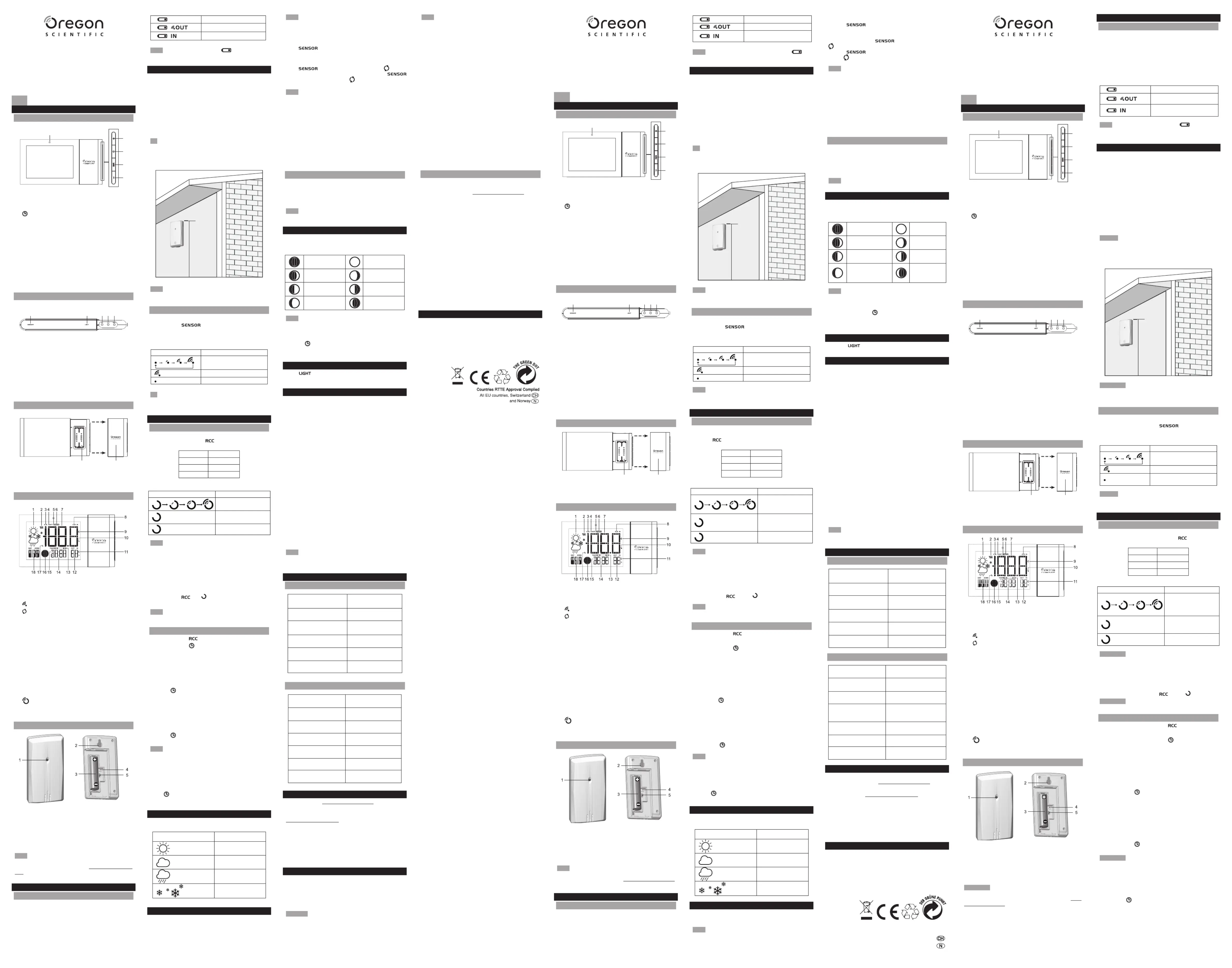
2. Battery compartment cover
1. Weather forecast display
2. temperature indicatorMAX / MIN
3. Outdoor sensor low battery display
4. Remote sensor reception indicator
5. Temperature auto-loop indicator
6. Outdoor sensor channel number
7. Indoor / outdoor temperature
8. Main unit low battery display
9. Temperature trend indicator
10. Indoor / outdoor temperature unit display ( )°C/°F
11. Humidity trend indicator
12. Humidity reading display
13. Date / month format display (date: month/month: date)
17. RCC Clock reception signal indicator
NOTE The sensor included in this package can search
channels 1, 2 and 3. To search all 5 channels, you may
purchase additional sensors. Visit www.oregonscientic.
com for more about accessory sensors.
1. Gently pull the battery compartment cover apart from
2. Insert the batteries, matching the polarities ( ).+/-
3. Press after each battery replacement. The mainRESET
unit turns on automatically.
Alizé (Versione avanzata)
1. Indicatore allarme ghiaccio
2. Premete per aumentare le impostazioni, tenete+ -
premuto per aumentare rapidamente le impostazioni.
3. - Premete per passare in successione tra orologio,
calendario, o le fasi della luna per data. Tenete premuto
per entrare in modalità impostazione.
4. – Premete per passare in successione tra leMEM
registrazioni della temperatura attuale / massima /
minima interna / esterna e umidità interna / esterna,
tenete premuto per cancellare le registrazioni MAX / MIN.
5. – - Premete per diminuire le impostazioni, tenete
premuto per diminuire rapidamente le impostazioni.
Tenete premuto per spegnere l’allerta ghiaccio.
1. – Premete per passare in sequenzaSENSOR
tra sensore interno ed i canali da 1 a 5, o per attivare o
disattivare l’autoscansione. Tenete premuto per ricercare
i sensori su tutti i canali.
2. – Premete per accendere la retroilluminazione LIGHT
3. – Premete per attivare e selezionare la funzioneRCC
RCC tra EU / UK / US e tenete premuto per disattivare
4. – Premete per selezionare l’ unità di misura della°C/°F
5. – Premete per ripristinare tutte le impostazioniRESET
1. Compartimento batterie
2. Coperchio compartimento batterie
SCHERMO A CRISTALLI LIQUIDI
1. Visualizzazione previsione del tempo
2. Indicatore temperatura MAX / MIN
3. Visualizzazione batteria esaurita sensore esterno
4. Indicatore ricezione sensore remoto
5. Indicatore auto-scansione temperatura
6. Numero canale sensore esterno
7. Temperatura interna / esterna
8. Visualizzazione batteria scarica unità principale
9. Indicatore tendenza temperatura
10. Visualizzazione unità di misura ( ) temperatura°C/°F
11. Indicatore tendenza umidità
12. Visualizzazione lettura umidità
13. Visualizzazione formato data / mese (data: mese /
16. Visualizzazione fase lunare
17. RCC Indicatore ricezione segnale orologio
18. Visualizzazione giorno della settimana
SENSORE REMOTO (THGN132N)
1. Indicatore LED di stato
2. Foro di montaggio a parete
3. Compartimento batterie
5. Switch per selezionare il (CANALE)CHANNEL
NOTE l sensore incluso in questa confezione può operare sul
canale 1, 2 o 3. Per operare sui canali 4 e 5 , potete comprare
sensori aggiuntivi. Visitate il sito www.oregonscientic.com
per saperne di più sui sensori/accessori.
1. Rimuovete il coperchio del compartimento batterie
2. Inserite le batterie, rispettando le polarità ( ).+ / -
3. Premete dopo ogni sostituzione delle batterie. RESET
L’unità principale si accende automaticamente.
1. Indicateur d’alerte de gel
2. Appuyez pour augmenter la valeur des réglages, + -
maintenez appuyé pour augmenter la valeur des
3. - Appuyez pour obtenir l’afchage alterné de l’horloge
et du calendrier, maintenez appuyé pour entrer dans le
4. MEM – Appuyez pour obtenir l’afchage alterné des
relevés de la température courante / maximum /
minimum,maintenez appuyé pour effacer les relevés de
5. – - Appuyez pour diminuer la valeur des réglages,
maintenez appuyé pour diminuer rapidement la valeur
des réglages. Maintenez appuyé pour désactiver l’alerte
1. – Appuyez pour obtenirSENSOR (CAPTEUR)
l’afchage alterné des canaux 1 à 5, et pour activer /
désactiver l’afchage en boucle. Maintenez appuyé pour
faire une recherche du capteur pour tous les canaux.
2. – Appuyez pour activer le rétro-LIGHT (LUMIERE)
3. RCC – Appuyez pour obtenir l’afchage alterné de
la fonction RCC EU / UK / US, maintenez appuyé pour
désactiver la fonction RCC.
4. - Appuyez pour choisir votre unité de mesure de°C/°F
5. – Appuyez pourRESET (REINITIALISATION)
réinitialiser tous les réglages par défaut.
2. Couvercle du compartiment à piles
1. Afchage des prévisions météo
2. Indicateur de température MAX / MIN
3. Afchage de pile faible du capteur extérieur
4. Indicateur de réception du capteur sans l
5. Indicateur d’auto-scan de la température extérieure
6. Numéro de canal du capteur extérieur
7. Température intérieure / extérieure
8. Afchage de pile faible de l’unité principale
9. Indicateur de tendance de la température
10. Unité de l’afchage de la température intérieure (°C/°F)
11. Indicateur de tendance du taux d’humidité
12. Afchage du taux d’humidité
13. Format d’afchage de la date / du mois (date: mois /
16. Afchage des phases de la lune
17. Indicateur du signal de réception de l’horloge RCC
18. Afchage des jours de la semaine
CAPTEUR SANS FIL (THN132N)
2. Trou de xation murale
4. Trou pour le RESET (RÉINITIALISATION)
5. Sélecteur CHANNEL (CANAL)
REMARQUE Le capteur inclus peut chercher les canaux
1,2 et 3. Pour chercher les 5 canaux, vous pouvez
acheter des capteurs supplémentaires. Visitez www.
oregonscientic.com pour plus d’informations concernant
les capteurs supplémentaires.
Main unit batteries are low
NOTE Replace the batteries when displays, or when
the display / backlight is dim.
The main unit can collect data from up to 5 sensors.
1. Open the battery compartment.
2. Insert the batteries, matching the polarities (+/-).
3. Select a channel then press .RESET
4. Close the battery door.
Place the sensor within 30 m (98 ft) of the main unit using
the table stand or wall mount.
TIP Ideal placements for the sensor would be in any location
on the exterior of the home at a height of not more than
1.5 m (5 ft) and which can shield it from direct sunlight or
wet conditions for an accurate reading.
NOTE Use alkaline batteries for longer usage and consumer
grade lithium batteries in temperatures below freezing.
The sensor reception icon in the remote sensor area shows
TIP The transmission range may vary depending on many
factors. You may need to experiment with various locations
This clock is designed to synchronize its clock automatically
with a clock signal. Press to turn on and select the
desired region ( ).EU / UK / US
Clock signal reception indicator:
for clock signal strength
NOTE It takes 2-10 minutes to receive the clock signal. If
the signal is weak, it could take up to 24 hours to receive
You may turn off the clock signal reception and set the clock
To disable signal reception:
Press and hold icon turns off.. The
NOTE The signal reception is on after each reset or battery
1. Press and hold to disable signal reception.
2. Press and hold . The screen displays and theZONE
3. Press once or press and hold +/- to adjust the setting.
For EU / UK, the time-zone offset sets the clock up to
+/- 23 hours from the received clock signal time. For US,
the time-zone setting is (P), (M), (C), (E).0 1 2 3
5. Press once or press and hold +/- to adjust the
setting for 12 / 24h hour format, hour, minute, year,
calendar format (month-day/day-month), month, date,
language and hemisphere option for moon phase
6. Press to conrm each setting.
NOTE ENG The language options are English ( ), Spanish
( ). SPA), Italian ( ), French (ITA FRE) and German (GER
When the unit is in idle mode, you may choose the display
To select the display mode:
Press to select between clock, date and moon phase
This product forecasts the next 6 hours of weather within a
19-31 mile (30-50 km) radius.
Screen display Description
To toggle temperature unit:
Press inside the battery compartment.°C / °F
Batterie sensore scariche
Batterie unità principale
NOTE Sostituire le batterie quando si visualizza , o
quando l’illuminazione/controluce è bassa.
L’unità principale può ricevere dati no a 5 sensori.
Per impostare il sensore:
1. Aprite il compartimento batterie.
2. Inserite le batterie, rispettando le polarità ( ). + / -
3. Selezionate un canale quindi premete . RESET
4. Chiudete il coperchio delle batterie.
5. Mettete il sensore entro 30 m (98 piedi) dall’unità
principale usando il supporto da tavolo oppure il
TIP Le posizioni ideali per il sensore sarebbero qualsiasi
posizione all’esterno della casa ad un altezza 1.5 m (5 piedi)
ed al riparo dalla luce solare diretta o dall’umidità per una
NOTE Usate batterie alcaline per il normale funzionamento
e batterie al litio per temperature rigide e / o al disotto dello
TRASMISSIONE DATI DEL SENSORE
Come ricercare un sensore:
L’icona di ricezione del sensore nell’area del sensore
Ricerca del / i sensore / i
NOTE La portata di trasmissione può variare in funzione di
molti fattori. Potreste dover provare con diverse posizioni
per ottenere i risultati migliori.
Questo orologio è progettato per sincronizzarsi
automaticamente con un segnale orario radiocontrollato.
Premete per accendere e selezionate la regione
desiderata ( ).EU / UK / US
Indicatore ricezione segnale orario:
rilevando l’intensità del
NOTE Ci vogliono da 2 a 10 minuti per ricevere il segnale
orario. Se il segnale è debole, ci potrebbero volere no a
24 ore per ricevere un segnale valido.
Potete spegnere la ricezione del segnale orario ed
impostare l’orologio manualmente.
Per disabilitare la ricezione del segnale:
Tenete premuto . L’icona si spegne.
NOTE La ricezione del segnale si accende dopo ogni
RESET o sostituzione batterie.
IMPOSTARE MANUALMENTE L’OROLOGIO
1. Tenete premuto per disabilitare la ricezione del
2. Tenete premuto . Lo schermo mostra ed ilZONE
3. Premete una volta o tenete premuto +/- per regolare
l’impostazione. Per EU / UK, la compensazione del
fuso orario imposta l’orologio no a +/- 23 ore dall’ora
del segnale orario ricevuto. Per US, l’impostazione del
fuso orario è (P), (M), (C), (E). 0 1 2 3
4. Premete per confermare.
5. Premete una volta o tenete premuto +/- per regolare
l’impostazione per il formato 12/24h, ore, minuti, anno,
formato di calendario (mese-giorno/giorno-mese),
mese, data e lingua e opzione emisfero per le fasi della
6. Premete per confermare ogni impostazione.
NOTE Le opzioni della lingua sono Inglese ( ), Spagnolo ENG
( ), Italiano ( ), Francese (SPA ITA FRE), Tedesco (GER).
Quando l’unità è in pausa, potete scegliere le opzioni di
modalità di visualizzazione.
Per selezionare la modalità di visualizzazione:
Premete per selezionare tra visualizzazione orario, data
Questo prodotto dà le previsioni del tempo per le prossime
6 ore per un raggio di 19-31 miglia (30-50 km).
Per cambiare l’unità di misura della temperatura:
Premete all’interno del comparto batterie. °C / °F
NOTE Quando la temperatura interna è inferiore a
-5°C (23,0 °F), lo schermo visualizza Quando la LL.L.
temperatura è superiore a 50 °C (122,0 °F), lo schermo
NOTE When the indoor temperature is lower than -5°C
(23.0°C), the screen displays LL.L. When the temperature
is higher than 50°C (122.0 °C), the screen displays . HH.H
To toggle sensor display:
To auto-loop between sensors:
Press repeatedly until the unit displays . The
data on each sensor displays for 3 seconds. Press
again turn off the auto-loop, the icon turns off.
NOTE The sensor displays in ascending order. If all ve
sensors are not present, the main unit skips the absent
sensor and advances to the next present sensor.
To toggle MAX / MIN and current records between the
main unit and the selected sensors:
To clear the MAX / MIN records:
Press and hold MAX / MIN data of indoor / outdoor MEM. All
temperature and indoor/outdoor humidity will be cleared and
starts to record the current readings.
If the channel 1 sensor temperature falls between 3 °C to
-2 °C (37 °F to 28 °F), LED indicator will ash, and will stop
ashing once the temperature is out of this range. Press and
hold – to turn off the ice warning alert.
NOTE The ice warning alert turns on again when the
temperature falls into the temperature range.
The Calendar must be set for this feature to work (see Set
the clock manually section).
Waxing Crescent Waning Gibbous
First quarter Third quarter
NOTE The moon phase displays in opposite orientation if
you are in southern hemisphere.
To review the moon phase by date:
1. Press twice. The moon phase display ashes.
2. Press +/- to toggle the date.
Press to turn on the backlight. The backlight will be
• Do not subject the unit to excessive force, shock, dust,
• Do not immerse the unit in water. If you spill liquid over it,
dry it immediately with a soft, lint-free cloth.
• Do not clean the unit with abrasive or corrosive materials.
• Do not tamper with the unit’s internal components. This
invalidates the warranty.
• Only use fresh batteries. Do not mix new and old
• Images shown in this manual may differ from the actual
• When disposing of this product, ensure it is collected
separately for special treatment.
• Placement of this product on certain types of wood
may result in damage to its nish for which Oregon
Scientic will not be responsible. Consult the furniture
manufacturer’s care instructions for information.
• The contents of this manual may not be reproduced
without the permission of the manufacturer.
• Do not dispose old batteries as unsorted municipal
waste. Collection of such waste separately for special
• Please note that some units are equipped with a
battery safety strip. Remove the strip from the battery
compartment before rst use.
NOTE The technical specications for this product and the
contents of the user manual are subject to change without
Visit our website www.oregonscientic.com to learn more
about Oregon Scientic products.
For any enquiry, please contact our Customer Services at
info@oregonscientic.com.
Oregon Scientic Global Distribution Limited reserves the
right to interpret and construe any contents, terms and
provisions in this user manual and to amend it, at its sole
discretion, at any time without prior notice. To the extent
that there is any inconsistency between the English version
and any other language versions, the English version shall
This device complies with Part 15 of the FCC Rules.
Operation is subject to the following two conditions: (1) This
device may not cause harmful interference, and (2) This
device must accept any interference received, including
interference that may cause undesired operation.
WARNING Changes or modications not expressly
approved by the party responsible for compliance could void
the user’s authority to operate the equipment.
Per cambiare la visualizzazione del sensore:
Per fare una scansione automatica dei sensori:
Premete ripetutamente no a che l’unità mostra
. I dati su ogni sensore sono visualizzati per 3 secondi.
Premete di nuovo per spegnere la auto scansione,
NOTE Il sensore visualizza in ordine ascendente. Se non
tutti i 5 sensori sono presenti, l’unità principale salta il
sensore assente ed avanza al prossimo sensore presente.
Per passare tra le registrazioni MAX / MIN e quelle
correnti tra l’unità principale e i sensori selezionati:
Premete ripetutamente .MEM
Per cancellare le registrazioni MAX / MIN:
Tenete premuto . Tutti i dati MAX / MIN della MEM
temperatura interna / esterna e l’umidità interna / esterna
saranno cancellati e inizia a registrare le letture correnti.
Se la temperatura del sensore del canale 1 scende ad un
valore tra 3°C e -2°C (tra 37°F e 28°F), l’indicatore LED
lampeggerà, e smetterà di lampeggiare una volta che
la temperatura sia al di fuori di questo intervallo. Tenete
premuto - per spegnere l’allerta ghiaccio.
NOTE L’allerta ghiaccio si accende di nuovo quando la
temperatura scende all’interno dell’intervallo di temperatura.
Il Calendario deve essere impostato afnché questa
caratteristica funzioni (vedere la sezione Impostare
Luna crescente Luna calante
Primo quarto Ultimo quarto
NOTE La fase lunare appare in orientamento opposto se
siete nell’emisfero meridionale.
Per passare in rassegna la fase lunare per data:
1. Premete due volte . La visualizzazione della fase
2. Premete +/- per cambiare la data.
Premete per accendere la retroilluminazione. La
retroilluminazione si accenderà per 5 secondi.
• Non sottoporre il prodotto a forza eccessiva, urti, polvere,
sbalzi eccessivi di temperatura o umidità.
• Non immergere l’unità in acqua. Se si versa del liquido
sul prodotto, asciugarlo immediatamente con un panno
• Non pulire l’unità con materiali abrasivi o corrosivi.
• Non manomettere i componenti interni. In questo modo
• Oregon Scientic declina ogni responsabilità per
eventuali danni alle niture causati dal posizionamento
del prodotto su determinati tipi di legno. Consultare le
istruzioni fornite dal fabbricante del mobile per ulteriori
• Le immagini del manuale possono differire dalla realtà.
• Il contenuto di questo manuale non può essere
ristampato senza l’autorizzazione del fabbricante.
• Utilizzare solo batterie nuove. Non mescolare batterie
nuove con batterie vecchie.
• Al momento dello smaltimento del prodotto, attenersi alla
nota relativa in allegato.
• Non smaltire le batterie vecchie come riuto
indifferenziato. È necessario che questo riuto venga
smaltito mediante raccolta differenziata per essere
• Alcune unità sono dotate di una striscia di sicurezza per
le batterie. Rimuovere la striscia dal vano batterie prima
NOTE Le speciche tecniche del prodotto e il contenuto
del manuale per l’utente possono essere modicati senza
(6,9 x 3,8 x 0,7 pollici)
Risoluzione 0,1°C (0,2°F)
(3,78 x 1,97 x 0,87 pollici)
Frequenza segnale 433 MHz
INFORMAZIONI SU OREGON SCIENTIFIC
Per ulteriori informazioni sui prodotti Oregon Scientic,
visitate il nostro sito web www.oregonscientic.com.
Per richiedere informazioni, contattate il nostro Servizio
Clienti all’indirizzo .info@oregonscientic.com
Oregon Scientic Global Distribution Limited si riserva il
diritto di interpretare e denire eventuali contenuti, termini
e disposizioni contenuti in questo manuale per l’utente
e di modicarli, a sua esclusiva discrezione, in qualsiasi
momento e senza preavviso. Nella misura in cui risultassero
incongruenze tra la versione in inglese e quelle in altre
lingue, farà fede la versione in inglese.
DICHIARAZIONE DI CONFORMITA’UE
Con la presente Oregon Scientic dichiara che Stazione
metereologica Alizé (Versione avanzata) (Modello:
BAR268HG) è conforme ai requisiti essenzialied alle altre
disposizioni pertinenti stabilite dalla direttiva 1999/5/CE.
Una copia rmata e datata della Dichiarazione di Conformità
è disponibile, su richiesta, tramite il servizio clienti della
PAESI CONFORMI ALLA DIRETTIVA R&TTE
Tutti I Paesi UE, Svizzera
NOTE This equipment has been tested and found to comply
with the limits for a Class B digital device, pursuant to Part
15 of the FCC Rules. These limits are designed to provide
reasonable protection against harmful interference in a
residential installation.
This equipment generates, uses and can radiate radio
frequency energy and, if not installed and used in
accordance with the instructions, may cause harmful
interference to radio communications. However, there
is no guarantee that interference will not occur in a
particular installation. If this equipment does cause harmful
interference to radio or television reception, which can be
determined by turning the equipment off and on, the user is
encouraged to try to correct the interference by one or more
of the following measures:
• Reorient or relocate the receiving antenna.
• Increase the separation between the equipment and
• Connect the equipment into an outlet on a circuit different
from that to which the receiver is connected.
• Consult the dealer or an experienced radio/TV technician
This Class B digital apparatus complies with Canadian
DECLARATION OF CONFORMITY
The following information is not to be used as contact for
support or sales. Please call our customer service number
(listed on our website at www.oregonscientic.com), or on
the warranty card for this product) for all inquiries instead.
Name: Oregon Scientic, Inc.
Address: 10778 SW Manhasset Dr.
Telephone No.: 1-800-853-8883
Product Name: Alizé Weather Station
Manufacturer: IDT Technology Limited
Address: Block C, 9/F, Kaiser Estate,
EU-DECLARATION OF CONFORMITY
Hereby, Oregon Scientic, declares that this Alizé Weather
Station (Advanced Version) (model: BAR268HG) is in
compliance with the essential requirements and other
relevant provisions of Directive 1999/5/EC. A copy of the
signed and dated Declaration of Conformity is available on
request via our Oregon Scientic Customer Service.
1. Retirez délicatement le couvercle du compartiment à
2. Insérez les piles, en respectant les indications de
3. Appuyez sur aprèsRESET (REINITIALISATION)
chaque changement de piles. L’appareil s’allume
Le niveau des piles de l’unité
NOTE Remplacez les piles lorsque s’afche ou
lorsque la luminosité de l’afchage ou du rétroéclairage
L’unité principale peut collecter des données jusqu’à
1. Ouvrez le compartiment à piles.
2. Insérez les piles en respectant les indications de polarité
3. Sélectionnez un canal et appuyez sur RESET
4. Refermez le compartiment à piles.
Placez le capteur dans les 30m (98ft) autour de l’unité
principale en utilisant le support table ou la xation murale.
ASTUCE Le positionnement idéal pour le capteur se trouve
en tout lieu à l’extérieur de la maison à une hauteur de 1,5m
(5 pieds) et protégé de la lumière directe du soleil ou de
l’humidité pour une lecture précise.
REMARQUE Utilisez des piles alcalines pour une durée
d’utilisation supérieure et des piles au lithium pour la
consommation lors de températures inférieures au gel.
TRANSMISSION DES DONNÉES DU CAPTEUR
Pour rechercher un capteur:
Maintenez appuyée la touche .
L’icône de réception du capteur dans la zone du capteur à
distance indique les états suivants :
ASTUCE La portée de transmission peut varier en fonction
de nombreux facteurs. Vous devrez peut-être essayer
plusieurs emplacements pour obtenir les meilleurs résultats.
L’horloge est conçue pour se synchroniser automatiquement
avec un signal d’horloge. Appuyez sur pour activer et
sélectionner une région ( ).EU / UK / US
Indicateur de réception du signal d’horloge:
REMARQUE l faut de 2 à 10 minutes pour recevoir le signal
d’horloge. Si le signal est faible, cela pourra prendre jusqu’à
24 heures pour recevoir un signal valide.
Vous pouvez désactiver la réception du signal d’horloge et
régler l’horloge manuellement.
Per disabilitare la ricezione del segnale:
Maintenez appuyée la touche . L’icône s’éteint.
REMARQUE La réception du signal est activée après
chaque réinitialisation ou changement de piles.
RÉGLAGE MANUEL DE L’HORLOGE
1. Maintenez appuyée la touche pour désactiver la
2. Maintenez appuyée la touche . L’écran afche
et un chiffre clignote.ZONE
3. Appuyez une fois ou maintenez appuyé pour+/-
ajuster les réglages. Pour EU / UK, la fonction fuseau
horaire règle l’horloge à +/- 23 heures de l’heure du
signal d’horloge reçu. Pour US, les réglages de la
fonction fuseau horaire sont (P), (M), (C), (E).0 1 2 3
4. Appuyez sur pour conrmer.
5. Appuyez une fois ou maintenez appuyé +/- pour
ajuster les réglages du format 12/24h, de l’heure, des
minutes, de l’année, du format du calendrier (mois
- jour / jour- mois), du mois, de la date, de la langue et
de l’option d’hémisphère pour les phases de la lune
6. Appuyez sur pour conrmer chaque réglage.
REMARQUE ENG Les options de langue sont l’anglais ( ),
l’espagnol ( ), l’italien ( ), le français ( ) et SPA ITA FRE
Lorsque l’appareil est en mode veille, vous pouvez choisir
l’option de mode d’afchage.
Pour sélectionner le mode d’afchage:
Appuyez sur pour sélectionner l’afchage de l’heure ou