Philips SmartMeeting PSE0540 Manual

Philips Mikrofon SmartMeeting PSE0540

Læs gratis den danske manual til Philips SmartMeeting PSE0540 (2 sider) i kategorien Mikrofon. Denne vejledning er vurderet som hjælpsom af 2 personer og har en gennemsnitlig bedømmelse på 4.8 stjerner ud af 1.5 anmeldelser. Har du et spørgsmål om Philips SmartMeeting PSE0540, eller vil du spørge andre brugere om produktet?

Side 1/2
Get your smart AI meeting
assistant
Start your free trial now!
1
Go to https://smartmeeting.sembly.ai
2
Sign up
3
Enter the serial number of your device (you can nd it on
the packaging or the device itself)
4
Use the code “SM2022D1” to activate your Team Plus plan (unlimited
number of meetings in the rst month, then up to 4 meetings per month)
12
11
10
9
7
4
5
2
1
8
4
3
6
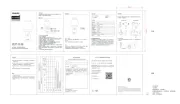
1. V- Volume down
2.
Bluetooth
3.
Power
4. Microphones
5. V+ Volume up
6. Mute
7. Status LED
8. Speaker
9. Reset
10. Power socket
11. Battery status LED
12. USB Type-C port
© 2022 Speech Processing Solutions GmbH. All rights reserved.
This product has been manufactured for and is sold under the responsibility of Speech Processing
Solutions GmbH, and Speech Processing Solutions GmbH is the warrantor in relation to this product.
Specications are subject to change without notice. Philips and the Philips shield emblem are
registered trademarks of Koninklijke Philips N.V. and are used under license.
Document version 1.1, 05/30/22
User
manual
For more support visit
www.dictation.philips.com/pse0540help
User manual
Portable Conference
Microphone
with Sembly Meeting
Assistant
PSE0540
SmartMeeting


Produkt Specifikationer

Mærke: Philips
Kategori: Mikrofon
Model: SmartMeeting PSE0540

Har du brug for hjælp?

Hvis du har brug for hjælp til Philips SmartMeeting PSE0540 stil et spørgsmål nedenfor, og andre brugere vil svare dig