SkyRC Progbox Manual


Læs gratis den danske manual til SkyRC Progbox (2 sider) i kategorien Ikke kategoriseret. Denne vejledning er vurderet som hjælpsom af 3 personer og har en gennemsnitlig bedømmelse på 4.4 stjerner ud af 2 anmeldelser. Har du et spørgsmål om SkyRC Progbox, eller vil du spørge andre brugere om produktet?

Side 1/2
3 / 6
3. PPM Monitor
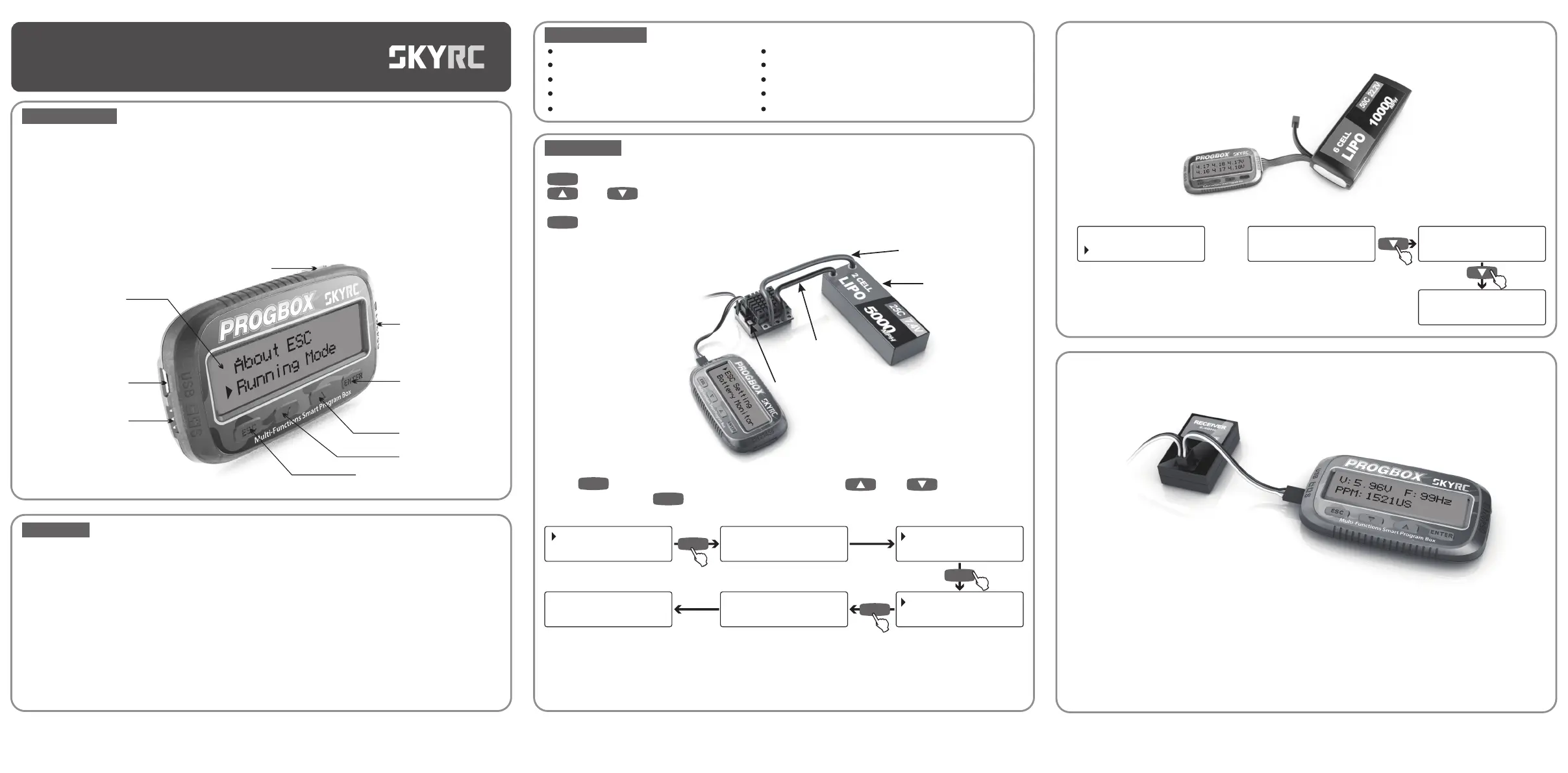
It can check the output voltage from the receiver and the receiver's PPM signal width and frequency.
Connection
Connect the Program Box with the ESC, receiver as the diagram above, and turn on the ESC and the
transmitter.
Please note that the Program Box must be inserted in to the Throttle Channel and the ESC can be
inserted to any channel of the receiver as it is used to supply power to the receiver.
When it connects the battery, ESC, receiver, it could check the output voltage from the receiver and
the receiver's frequency and the neutral pulse position.
At this time, hold full throttle and hold full brake to check the receiver's PPM signal width.
4.17 4.18 4.17V
4.16 4.17 4.18V
MIN:4.16V
MAX:4.18V
Delta:0.02V
Total:25.03V
ESC Setting
Battery Monitor
Connect the Program Box and the battery as the diagram above, monitor battery voltage as follows,
2. Battery Monitor
It could check the total cell number, total voltage, each cell voltage, highest voltage and lowest
voltage and the voltage difference between the highest voltage and lowest voltage.
LiPo Battery Connection Diagram
INSTRUCTIONMANUAL
PROGBOX
Thank you for purchasing SkyRC Program Box. Please read this entire operating manual completely
and attentively as it contains important information. SkyRC Program Box is a very sophisticated
electronic device that controlled by high performance microprocessor.
With compact size and easy operation, SkyRC Program Box offers six-in-one functions:
INTRODUCTION
FUNCTION
SK-300079
1 / 6
ESC Setting: It can work as a Program Box, an individual device which can be used to programming
the ESC, and the option of each parameter is displayed on the LCD screen;
LiPo Battery Monitor: It can check the total cell number, total voltage, each cell voltage, highest voltage
and lowest voltage and the voltage difference between the highest voltage and lowest voltage.
Input PPM Signal Monitor: It can check the output voltage from the receiver and the receiver's PPM
signal width and frequency.
Servo Tester: It can check the input voltage, servo travel position and peak current.
Motor KV/RPM Tester: It can check the motor KV, RPM and input voltage.
It can also work as SkyLINK, an USB adaptor which can be used to link the ESC with a PC, and the
user can update the firmware of the ESC or programming the ESC by SkyLINK software on PC.
1.
2.
3.
4.
5.
Motor Sensor
USB to PC
I/O Connector
Escape Key
Down Key
Up Key
Enter Key
Battery Balance
Connector
LCD Screen
16Chr. X 2 Lines
1. ESC Setting
2. LiPo Battery Monitor
3. Input PPM Signal Monitor
4. Servo Tester
5. Motor KV/RPM Tester
6. PC Interface - Link ESC to PC
6.
1. ESC Setting
Connect the Program Box as the diagram above, turn on the ESC and do as follows,
Press key to enter different programmable items, press and key to browse all
the options and press key to confirm your selection and then the screen will go back to main
programmable menu.
When the screen displays the programed item, you could press “ESC” key to main programmable menu
and start to program next item.
Note: The programmable items differs depends on 1/10th, 1/8th and 1/5th ESC. Concerning to screen
above, we take SkyRC Toro 1/10th 120A ESC(SK-300044) as example.
Sending to ESC
Please waiting..
Red power wire
(battery positive)
Battery
Pack
Black power wire
(battery negative)
Power
Switch
2 /6
SPECIFICATIONS
Input Voltage (ESC Setting): 6-10VDC
Input Current (ESC Setting): 500mA
Idle Current (ESC Setting): <20mA
Operating Temperature: 0-40ºC
Storage Temperature: -10 — 60 ºC
Operating Humidity: 10 - 90%RH
Storage Humidity: 20 - 75%RH
Protection Class: IP20
Dimension: 85x48.5x11.8mm
Weight: 40g
APPLIATION
There are four keys on the front panel,
: You could press this key to enter into the referred menu or confirm your selection.
And : You could press these two keys to go to previous page and to go to next page or
change the value of referred item.
: You could press this key to go back to previous menu.
ESC Setting
Battery Monitor
ENTER
Connecting ESC
Please waiting..
Running Mode
Motor Direction
ENTER
ESC
ENTER
Sending OK!
ENTER
ENTER
Forward/Brake*
Forward/Brake/R
ENTER


Produkt Specifikationer

Mærke: SkyRC
Kategori: Ikke kategoriseret
Model: Progbox

Har du brug for hjælp?

Hvis du har brug for hjælp til SkyRC Progbox stil et spørgsmål nedenfor, og andre brugere vil svare dig


Ikke kategoriseret SkyRC Manualer

SkyRC

SkyRC Progbox Manual

8 December 2025
SkyRC

SkyRC T6755 Manual

8 December 2025
SkyRC

SkyRC Ultimate 1400W Manual

8 December 2025
SkyRC

SkyRC BD200 Manual

8 December 2025
SkyRC

SkyRC Q200 Manual

8 December 2025
SkyRC

SkyRC Immersion GO Manual

7 December 2025
SkyRC

SkyRC e660 Manual

7 December 2025
SkyRC

SkyRC SK-500026 Manual

7 December 2025
SkyRC

SkyRC B6 Lite Manual

7 December 2025

Ikke kategoriseret Manualer

Nyeste Ikke kategoriseret Manualer

Melchioni

Melchioni SIBERIA 85 Manual

8 December 2025
Artrom

Artrom CF-18M Manual

8 December 2025
Klarfit

Klarfit Ease Delux Manual

8 December 2025
Kora

Kora DVB-T2 Manual

8 December 2025
Bosch

Bosch WGB244ASFG Manual

8 December 2025
Atoll

Atoll P50 Manual

8 December 2025
JET

JET SLT-330F Manual

8 December 2025
Fostex

Fostex FE206En Manual

8 December 2025
JET

JET JAT-920 Manual

8 December 2025