Sony CKM-NWE010 Manual


Læs gratis den danske manual til Sony CKM-NWE010 (2 sider) i kategorien Ikke kategoriseret. Denne vejledning er vurderet som hjælpsom af 10 personer og har en gennemsnitlig bedømmelse på 4.2 stjerner ud af 5.5 anmeldelser. Har du et spørgsmål om Sony CKM-NWE010, eller vil du spørge andre brugere om produktet?
Side 1/2
日本語
取り付けかた
1
ウォークマンの
HOLD
スイッチを
HOLD
の位置にスライドする。
2
ウォークマンの表示部を下にして、図のようにヘッドホンジャック側から中に押し込み、ケース
3
ケースの穴をウォークマンのボタンの位置に合うように調整する。
HOLD
を解除してからお使いください。
ヒント
ケースに入れたまま、ウォークマンの充電をしたり(図B、ストラップを取り付けたりできます。
ウォークマンの傷防止のため、ウォークマン表面をからぶきしてからケースに入れることをおすすめします。
取り外しかた
図のようにウォークマンを取りはずす(図C
ご注意
ケースを誤って口に入れないよう、乳幼児の手の届かない場所に保管してください。
ケースを無理に引っぱったりしないでください。ケースが切れることがあります。
ウォークマン
”WALKMAN, “WALKMAN
ロゴは、ソニー株式会社の登録商標です。
CKM-NWE010
© 2007 Sony Corporation Printed in China
A
3-209-187- (1)01
B
C
取扱説明書
English
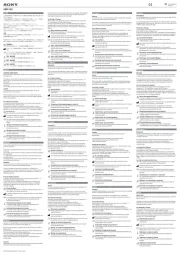
To attach the case
1
Slide the HOLD switch on your Walkman to the HOLD position.
2
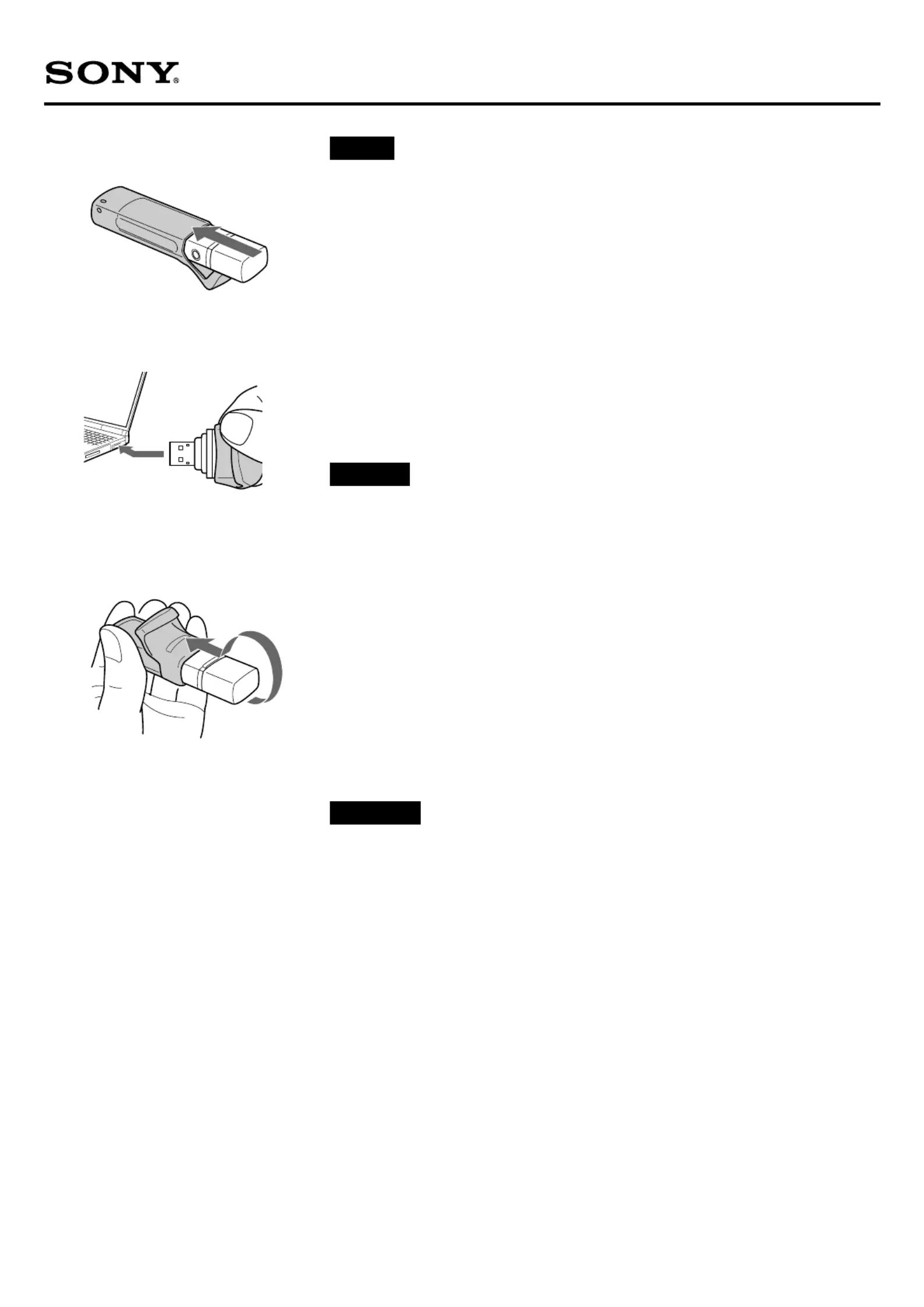
Insert the Walkman from the headphone jack side with the display facing down shown in the illustration,
and then cover with the case cap (Figure A).
3
Adjust the case to fit the hollows over the Walkman buttons.
Deactivate the HOLD function before use.
Hints
You can charge the Walkman (Figure B), or attach a strap with the case attached.
It is recommended to wipe the Walkman’s surface with a dry cloth before attaching the case to avoid damaging the
Walkman.
To detach the case
Uncover the Walkman as shown in the illustration, and then remove the case (Figure C).
Notes
Please keep the case out of children’s reach to avoid them putting it in their mouth.
Do not pull the case forcibly, as the case might be damaged.
“WALKMAN” and “WALKMAN” logo are registered trademarks of Sony Corporation.
Operating Instructions
Français
Pour mettre l’étui en place
1
Faites coulisser le commutateur HOLD de votre Walkman vers la position HOLD.
2
Insérez le Walkman par le côté de la prise casque avec l’écran orienté vers le bas, comme illustré, puis
recouvrez-le avec le capuchon de l’étui (figure ).A
3
Ajustez l’étui de sorte que les parties creuses soient placées sur les touches du Walkman.
Désactivez la fonction HOLD avant d’utiliser l’appareil.
Conseils
Vous pouvez charger le Walkman (figure ) ou fixer une sangle lorsque l’étui est en place.B
Il est recommandé d’essuyer la surface du Walkman avec un chiffon sec avant de mettre l’étui en place, afin d’éviter toute
détérioration du Walkman.
Pour retirer l’étui
Retirez le Walkman comme illustré, puis retirez l’étui (figure ).C
Remarques
Gardez l’étui hors de portée des enfants afin d’éviter qu’ils ne le mettent dans la bouche.
Ne forcez pas sur l’étui car vous risqueriez de l’endommager.
« WALKMAN » et le logo « WALKMAN » sont des marques déposées de Sony Corporation.
Mode d’emploi


Produkt Specifikationer

Mærke: Sony
Kategori: Ikke kategoriseret
Model: CKM-NWE010

Har du brug for hjælp?

Hvis du har brug for hjælp til Sony CKM-NWE010 stil et spørgsmål nedenfor, og andre brugere vil svare dig


Ikke kategoriseret Sony Manualer

Sony

Sony UP-55MD Manual

4 December 2025
Sony

Sony AC-UES1230 Manual

27 November 2025
Sony

Sony EVI-D70 Manual

10 November 2025
Sony

Sony PWSK-4505 Manual

10 November 2025
Sony

Sony PDBK-F1500 Manual

9 November 2025
Sony

Sony SNC-VM631 Manual

9 November 2025
Sony

Sony UPP-725 Manual

8 November 2025
Sony

Sony XVS-9000 Manual

8 November 2025
Sony

Sony XDS-102 Manual

7 November 2025
Sony

Sony NU-IP3T Manual

7 November 2025

Ikke kategoriseret Manualer

Nyeste Ikke kategoriseret Manualer

Senseca

Senseca PRO 515 Manual

24 December 2025
Campart

Campart CU-0410 Manual

24 December 2025
Blaupunkt

Blaupunkt GTr 18080 A Manual

24 December 2025
Kenmore

Kenmore SM2061 Manual

24 December 2025
Vorago

Vorago BP-500 Manual

24 December 2025
Vaxcel

Vaxcel T0727 Manual

24 December 2025
VOX

VOX SETSC5702R Manual

24 December 2025
Yamazen

Yamazen SUC-152 Manual

24 December 2025
Viewsonic

Viewsonic IFP7563-2C Manual

24 December 2025
LevelOne

LevelOne VDS-1202 Manual

24 December 2025