Sony CKS-NWS610 Manual


Læs gratis den danske manual til Sony CKS-NWS610 (2 sider) i kategorien Ikke kategoriseret. Denne vejledning er vurderet som hjælpsom af 24 personer og har en gennemsnitlig bedømmelse på 4.5 stjerner ud af 12.5 anmeldelser. Har du et spørgsmål om Sony CKS-NWS610, eller vil du spørge andre brugere om produktet?

Side 1/2
©2007 Sony Corporation Printed in China
CKS-NWS610
3-281-349- (2)01
A
日本語
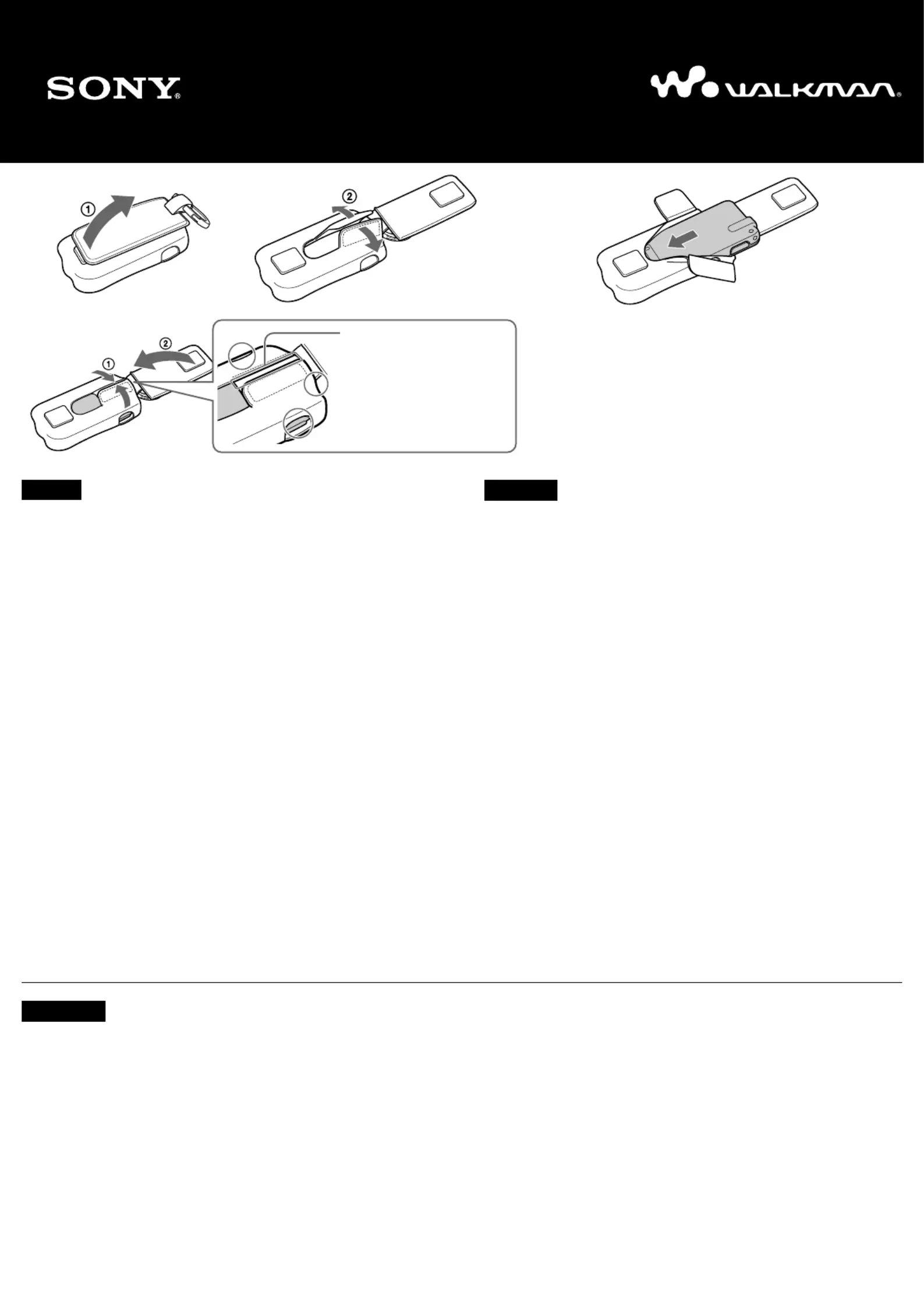
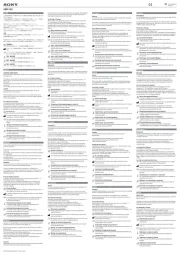
ケースの取り付けかた
1
ケース裏面のベルト通しをはず(図A
1、面テープをはがしてケー
スを拡げる(図A
2
お買い上げ時はケース内に緩衝材が入っています。取り出してから使用
してください。
2
ウォークマンの画面を下にして
WM-PORT
ジャック側からケースに入
れる(図B
3
ウォークマンの画面や各ツマミ、端子などの位置に合うようにケースを
調整する。
4
面テープでケースを閉(図C
1、ベルト通しを付ける(図C
2
z
ヒント
ケースに入れたまま、ウォークマンの操作や充電ができます。
ウォークマンの傷防止のため、ウォークマンの表面をからぶきしてからケースに入れるこ
とをおすすめします。
ケースからの取り出しかた
ベルト通しと面テープをはがして、ウォークマン本体を取り出す。
ご注意
ウォークマンへの傷防止のため、本製品の内側およびウォークマン表面に、砂やほこりな
どの異物が無いことを確認し取り付けてください。砂やほこりが入った場合は、「メガネ
ふきなどのやわらかい布」でふき取ってください。
ケースを無理に引っぱったりしないでください。ケースが切れることがあります。
伸縮性の生地を使用していますので、折り曲げたりヘッドホンコードを巻きつけて使用し
たりしないでください。生地表面の変形、キズ、へこみの原因となります。
ケース表面の透明なシート内側には触らないでください。ごみが付着すると画面がみづら
くなります。
ノイズキャンセリングスイッチをお使いになるときは、ベルト通しを開いてスイッチを操
作してください。
NW-S710F
シリーズのみ)
高温、多湿となる場所や、直射日光のあたる場所には置かないでください。変色、変形、
劣化の原因となります。
ウォークマンの画面と透明シートが張り付いたときは、一度ウォークマンを取り出してか
ら入れ直してください。
ウォークマン
WALKMAN
WALKMAN
ロゴは、ソニー株式会社の登録商標です。
取扱説明書
C
B
English
To insert into the case
1
Open the belt loop at the rear of the case (Figure - ), and release the touchA1
fastener to open the case (Figure A-2).
At purchase, a buffer material is inserted into the case. Take out the buffer
material before using the case.
2
Insert the Walkman from the WM-PORT jack side with the display facing down
(Figure ).B
3
Adjust the case to fit with the display, controls and jack of the Walkman.
4
Close the case with the touch fastener (Figure ), and attach the belt loopC-1
(Figure - ).C2
z Hints
You can operate or charge your Walkman with the Walkman inserted into the case.
It is recommended to wipe your Walkman surface with a dry cloth before inserting it into the case to
avoid damaging your Walkman.
To take out from the case
Detach the belt loop and open the case, then take out the Walkman.
Notes
To prevent possibly damaging the Walkman, make sure that there is no dirt or dust inside the case or
on the Walkman before using the case. If necessary, wipe the case with a soft cloth, such as an
eyeglass cleaning cloth.
Do not pull the case forcibly, as the case might be cut.
Because the case is made of elastic fabric, do not bend it, or wind the headphone cord around it, as it
may cause damage.
Do not touch the inside of the case’s window. It may impede display visibility.
Do not leave the case in a location subject to direct sunlight, heat or moisture. It may result in
discoloration, deformation or deterioration.
If the display of the Walkman is stuck to the case’s window, take out the Walkman from the case and
insert it again.
“WALKMAN” and “WALKMAN” logo are registered trademarks of Sony Corporation.
Français
Mise en place de l’étui
1
Ouvrez la boucle de ceinture située à l’arrière de l’étui (figure - ), puisA1
relâchez le système de fermeture par pression pour ouvrir l’étui (figure - ).A2
Un matériau de protection est inséré dans l’étui lors de l’achat. Enlevez-le avant
d’utiliser l’étui.
2
Insérez le Walkman par le côté de la prise WM-PORT avec la fenêtre
d’affichage orientée vers le bas (figure B).
3
Ajustez l’étui de sorte qu’il s’adapte à l’écran, aux commandes et à la prise du
Walkman.
4
Fermez l’étui à l’aide du système de fermeture par pression (figure - ) etC1
fixez la boucle de ceinture (figure C- ).2
Operating Instructions
Mode d’emploi
z Conseils
Vous pouvez faire fonctionner ou charger le Walkman lorsque l’étui est en place.
Il est recommandé d’essuyer la surface du Walkman avec un chiffon sec avant de mettre l’étui en
place, afin d’éviter d’abîmer le Walkman.
Retrait de l’étui
Détachez la boucle de ceinture, ouvrez l’étui et retirez le Walkman.
Remarques
Afin d’éviter d’abîmer le Walkman, veillez à ce qu’il n’y ait pas de saleté ou de poussière à
l’intérieur de l’étui ou sur le Walkman avant d’utiliser l’étui. Si nécessaire, nettoyez l’étui à l’aide
d’un chiffon doux, tel qu’un chiffon à lunettes.
Ne forcez pas sur l’étui car vous risqueriez de le fendre.
L’étui étant en textile élastique, ne le pliez pas et n’enroulez pas le cordon des écouteurs autour de
l’étui. Cela pourrait l’endommager.
Ne touchez pas l’intérieur de la fenêtre de l’étui. Cela risque de gêner la visibilité de l’écran.
Ne laissez pas l’étui dans un endroit soumis à la lumière directe du soleil, à la chaleur ou à
l’humidité. Une décoloration, une déformation ou une détérioration risquerait de se produire.
Si l’écran du Walkman est collé à la fenêtre de l’étui, retirez le Walkman de l’étui et réinsérez-le.
« WALKMAN » et le logo « WALKMAN » sont des marques déposées de Sony Corporation.
各操作部が穴から見えるように
面テープを引き寄せて閉じる。
Secure with the touch fastener
so that each control can be
operated through each hole.
Fixez-le à l’aide du système de
fermeture par pression de
sorte que vous puissiez
commander le Walkman à
travers les trous.


Produkt Specifikationer

Mærke: Sony
Kategori: Ikke kategoriseret
Model: CKS-NWS610

Har du brug for hjælp?

Hvis du har brug for hjælp til Sony CKS-NWS610 stil et spørgsmål nedenfor, og andre brugere vil svare dig


Ikke kategoriseret Sony Manualer

Sony

Sony UP-55MD Manual

4 December 2025
Sony

Sony AC-UES1230 Manual

27 November 2025
Sony

Sony EVI-D70 Manual

10 November 2025
Sony

Sony PWSK-4505 Manual

10 November 2025
Sony

Sony PDBK-F1500 Manual

9 November 2025
Sony

Sony SNC-VM631 Manual

9 November 2025
Sony

Sony UPP-725 Manual

8 November 2025
Sony

Sony XVS-9000 Manual

8 November 2025
Sony

Sony XDS-102 Manual

7 November 2025
Sony

Sony NU-IP3T Manual

7 November 2025

Ikke kategoriseret Manualer

Nyeste Ikke kategoriseret Manualer

Senseca

Senseca PRO 515 Manual

24 December 2025
Campart

Campart CU-0410 Manual

24 December 2025
Blaupunkt

Blaupunkt GTr 18080 A Manual

24 December 2025
Kenmore

Kenmore SM2061 Manual

24 December 2025
Vorago

Vorago BP-500 Manual

24 December 2025
Vaxcel

Vaxcel T0727 Manual

24 December 2025
VOX

VOX SETSC5702R Manual

24 December 2025
Yamazen

Yamazen SUC-152 Manual

24 December 2025
Viewsonic

Viewsonic IFP7563-2C Manual

24 December 2025
LevelOne

LevelOne VDS-1202 Manual

24 December 2025