StarTech.com 115B-USBC-MULTIPORT Manual

StarTech.com Ikke kategoriseret 115B-USBC-MULTIPORT

Læs gratis den danske manual til StarTech.com 115B-USBC-MULTIPORT (2 sider) i kategorien Ikke kategoriseret. Denne vejledning er vurderet som hjælpsom af 42 personer og har en gennemsnitlig bedømmelse på 4.7 stjerner ud af 21.5 anmeldelser. Har du et spørgsmål om StarTech.com 115B-USBC-MULTIPORT, eller vil du spørge andre brugere om produktet?
Side 1/2
Quick-Start Guide
To view manuals, FAQs, videos, drivers, downloads, technical drawings, and more, visit www.startech.com/support.
Manual Revision: October 25, 2022 10:24 AM
Product ID
115B-USBC-MULTIPORT
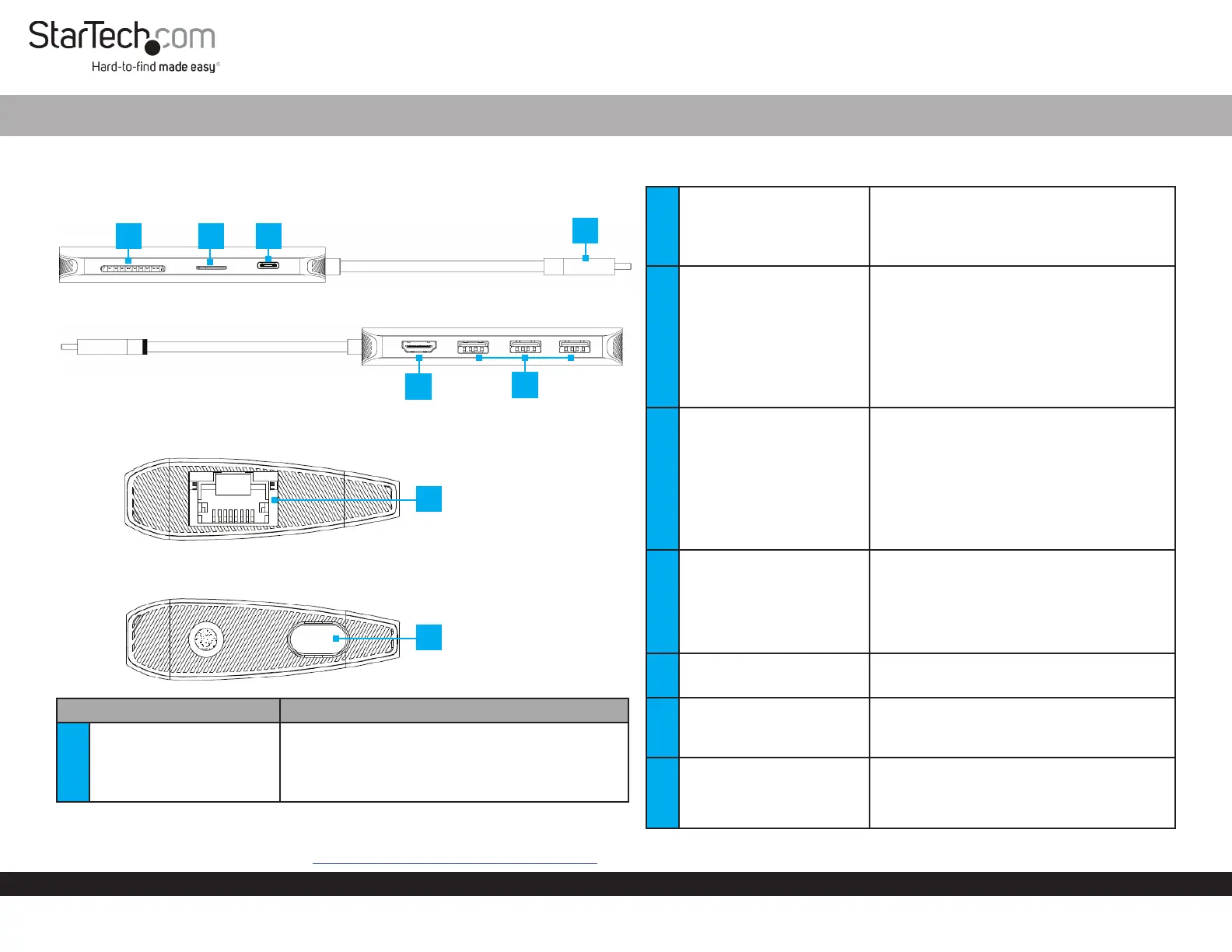
Product Diagram (Side A)
(Side B)
(Side C)
Component Function
1 Built-in USB-C Host Cable
Connect to a USB-C Port on a Host Computer
USB 3.1 Gen 1 (5Gbps)
Power Delivery 3.0 Specication (Up to 100W
with up to 85W available for laptop charging)
Requirements
For the latest requirements, please visit www.StarTech.com/115B-USBC-MULTIPORT
USB-C Multiport Adapter - HDMI 4K 60Hz HDR - 3 x USB-A (5Gbps) - GbE - SD / MicroSD - 100W PD
4
1
6
3 2
2
USB-C DATA/100W Power
Delivery Pass through-
Port
Connect a USB-C power adapter or a
USB-C peripheral
USB Power Delivery 3.0 (up to 100W)
USB 2.0 (480Mbps)
3 MicroSD Card Reader
Micro Secure Digital (microSD) 2.0, 1.1, and
1.0 compatibility
Push a microSD Card, label side up, into
the microSD Card Slot
Note: The Host Computer’s Operating
System (OS) will automatically detect the
SD Card and install the required driver
software
4 SD Card Reader
Secure Digital (SD) 2.0, 1.1, and 1.0
compatibility
Push an SD Card, label side up, into the SD
Card Slot
Note: The Host Computer’s Operating
System (OS) will automatically detect the
SD Card and install the required driver
software
5 HDMI Output Port
Connect an HDMI Display Device
HDMI 2.0b HDR10
Up to 4K (4096x2160) 60Hz
Via DisplayPort 1.4 DP Alt Mode
6 USB-A Data Ports
Connect USB-A Peripherals
USB 3.1 Gen 1 (5Gbps)
7 Gb Ethernet Port
Connect a CAT 5e/CAT 6 cable to establish
a network connection
10/100/1000Mbps
8
Cable Management Port
Plug
Insert the USB-C connector located on the
Built-in USB-C Host Cable to secure the
cable and avoid tangles during storage
and travel
5
7
8
(Side D)


Produkt Specifikationer

Mærke: StarTech.com
Kategori: Ikke kategoriseret
Model: 115B-USBC-MULTIPORT

Har du brug for hjælp?

Hvis du har brug for hjælp til StarTech.com 115B-USBC-MULTIPORT stil et spørgsmål nedenfor, og andre brugere vil svare dig


Ikke kategoriseret StarTech.com Manualer

Ikke kategoriseret Manualer

Nyeste Ikke kategoriseret Manualer

JET

JET JAT-450 Manual

4 December 2025
JET

JET JCT-3643 Manual

4 December 2025
Draper

Draper 34570 Manual

4 December 2025
Advantech

Advantech ADAM-4051 Manual

4 December 2025
SPT

SPT SU-1054 Manual

4 December 2025
ELO

ELO E119034 Manual

4 December 2025
ELO

ELO E432771 Manual

4 December 2025







