Quick-Start Guide
To view manuals, FAQs, videos, drivers, downloads, technical drawings, and more, visit www.startech.com/support.
Manual Revision: April 5, 2022 1:28 PM
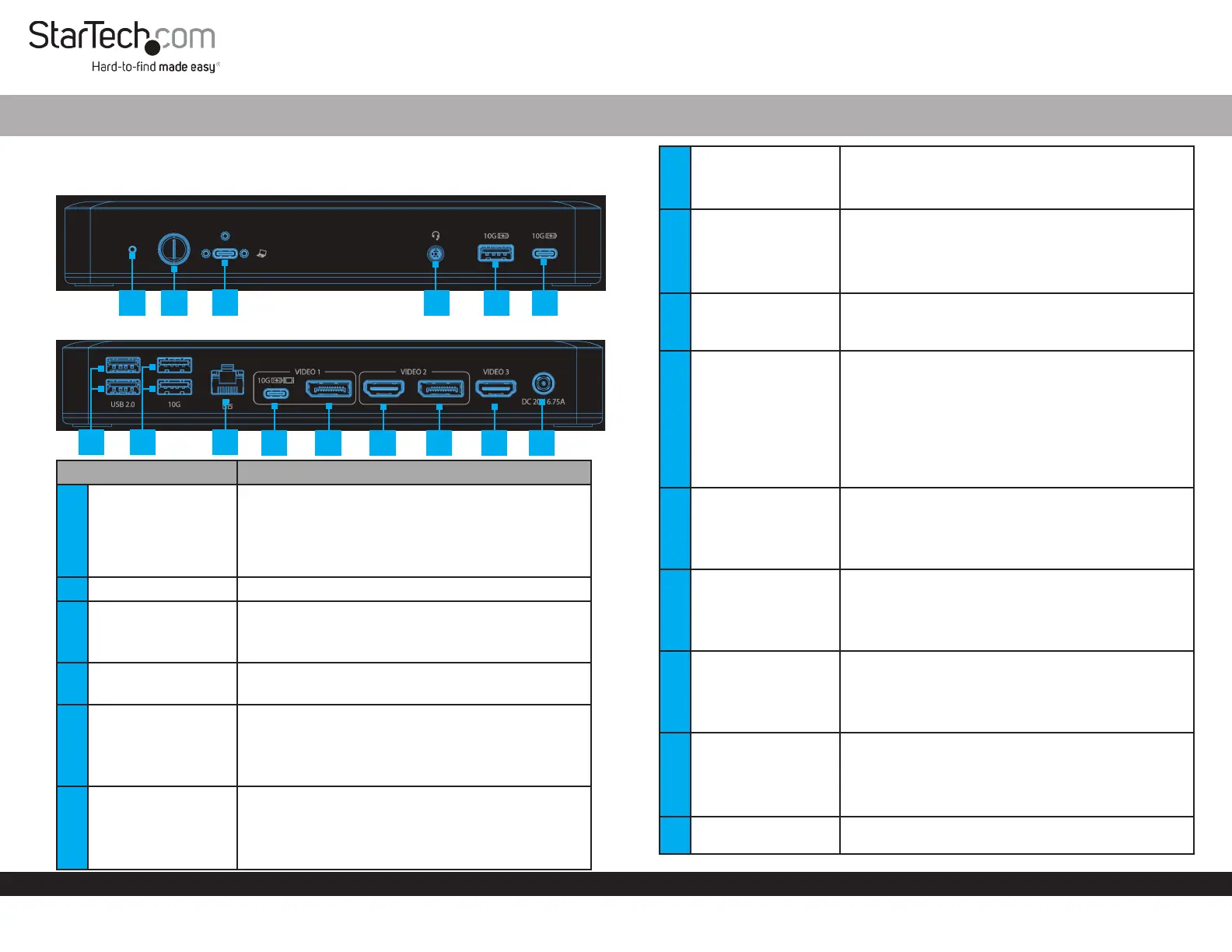
Product Diagram
(Side A)
USB-C 10Gbps Triple and Dual Monitor Docking Station - HDMI/DP/USB-C - 60W PD - Chromebook Certied
7
1
4 5
6
8
Component Function
1 Power LED
• Solid Green LED indicates the Dock is powered ON in 4-Lane
Mode (USB ports operate at USB 2.0 480 Mbps speed)
• Solid Orange LED indicates the Dock is powered ON in 2-Lane
Mode
• Hold Power Button for 4 seconds to switch between modes
2 Power Button
• Hold Power Button for 1 second to power the Dock ON and O
3
Screw-Locking
USB-C Host Port
• Connect to a USB-C Port on a Host Computer
• USB 3.2 Gen 2 (10 Gbps)
• Power Delivery 3.0 Specication
4 3.5mm Audio Port
• Connect an Audio Device
• 4 Position Audio Jack for Headset use
5
USB-A Data/Charge
Port
• Connect and/or charge a USB-A Peripheral
• USB 3.2 Gen 2 (10 Gbps) *USB 2.0 (480 Mbps) in 4-Lane Mode
• Supports BC 1.2 5 V/1.5 A (7.5 W) charging
• Requires Host Connection for Charging
6
USB-C Data/Charge
Port
• Connect and/or charge a USB-C Peripheral
• USB 3.2 Gen 2 (10 Gbps) *USB 2.0 (480 Mbps) in 4-Lane Mode
• Supports 5 V/1.5 A (7.5 W) charging
• Requires Host Connection for Charging
7 2x USB-A Data Ports
• Connect USB-A Peripherals
• USB 2.0 (480Mbps)
• Supports up to 5 V/0.5 A (2.5 W) charging
8 2x USB-A Data Ports
• Connect USB-A Peripherals
• USB 3.2 Gen 2 (10 Gbps) *USB 2.0 (480 Mbps) in 4-Lane Mode
• Supports up to 5 V/0.9 A (4.5 W) charging
9
Gigabit Ethernet
Port
• Connect the Docking Station to a Network Device, using a
Network Cable
• 10/100/1000 Mbps
10
USB-C Data/
Charge/DP Alt
Mode Video Port
(Video Output 1)
• Connect and/or charge a USB-C peripheral
• Connect a USB-C Display directly, or for any other Display, a
USB-C Video Adapter is required
• USB 3.2 Gen 2 (10Gbps) *USB 2.0 (480 Mbps) in 4-Lane Mode
• Supports 5 V/1.5 A (7.5 W) charging
• Display output via DisplayPort 1.4 DP Alt Mode
11
DisplayPort Video
Port
(Video Output 1)
• Connect a DisplayPort Display as Video Output #1
• DisplayPort 1.4
• Up to 4K (4096x2160) 60Hz
• Via DisplayPort 1.4 DP Alt Mode
12
HDMI Video Port
(Video Output 2)
• Connect an HDMI Display as Video Output #2
• HDMI 2.0b HDR10
• Up to 4K (4096x2160) 60Hz
• Via DisplayPort 1.4 DP Alt Mode
13
DisplayPort Video
Port
(Video Output 2)
• Connect a DisplayPort Display as Video Output #2
• DisplayPort 1.4
• Up to 4K (4096x2160) 60Hz
• Via DisplayPort 1.4 DP Alt Mode
14
HDMI Video Port
(Video Output 3)
• Connect an HDMI Display as Video Output #3
• HDMI 2.0b HDR10
• Up to 4K (4096x2160) 60Hz
• Via DisplayPort 1.4 DP Alt Mode
15 DC 20V Port
• Connect the Dock to a Power Source, using the Universal
Power Adapter
9
10
11
12 13 14 15
2
(Side B)
3
Product ID
DK31C3MNCR / DK31C3MNCRUE












