StarTech.com LAPTOP-SIT-STAND Manual

StarTech.com Ikke kategoriseret LAPTOP-SIT-STAND

Læs gratis den danske manual til StarTech.com LAPTOP-SIT-STAND (2 sider) i kategorien Ikke kategoriseret. Denne vejledning er vurderet som hjælpsom af 10 personer og har en gennemsnitlig bedømmelse på 4.8 stjerner ud af 5.5 anmeldelser. Har du et spørgsmål om StarTech.com LAPTOP-SIT-STAND, eller vil du spørge andre brugere om produktet?
Side 1/2
Quick-Start Guide
To view manuals, FAQs, videos, drivers, downloads, technical drawings, and more, visit www.startech.com/support
Manual Revision: May 18, 2022 3:20 PM
3
1
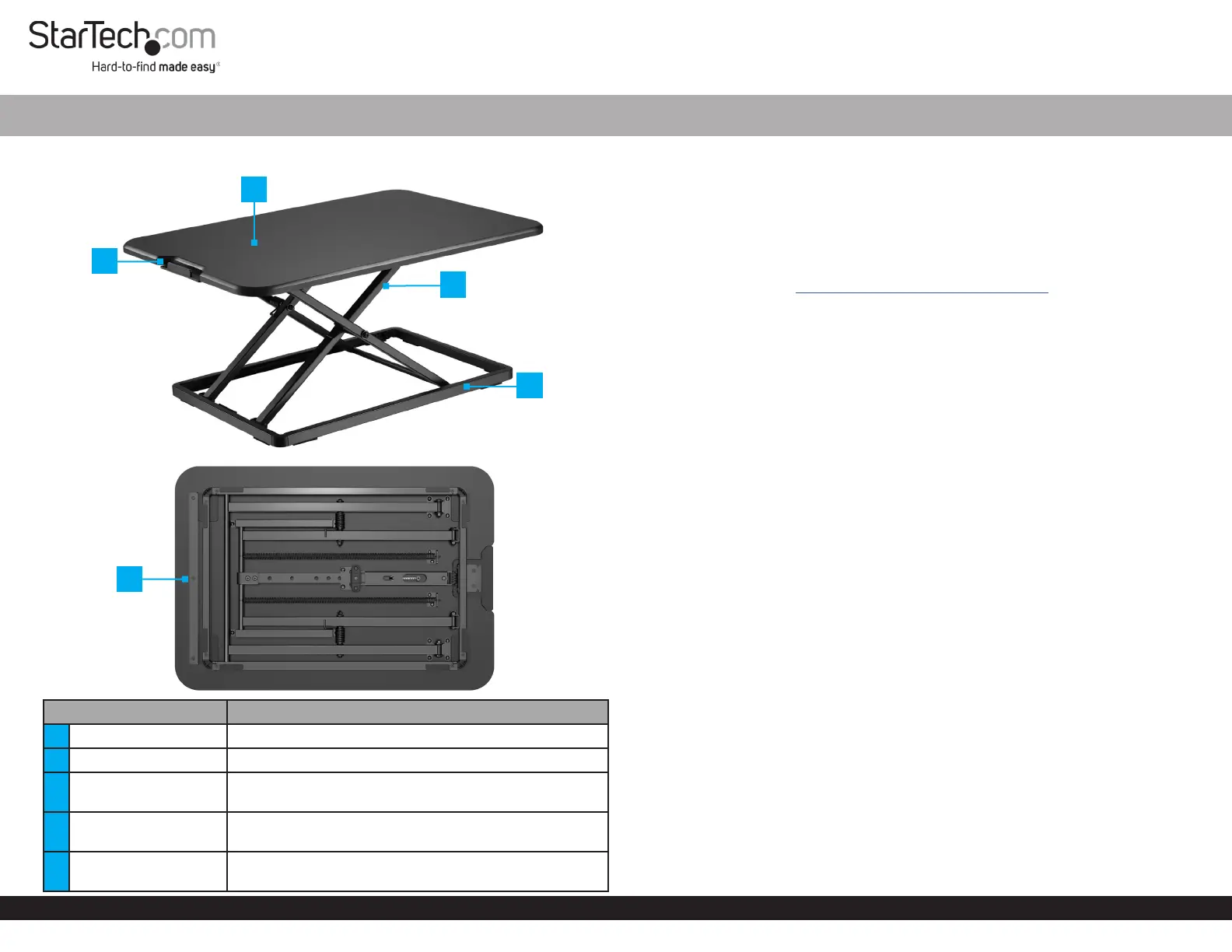
Product Diagram (LAPTOP-SIT-STAND)
Front View
Bottom View
Component Function
1 Slide Button Push-in to Raise or Lower the workstation
2 Workstation Surface Place a laptop, keyboard, and a mouse
3 Upper Frame
Supports the workstation. Adjusts the Height in Six
Dierent Positions from 1.8 to 15.9 in (45 to 405 mm)
4 Lower Frame
Stabilizes the workstation. Foam pads at the bottom
protect the desk surface
5 Finger Guard
Helps prevent trapping your ngers when Lowering
the workstation
Ergonomic Adjustable Laptop Sit Stand Desk Converter
Package Contents
Desktop Sit-Stand Workstation x 1
Quick-Start Guide x 1
Requirements
For the latest manuals, product information, technical specications, and declarations of
conformance, please visit: www.startech.com/LAPTOP-SIT-STAND
Installation
WARNINGS!
Do not exceed the weight capacity of this product. Overloading this product might
result in injury or property damage. This product can support the following weight: up
to 17.6 lb (8 kg).
When adjusting the height of this product, ensure that the mounted equipment is
properly secured and the weight is supported until the locking mechanism is fully
engaged. Adjust the height at a slow speed to prevent any equipment instability.
Failure to follow these guidelines may result in property damage and/or personal
injury.
Stored Energy Hazard! This product contains a spring mechanism that can cause the
assembly and/or mounted equipment to move forcibly and quickly upwards when the
slide button is pressed.
Pinch Hazard! Keep your ngers clear from moving components. Do not place your
ngers past the nger guard at the bottom of the workstation surface when lowering
it.
1. Cut the security plastic Tie that Holds the Upper Frame to the Lower Frame .
2. Carefully Remove the foam Pad installed on the Slide Button.
Operation
When adjusting the height of this product, always use two hands to ensure a
controlled movement.
If the slide button is pushed in and without releasing, you can adjust the height of the
upper frame in one movement to any of the available height positions. Until the slide
button is released, the height of the upper frame cannot be locked.
Due to the spacing of the locking holes, the user must continue to support the
workstation weight until the locking mechanism is engaged.
2
4
5


Produkt Specifikationer

Mærke: StarTech.com
Kategori: Ikke kategoriseret
Model: LAPTOP-SIT-STAND
Bredde: 470 mm
Dybde: 670 mm
Højde: 45 mm
Vægt: 8200 g
Brugervejledning: Ja
Produktfarve: Sort
Ramme, materiale: Stål
Pakkevægt: 8300 g
Pakkedybde: 75 mm
Pakkebredde: 755 mm
Pakkehøjde: 560 mm
Harmoniseret systemkode (HS): 94038900
Hovedkassen højde (udvendigt): 560 mm
Hovedkassens længde (udvendigt): 75 mm
Hovedkassens bredde (udvendigt): 755 mm
Højdejustering: Ja
Produkter pr. hovedkasse (udvendigt): 1 stk
Maksimal vægtkapacitet: 8 kg
Højdejusteringsområde: 45 - 405 mm
Forbedret kabelstyring: Ingen
Antal understøttede skærme: 1
Justerbar højde (maks.): 405 mm

Har du brug for hjælp?

Hvis du har brug for hjælp til StarTech.com LAPTOP-SIT-STAND stil et spørgsmål nedenfor, og andre brugere vil svare dig


Ikke kategoriseret StarTech.com Manualer

Ikke kategoriseret Manualer

Nyeste Ikke kategoriseret Manualer

JET

JET JAT-450 Manual

4 December 2025
JET

JET JCT-3643 Manual

4 December 2025
Draper

Draper 34570 Manual

4 December 2025
Advantech

Advantech ADAM-4051 Manual

4 December 2025
SPT

SPT SU-1054 Manual

4 December 2025
ELO

ELO E119034 Manual

4 December 2025
ELO

ELO E432771 Manual

4 December 2025







