StarTech.com MOD4AVHD Manual


Læs gratis den danske manual til StarTech.com MOD4AVHD (2 sider) i kategorien Ikke kategoriseret. Denne vejledning er vurderet som hjælpsom af 13 personer og har en gennemsnitlig bedømmelse på 4.9 stjerner ud af 7 anmeldelser. Har du et spørgsmål om StarTech.com MOD4AVHD, eller vil du spørge andre brugere om produktet?
Side 1/2
Quick-Start Guide
Manual Revision: 11/09/2018
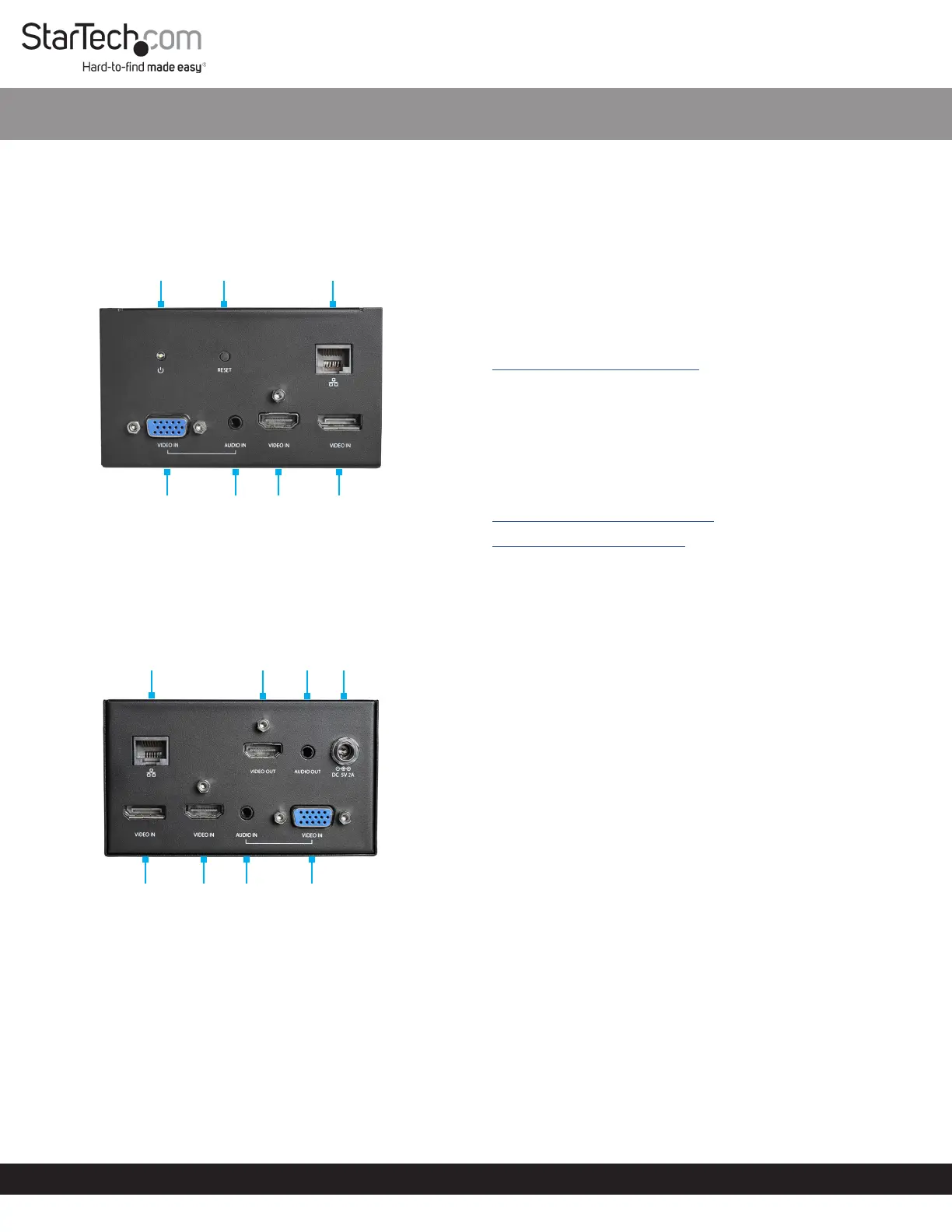
Product Diagram
Actual product may vary from photos.
Front View
Rear View
Package Contents
A/V Module x 1
Universal Power Adapter x 1
Power Clips (NA, EU, UK) x 3
Mounting Bracket x 1
Mounting Bracket Screws (M5 x 20 mm) x 4
Module Screws (#6-32 x 3/16”) x 8
Quick-Start Guide x 1
SKU #: MOD4AVHD
A/V Connectivity Module for BOX4MODULE and BEZ4MOD
Requirements
Power Source (i.e. AC Electrical Outlet)
Installation Requirements:
Mounting Surface
Mounting Bracket x 1
Mounting Bracket Screws (M5 x 20 mm) x 4
Module Screws (#6-32 x 3/16”) x 4
Writing Utensil x 1
Phillips Head Screwdriver x 1
For the latest requirements, please visit:
www.startech.com/MOD4AVHD.
Installation
See the Installation section in the Modular Conference Table
Box (BOX4MODULE) or Single-Module Conference Table Box
(BEZ4MOD) User Manual for instructions on how to install a
Module.
These User Manuals can be found under the Support tab at:
www.startech.com/BOX4MODULE
www.startech.com/BEZ4MOD
(Optional) Mounting the Module
Note: StarTech.com is not responsible for any damages related to
the installation of this product.
Note: Before mounting the Module, consider the desired
orientation of the ports (front and rear).
1. Align the Mounting Bracket with four Mounting Holes on the
Module.
Note: There are four Mounting Holes on each side of the
Module, which gives you two dierent mounting options.
2. Insert the Module Screws (x4) through the Mounting Bracket
and into the Mounting Holes.
3. Tighten the Module Screws using a Phillips Head Screwdriver.
Do not overtighten the Module Screws.
4. Before installing the Mounting Bracket on or under your
Mounting Surface, measure and position the Mounting
Bracket in the desired location. The Module can be mounted on
a vertical or horizontal Mounting Surface.
5. (Optional) Depending on the Mounting Surface you are using
to install the product, you may need to drill pilot holes prior to
installing the Mounting Bracket Screws into the Mounting
Surface.
6. Mark the location of the Mounting Holes using a Writing
Utensil. These marks can be used as a guide to indicate where
the Mounting Bracket Screws will be installed in the surface.
7. Install the Mounting Bracket Screws (x4) through the Mounting
Bracket and into the Mounting Surface, using a Phillips Head
Screwdriver. Do not overtighten the Mounting Bracket Screws.
Warning: To prevent the Mounting Bracket Screws from
penetrating the opposite side of the Mounting Surface, be
conscious of the length of the Mounting Bracket Screws
compared to the depth of the Mounting Surface.
For the latest information, specications, and support visit www.startech.com/MOD4AVHD
Power
LED
Reset
Button
RJ45
Passthrough
Port
VGA In
Port
Audio
In Port
HDMI
In Port
DisplayPort
In Port
RJ45
Passthrough
Port
HDMI
Out
Port
Audio
Out
Port
DC
5V 2A
Port
VGA In
Port
Audio
In Port
HDMI
In Port
DisplayPort
In Port


Produkt Specifikationer

Mærke: StarTech.com
Kategori: Ikke kategoriseret
Model: MOD4AVHD
Bredde: 105 mm
Dybde: 110 mm
Højde: 60 mm
Vægt: 200 g
Produktfarve: Sort
Pakkevægt: 200 g
Pakkedybde: 250 mm
Pakkebredde: 100 mm
Pakkehøjde: 210 mm
Opbevaringstemperatur (T-T): -20 - 60 °C
Relativ luftfugtighed ved drift (H-H): 10 - 85 %
Ethernet LAN-porte (RJ-45): 2
Ethernet LAN: Ja
Strømforbrug (typisk): 10 W
Driftstemperatur (T-T): 0 - 60 °C
Maksimal opløsning: 3840 x 2160 pixel
Indgangsspænding for vekselstrømsadapter: 100 - 240 V
Udgangsspænding for vekselstrømsadapter: 5 V
Hurtig start guide: Ja
Understøttede grafikopløsninger: 1280 x 720 (HD 720), 1920 x 1080 (HD 1080), 1920 x 1200 (WUXGA), 2560 x 1600 (WQXGA), 3840 x 2160
Understøttede billedformater: 16:9
Certificering: CE, FCC, REACH
LED-indikatorer: Strøm
AC-adapter inkluderet: Ja
Bæredygtighedscertifikater: RoHS
Lydindgang: 2 x 3.5mm
Indgangsstrøm: 0.4 A
HDMI-version: 1.4
DisplayPort-version: 1.2
Antal DisplayPorts: 2
Vekselstrømsadapterens udgangsstrøm: 2 A
Strømstiktype: Type M
Monteringsbeslag inkluderet: Ja
Lydudgang: 1 x 3.5 mm
VGA (D-Sub) indgangsporte: 2
Skruer inkluderet: Ja
Antal HDMI-indgangsporte: 2
Antal HDMI-udgangsporte: 1
Chipsæt: Parade - PS176, Chrontel - CH7035, Explore Micro - EP9442U, TI - TS3DV642
Ekstern strømforsyning: Ja
USB pass-through: Ingen

Har du brug for hjælp?

Hvis du har brug for hjælp til StarTech.com MOD4AVHD stil et spørgsmål nedenfor, og andre brugere vil svare dig


Ikke kategoriseret StarTech.com Manualer

Ikke kategoriseret Manualer

Nyeste Ikke kategoriseret Manualer

JET

JET JAT-450 Manual

4 December 2025
JET

JET JCT-3643 Manual

4 December 2025
Draper

Draper 34570 Manual

4 December 2025
Advantech

Advantech ADAM-4051 Manual

4 December 2025
SPT

SPT SU-1054 Manual

4 December 2025
ELO

ELO E119034 Manual

4 December 2025
ELO

ELO E432771 Manual

4 December 2025







