StarTech.com MSAT2SAT3 Manual


Læs gratis den danske manual til StarTech.com MSAT2SAT3 (2 sider) i kategorien Ikke kategoriseret. Denne vejledning er vurderet som hjælpsom af 89 personer og har en gennemsnitlig bedømmelse på 4.6 stjerner ud af 45 anmeldelser. Har du et spørgsmål om StarTech.com MSAT2SAT3, eller vil du spørge andre brugere om produktet?
Side 1/2
Instruction Manual
DE: Bedienungsanleitung - de.startech.com
FR: Guide de l'utilisateur - fr.startech.com
ES: Guía del usuario - es.startech.com
IT: Guida per l'uso - it.startech.com
NL: Gebruiksaanwijzing - nl.startech.com
PT: Guia do usuário - pt.startech.com
Manual Revision: 10/07/2013
For the most up-to-date information, please visit: www.startech.com
1 x mSATA to SATA Adapter
2 x Installation Screws
1 x Instruction Manual
System Requirements
SATA Hard Drive
Computer System with:
Available mSATA port on the motherboard
Available SATA Power connector on the power supply
MSAT2SAT3
mSATA to SATA port Adapter
*actual product may vary from photos
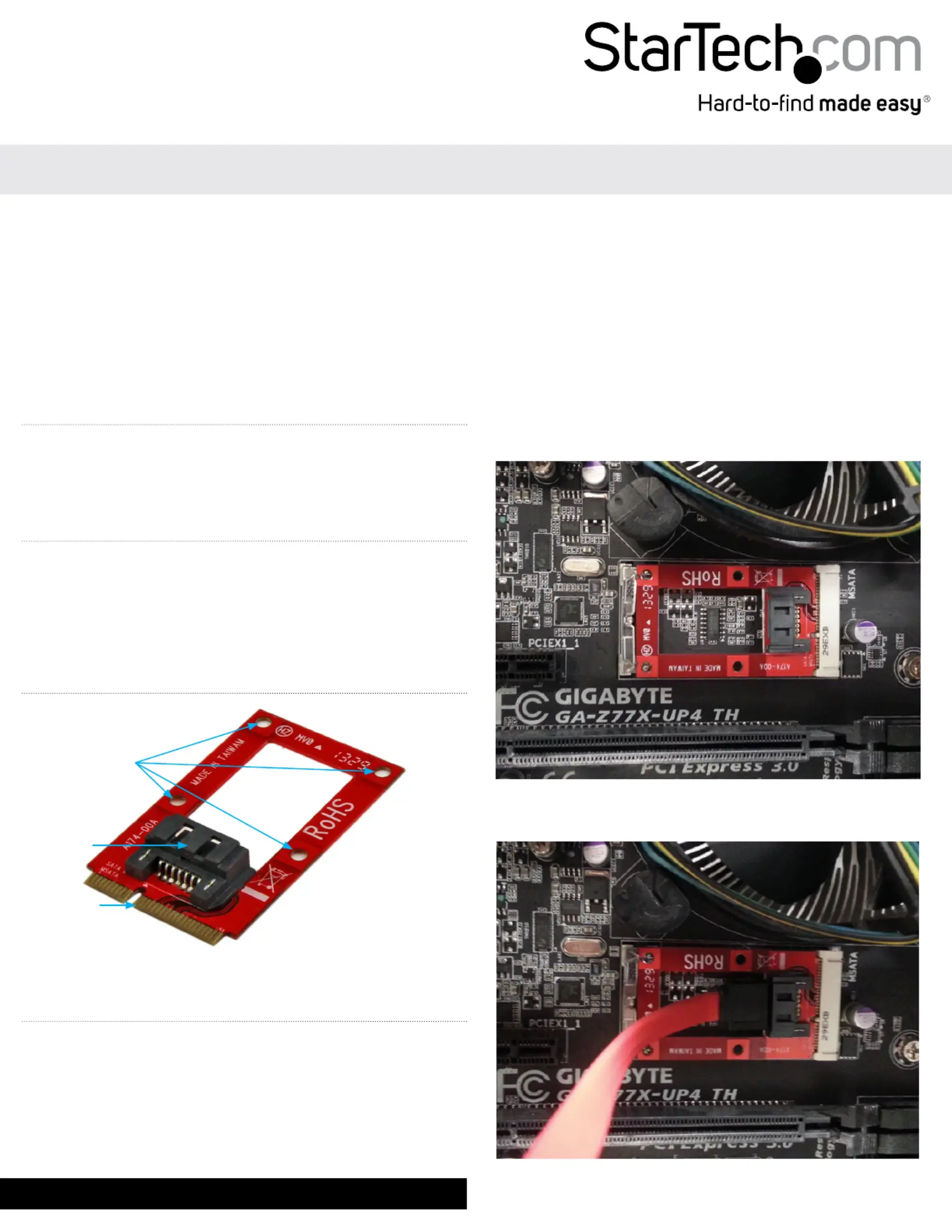
Product Overview
mSATA Port
SATA Port
Installation Holes
WARNING! Hard Drives and format adapters require careful
handling. If you are not careful with your Drive, lost data may result.
Always handle your drive with caution. Be sure that you are properly
grounded by wearing an anti-static strap when handling computer
components or discharge yourself of any static electricity build-up
by touching a large grounded metal surface (such as the computer
case) for several seconds.
1. Slide the mSATA to SATA adapter into the mSATA connector on
the system motherboard.
2. Secure the drive into place.
If the board has an installation clip, gently apply pressure to the
top center of the adapter until it locks into place on either side of
the SSD clip. To release the adapter refer to your motherboards
user manual for detailed instruction.
or
If the board has mounting holes. Drive each of the included
installation screws through the matching installation holes on the
adapter into the mounting holes on the motherboard.
3. The SATA port on the adapter now functions as a standard SATA
port to the specication of the motherboard’s mSATA port.


Produkt Specifikationer

Mærke: StarTech.com
Kategori: Ikke kategoriseret
Model: MSAT2SAT3
Bredde: 30 mm
Dybde: 51 mm
Højde: 8 mm
Vægt: 10 g
Brugervejledning: Ja
Produktfarve: Grøn
Pakkevægt: 15 g
Pakkedybde: 225 mm
Pakkebredde: 125 mm
Pakkehøjde: 10 mm
Opbevaringstemperatur (T-T): -25 - 70 °C
Relativ luftfugtighed ved drift (H-H): 20 - 80 %
Relativ luftfugtighed ved opbevaring (H-H): 15 - 90 %
Driftstemperatur (T-T): 5 - 50 °C
Harmoniseret systemkode (HS): 84733020
Bæredygtighedscertifikater: CE, RoHS
Hovedkassen højde (udvendigt): 215 mm
Hovedkassens længde (udvendigt): 690 mm
Hovedkassens bredde (udvendigt): 295 mm
Værtsgrænseflade: mSATA
Intern: Ja
Produkter pr. hovedkasse (udvendigt): 100 stk
Skruer inkluderet: Ja
Output-grænseflade: SATA
Dataoverførselshastighed (maks.): 6 Gbit/sek.
SATA revision: 3.0

Har du brug for hjælp?

Hvis du har brug for hjælp til StarTech.com MSAT2SAT3 stil et spørgsmål nedenfor, og andre brugere vil svare dig


Ikke kategoriseret StarTech.com Manualer

Ikke kategoriseret Manualer

Nyeste Ikke kategoriseret Manualer

JET

JET JAT-450 Manual

4 December 2025
JET

JET JCT-3643 Manual

4 December 2025
Draper

Draper 34570 Manual

4 December 2025
Advantech

Advantech ADAM-4051 Manual

4 December 2025
SPT

SPT SU-1054 Manual

4 December 2025
ELO

ELO E119034 Manual

4 December 2025
ELO

ELO E432771 Manual

4 December 2025







