StarTech.com PEX1394A2V2 Manual


Læs gratis den danske manual til StarTech.com PEX1394A2V2 (2 sider) i kategorien Ikke kategoriseret. Denne vejledning er vurderet som hjælpsom af 12 personer og har en gennemsnitlig bedømmelse på 4.5 stjerner ud af 6.5 anmeldelser. Har du et spørgsmål om StarTech.com PEX1394A2V2, eller vil du spørge andre brugere om produktet?
Side 1/2
Quick-Start Guide
To view manuals, FAQs, videos, drivers, downloads, technical drawings, and more, visit www.startech.com/support.
Manual Revision: October 1, 2019 1:45 PM
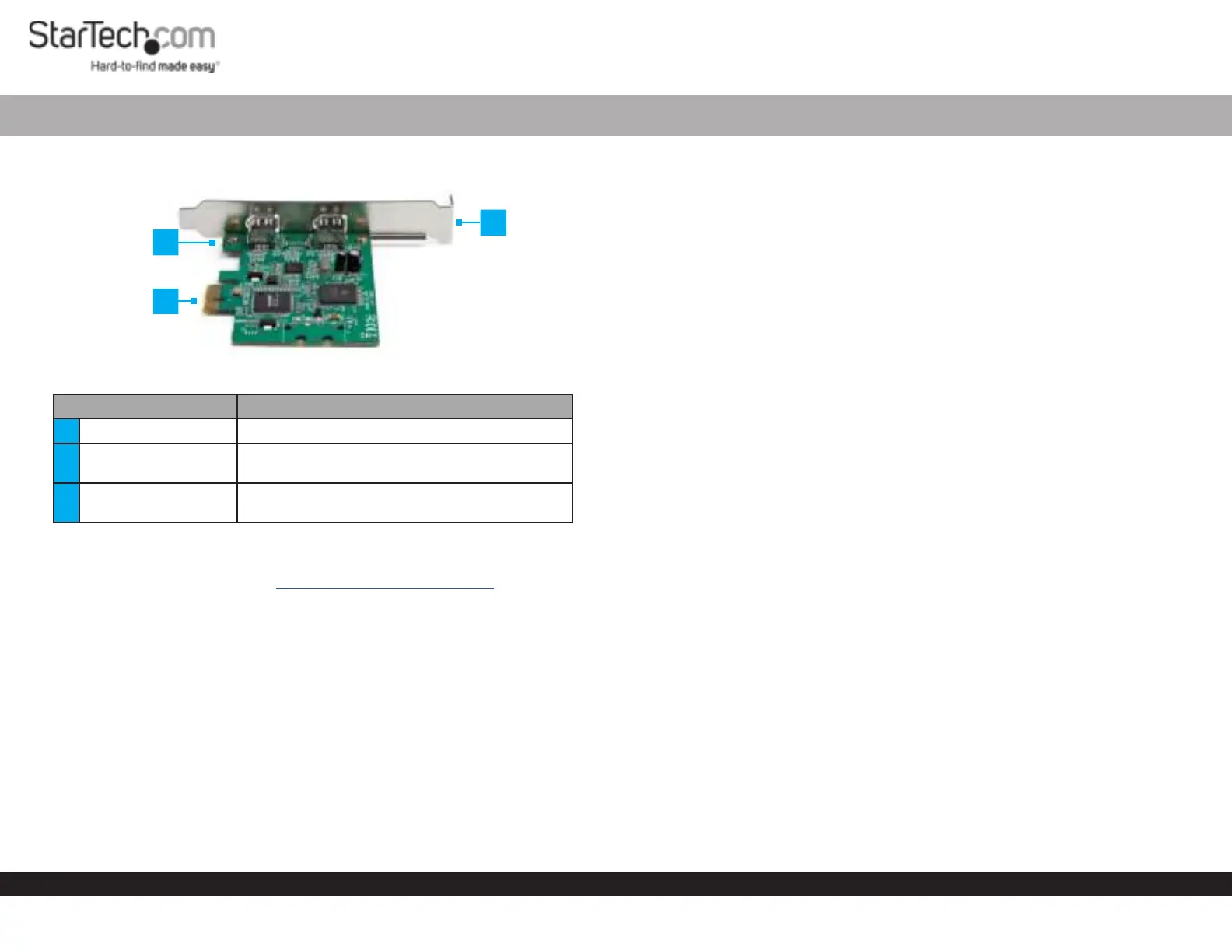
Product Diagram (PEX1394A2V2)
Component Function
1 Bracket Screws Used to secure the Bracket to the Card.
2 Full Prole Bracket
Used to securely attach the Card to the Host
Computer.
3 PCIe Connector
Used to connect the Card to a PCI Express Slot
on the Host Computer.
Requirements
For the latest requirements, please visit
www.startech.com/PEX1394A2V2
Phillips Head Screwdriver x 1
Operating System
Windows® 10, 8.1, 8, and 7
Windows Server 2019, 2016, and 2012
mac OS 10.13, 10.12, 10.11 and 10.10
Linux® Ubuntu
Package Contents
PCI Express FireWire Card x 1
Full Prole Bracket (pre-installed) x 1
Low Prole Bracket x 1
Quick-Start Guide x 1
2 Port PCI Express 1394a FireWire Card
Installation
Warnings! PCI Express cards, can be severely damaged by static electricity. Be sure
that you are properly grounded before opening your computer case or touching your
card.
Be careful to handle the card by its edges and not the gold connectors.
1. Turn o the Host Computer and all connected Peripheral Devices (e.g. printer,
external hard drives, etc.).
2. Unplug the Power Cable from the Host Computer.
3. Remove the cover from the Host Computer’s Case.
Note: Refer to the documentation that came with your computer for further
information on how to properly remove the computer case.
4. Locate a PCI Express Slot and remove the Metal Cover Plate.
Note: Refer to the documentation that came with your computer for further
information on how to properly remove the metal cover plate.
5. Gently insert the PCIe Connector on the Card into the PCI Express Slot.
6. Using the screws removed from the Metal Cover Plate and a Phillips Head
Screwdriver, secure the Card to the rear of the computer case.
7. Place the cover back over the computer case.
8. Reconnect the power cable and Peripheral Devices to the Host Computer and
power the Host Computer On.
Verifying Installation
The operating system will detect the presence of the card and automatically install the
necessary drivers.
Windows
1. Open the Device Manager screen by right-clicking on Computer, and then select
Manage. In the Computer Management screen, select Device Manager from the
left panel (For Windows 8, open the Control Panel and select Device Manager).
2. Expand the IEEE 1394 bus host controllers section. You should see the Texas
Instruments 1394 OHCI Compliant Host Controller in the list with no exclamation
points or question marks next to it.
1
2
3


Produkt Specifikationer

Mærke: StarTech.com
Kategori: Ikke kategoriseret
Model: PEX1394A2V2
Bredde: 68 mm
Dybde: 89 mm
Højde: 17.8 mm
Vægt: 49 g
Produktfarve: Grøn
Pakkevægt: 117 g
Pakkedybde: 142 mm
Pakkebredde: 170 mm
Pakkehøjde: 30 mm
Opbevaringstemperatur (T-T): -20 - 80 °C
Driftstemperatur (T-T): 0 - 70 °C
Antal: 1
Hurtig installationsvejledning: Ja
Forbindelsesteknologi: Ledningsført
Certificering: CE, FCC, REACH
Harmoniseret systemkode (HS): 84733020
Bæredygtighedscertifikater: RoHS
Understøttede Mac-operativsystemer: Mac OS X 10.10 Yosemite, Mac OS X 10.11 El Capitan, Mac OS X 10.12 Sierra, Mac OS X 10.13 High Sierra
Hovedkassen højde (udvendigt): 306 mm
Hovedkassens længde (udvendigt): 345 mm
Hovedkassens bredde (udvendigt): 685 mm
Værtsgrænseflade: PCI Express
Intern: Ja
Plug and play: Ja
Produkter pr. hovedkasse (udvendigt): 75 stk
Understøttede operativsystemer til servere: Windows Server 2003, Windows Server 2012, Windows Server 2012 R2, Windows Server 2016, Windows Server 2019
Monteringsbeslag inkluderet: Ja
Output-grænseflade: IEEE 1394/Firewire
Funktioner: 1
Udvidelseskort standard: PCIe 1.1
Dataoverførselshastighed (maks.): 0.4 Gbit/sek.
Chipsæt: Texas Instruments - TSB82AA2
Antal FireWire 400-porte: 2

Har du brug for hjælp?

Hvis du har brug for hjælp til StarTech.com PEX1394A2V2 stil et spørgsmål nedenfor, og andre brugere vil svare dig


Ikke kategoriseret StarTech.com Manualer

Ikke kategoriseret Manualer

Nyeste Ikke kategoriseret Manualer

JET

JET JAT-450 Manual

4 December 2025
JET

JET JCT-3643 Manual

4 December 2025
Draper

Draper 34570 Manual

4 December 2025
Advantech

Advantech ADAM-4051 Manual

4 December 2025
SPT

SPT SU-1054 Manual

4 December 2025
ELO

ELO E119034 Manual

4 December 2025
ELO

ELO E432771 Manual

4 December 2025







