StarTech.com PEX4SFF8639U3 Manual


Læs gratis den danske manual til StarTech.com PEX4SFF8639U3 (2 sider) i kategorien Ikke kategoriseret. Denne vejledning er vurderet som hjælpsom af 27 personer og har en gennemsnitlig bedømmelse på 5.0 stjerner ud af 14 anmeldelser. Har du et spørgsmål om StarTech.com PEX4SFF8639U3, eller vil du spørge andre brugere om produktet?
Side 1/2
Quick-Start Guide
To view manuals, FAQs, videos, drivers, downloads, technical drawings, and more, visit www.startech.com/support.
Manual Revision: February 22, 2023 1:29 PM
Product ID
PEX4SFF8639U3
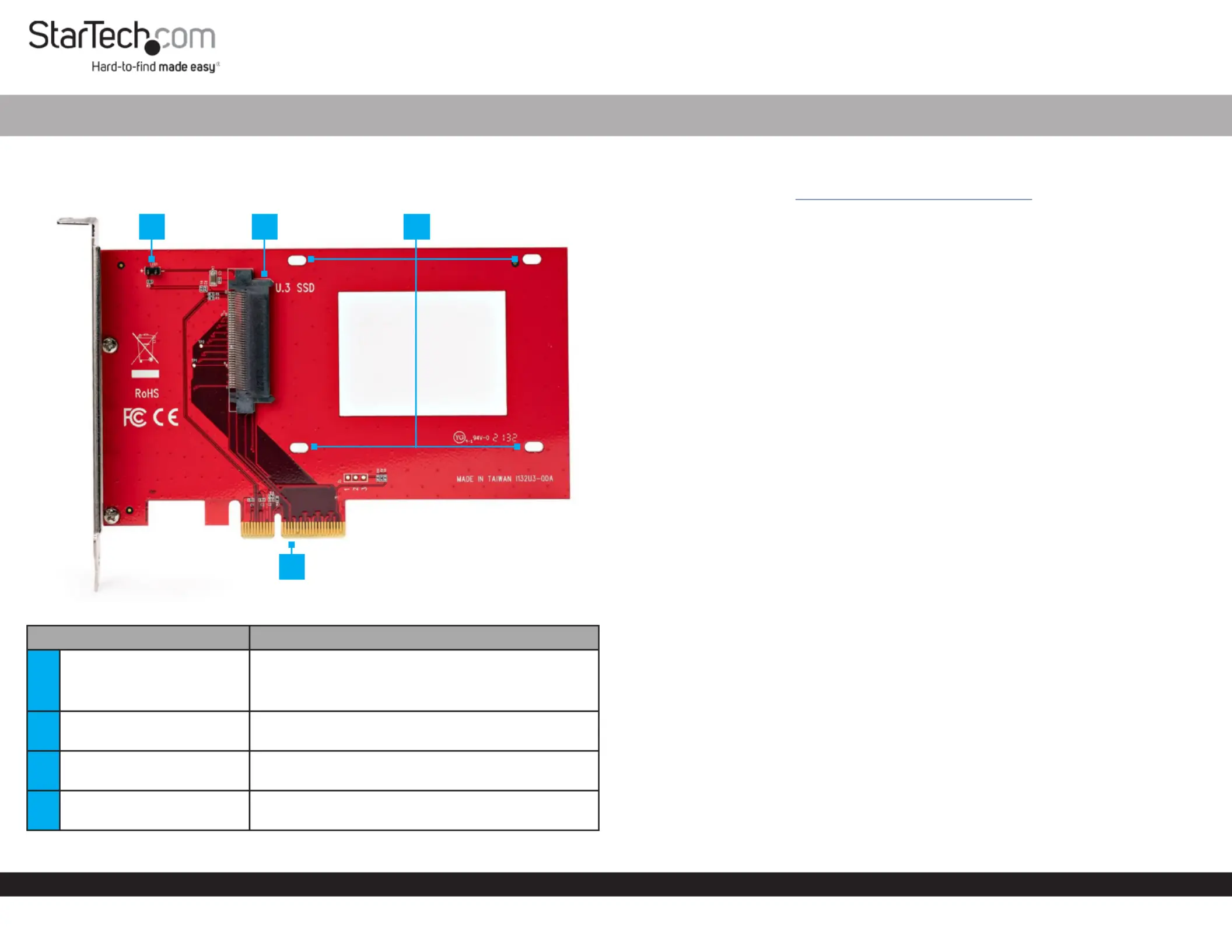
Component Function
1LED Jumper Pins
Connect to the LED Lights U.3 to PCIe p1-x4
Adapter Drive to show power/activity
2
U.3 (SFF-TA-1001) Drive
Connector
Connect a to U.3 (SFF-TA-1001) Storage Device
the U.3 to PCIe p1-x4 Adapter
3Drive Mounting Holes
Secure the to the U.3 Storage Device U.3 to PCIe
x4 Adapter
4PCIe p1-x4 Connector
Connect the to theU.3 to PCIe p1-x4 Adapter PCIe
Slot Computerin a
U.3 (SFF-TA-1001) to PCIe 4.0 p1-x4 Host Adapter for 2.5” U.3 NVMe SSDs
Requirements
For the latest drivers/software, technical specications, and declarations of
conformance, please visit: www.StarTech.com/PEX4SFF8639U3
Package Contents
U.3 to PCIe p1-x4 Adapter x 1
Drive Mounting Screws x 4
Quick-Start Guide x 1
Installation
Connect an SSD to the Drive Adapter
Warning! Drives should be handled carefully, especially when being transported.
If not handled with care, lost or corrupted data may be experienced. Ensure that the
Installer Computer Case U.3 is properly grounded before opening the or touching the
to PCIe p1-x4 Adapter Installer . The should wear an when installing Anti-Static Strap
any computer component. If an is not available, discharge any Anti-Static Strap
built-up static electricity by touching a large for several Grounded Metal Surface
seconds. Only handle the U.3 to PCIe p1-x4 Adapter by its edges and do not touch the
gold connectors.
1. Carefully slide the into the and connect it to theSSD U.3 to PCIe p1-x4 Adapter U.3
(SFF-TA-1001) Connector on the card.
2. Turn over the .U.3 to PCIe p1-x4 Adapter
3. Use a and insert the four through Phillips Screwdriver Drive Mounting Screws
the on the and into the .Drive Mounting Holes U.3 to PCIe p1-x4 Adapter SSD
4. Tighten the to secure the drive to the .Screws U.3 to PCIe p1-x4 Adapter
Installing the Drive Adapter
1. Turn o the and any connected or (such as Computer Devices Peripherals
printers and external storage).
2. Unplug the from the back of the .Power Cable Computer
3. Disconnect any connected to the .Peripheral Devices Computer
4. Open the , referring to the documentation that came with the Computer Case
computer system for guidance.
4
1 2 3


Produkt Specifikationer

Mærke: StarTech.com
Kategori: Ikke kategoriseret
Model: PEX4SFF8639U3
Bredde: 90 mm
Dybde: 154 mm
Højde: 1.5 mm
Vægt: 62 g
Produktfarve: Rød
Pakkevægt: 130 g
Pakkedybde: 155 mm
Pakkebredde: 215 mm
Pakkehøjde: 30 mm
Opbevaringstemperatur (T-T): -40 - 80 °C
Relativ luftfugtighed ved drift (H-H): 20 - 80 %
Driftstemperatur (T-T): 0 - 60 °C
Hurtig installationsvejledning: Ja
LED-indikatorer: Activity, Power
Hovedkassen højde (udvendigt): 490 mm
Hovedkassens længde (udvendigt): 340 mm
Hovedkassens bredde (udvendigt): 460 mm
Værtsgrænseflade: PCIe
Intern: Ja
Plug and play: Ja
Produkter pr. hovedkasse (udvendigt): 60 stk
Gennemsnitstid mellem fejl (MTBF): 21693912 t
Skruer inkluderet: Ja
Output-grænseflade: U.3
Hot-swap: Ingen
Understøttede lagerdisk højder: 5, 7,9.5, 12.5, 15 mm

Har du brug for hjælp?

Hvis du har brug for hjælp til StarTech.com PEX4SFF8639U3 stil et spørgsmål nedenfor, og andre brugere vil svare dig


Ikke kategoriseret StarTech.com Manualer

Ikke kategoriseret Manualer

Nyeste Ikke kategoriseret Manualer

JET

JET JAT-450 Manual

4 December 2025
JET

JET JCT-3643 Manual

4 December 2025
Draper

Draper 34570 Manual

4 December 2025
Advantech

Advantech ADAM-4051 Manual

4 December 2025
SPT

SPT SU-1054 Manual

4 December 2025
ELO

ELO E119034 Manual

4 December 2025
ELO

ELO E432771 Manual

4 December 2025







