StarTech.com PEXUSB311AC3 Manual


Læs gratis den danske manual til StarTech.com PEXUSB311AC3 (2 sider) i kategorien Ikke kategoriseret. Denne vejledning er vurderet som hjælpsom af 8 personer og har en gennemsnitlig bedømmelse på 3.8 stjerner ud af 4.5 anmeldelser. Har du et spørgsmål om StarTech.com PEXUSB311AC3, eller vil du spørge andre brugere om produktet?
Side 1/2
Quick-Start Guide
To view manuals, FAQs, videos, drivers, downloads, technical drawings, and more, visit www.startech.com/support.
Manual Revision: May 14, 2020 2:21 PM
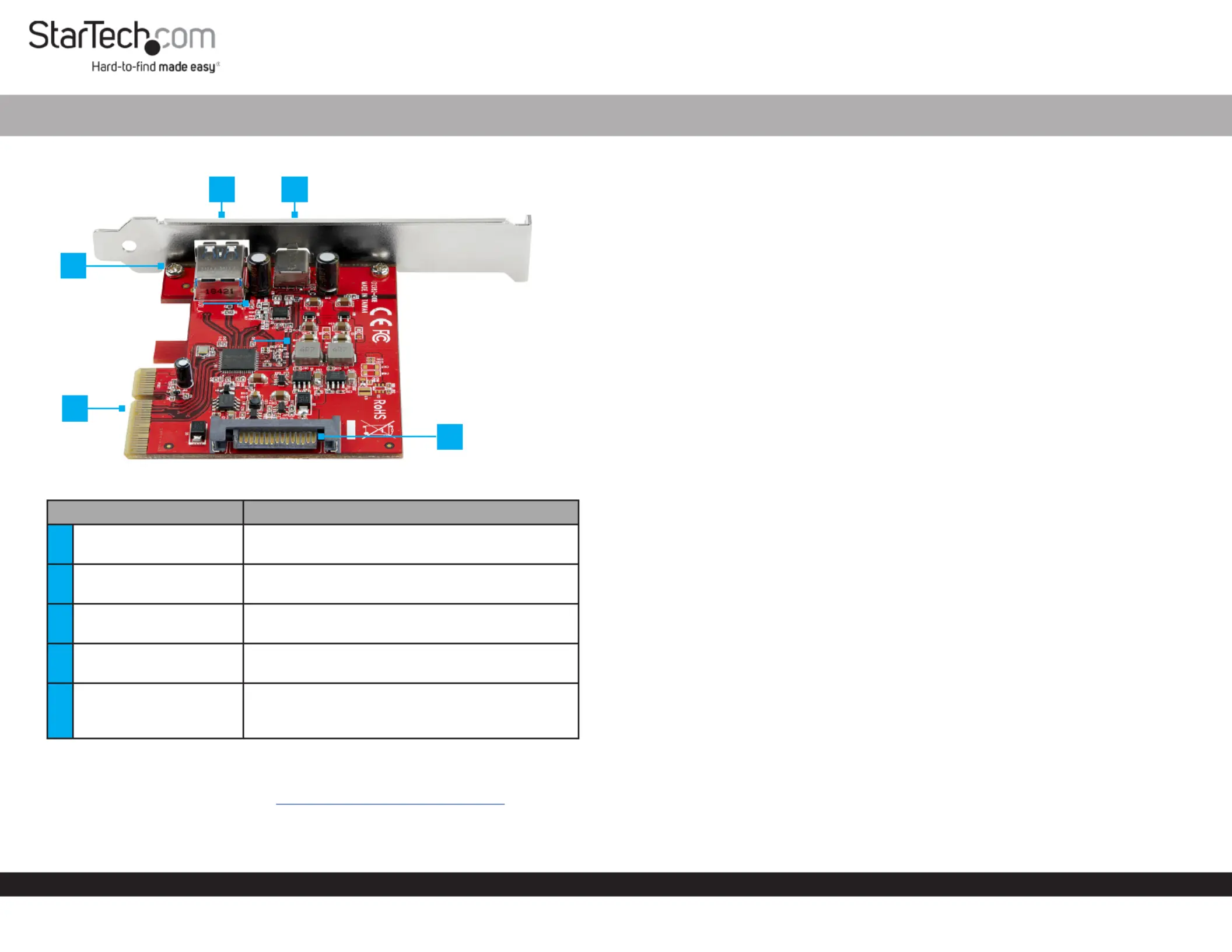
Product Diagram (PEXUSB311AC3)
Component Function
1USB-A Port
Used to connect a to USB Peripheral Device
the . USB Card
2USB-C Port
Used to connect a to USB Peripheral Device
the . USB Card
Used to the orSecure Low Prole Full Prole
Bracket USB Card.to the
4PCI Express Connector
Used to connect the to the USB Card PCI
Express Slot Host Computer on the .
5SATA Power Connector
(Optional) Connect a 15 Pin SATA Power
Connector to provide extra power to the USB
Ports.
Requirements
For the latest requirements, please visit www.startech.com/PEXUSB311AC3
Computer with an available PCI Express® slot (x4, x8, or x16)
(Optional) SATA Power Source
2-Port USB 3.1 Card - 10Gbps per port - USB-C, USB-A - PCIe
Tools
Small Phillips Head Screwdriver
Hardware Installation
Warning: USB cards can be damaged by static electricity. Make sure that you are
properly grounded before you open your computer case or touch the . You USB Card
should wear an anti-static strap when you install any computer component. If an anti-
static strap is not available, discharge any built-up static electricity by touching a large
grounded metal surface for several seconds. Only handle the by its edges USB Card
and do not touch the gold connectors.
Installing the Low Prole Bracket
By default the is attached to the . Depending on your Full Prole Bracket USB Card
system conguration you may need to remove the and replace it Full Prole Bracket
with the (included).Low Prole Bracket
1. Using a , remove the two securing Small Phillips Head Screwdriver Bracket Screws
the to the .Full Prole Bracket USB Card
2. Align the on the with the on the Screw Holes USB Card Screw Holes Low Prole
Bracket USB Card Screw Holes Low . Making sure the is sitting on-top of the on the
Prole Bracket.
3. Insert the through the and into the on the Bracket Screws USB Card Screw Holes
Low Prole Bracket.
4. Using the , tighten the being Small Phillips Head Screwdriver Bracket Screws,
careful not to over-tighten.
Installing the USB Card
1. Turn o the and any that are connected (e.g., Computer Peripheral Devices
printers, external hard drives, etc.).
2. Unplug the from the back of the and disconnect any Power Cable Computer
Peripheral Devices that are connected.
3. Remove the from the . Cover Computer Case
Note: Consult the documentation that came with the for details about Computer
how to do this safely.
4. Locate an open (x4, x8, or x16) and remove the corresponding PCI Express Slot
Metal Cover Plate Computer Case from the back of the .
5. Gently insert the into the open and fasten the USB Card PCI Express Slot Bracket
to the back of the .Computer Case
2
5
1
3
4


Produkt Specifikationer

Mærke: StarTech.com
Kategori: Ikke kategoriseret
Model: PEXUSB311AC3
Bredde: 81 mm
Dybde: 120 mm
Højde: 19 mm
Vægt: 48 g
Produktfarve: Rød
Pakkevægt: 123 g
Pakkedybde: 142 mm
Pakkebredde: 170 mm
Pakkehøjde: 30 mm
Opbevaringstemperatur (T-T): -20 - 85 °C
Relativ luftfugtighed ved drift (H-H): 20 - 80 %
Driftstemperatur (T-T): 5 - 50 °C
Hurtig installationsvejledning: Ja
Harmoniseret systemkode (HS): 84733020
Bæredygtighedscertifikater: CE, RoHS
Understøttede Mac-operativsystemer: Mac OS X 10.13 High Sierra, Mac OS X 10.14 Mojave, Mac OS X 10.15 Catalina, Mac OS X 11.0 Big Sur, Mac OS X 12.0 Monterey, Mac OS X 13.0 Ventura
Understøttede Linux-operativsystemer: Ja
Hovedkassen højde (udvendigt): 500 mm
Hovedkassens længde (udvendigt): 365 mm
Hovedkassens bredde (udvendigt): 370 mm
Værtsgrænseflade: PCIe
Intern: Ja
Produkter pr. hovedkasse (udvendigt): 60 stk
Overholdelse af bæredygtighed: Ja
Gennemsnitstid mellem fejl (MTBF): 2684396 t
Understøttede operativsystemer til servere: Windows Server 2008 R2, Windows Server 2012, Windows Server 2016, Windows Server 2019
Monteringsbeslag inkluderet: Ja
Output-grænseflade: USB 3.2 Gen 2 (3.1 Gen 2)
Antal USB 3.2 Gen 2 (3.1 Gen 2) type-C-porte: 1
Antal USB 3.2 Gen 2 (3.1 Gen 2) type-A-porte: 1
Understøtter UASP: Ja
Udvidelseskort standard: PCIe 3.0
Udvidelseskort formfaktor: Fuld højde/ lav profil
Dataoverførselshastighed (maks.): 10 Gbit/sek.
Chipsæt: ASMedia - ASM3142

Har du brug for hjælp?

Hvis du har brug for hjælp til StarTech.com PEXUSB311AC3 stil et spørgsmål nedenfor, og andre brugere vil svare dig


Ikke kategoriseret StarTech.com Manualer

Ikke kategoriseret Manualer

Nyeste Ikke kategoriseret Manualer

JET

JET JAT-450 Manual

4 December 2025
JET

JET JCT-3643 Manual

4 December 2025
Draper

Draper 34570 Manual

4 December 2025
Advantech

Advantech ADAM-4051 Manual

4 December 2025
SPT

SPT SU-1054 Manual

4 December 2025
ELO

ELO E119034 Manual

4 December 2025
ELO

ELO E432771 Manual

4 December 2025







