StarTech.com PEXUSB3S42 Manual


Læs gratis den danske manual til StarTech.com PEXUSB3S42 (2 sider) i kategorien Ikke kategoriseret. Denne vejledning er vurderet som hjælpsom af 10 personer og har en gennemsnitlig bedømmelse på 4.5 stjerner ud af 5.5 anmeldelser. Har du et spørgsmål om StarTech.com PEXUSB3S42, eller vil du spørge andre brugere om produktet?

Side 1/2
Instruction Manual
DE: Bedienungsanleitung - de.startech.com
FR: Guide de l'utilisateur - fr.startech.com
ES: Guía del usuario - es.startech.com
IT: Guida per l'uso - it.startech.com
NL: Gebruiksaanwijzing - nl.startech.com
PT: Guia do usuário - pt.startech.com
Manual Revision: 01/28/2015
For the most up-to-date information, please visit: www.startech.com
1x 4 Port PCI Express USB 3.0 Card
1x Low-Prole Bracket
1x Driver CD
1x Instruction Manual
System Requirements
PCI Express enabled computer with an available PCI Express p1-x1 slot
or higher (x4, x8, x16)
SATA power connector (highly recommended, but optional)
Windows® 8 / 8.1 (32/64bit), 7 (32/64), Vista (32/64), XP (32/64),
Windows Server® 2012, 2008 R2, Linux 2.6.31 and up (Tested up to
3.5)
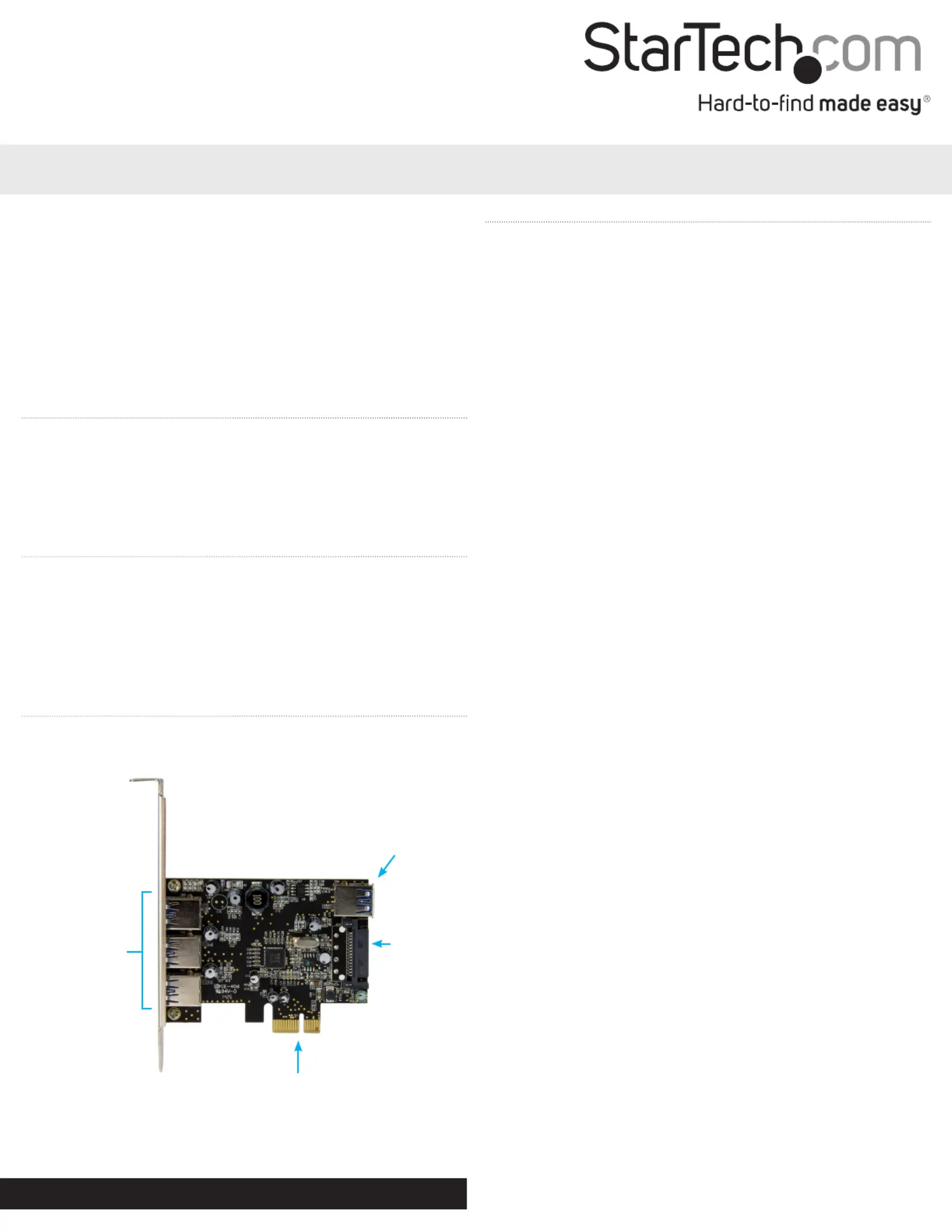
Product Overview
Top View
PEXUSB3S42
4 Port PCI Express SuperSpeed USB 3.0 Card with UASP - SATA Power
USB 3.0 Ports
Type A Female
x 3
SATA Power
Internal USB 3.0
Port Type A
Female
PCI Express x1
Installation
Hardware Installation
WARNING!
PCI Express cards, like all computer equipment, can be severely
damaged by static electricity. Be sure that you are properly
grounded before opening your computer case or touching your PCI
Express card. StarTech.com recommends that you wear an anti-
static strap when installing any computer component. If an anti-
static strap is unavailable, discharge yourself of any static electricity
build-up by touching a large grounded metal surface (such as the
computer case) for several seconds. Also be careful to handle the PCI
Express card by its edges and not the gold connectors.
1. Turn your computer o and any peripherals connected to the
computer (i.e. printers, external hard drives, etc.). Unplug the
power cable from the rear of the power supply on the back of the
computer and disconnect all peripheral devices.
2. Remove the cover from the computer case. (See your computer
system documentation for details).
3. Locate an open PCI Express p1-x1 slot and remove the metal cover
plate on the rear of the computer case. (See your computer
system documentation for details).
Note: This card will work in PCI Express slots of additional lanes (i.e.
x4, x8, or x16 slots).
4. Gently insert the card into the open PCI Express slot and fasten
the bracket to the rear of the computer case.
Note: If installing the card into a small form-factor/low-prole
desktop system, replacing the pre-installed standard-prole bracket
with the included low-prole (half-height) installation bracket may
be necessary.
5. It is recommended you connect the optional SATA power using
an available SATA power connector from the computers power
supply.
Note: It is recommended that SATA power is connected to the card
to ensure sucient power is provided to each USB 3.0 port.
6. Place the cover back onto the computer case.
7. Insert the power cable into the socket on the power supply of the
computer, and reconnect all other connectors removed in Step 1.


Produkt Specifikationer

Mærke: StarTech.com
Kategori: Ikke kategoriseret
Model: PEXUSB3S42
Bredde: 15 mm
Dybde: 167 mm
Højde: 120 mm
Vægt: 90 g
Brugervejledning: Ja
Produktfarve: Black, Stainless steel
Pakkevægt: 141 g
Pakkedybde: 144 mm
Pakkebredde: 171 mm
Pakkehøjde: 30 mm
Opbevaringstemperatur (T-T): -20 - 60 °C
Relativ luftfugtighed ved drift (H-H): 20 - 80 %
Antal USB 3.2 Gen 1 (3.1 Gen 1) type-A-porte: 4
Driftstemperatur (T-T): 5 - 50 °C
Certificering: CE, FCC
Harmoniseret systemkode (HS): 84733020
Bæredygtighedscertifikater: RoHS
Understøttede Linux-operativsystemer: Ja
Værtsgrænseflade: PCIe
Intern: Ja
Drivere inkluderet: Ja
Understøttede operativsystemer til servere: Windows Server 2008 R2, Windows Server 2012
Monteringsbeslag inkluderet: Ja
Output-grænseflade: USB 3.2 Gen 1 (3.1 Gen 1)
Hot-swap: Ja
Understøtter UASP: Ja
Maksimal kabellængde: 3 m
Udvidelseskort standard: PCI 2.0
Udvidelseskort formfaktor: Fuld højde/ lav profil
Dataoverførselshastighed (maks.): 5 Gbit/sek.
Chipsæt: 2 x Renesas / NEC - µPD720202

Har du brug for hjælp?

Hvis du har brug for hjælp til StarTech.com PEXUSB3S42 stil et spørgsmål nedenfor, og andre brugere vil svare dig


Ikke kategoriseret StarTech.com Manualer

Ikke kategoriseret Manualer

Nyeste Ikke kategoriseret Manualer

JET

JET JAT-450 Manual

4 December 2025
JET

JET JCT-3643 Manual

4 December 2025
Draper

Draper 34570 Manual

4 December 2025
Advantech

Advantech ADAM-4051 Manual

4 December 2025
SPT

SPT SU-1054 Manual

4 December 2025
ELO

ELO E119034 Manual

4 December 2025
ELO

ELO E432771 Manual

4 December 2025