StarTech.com PIB2M21 Manual


Læs gratis den danske manual til StarTech.com PIB2M21 (2 sider) i kategorien Ikke kategoriseret. Denne vejledning er vurderet som hjælpsom af 35 personer og har en gennemsnitlig bedømmelse på 4.6 stjerner ud af 18 anmeldelser. Har du et spørgsmål om StarTech.com PIB2M21, eller vil du spørge andre brugere om produktet?
Side 1/2
Quick-start guide
FR: Guide de l’utilisateur - fr.startech.com
DE: Bedienungsanleitung - de.startech.com
ES: Guía del usuario - es.startech.com
NL: Gebruiksaanwijzing - nl.startech.com
PT: Guia do usuário - pt.startech.com
IT: Guida per l’uso - it.startech.com
Manual Revision: 10/18/2016
For the latest information, technical specications, and support for
Package contents
1 x USB to M.2 SATA converter
1 x USB-A to Micro-B cable
1 x set of adapter-mounting hardware
1 x set of drive-mounting hardware (preinstalled)
1 x quick-start guide
Requirements
M.2 SATA drive
Development board (for example, Raspberry Pi)
Screwdriver
Small pliers
Note: The PIB2M21 is compatible with M.2 SATA B-key drives only.
This converter is OS independent and doesn’t require any additional
drivers or software.
Requirements are subject to change. For the latest requirements,
please visit www.StarTech.com/PIB2M21.
PIB2M21
USB to M.2 SATA Converter for Raspberry Pi and Development Boards
*actual product may vary from photos
Introduction
You can use the PIB2M21 to connect an M.2 SATA drive to a
development board to increase data storage capacity and
performance.
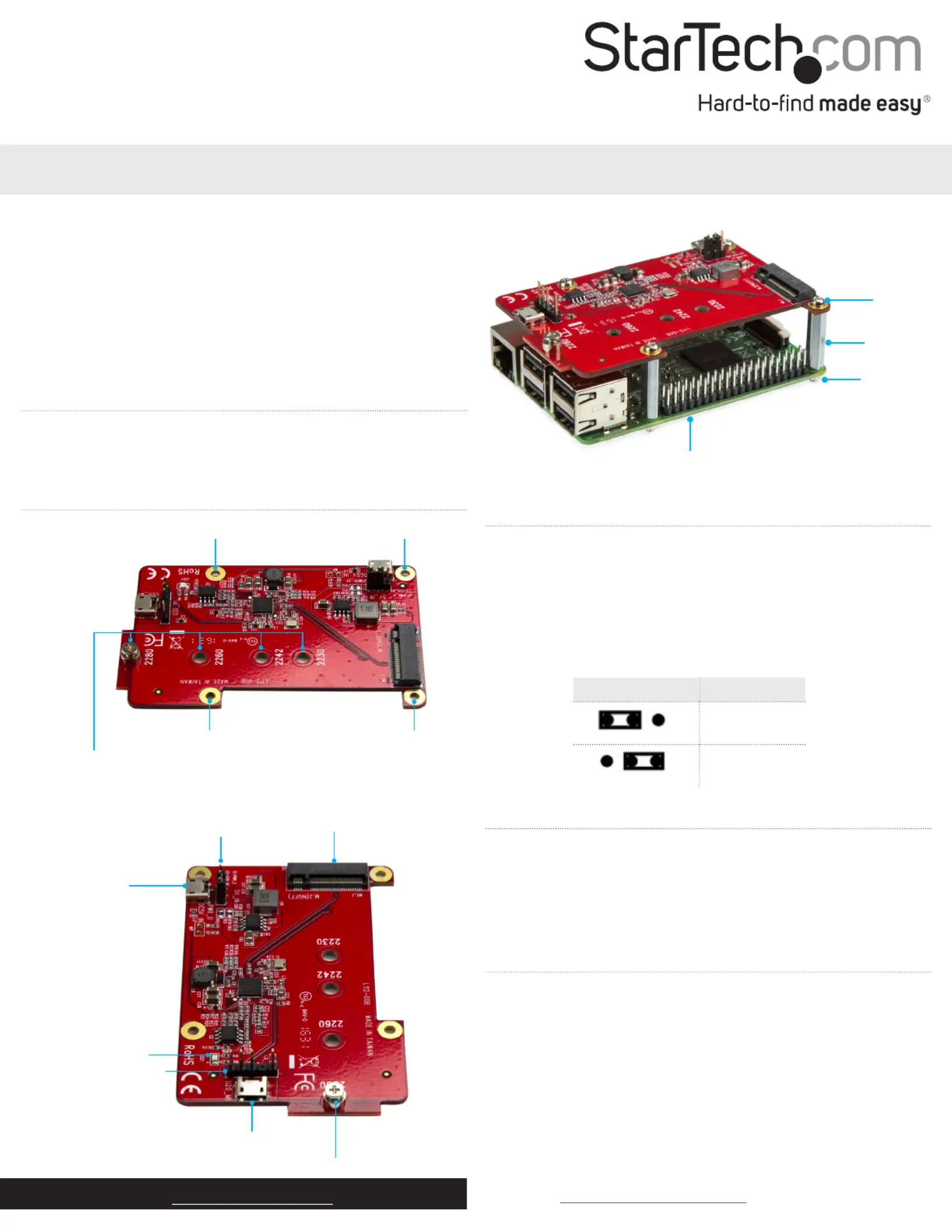
Product diagram
Installation hole
Installation hole
Installation hole Installation hole
Drive-mounting holes
M.2 SATA port
USB 2.0 header
USB 2.0 port
Drive-mounting hardware
LED
Jumper
5V DC AUX USB
power port
Converter installed on a development board
Screw
Stando
Nut
Development board
(not provided)
Change the power mode
The converter includes an auxiliary Micro-B USB port that you can
use if you don’t want to draw power from the bus. The AUX power
port is 5V DC.
You can use the jumper to control which interface power is drawn
from. By default, the jumper position on the converter is set to USB
power. Consult the table below for more information about how to
change the power mode.
Jumper position Mode
USB powered
AUX powered


Produkt Specifikationer

Mærke: StarTech.com
Kategori: Ikke kategoriseret
Model: PIB2M21
Bredde: 56 mm
Dybde: 88 mm
Højde: 11 mm
Vægt: 21.8 g
Produktfarve: Rød
Pakkevægt: 110 g
Pakkedybde: 170 mm
Pakkebredde: 142 mm
Pakkehøjde: 30 mm
Opbevaringstemperatur (T-T): -25 - 70 °C
Relativ luftfugtighed ved drift (H-H): 15 - 90 %
Driftstemperatur (T-T): 5 - 50 °C
Hurtig installationsvejledning: Ja
Kabler inkluderet: USB
Certificering: CE, FCC
Harmoniseret systemkode (HS): 84733020
Bæredygtighedscertifikater: RoHS
Værtsgrænseflade: Micro-USB
Intern: Ja
USB-drevet: Ja
Gennemsnitstid mellem fejl (MTBF): 5839751 t
Pakkevolumen: 100 cm³
Output-grænseflade: M.2
Dataoverførselshastighed (maks.): 6 Gbit/sek.
Chipsæt: Renesas - µPD720231A

Har du brug for hjælp?

Hvis du har brug for hjælp til StarTech.com PIB2M21 stil et spørgsmål nedenfor, og andre brugere vil svare dig


Ikke kategoriseret StarTech.com Manualer

Ikke kategoriseret Manualer

Nyeste Ikke kategoriseret Manualer

JET

JET JAT-450 Manual

4 December 2025
JET

JET JCT-3643 Manual

4 December 2025
Draper

Draper 34570 Manual

4 December 2025
Advantech

Advantech ADAM-4051 Manual

4 December 2025
SPT

SPT SU-1054 Manual

4 December 2025
ELO

ELO E119034 Manual

4 December 2025
ELO

ELO E432771 Manual

4 December 2025







