StarTech.com SM2DUPE11 Manual


Læs gratis den danske manual til StarTech.com SM2DUPE11 (2 sider) i kategorien Ikke kategoriseret. Denne vejledning er vurderet som hjælpsom af 11 personer og har en gennemsnitlig bedømmelse på 3.5 stjerner ud af 6 anmeldelser. Har du et spørgsmål om StarTech.com SM2DUPE11, eller vil du spørge andre brugere om produktet?
Side 1/2
Quick-Start Guide
To view manuals, FAQs, videos, drivers, downloads, technical drawings, and more, visit www.startech.com/support.
Manual Revision: April 26, 2021 10:15 AM
To view manuals, FAQs, videos, drivers, downloads, technical drawings, and more, visit www.startech.com/support.
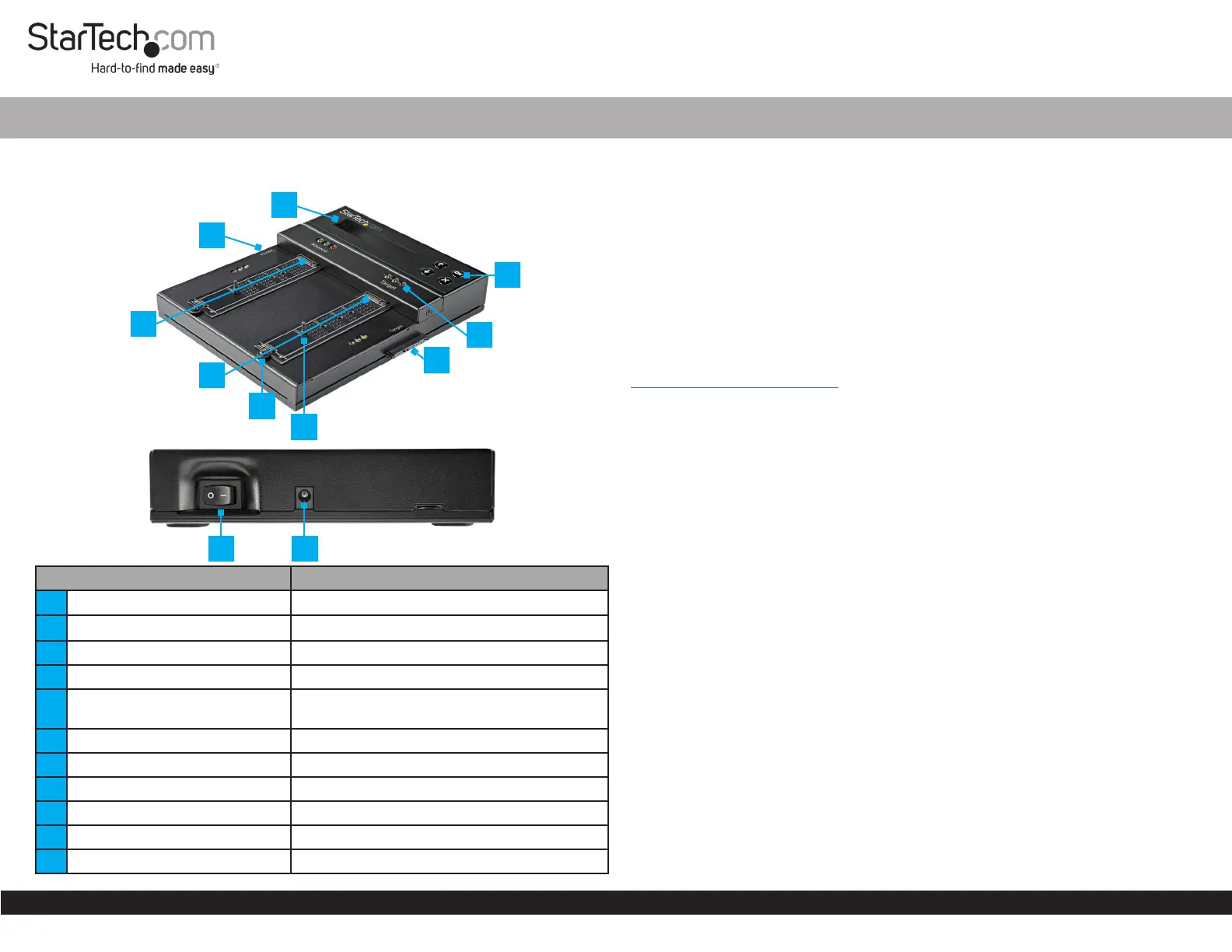
Product Diagram (SM2DUPE11)
Front View
Top Edge View
Component Function
1 LCD Display Displays Menu options, status, and details
2 2.5”/3.5” SATA Drive Connector Connect a source 2.5”/3.5” SATA Drive
3 M.2 Drive Connector Connect a source M.2 SATA or NVMe Drive
4 M.2 Drive Connector Connect a target M.2 SATA or NVMe Drive
5
Drive-Tray Screw /Drive -Tray
Screw Hole
Secures the Drive Tray
6 Rubber Drive Holder Secures the M.2 SATA or NVMe Drive
7 2.5”/3.5” SATA Drive Connector Connect a target 2.5”/3.5” SATA Drive
8 LED Indicators Indicates Drive Status
9 LCD Display Buttons Navigate through the LCD Display
10 Power Switch Toggle ON (I) or OFF (O)
11 Power Connector Connect the Universal Power Adapter
1 to 1 NVMe/SATA Drive Duplicator and Secure Eraser
Package Contents
Duplicator Dock x 1
SATA Drive Extensions Cable x 2
Anti-Slip/Vibration Pads x 2
Universal Power Adapter x 1
Regional Power Cords (NA, JP, EU, UK, ANZ) x 5
Quick-Start Guide x 1
Product Information
For product information, technical specications, manuals, and Declarations of
Conformance please visit:
www.startech.com/SM2DUPE11
Product Requirements
M2 SATA/NVMe SSD x 2
2.5”/3.5” SATA Drive x 2
Installation
Power the Drive Duplicator and Secure Eraser
1. Connect the Universal Power Adapter to the appropriate Regional Power Cord.
2. Connect the Universal Power Adapter to the Power Connector on the Drive
Duplicator and Secure Eraser.
3. Connect the Regional Power Cord to a Power Source.
4. Toggle the Power Switch to the ON (I) position.
Connect a 2.5”/3.5” SATA Drive
Note: Do not connect drives directly into the Hard Drive Duplicator and Secure
Eraser, as it puts undue strain on the device connectors.
1. Connect the Drive Connector Cable(s) to 2.5”/3.5” SATA Drive(s) and to the
2.5”/3.5” SATA Drive Connector(s) on the Drive Duplicator and Secure Eraser.
2. Place the Drive Duplicator and Secure Eraser on the Anti-Slip/Vibration Pads
(included).
Note: Avoid placing drives directly on a metal surface.
Connect M.2 SATA or NVMe Drive
1. Determine the size of the M2. SATA or NVMe Drive(s).
10
11
2
3
5
9
1
8
7
4
*Product may vary from photos
6


Produkt Specifikationer

Mærke: StarTech.com
Kategori: Ikke kategoriseret
Model: SM2DUPE11
Vekselstrømsindgangsspænding: 110 - 240 V
Vægt: 1200 g
Brugervejledning: Ja
Produktfarve: Sort
Produkttype: HDD/SSD duplikator
Pakkevægt: 3000 g
Pakkedybde: 465 mm
Pakkebredde: 235 mm
Pakkehøjde: 95 mm
Opbevaringstemperatur (T-T): -20 - 85 °C
Relativ luftfugtighed ved drift (H-H): 20 - 80 %
Strømforbrug (typisk): 60 W
Driftstemperatur (T-T): 5 - 45 °C
Skærm: LCD
Husmateriale: Metal
Dimensioner (BxDxH): 208 x 181 x 29 mm
Kabler inkluderet: AC, SATA
Produkter pr. palle: 6 stk
LED-indikatorer: Ja
Udgangsspænding: 12 V
Udgangsstrøm: 5 A
AC-adapter inkluderet: Ja
Bæredygtighedscertifikater: CE, RoHS
Hovedkassen højde (udvendigt): 330 mm
Hovedkassens længde (udvendigt): 520 mm
Hovedkassens bredde (udvendigt): 520 mm
Grænseflade: SATA
Indgangsstrøm: 1.4 A
Produkter pr. hovedkasse (udvendigt): 6 stk
Pakkelængde: 236 mm
SSD-grænsefladetype: M.2
Strømstiktype: Type M
Understøttede HDD-størrelser: 2.5, 3.5 "
Maksimalt understøttet lagerkapacitet: 16 TB
Understøttede HDD-grænseflader: SATA
Inkluderede strømstik typer: ANZ, EU, JP, NA, UK
Overførselshastighed: 7.5 GB/min
Antal samtidige kopier: 1 Kopier
Kopimaskine driftstilstande: Copy, Erase
Antal puder inkluderet: 2

Har du brug for hjælp?

Hvis du har brug for hjælp til StarTech.com SM2DUPE11 stil et spørgsmål nedenfor, og andre brugere vil svare dig


Ikke kategoriseret StarTech.com Manualer

Ikke kategoriseret Manualer

Nyeste Ikke kategoriseret Manualer

JET

JET JAT-450 Manual

4 December 2025
JET

JET JCT-3643 Manual

4 December 2025
Draper

Draper 34570 Manual

4 December 2025
Advantech

Advantech ADAM-4051 Manual

4 December 2025
SPT

SPT SU-1054 Manual

4 December 2025
ELO

ELO E119034 Manual

4 December 2025
ELO

ELO E432771 Manual

4 December 2025







