StarTech.com ST122HD4KU Manual


Læs gratis den danske manual til StarTech.com ST122HD4KU (2 sider) i kategorien Ikke kategoriseret. Denne vejledning er vurderet som hjælpsom af 14 personer og har en gennemsnitlig bedømmelse på 4.3 stjerner ud af 7.5 anmeldelser. Har du et spørgsmål om StarTech.com ST122HD4KU, eller vil du spørge andre brugere om produktet?
Side 1/2
Instruction Manual
DE: Bedienungsanleitung - de.startech.com
FR: Guide de l'utilisateur - fr.startech.com
ES: Guía del usuario - es.startech.com
IT: Guida per l'uso - it.startech.com
NL: Gebruiksaanwijzing - nl.startech.com
PT: Guia do usuário - pt.startech.com
Manual Revision: 10/16/2014
For the most up-to-date information, please visit: www.startech.com
1x HDMI Audio/Video Splitter (ST122HD4KU)
1x Power Adapter (NA/EU/UK/AUS)
1x USB power Cable
1x Instruction Manual
System Requirements
1x HDMI-enabled Video Source Device (i.e. Blu-ray player,
computer, etc.)
2x HDMI-enabled Display Devices w/ cabling (i.e. Television,
projector, etc.)
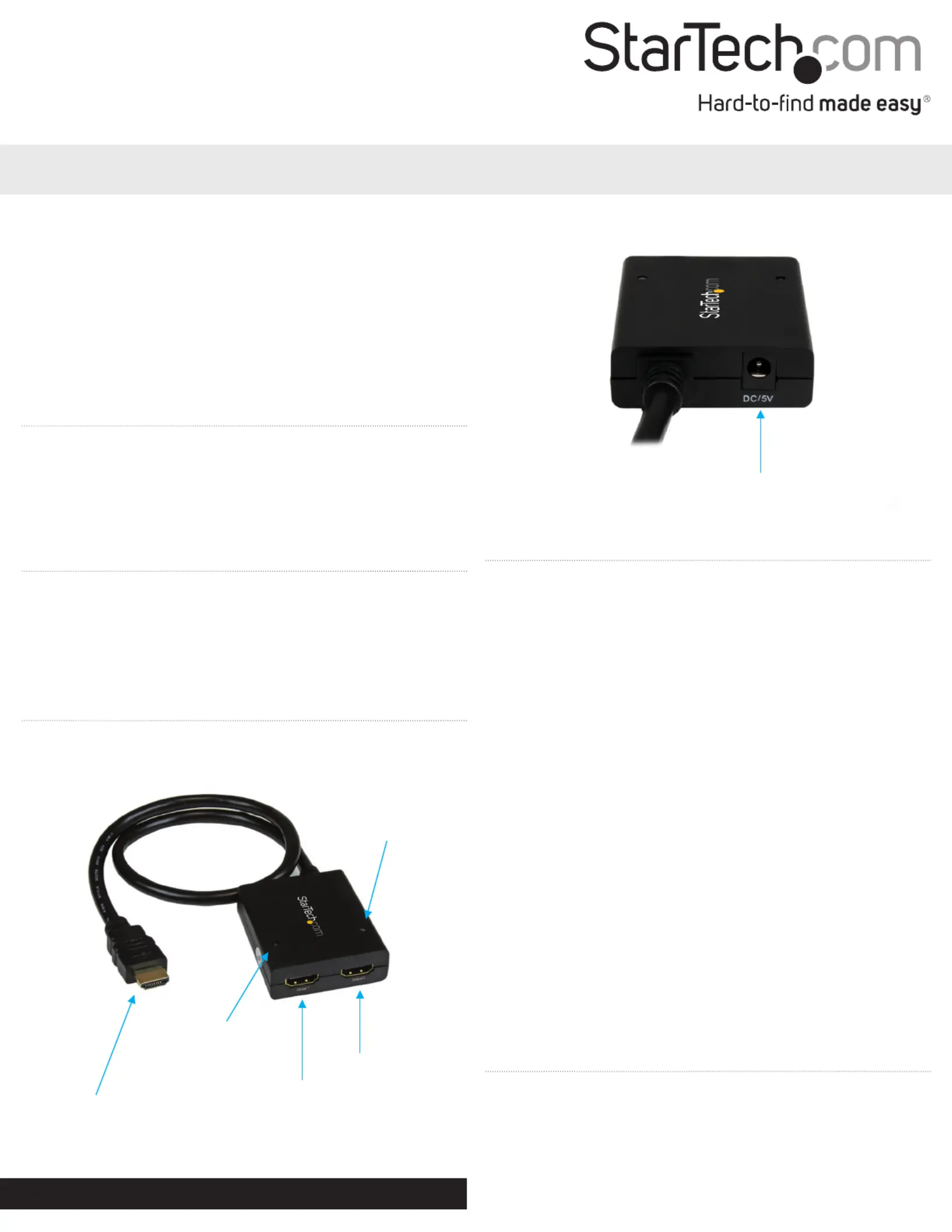
Product Diagram
Front View
Hardware Installation
Note: Ensure your HDMI-enabled video source device, and the
HDMI-enabled Display Devices are powered o before you begin
installation.
1. Connect the on the HDMI Input Dongle Cable ST122HD4KU
from the A/V output port of your HDMI-enabled Video Source
Device.
2. Connect an (not included) from each of theHDMI cable HDMI
output ports ST122HD4KU HDMI input port on the to the on
your HDMI-enabled Display Devices.
Note: Each port is numbered, please take note of which number is
assigned to each HDMI-enabled display device.
3. Power on each HDMI-enabled Display Device, followed by your
HDMI-enabled Video Source Device.
4. Connect the included power adapter from an available power
source to the power adapter port ST122HD4KU. on the
Or
If you would prefer to use a USB power source, connect the
included from an available USB power source, USB power cable
to the power adapter port ST122HD4KU. on the
5. Your Video source device A/V output will now appear on each
attached HDMI-enabled display device.
ST122HD4KU
2-Port HDMI® Splitter with USB Power – 4K
HDMI Output Port 1
HDMI Output Port 1
Activity LED
HDMI Input Dongle
Cable
HDMI Output Port 2
Activity LED
HDMI Output Port 2
Power Adapter Port
Rear View
Activity LED
Each HDMI output port on the ST122HD4KU is equipped with an
Activity LED. This LED will light while an active HDMI display is
attached and receiving a video input signal.


Produkt Specifikationer

Mærke: StarTech.com
Kategori: Ikke kategoriseret
Model: ST122HD4KU
Vekselstrømsindgangsspænding: 100-240 V
Bredde: 50 mm
Dybde: 620 mm
Højde: 18 mm
Vægt: 235 g
Brugervejledning: Ja
Produktfarve: Sort
Pakkevægt: 396 g
Pakkedybde: 156 mm
Pakkebredde: 230 mm
Pakkehøjde: 56 mm
Ethernet LAN: Ingen
Maksimal opløsning: 3840 x 2160 pixel
Kabler inkluderet: USB
Understøttede grafikopløsninger: 1280 x 720 (HD 720), 1920 x 1080 (HD 1080), 1920 x 1200 (WUXGA), 2560 x 1600 (WQXGA)
Certificering: REACH, FCC, CE
DC-in-stik: Ja
Udgangsspænding: 5 V
Udgangsstrøm: 2 A
AC-adapter inkluderet: Ja
Full HD: Ja
Harmoniseret systemkode (HS): 85176990
Bæredygtighedscertifikater: RoHS
Indgangsstrøm: 0.5 A
USB-drevet: Ja
Maksimal opdateringshastighed: 30 Hz
HDMI-version: 1.4
Videoudgang: 2x HDMI
Video porttype: HDMI
Antal videoporte: 2
Inkluderede strømstik typer: AU, EU, NA, UK
Understøttelse af lyd: Ja

Har du brug for hjælp?

Hvis du har brug for hjælp til StarTech.com ST122HD4KU stil et spørgsmål nedenfor, og andre brugere vil svare dig


Ikke kategoriseret StarTech.com Manualer

Ikke kategoriseret Manualer

Nyeste Ikke kategoriseret Manualer

JET

JET JAT-450 Manual

4 December 2025
JET

JET JCT-3643 Manual

4 December 2025
Draper

Draper 34570 Manual

4 December 2025
Advantech

Advantech ADAM-4051 Manual

4 December 2025
SPT

SPT SU-1054 Manual

4 December 2025
ELO

ELO E119034 Manual

4 December 2025
ELO

ELO E432771 Manual

4 December 2025







