StarTech.com UDCMTRAY Manual


Læs gratis den danske manual til StarTech.com UDCMTRAY (2 sider) i kategorien Ikke kategoriseret. Denne vejledning er vurderet som hjælpsom af 15 personer og har en gennemsnitlig bedømmelse på 4.6 stjerner ud af 8 anmeldelser. Har du et spørgsmål om StarTech.com UDCMTRAY, eller vil du spørge andre brugere om produktet?
Side 1/2
Quick-Start Guide
To view manuals, FAQs, videos, drivers, downloads, technical drawings, and more, visit www.startech.com/support.
Manual Revision: November 12, 2020
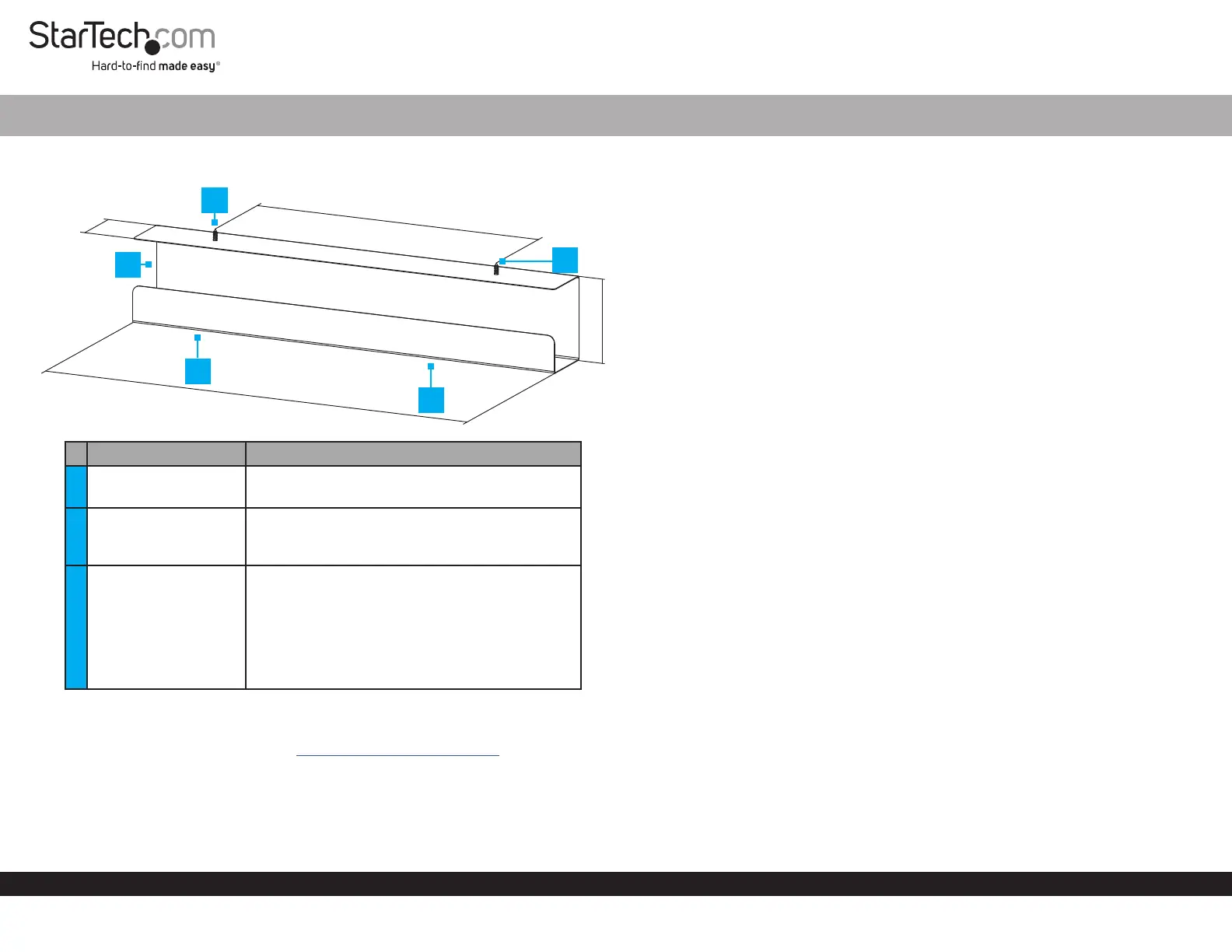
Product Diagram (UDCMTRAY)
Components Function
1 Cable Tray Organizer
Organize and hide Cables
Hide a Power Strip
2
Mounting Holes/
Screws
Mount the Cable Tray Organizer underneath
a Desk
#12 Phillips® Head Screws
3
Screwdriver Access
Holes
Cutouts that allow a Phillips Head
Screwdriver or a Phillips Head Drill Bit to
pass through the bottom of the Cable Tray
Organizer
Note: A long Phillips Head Screwdriver or a
Drill Bit Extension may be required to fasten the
Mounting Screws.
Requirements
For the latest requirements, please visit www.startech.com/UDCMTRAY.
#3 Phillips Head Screwdriver or a Power Drill with a Phillips Head Bit x 1
Power Drill with a Drill Bit x 1
Pencil x 1
(Optional) Drill Bit Extension x 1
Under Desk Cable Tray Organizer
Installation
Note: It is easier to complete the following installation steps with two people.
1. Hold the Cable Tray Organizer in the desired location under the Desk, with the
Mounting Holes resting against the underside of the Desk.
2. Mark the location of the Mounting Holes using a Pencil.
3. Use a Power Drill with an appropriately sized Drill Bit to drill Pilot Holes into the
locations of the Mounting Holes.
Notes: The Pilot Holes should be the same depth as the length of the Mounting
Screws. A small piece of tape can be placed on the Drill Bit to mark the proper depth
of the Pilot Holes.
The Drill Bit size will be determined by the wood used to construct the Desk. Consult a
professional if you are unable to determine the proper Drill Bit size.
4. Insert the Mounting Screws through the Mounting Holes and into the Desk.
(Figure 1)
5. Fasten the Screws into the Desk using a Phillips Head Screwdriver or a Power
Drill with a Phillips Head Bit.
114mm
76mm
600mm
400mm
1
2
2
3
3


Produkt Specifikationer

Mærke: StarTech.com
Kategori: Ikke kategoriseret
Model: UDCMTRAY
Type: Kabelbakke
Bredde: 600 mm
Dybde: 120 mm
Højde: 80 mm
Vægt: 1200 g
Antal pr. pakke: 1 stk
Produktfarve: Sort
Pakkevægt: 1300 g
Pakkedybde: 120 mm
Pakkebredde: 615 mm
Pakkehøjde: 80 mm
Hurtig start guide: Ja
Materiale: Stål
Harmoniseret systemkode (HS): 85389099
Bæredygtighedscertifikater: RoHS
Formål: Skrivebord
Hovedkassen højde (udvendigt): 355 mm
Hovedkassens længde (udvendigt): 390 mm
Hovedkassens bredde (udvendigt): 640 mm
Produkter pr. hovedkasse (udvendigt): 12 stk
Skruer inkluderet: Ja
Antal skruer: 2

Har du brug for hjælp?

Hvis du har brug for hjælp til StarTech.com UDCMTRAY stil et spørgsmål nedenfor, og andre brugere vil svare dig


Ikke kategoriseret StarTech.com Manualer

Ikke kategoriseret Manualer

Nyeste Ikke kategoriseret Manualer

JET

JET JAT-450 Manual

4 December 2025
JET

JET JCT-3643 Manual

4 December 2025
Draper

Draper 34570 Manual

4 December 2025
Advantech

Advantech ADAM-4051 Manual

4 December 2025
SPT

SPT SU-1054 Manual

4 December 2025
ELO

ELO E119034 Manual

4 December 2025
ELO

ELO E432771 Manual

4 December 2025







