Vocopro SDR-4 Manual


Læs gratis den danske manual til Vocopro SDR-4 (2 sider) i kategorien Ikke kategoriseret. Denne vejledning er vurderet som hjælpsom af 9 personer og har en gennemsnitlig bedømmelse på 4.4 stjerner ud af 5 anmeldelser. Har du et spørgsmål om Vocopro SDR-4, eller vil du spørge andre brugere om produktet?

Side 1/2
SDR-4 RECORDER
Use the SDR-4 in combination with
a compatible unit to capture audio
direct to an SD card. Once recorded,
the audio can then be played back
through the device in which it is
installed. Of course, you can also
remove the SD card and transfer
the MP3 files to your computer for
SDR-4 User’s Guide
SDR-4 User’s Guide
© VocoPro 2012
v1.1113
www.vocopro.com
LOCK
UNLOCK
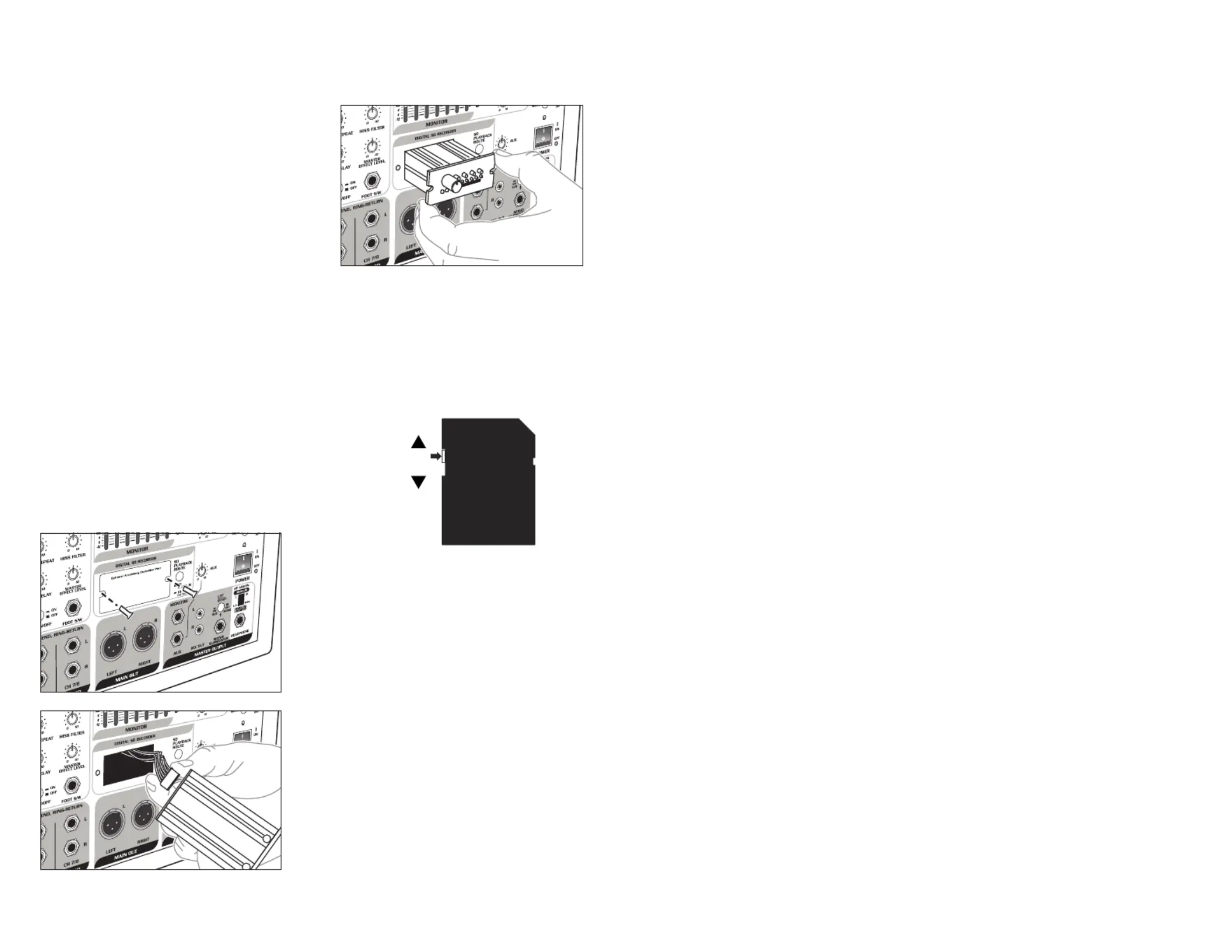
SDR-4 Installation
1. Unscrew the retaining screws
from the expansion slot cover on
your host device.
2. Remove the cover and store it in
a safe place.
3. Attach the cable to the back of
the SDR-4.
NOTE: The USB jack on the rear
panel of the SDR-4 is for factory
use only.
4. Carefully slide the SDR-4 into
place.
5. Replace and tighten screws.
Inserting/Removing an SD
card
1. Ensure that SD card lock
mechanism is not set to
‘Lock’.
2. Insert SD card with the same
alignment as indicated by the
SD card icon on the front of the
SDR-4.
3. Push the SD card in until it clicks
into place.
4. To remove the SD card, gently
push in until it clicks and pops
out slightly; it is then safe to
remove.
NOTE: The maximum size SD card
that can be used by the SDR-4 is
16GB.
Recording to the SDR-4
Prior to recording to the SDR-4, you
want to ensure that the signal being
recorded is properly mixed. Once
you are happy with your overall mix,
follow the steps below to record.
Press the REC button once to place
the SDR-4 in record pause mode.
This is the time to check the levels of
the audio to be recorded and adjust
the REC VOL control if necessary. An
optimal recording level will illuminate
all the green LEDs with very little to
no activity on the red LEDs.
Press the REC button a second time
to begin recording.
Pressing the REC button during a
recording in progress will pause the
recording without creating a new
track. This is useful for recording
several sections of a recording
session into a single track without
breaking it up into several tracks.
Press the PLAY/STOP button to
stop recording.
Once a file is recorded, it will appear as
LIN0001.MP3 in the root directory
of the SD card (when viewed on a
computer). Subsequent recorded
files will be named LIN0002.MP3,
LIN0003.MP3…
Playing Back Recorded
Files
In addition to recorded les, the
SDR-4 can playback other files
placed on the SD card.
Compatible file formats: MP3, WMA
SDR-4
SD Digital Audio Recorder Module
OWNER’S MANUAL
(Your host unit may differ from that
shown in diagram)
The tracks will play in the following
order:
Files in root directory
MP3 format (alphabetically)
WMA format (alphabetically)
Files in folders (alphabetically)
MP3 format (alphabetically)
WMA format (alphabetically)
Refer to the descriptions and
functions on the next page for
playback controls.


Produkt Specifikationer

Mærke: Vocopro
Kategori: Ikke kategoriseret
Model: SDR-4

Har du brug for hjælp?

Hvis du har brug for hjælp til Vocopro SDR-4 stil et spørgsmål nedenfor, og andre brugere vil svare dig


Ikke kategoriseret Vocopro Manualer

Ikke kategoriseret Manualer

Nyeste Ikke kategoriseret Manualer

Waterstone

Waterstone 7800 Manual

11 December 2025
Kwikset

Kwikset 258 Manual

11 December 2025
Schlage

Schlage F170 Manual

11 December 2025
Moen

Moen Align 7565EV Manual

11 December 2025
ALNO

ALNO MC10244 Manual

11 December 2025
JET

JET TAK-ZX Manual

11 December 2025
Waterstone

Waterstone 1455 Manual

11 December 2025
Laica

Laica NE2015 Manual

11 December 2025