Whirlpool AKP 3840 PIX AUS Manual

Whirlpool Ovn AKP 3840 PIX AUS

Læs gratis den danske manual til Whirlpool AKP 3840 PIX AUS (8 sider) i kategorien Ovn. Denne vejledning er vurderet som hjælpsom af 34 personer og har en gennemsnitlig bedømmelse på 4.4 stjerner ud af 17.5 anmeldelser. Har du et spørgsmål om Whirlpool AKP 3840 PIX AUS, eller vil du spørge andre brugere om produktet?

Side 1/8
EN
1
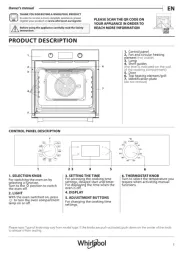
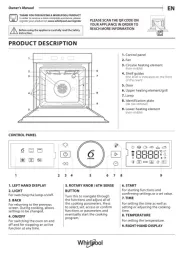
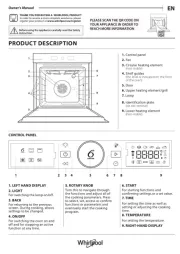
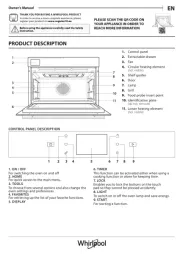
PRODUCT DESCRIPTION
DAILY REFERENCE
GUIDE
CONTROL PANEL
Before using the appliance carefully read the Health and Safety guide.
1. Control panel
2. Fan
3. Lamp
4. Shelf guides
(the level is indicated on the wall
of the cooking compartment)
5. Door
6. Door lock
(the level is indicated on the wall
of the cooking compartment)
7. Upper heating element/grill
8. Circular heating element
(non-visible)
9. Identification plate
(do not remove)
10. Bottom heating element
(non-visible)
1. SELECTION KNOB
For switching the oven on by
selecting a function.
Turn to the position to switch
the oven off.
2. LIGHT
With the oven switched on, press
to turn the oven compartment
lamp on or off.
3. TIME SETTING
For accessing the cooking time
settings, delayed start and timer.
For displaying the time when the
oven is off.
4. DISPLAY
5. ADJUSTMENT BUTTONS
For changing the cooking time
settings.
6. THERMOSTAT KNOB
Turn to select the temperature you
require when activating manual
functions.
Automatic functions use .
THANK YOU FOR PURCHASING AN
WHIRLPOOL PRODUCT
To receive more comprehensive help and
support, please register your product at
www . whirlpool . eu/ register
You can download the Safety Instructions
and the Use and Care Guide by visiting our
website docs . whirlpool . eu and following
the instructions on the back of this booklet.
1
2
3
4
5
9
10
8
7
6
1 32 4 5 6


Produkt Specifikationer

Mærke: Whirlpool
Kategori: Ovn
Model: AKP 3840 PIX AUS

Har du brug for hjælp?

Hvis du har brug for hjælp til Whirlpool AKP 3840 PIX AUS stil et spørgsmål nedenfor, og andre brugere vil svare dig