Whirlpool WTC 3746 A+NFCX Manual
Whirlpool Køleskab WTC 3746 A+NFCX

Læs gratis den danske manual til Whirlpool WTC 3746 A+NFCX (4 sider) i kategorien Køleskab. Denne vejledning er vurderet som hjælpsom af 2 personer og har en gennemsnitlig bedømmelse på 4.3 stjerner ud af 1.5 anmeldelser. Har du et spørgsmål om Whirlpool WTC 3746 A+NFCX, eller vil du spørge andre brugere om produktet?

Side 1/4
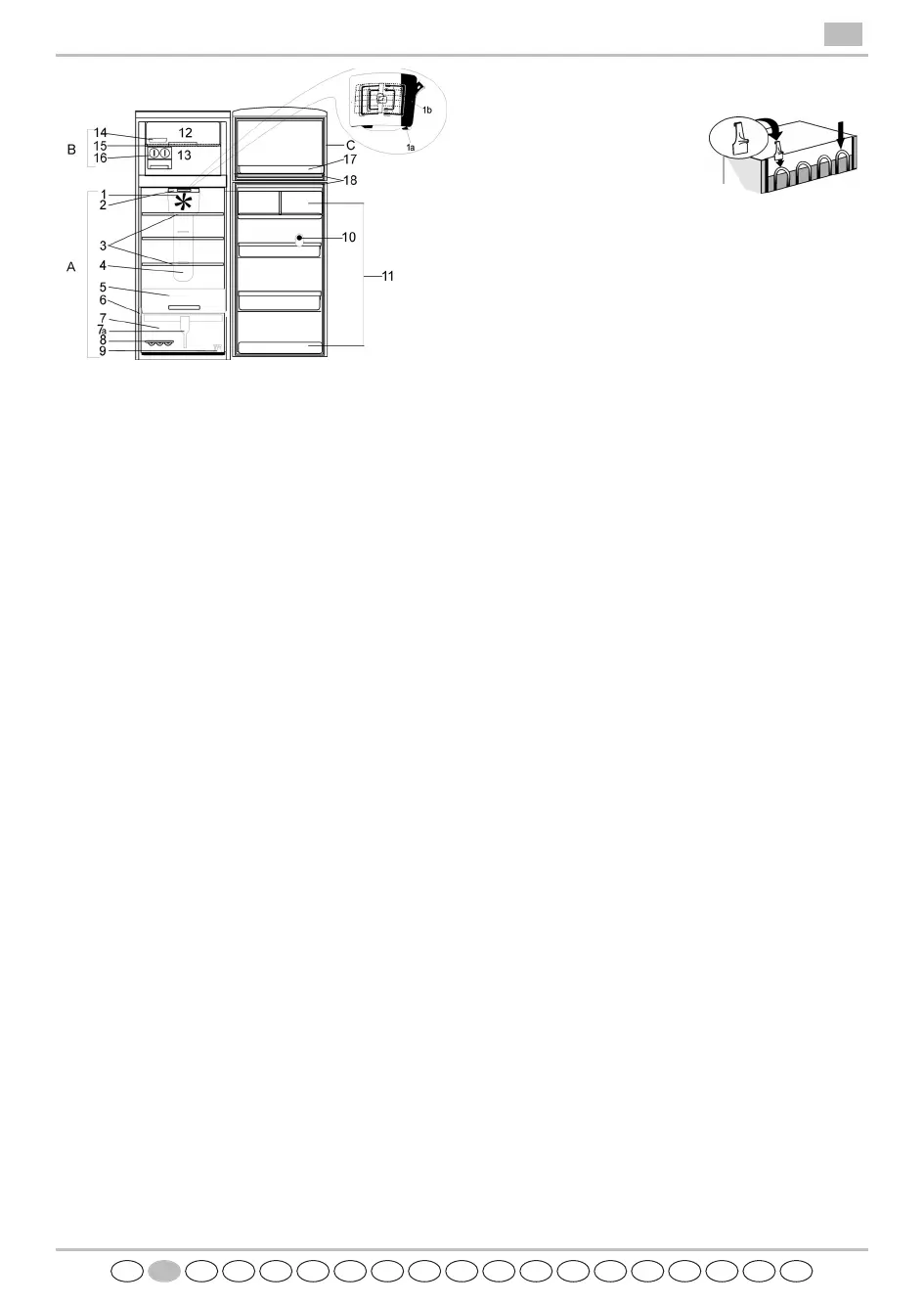
A. Refrigerator Compartment
2. LED's lighting
3. Shelves / Shelf area
4. Multi-flow cold air system
5. Cooler compartment
6. Rating plate with commercial name
7a. Crisper divider
8. Egg tray
9. Reversibility kit
10. Separator
11. Door trays
B. Freezer Compartment
12. Area for freezing (with/without flap)
13. Area for storing frozen foods
14. Ice tray
15. Plastic shelf
16. Ice-cube tray
17. The freezer door trays for pizza or other frozen
products with a short storage time (2** storage
compartment)
Depending on the model the number and type of
accessories may vary.
C. Control panel and display
Anti-bacterial protection:
1. Filter in fan (depending on the model)
7. Crisper with antibacterial additives (depending
on the model)
18. Door seals
The crisper and the door seals are manufactured from
materials that inhibit bacterial growth.
Notes:
- All shelves and door trays are removable. Freezer plastic
shelf cannot be removed to have a good air flow rate
inside freezer compartment.
- The internal temperatures of the appliance depend on
the ambient temperature, frequency of opening the
doors, as well as location of the appliance. Temperature
setting must consider these factors.
- The appliance accessories are not suitable for washing in
dishwasher.
HOW TO START THE APPLIANCE
Fit the spacers (if supplied) on the
upper part of the condenser at the
rear of the appliance. When the
appliance is connected to the
power supply, the display lights up
and all the symbols appear on the
display for a few seconds.
The freezer factory setting -18°C appears and flashes,
while the refrigerator display shows a temperature of
+5°C (factory-set). While the appliance is working to
reach the factory-set temperature, an acoustic alarm
sounds and temperature symbol on the freezer display
flashes (- -). This indicates that the appliance has not yet
reached the optimal temperature for storage of foodstuffs.
Press and hold the button "Reset" until the acoustic alarm
disables.
The icon disappears when the freezer compartment
reaches a temperature below -12°C, the display will show
the temperature -18°C.
After being switched on, the refrigerator needs from 4 to
6 hours to reach the correct temperature to store a
typical volume of food in the refrigerator compartment.
Important:
If food is placed in the refrigerator before the appliance
has cooled completely, it may deteriorate.
Turning the refrigerator and freezer controls to a colder
than recommended setting will not cool the
compartments any faster.
A built-in exterior moisture control continuously guards
against moisture build-up on the front edges.
Do not be alarmed if these edges sometimes feel warm to
the touch. The inside light switches on when the
refrigerator door is opened.
After 10 minutes of door opening the light switches off.
FAN WITH A BUTTON
The fan improves temperature distribution inside the
refrigerator compartment, allowing better preservation of
stored food. By default, the fan is ACTIVE.
It is advisable to keep the fan active, so that the "Fresh
Control" / "ProFresh" function can work and also when
the ambient air temperature is over 27 ÷ 28°C or if you
perceive drops of water on the glass shelves or in the
severe humidity conditions.
Note
Do not obstruct the air intake area with food items.
When Fresh Control / ProFresh is disabled
remember to turn off the fan when there is a lower
ambient air temperature.
To turn off the fan press the button (1a).
If the appliance has the fan it can be equipped with the
antibacterial filter.
Remove it from the box (found in the crisper drawer
(item 7) and insert into the cover of fan (item 1b).
The replacement procedure is attached with the filter.
PRODUCT SHEET
GB
ROBGRUSHSKCZPLIGB FINDKNSGRPENLFD


Produkt Specifikationer

Mærke: Whirlpool
Kategori: Køleskab
Model: WTC 3746 A+NFCX

Har du brug for hjælp?

Hvis du har brug for hjælp til Whirlpool WTC 3746 A+NFCX stil et spørgsmål nedenfor, og andre brugere vil svare dig


Køleskab Whirlpool Manualer

Køleskab Manualer

Nyeste Køleskab Manualer

Neff

Neff KI6773FE1 Manual

22 December 2025
AEG

AEG SCS61800F1 Manual

22 December 2025
AEG

AEG TF6FS18XDC Manual

22 December 2025
Neff

Neff KI2326DD1 Manual

21 December 2025
Neff

Neff KI1216DD1 Manual

21 December 2025
GE

GE GTE16DTNRWW Manual

21 December 2025
Gaggenau

Gaggenau RVC467190 Manual

21 December 2025
Neff

Neff KI7861SE0 Manual

21 December 2025
Neff

Neff KI1416DD1 Manual

21 December 2025
BEKO

BEKO B5RCNA345HG1 Manual

21 December 2025