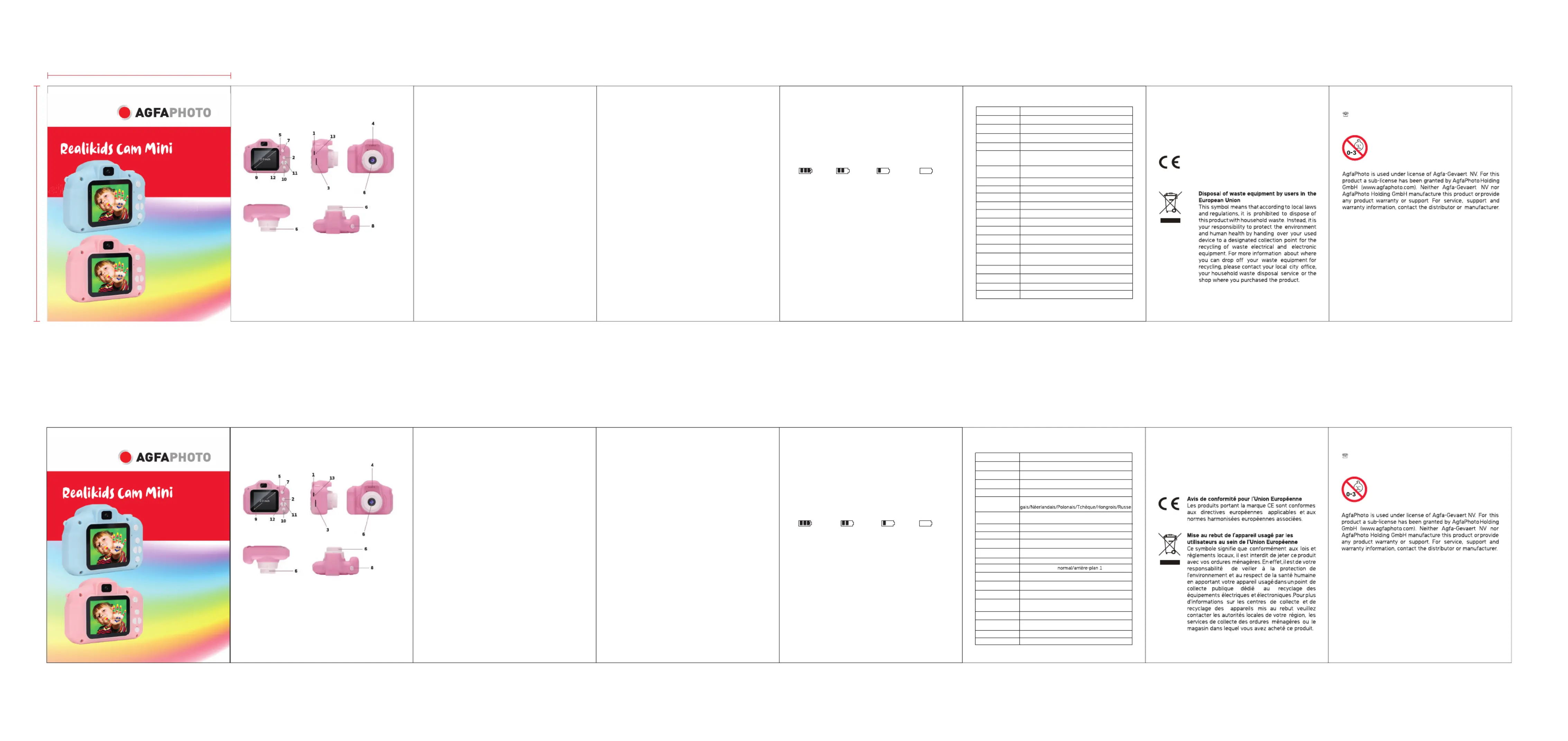
Button function description
With the supplied USB cable, you can connect the camera either to
a PC for data transfer or to a power source to recharge its battery.
Once the camera is on, press this button to successively move from
a mode to another: video recording / camera / video playback and
Before use, insert an SD card in this slot to save your videos and
It plays the sound of a video or an audio recording.
It records the sound of a video or an audio recording.
This button turns the camera on/off and also serves as a charging
1. In video recording mode, short press this button to start
recording and press to again to stop it.
2. In camera mode, short press this button to take photos.
3. In settings menu, this button is used to validate each setting
Its 2-inch size allows comfortable viewing of video and photo files.
Short press this button to enter the setting menu and press it
Use these buttons to move up and down in a list of options.
1.USB 2.Up button 3.SD card slot
4.Speaker 5.Indicator light 6.Lens
7.Power button 8.Shutter button 9.Screen
10.Down button 11.Mode button 12.Menu button
Product specifications Warranty: this product is one-year guaranteed.
Product manufactured for and distributed by :
GT COMPANY - 5 rue de la Galmy - 77700 Chessy - France -
+33 (0) 1.61.10.09.25 - www.gtcompany.fr
Notice of compliance for the European Union
Products bearing the CE mark comply with the
applicable European directives and associated
harmonised European standards.
WARNING! Not suitable for children under 36
Small parts and long cord.
Choking and strangulation hazards.
Basic operation instructions
Press a few seconds the power button to turn the camera on, the blue
light indicator will then light up once the camera is on. Press this button
again to turn the camera off, the blue light indicator will also stop lighting
Short press mode button to switch to video mode then the camera
resolution and icon will be displayed in the upper right corner of the
Short press the menu button to exit the setting menu.
Connect the USB cable to the computer and the child camera wil!
automatically switch to USB mode.
In this mode, you can read or transfer video or photo files saved on the
1. Battery indicator, please refer to the illustration:
fixed lens, 100 degree angle
English/French/German/Spanish/Italian/Portuguese/
Dutch/Polish/Czech/Hungarian/Russian
2. 0 inch screen (720x320)
off/1 minute/3 minutes/5 minutes/10 minutes
delete one single file/delete all files
Windows me/2000/2003/Win7/XP/Vista;
cancel/executeReset system
@ : aftersaleservice@gtcompany.fr
screen. Short press the shutter button to start video recording, the
recording indicator will then start flashing indicating that the camera is
Short press the mode button to switch to the camera mode, then the
camera resolution and icon will be displayed in the upper right
Short press the shutter button to take a picture.
When the picture is taken, the indicator flashes once indicating that the
Short press the mode button to switch to the playback mode, then
the playback icon will be displayed in the upper right corner of the screen.
Short press the up/down buttons to select a file up or down.
Short press menu button to enter the setting menu. By pressing the
up/down buttons you can go up and down in each setting item.
Select the setting item that needs to be changed, and confirm the
change by short pressing the shutter button.
Full battery Lower battery Low battery Empty battery
2. There are three ways to charge the battery, please note that
the blue charging indicator will light up during charging.
1: Charging with an AC adapter.
2: Charging with a computer.
3: Charging with a USB car charger.
Note: If bug occur during use, remove the battery or press the reset button
and then turn the camera on again to return to normal.
1080p: 1440 1080 720p: 1280x720 GA: 640x480 x / /V
Description des fonctions des boutons
Avec le câble USB fourni, vous pouvez connecter l'appareil photo soit à un
PC pour y transférer des fichiers, soit à une source d'alimentation pour
Une fois l'appareil photo allumé, appuyez plusieurs fois sur ce bouton pour
passer successivement d'un mode à l'autre : enregistrement vidéo / appareil
photo / lecture vidéo et visualisation de photos.
Avant toute utilisation, insérez une carte SD dans cette fente pour
enregistrer vos vidéos et vos photos.
Lit le son d'une vidéo ou d'un enregistrement audio.
Enregistre le son d'une vidéo ou d'un enregistrement audio.
Ce bouton permet d'allumer et d'éteindre l'appareil photo et sert également
1. En mode d'enregistrement vidéo, appuyez brièvement sur ce
bouton pour démarrer l'enregistrement puis appuyez à nouveau
2. En mode appareil photo, appuyez brièvement sur ce bouton
3. Dans le menu des réglages, ce bouton permet de valider chaque
Sa taille de 2 pouces permet de visualiser confortablement des fichiers
Appuyez brièvement sur ce bouton pour entrer dans le menu des réglages
et appuyez à nouveau pour quitter.
Utilisez ces boutons pour vous déplacer de haut en bas dans une liste
1. USB 2. Bouton Haut 3. Fente carte SD
4. Haut-parleur 5. Indicateur lumineux 6. Objectif
7. Bouton d’alimentation 8. Bouton obturateur 9. Écran
10. Bouton Bas 11. Bouton Mode 12. Bouton Menu
13. Bouton de réinitialisation
Caractéristiques produit Garantie : ce produit est garanti un an.
Produit fabriqué pour et distribué par :
GT COMPANY – 5 rue de la Galmy - 77700 Chessy - France -
+33 (0) 1.61.10.09.25 - www.gtcompany.fr
ATTENTION! Ne convient pas à un enfant de
Petites pièces et long tour de cou.
Risques d'étouffement et de strangulation.
Instructions pour fonctionnement de base
Appuyez quelques secondes sur le bouton d'alimentation pour allumer
l'appareil photo, l’indicateur lumineux s'allumera alors en bleu une fois la
mise en marche effectuée. Appuyez à nouveau sur ce bouton pour
éteindre l'appareil photo, l’indicateur lumineux va également s’éteindre.
Appuyez brièvement sur le bouton mode pour passer en mode
enregistrement vidéo, puis la résolution et l'icône de la caméra s'afficheront
dans le coin supérieur droit de l'écran. Appuyez brièvement sur le bouton
obturateur pour lancer l'enregistrement vidéo, l’indicateur lumineux se met
alors à clignoter indiquant que la caméra est en train d'enregistrer.
Appuyez brièvement sur le bouton mode pour passer en mode appareil
photo, puis la résolution et l'icône de l’appareil photo s'afficheront dans le coin
supérieur droit de l'écran. Appuyez brièvement sur le bouton obturateur
pour prendre une photo. Lorsque la photo est prise, l'indicateur lumineux
s’allume une fois indiquant que la photo a bien été enregistrée.
4. Lecture photo et vidéo
Appuyez brièvement sur le bouton mode pour passer en mode lecture,
puis l'icône de lecture s'affichera dans le coin supérieur droit de l'écran.
Appuyez brièvement sur les boutons haut/bas pour sélectionner une
photo à visualiser ou une vidéo à lire.
Appuyez brièvement sur le bouton menu pour entrerdans le menu de
réglage. En appuyant sur les touches haut/bas, vous pouvez monter et
descendre dans chaque liste d’options de réglage. Sélectionnez le
paramètre devant être modifié et confirmez le changement en appuyant
brièvement sur le bouton obturateur.
6. Quitter le menu de réglage
Appuyez brièvement sur le bouton menu pour quitter le menu de réglage.
Une fois branché par USB à l’ordinateur, l’appareil photo passe
automatiquement en mode USB.
Dans ce mode, vous pouvez lire ou transférer des fichiers vidéo ou photo
enregistrés sur la carte mémoire.
Instructions concernant la batterie
1. Veuillez vous référer aux illustrations ci-dessous pour les diverses
significations de l’icône de la batterie:
2. La batterie se recharge de 3 façons différentes, notez que l’indicateur
de charge lumineux s’allume en bleu pendant le chargement.
1. Avec un adaptateur sur prise secteur
2. Avec le câble USB sur ordinateur
appuyez sur le bouton de réinitialisation puis rallumer l’appareil photo pour
que son fonctionnement revienne à la normale.
objectif fixe, angle de 100 degrés
carte micro SD jusqu’à 32GB
Anglais/Français/Allemand/Espagnol/Italien/Portu
720p : 1280x720/VGA : 640x480
off/1 minute/3 minutes/5 minutes/10 minutes
supprimer un seul fichier/supprimer tout
Windows me/2000/2003/Win7/XP/Vista;
@ : aftersaleservice@gtcompany.fr
Batterie pleine Batterie légèrement
3. Sur ch USB allume-cigare en voiture
Remarque : Si un bug survient pendant l'utilisation, retirez la batterie ou