Whirlpool ADG 9200 Manual


Læs gratis den danske manual til Whirlpool ADG 9200 (8 sider) i kategorien Opvaskemaskine. Denne vejledning er vurderet som hjælpsom af 3 personer og har en gennemsnitlig bedømmelse på 4.3 stjerner ud af 2 anmeldelser. Har du et spørgsmål om Whirlpool ADG 9200, eller vil du spørge andre brugere om produktet?

Side 1/8
GB
-1-
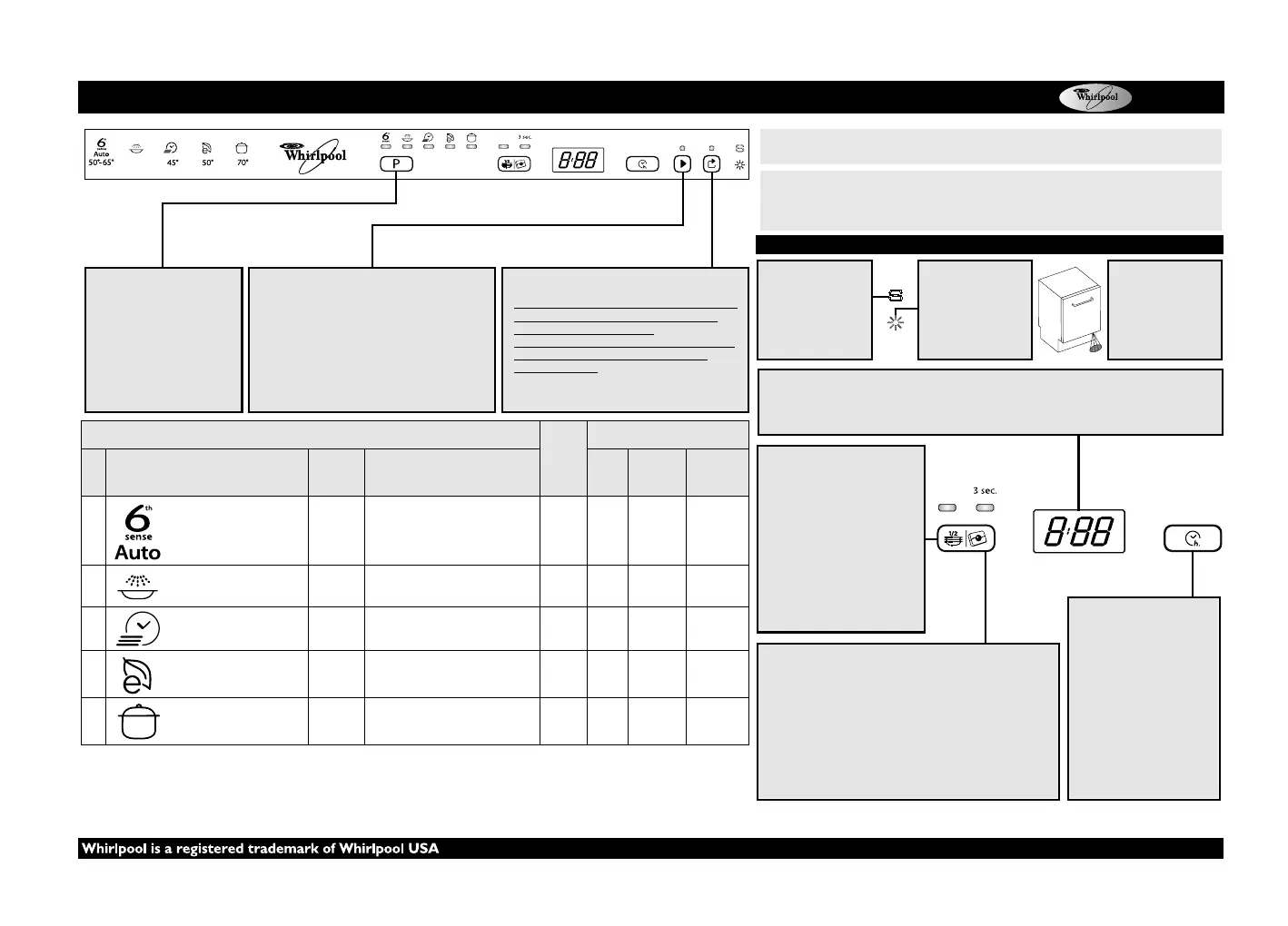
Chart
PROGRAM SELECTION
BUTTON
Push “Programs” button
(repeatedly) until the indicator
of the required program lights
up (see “Table of programs”
below).
START/RESUME BUTTON
Push this button to start the selected program: the
indicator lights up and goes off at the end of the program.
When the door is opened during a washing cycle, the
cycle is temporarily paused: the Start indicator blinks.
To resume the cycle push Start button and close
the door within 3 seconds.
CANCEL/OFF BUTTON
Push this button to switch off the control panel.
If pressed when a program is running it cancels the
program ongoing draining water for 1 minute
(0:01 is shown into the display).
If pressed when the dishwasher is switched off, it
drains any possible liquids from dishwasher
(1minute process).
(see at right for options description)
1) Program data obtained in conformity with European standard EN 50242, obtained under normal conditions
(without additional options) and may vary depending on conditions. Differences of up to 20 minutes are possible
with sensor programs as a result of the appliance’s automatic calibration system.
2) Reference program for energy label in compliance with EN 50242 regulations. - Note for Testing Institutes: for
detailed information on the EN/Standard loading comparison test and other tests, contact the following address:
“nk_customer@whirlpool.com”.
Table of programs
Deter-
gent
Consumption
P
Programs
Available
options
Loading instructions
Litres kWh
Minutes
1)
1
AutoSensor 50-65°C
Delay
Half load
Recommended program for
routine washes, with dried-on
food (e.g. EN 50242).
X 7-14 1.00-1.60 70-155
2
Pre-Wash cold
Delay Crockery to be washed later. 4.0 0.03 14
3
Quickwash 45°C
Delay
Lightly soiled crockery, with no
dried-on food.
X 11.0 0.80 30
4
Eco
2)
50°C
Delay
Half load
Normally soiled crockery.
Energy-saving program.
X 12.0 1.05 165
5
Intensive 70°C
Delay
Recommended program for
heavily soiled crockery, especially
suitable for pans and saucepans.
X 14.0 1.55 155
5019 396 01936ADG 9200
WASH TIME DISPLAY
Indicated the cycle duration and the remaining time (h:min). With “Delayed start” selected it indicates
the time remaining until program start (h.00) - below 1h (0:mim).
If “Fx Ey” messages appears on the display, see page 6 - chapter “What to do if...”.
HALF LOAD BUTTON
Half load cycle can be used for the
upper or lower rack. Select the
required program then press the
“Half Load” button - the light
comes on. Turns off at the end of
the program.
The “Half Load” option can be
used with the programs
indicated in the table of
programs.
TABLET SETTING
This setting allows to optimize the cycle performances
according the type of detergent used.
Push the Tablet button for 3 seconds (until the indicator lights
up) if you are using the combined detergents in tablet (rinse aid,
salt and detergent in 1 dose).
If you are using powder detergent or liquid detergent, the
Tablet indicator on the control panel has to be off.
DELAYED START BUTTON
Push the button (repeatedly)
to delay the start of the
program. Adjustable from 1 to
24 hours. With each press of
the button, the delayed start
indicator increases by one
hour and after 24 restarts from
0. Then press the START
button. The dishwasher will
start after the set time.
SALT INDICATOR
When lit (at the end of
the cycle), the salt
reservoir needs to be
refilled.
RINSE AID
INDICATOR
When lit (at the end of
the cycle), the rinse aid
dispenser needs to be
refilled.
OPERATION
INDICATOR
A LED light projected
on the floor indicates
that the dishwasher is
working.
BEFORE USING THE APPLIANCE FOR THE FIRST TIME CAREFULLY READ
THIS QUICK REFERENCE GUIDE AND THE ASSEMBLY INSTRUCTIONS!
Options and display description
THE CONTROL PANEL OF THIS DISHWASHER ACTIVATES PUSHING
ANY BUTTON EXCEPT CANCEL/OFF BUTTON. FOR ENERGY SAVING
THE CONTROL PANEL DEACTIVATES AUTOMATICALLY AFTER 30
SECONDS IF NO CYCLE HAS STARTED.
Quick reference guide


Produkt Specifikationer

Mærke: Whirlpool
Kategori: Opvaskemaskine
Model: ADG 9200

Har du brug for hjælp?

Hvis du har brug for hjælp til Whirlpool ADG 9200 stil et spørgsmål nedenfor, og andre brugere vil svare dig


Opvaskemaskine Whirlpool Manualer

Whirlpool

Whirlpool ADG 9200 Manual

25 December 2025
Whirlpool

Whirlpool ADPU 3004 Manual

25 December 2025
Whirlpool

Whirlpool ADP 4529 WH Manual

25 December 2025
Whirlpool

Whirlpool WFC 3C26 P Manual

25 December 2025
Whirlpool

Whirlpool WFC3C26 Manual

25 December 2025
Whirlpool

Whirlpool WP 88 Manual

25 December 2025
Whirlpool

Whirlpool WUIE2B19 Manual

25 December 2025
Whirlpool

Whirlpool ADP 7570 IX Manual

25 December 2025
Whirlpool

Whirlpool ADG 555 IX Manual

25 December 2025
Whirlpool

Whirlpool ADP 650 WH Manual

23 December 2025

Opvaskemaskine Manualer

Nyeste Opvaskemaskine Manualer

Bosch

Bosch SMS2HTI19E Manual

25 December 2025
Siemens

Siemens SK26E82208 Manual

24 December 2025
Siemens

Siemens SX67E800BE Manual

24 December 2025
Aspes

Aspes AJ13601EDX Manual

24 December 2025
Bosch

Bosch SMV4EMX01N Manual

23 December 2025
PITSOS

PITSOS DVF61X02 Manual

23 December 2025
Bosch

Bosch SMV4HTX00N Manual

23 December 2025
Siemens

Siemens SN65ZX09CE Manual

23 December 2025