Quick Start Guide
Kullanim Klavuzu
USB-AX57 Nano
Dual-band AX1800 USB WiFi Adapter
Dual-band AX1800 USB WiFi Adapter
AX1800
無線雙頻
USB
網卡
AX1800
無線双頻
USB
网卡
U26235 / First Edition / April 2025
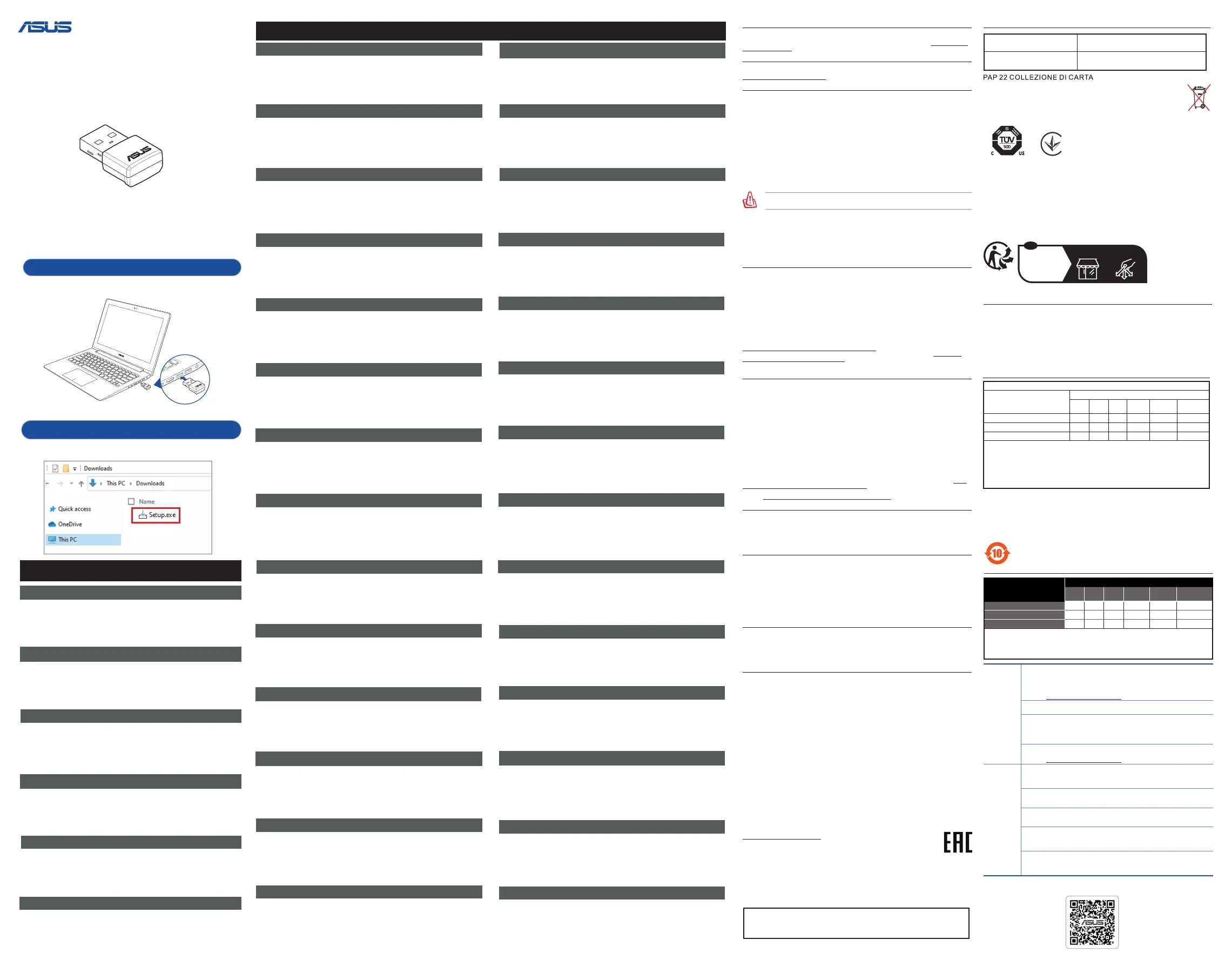
1. Prepare yourUSB-AX57 Nano
Insert your USB-AX57 Nano to your device.
2. Install the driver
Double click on “Setup”.
Setting up a Home Network
Български
1. ПодгответесвояUSB-AX57Nano
Вкарайте своя USB-AX57 Nano във Вашето устройство.
2. Инсталираненадрайвера
Щракнете двукратно върху Setup (Инсталиране)
Hrvatski
1. PripremiteUSB-AX57Nano
Ukopčajte USB-AX57 Nano u uređaj.
2. Instalacijaupravljačkogprograma
Dvaput kliknite na “Postava”.
Svenska
Čeština
Türkçe
Português
Norsk
Eesti
Dansk
Deutsch
Nederlands
Ελληνικά
Français Italiano
Suomi
Magyar
1. FörbereddinUSB-AX57Nano
Sätt i din USB-AX57 Nano i din enhet.
2. Installeradrivrutinen
Dubbelklicka på ”Installation”
1. PřípravazařízeníUSB-AX57Nano
Připojte USB-AX57 Nano k vašemu zařízení.
2. Instalaceovladače
Klikněte dvakrát na „Setup“.
1. USB-AX57Nanoettevalmistamine
Sisestage USB-AX57 Nano oma seadmesse.
2. Installigedraiver
Tehke topeltklõps suvandil „Häälestamine“
1. GjørklarUSB-AX57Nano
Sett USB-AX57 Nano inn i enheten.
2. Installerdriveren
Dobbeltklikk på «Oppsett»
1. PrepareoseuUSB-AX57Nano
Insira o USB-AX57 Nano no seu dispositivo.
2. Instalarocontrolador
Faça duplo clique em “Conguração”.
1. USB-AX57Nano’nuzuhazırlayın
USB-AX57 Nano’nuzu cihazınıza takın.
2. Sürücüyüyükleyin
“Kurulum” seçeneğine çift tıklayın.
1. ForbereddinUSB-AX57Nano
Sæt din USB-AX57 Nano i din enhed.
2.
Installerdriveren
Dobbeltklip på “Opsæt”
1. BereiddeUSB-AX57Nanovoor
Steek de USB-AX57 Nano in het apparaat.
2. Installeerhetstuurprogramma
Dubbelklik op “Setup” (Installeren)
1. PréparervotreUSB-AX57Nano
Connectez l’adaptateur USB-AX57 Nano à votre appareil.
2. Installerlepilote
Double-cliquez sur le fichier «Setup».
1. ValmisteleUSB-AX57Nano
Aseta USB-AX57 Nano laitteeseen.
2. Asennaohjain
Kaksoisnapsauta “Asenna”
1. StellenSieIhrenUSB-AX57Nanobereit
Schließen Sie Ihren USB-AX57 Nano an Ihr Gerät an.
2. InstallierenSiedenTreiber
Doppelklicken Sie auf “Setup”.
1. ΠροετοιμάστετοUSB-AX57Nano
Τοποθετήστε το USB-AX57 Nano στη συσκευή σας.
2. Εγκαταστήστετοπρόγραμμαοδήγησης
Κάντε διπλό κλικ στην επιλογή “Setup” (Εγκατάσταση)
1. PreparazionedelNanoUSB-AX57
Inserire Nano USB-AX57 nel dispositivo.
2. Installareildriver
Cliccare due volte su “Setup”.
1. AzUSB-AX57Nanoelőkészítése
Helyezze be az USB-AX57 Nano Nanót a készülékbe.
2. Telepítseazillesztőprogramot
Kattintson duplán a „Setup” gombra
Latviski
Lietuvių
1. USB-AX57Nanosagatvošana
Ievietojiet USB-AX57 Nano ierīcē.
2. Draiverainstalēšana
Noklikšķiniet uz “Setup” (Iestatīšana)
1. Paruoškite„USB-AX57Nano“
Įkiškite „USB-AX57 Nano“ į įrenginį.
2. Įdiekitetvarkyklę
Dukart spustelėkite „Setup“ (Atlikti sąranką)
Polski
Română
1. PrzygotujUSB-AX57Nano
Podłącz USB-AX57 Nano do urządzenia.
2. Zainstalujsterownik
Kliknij dwukrotnie pozycję „Setup” (Instalacja).
1. PrepareyourUSB-AX57Nano
Insert your USB-AX57 Nano to your device.
2. Installthedriver
Double click on “Setup”.
繁中
简
中
1. 準備好您的USB-AX57Nano
將USB-AX57Nano插入您的裝置。
2. 安裝驅動程式
雙擊「Setup」。
1. 準備好您的 USB-AX57 Nano
將 USB-AX57 Nano 插入您的設備。
2. 安裝驅動程序
雙擊“Setup”。
한국어
1. USB-AX57Nano를준비하세요
장치에USB-AX57Nano를삽입합니다
2. 드라이버를설치하세요
“setup(설치)”를더블클릭하세요
Tiếng Việt
1. ChuẩnbịUSB-AX57Nano
Cắm USB-AX57 Nano vào thiết bị.
2. Càiđặtdriver
Nhấp đúp chuột vào “Cài đặt”
Setting up a Home Network
USB-AX57 Nano
Slovensky
Español
Slovenščina
Srpski
1. PripremitesvojUSB-AX57Nano
Ubacite svoj USB-AX57 Nano u svoj uređaj.
2. Instalirajtedrajver
Kliknite duplim klikom na “Setup” (Podešavanje)
1. PripraviteUSB-AX57Nano
Vstavite USB-AX57 Nano v svojo napravo.
2. Namestitegonilnik
Dvokliknite “Nastavitev”.
1. PripravtesvojUSB-AX57Nano
Svoj USB-AX57 Nano vložte do zariadenia.
2. Nainštalujteovládač
Dvakrát kliknite na “Setup” (Nastaviť).
1. PreparesuUSB-AX57Nano
Inserte su USB-AX57 Nano en el dispositivo.
2. Instalarelcontrolador
Haga doble clic en “Congurar”.
Русский
Українська
1. ПодготовкаUSB-AX57Nano
ПодключитеUSB-AX57Nanoкустройству.
2. Установкадрайвера
ДваждыщелкнитеНастройка.
1. ПідготуйтеUSB-AX57Nano
Вставте USB-AX57 Nano до пристрою.
2. Інсталюйтедрайвер
Двічі натисніть Setup (Налаштування).
ქართული
ენა
1
. მოამზადეთთქვენიUSB-AX57Nano
ჩასვით თქვენი USB-AX57 Nano თქვენს მოწყობილობაში.
2. დააინსტალირეთდრაივერი
ორჯერ დააწკაპუნეთ “დაყენებას”
BahasaMelayu
1. SediakanUSB-AX57Nanoanda
Masukkan USB-AX57 Nano anda ke peranti anda.
2. Pasangpemacu
Klik dua kali pada “Penyediaan”.
BahasaIndonesia
1. SiapkanUSB-AX57NanoAnda
Masukkan USB-AX57 Nano ke perangkat Anda.
2. Pasangdriver
Klik dua kali pada “Pengaturan”
ไทย
1. เตรียมUSB-AX57Nanoของคุณ
เสียบUSB-AX57Nanoเข้ากับอุปกรณ์ของคุณ
2. ติดตั้งไดรเวอร์
ดับเบิลคลิกที่“ตั้งค่า”
ASUS Recycling/Takeback Services
ASUS recycling and takeback programs come from our commitment to the highest standards for
protecting our environment. We believe in providing solutions for you to be able to responsibly recycle our
products, batteries, other components, as well as the packaging materials. Please go to https://esg.asus.
com/en/Takeback.htm for the detailed recycling information in different regions.
REACH
Complying with the REACH (Registration, Evaluation, Authorisation, and Restriction of Chemicals)
regulatory framework, we published the chemical substances in our products at ASUS REACH website at
https://esg.asus.com/Compliance.htm
Federal Communications Commission Statement
This device complies with Part 15 of the FCC Rules. Operation is subject to the following two conditions:
• This device may not cause harmful interference.
• This device must accept any interference received, including interference that may cause undesired
operation.
This equipment has been tested and found to comply with the limits for a class B digital device, pursuant
to part 15 of the FCC Rules. These limits are designed to provide reasonable protection against harmful
interference in a residential installation.
This equipment generates, uses and can radiate radio frequency energy and, if not installed and used in
accordance with the instructions, may cause harmful interference to radio communications. However,
there is no guarantee that interference will not occur in a particular installation. If this equipment does
cause harmful interference to radio or television reception, which can be determined by turning the
equipment off and on, the user is encouraged to try to correct the interference by one or more of the
following measures:
• Reorient or relocate the receiving antenna.
• Increase the separation between the equipment and receiver.
• Connect the equipment into an outlet on a circuit different from that to which the receiver is
connected.
• Consult the dealer or an experienced radio/TV technician for help.
WARNING!Anychangesormodicationsnotexpresslyapprovedbythepartyresponsiblefor
compliance could void the user’s authority to operate the equipment.
Prohibition of Co-location
This device and its antenna(s) must not be co-located or operating in conjunction with any other antenna
or transmitter.
FCC Radiation Exposure Statement:
This device has been tested and meets applicable limits for Radio Frequency (RF) exposure.
This device was tested with a separation distance of 5 mm. Always keep the device away from your body
to ensure exposure levels remain at or below the as-tested levels.
Compliance Statement of Innovation, Science and Economic Development Canada
(ISED)
This device complies with Innovation, Science and Economic Development Canada licence exempt
RSS standard(s). Operation is subject to the following two conditions: (1) this device may not cause
interference, and (2) this device must accept any interference, including interference that may cause
undesired operation of the device.
Operation in the band 5150–5250 MHz is only for indoor use to reduce the potential for harmful
interference to co-channel mobile satellite systems.
CAN ICES (B)/NMB (B)
IC Radiation Exposure Statement
This device has been tested and meets applicable limits for Radio Frequency (RF) exposure.
This device was tested with a separation distance of 5 mm. Always keep the device away from your body
to ensure exposure levels remain at or below the as-tested levels.
ThisdevicehasbeencertiedforuseinCanada.StatusofthelistingintheInnovation,Scienceand
Economic Development Canada’s REL (Radio Equipment List) can be found at the following web address:
http://www.ic.gc.ca/eic/site/ceb-bhst.nsf/eng/h_tt00020.html
Additional Canadian information on RF exposure also can be found at the following web: https://www.
ic.gc.ca/eic/site/smt-gst.nsf/eng/sf08792.html
Déclaration de conformité de Innovation, Sciences et Développement économique
Canada (ISED)
Le présent appareil est conforme aux CNR d’Innovation, Sciences et Développement économique
Canada applicables aux appareils radio exempts de licence. L’exploitation est autorisée aux deux
conditions suivantes : (1) l’appareil ne doit pas produire de brouillage, et (2) l’utilisateur de l’appareil doit
accepter tout brouillage radioélectrique subi, même si le brouillage est susceptible d’en compromettre le
fonctionnement.
Labande5150–5250MHzestréservéeuniquementpouruneutilisationàl’intérieuranderéduireles
risques de brouillage préjudiciable aux systèmes de satellites mobiles utilisant les mêmes canaux.
CAN ICES (B)/NMB (B)
Informations concernant l’exposition aux fréquences radio (RF)
Lapuissancedesortieémiseparcetappareilsanslestinférieureàlalimited’expositionauxfréquences
radiod’IndustrieCanada(IC).Utilisezl’appareilsansldefaçonàminimiserlescontactshumainslors
d’un fonctionnement normal.
Cet appareil a été testé et respecte les limites applicables en matière d’exposition aux radiofréquences
(RF).
Cet appareil a été testé avec une distance de séparation de 5 mm. Gardez toujours l’appareil éloigné de
votre corps pour vous assurer que les niveaux d’exposition restent égaux ou inférieurs aux niveaux testés.
L’utilisation de cet appareil est autorisée au Canada. Pour consulter l’entrée correspondant à l’appareil
dans la liste d’équipement radio (REL - Radio Equipment List) d’Industrie Canada, rendez-vous sur: http://
www.ic.gc.ca/app/sitt/reltel/srch/nwRdSrch.do?lang=eng
Pour des informations supplémentaires concernant l’exposition aux fréquences radio au Canada, rendez-
vous sur: http://www.ic.gc.ca/eic/site/smt-gst.nsf/eng/sf08792.html
Precautions for the use of the device
a. Pay particular attention to the personal safety when use this device in airports, hospitals, gas stations
and professional garages.
b. Medical device interference: Maintain a minimum distance of at least 15 cm (6 inches) between
implanted medical devices and ASUS products in order to reduce the risk of interference.
c. Kindly use ASUS products in good reception conditions in order to minimize the radiation’s level.
d. Keep the device away from pregnant women and the lower abdomen of the teenager.
Précautions d’emploi de l’appareil
a. Soyez particulièrement vigilant quant à votre sécurité lors de l’utilisation de cet appareil dans certains
lieux (les avions, les aéroports, les hôpitaux, les stations-service et les garages professionnels).
b. Évitez d’utiliser cet appareil à proximité de dispositifs médicaux implantés. Si vous portez un
implant électronique (stimulateurs cardiaques, pompes à insuline, neurostimulateurs…), veuillez
impérativement respecter une distance minimale de 15 centimètres entre cet appareil et votre corps
pour réduire les risques d’interférence.
c. Utilisez cet appareil dans de bonnes conditions de réception pour minimiser le niveau de rayonnement.
Ce n’est pas toujours le cas dans certaines zones ou situations, notamment dans les parkings
souterrains, dans les ascenseurs, en train ou en voiture ou tout simplement dans un secteur mal
couvert par le réseau.
d. Tenez cet appareil à distance des femmes enceintes et du bas-ventre des adolescents.
NCC: Wireless Statement
低功率射頻器材技術規範
「取得審驗證明之低功率射頻器材,非經核准,公司、商號或使用者均不得擅自變更頻率、加大功率或變
更原設計之特性及功能。低功率射頻器材之使用不得影響飛航安全及干擾合法通信;經發現有干擾現象
時,應立即停用,並改善至無干擾時方得繼續使用。前述合法通信,指依電信管理法規定作業之無線電通
信。低功率射頻器材須忍受合法通信或工業、科學及醫療用電波輻射性電機設備之干擾。」 應避免影響附
近雷達系統之操作。
India RoHS
This product complies with the “India E-Waste (Management) Rules, 2016” and prohibits use of lead,
mercury, hexavalent chromium, polybrominated biphenyls(PBBs) and polybrominated diphenyl ethers
(PBDEs) in concentrations exceeding 0.1 % by weight in homogenous materials and 0.01 % by weight in
homogenous materials for cadmium, except for the exemptions listed in Schedule II of the Rule.
Условия эксплуатации:
- Температураэксплуатацииустройства:0-40°C.Неиспользуйтеустройствовусловиях
экстремальновысокихилинизкихтемператур.
- Неразмещайтеустройствовблизиисточниковтепла,например,рядомсмикроволновой
печью,духовымшкафомилирадиатором.
- Использованиенесовместимогоилинесертифицированногоадаптерапитанияможет
привестиквозгоранию,взрывуипрочимопаснымпоследствиям.
- Приподключенииксетиэлектропитанияустройствоследуетрасполагатьблизкокрозетке,к
нейдолженосуществлятьсябеспрепятственныйдоступ.
- Утилизацияустройстваосуществляетсявсоответствиисместнымизаконамииположениями.
Устройствопоокончаниисрокаслужбыдолжныбытьпереданывсертифицированныйпункт
сборадлявторичнойпереработкиилиправильнойутилизации.
- Данноеустройствонепредназначенодлядетей.Детимогутпользоватьсяустройствомтолько
вприсутствиивзрослых.
- Невыбрасывайтеустройствоиегокомплектующиевместесобычнымибытовымиотходами.
Перелік режимів роботи для України:
2,4ГГц:802.11b,802.11g,802.11n(HT20),802.11n(HT40),802.11ax(HE20),802.11ax(HE40)
5ГГц:802.11a,802.11n(HT20),802.11n(HT40),802.11ac(VHT20),802.11ac(VHT40),802.11ac(VHT80),
802.11ac(VHT160),802.11ax(HE20),802.11ax(HE40),802.11ax(HE80),802.11ax(HE160)
Частота,режимімаксимальнавипромінюванапотужністьдляУкраїни:
2412-2472MHz:19,98dBm;5180-5240MHz:19,98dBm;5260-5320MHz:19,98dBm;5500-5700MHz:
19,98 dBm
Пристрійпризначенодлявикористаннятількиуприміщенні.
справжнімASUSзаявляє,щоданийпристрійвідповідаєТехнічномурегламентурадіообладнання;
повнийтекстдеклараціїпровідповідністьдоступнийнавеб-сайтізаадресою:
https://certicates.asus.website/wl/
AEEE Yönetmeliğine Uygundur. IEEE Yönetmeliğine Uygundur.
- BuCihazTürkiyeanalogşebekelerdeçalışabilecekşekildetasarlanmıştır.
- CihazınayrıntılıkurulumrehberikutuiçeriğindençıkanCDiçerisindedir.Cihazınkullanıcı
arayüzüTürkçe’dir.
- Cihazınkullanılmasıplanlananülkelerdeherhangibirkısıtlamasıyoktur.Ülkelersimgeler
halindekutuüzerindebelirtilmiştir.
KC: Korea Warning Statement
B급기기
(가정용방송통신기자재)
이기기는가정용(B급)으로전자파적합등록을한기기로서주로
가정에서사용하는것을목적으로하며,모든지역에서사용할
수있습니다.
Class B equipment
(For Home Use Broadcasting &
Communication Equipment)
This equipment is home use (Class B) electromagnetic
wave suitability and to be used mainly at home and it can
be used in all areas.
Points de collecte sur www.quefairedemesdechets.fr
Privilégiez la répara�on ou le don de votre appareil !
À DÉPOSER
EN MAGASIN
À DÉPOSER
EN DÉCHÈTERIE
OU
Cet appareil
se recycle
רצומבשומישלתוחיטבתוארוה
:רצומב שומיש תעב םיאבה תוחיטבה יללכ פ"ע לועפל שי
.למשחה לבכ וא/ו עקתה תוניקתו תומלש אדו •
.תובוטר םיידיב למשחה תשרמ עקתה תא איצוהל וא סינכהל ןיא •
.הבורקה תורישה תדבעמל תונפל שי ,יהשלכ היעב לש הרקמב ,ןעטמה תא חותפל ןיא ,ינוציח ןעטמ י"ע לעפומ רצומה םאב •
.םילזונמ ןעטמהו רצומה תא קיחרהל שי •
.תוריש תדבעמל תונפלו למשחה תשרמ תידיימ וקתנל שי ,חוכ קפס/ןעטמב וא/ו רצומב םרוקמש םישער ,רזומ חיר לש הרקמב •
.החל הביבסב שומישל אלו ינוציח שומישל אל ,דבלב הנבמה ךותב שומישל דעוימ חוכ קפס/ןעטמהו רצומה •
.למשחה לבכ תא םקעלו ,רובשל ,ךותחל ןיא •
.תולמשחתה וא הקילד ,קזנל םורגל לולע רבדה ןכש ,הדימה לע רתי םמחתהל ול חינהל וא למשחה לבכ לע םיצפח חינהל ןיא •
.למשחה תשרמ וקתנל שי ןעטמה וא/ו רצומה יוקינ ינפל •
.למשחה תשרמ הניזה ליתפ קותינו רוביחל החונ השיג רשפאל שי •
:הרהזא שומישל ןכומ ילועפת בצמב קותינה ןקתה תא קזחתלו דיפקהל שי •
.שמתשמה תולמשחתהל םורגל לולע יוקל רוביח ,םיירוקמ אל םיפילחתב הניזה לבכ תא ףילחהל ןיא •
.לבכבש הקראה ךילומ תוניקת אדוול שי ךיראמ לבכ לע שומישב •
Service and Support
https://www.asus.com/support
ASUSTeK Computer Inc.
Tel:+886-2-2894-3447
Address: 1F., No.15, Lide Rd.,Beitou Dist., Taipei City 112
華碩電腦股份有限公司
電話: +886-2-2894-3447
Contact: https://qr.asus.com/ProductSafety
ASUS Computer GmbH (Germany & Austria)
Address:HARKORTSTR.21-23,40880RATINGEN,GERMANY
ASUSTEK (UK) LIMITED
Address: 1
st
Floor,SackvilleHouse,143-149FenchurchStreet,London,EC3M6BL,
England, United Kingdom
Tel:+44-01442-202-700
Fax:+44-01442-245-882
ASUS GLOBAL PTE. LTD.
Address:10ChangiBusinessParkCentral2#02-01HansapointSingapore486030
Contact: https://qr.asus.com/ProductSafety
Authorised
distributors
inTurkey
BOGAZICI BILGISAYAR TICARET VE SANAYI A.S.
Tel./FAXNo.:+90 212 331 10 00 / +90 212 332 28 90
Address:ESENTEPEMAH.BUYUKDERECAD.ERCANHANBBLOKNO.121SISLI,
ISTANBUL34394
CIZGI Elektronik San. Tic. Ltd. Sti.
Tel./FAXNo.:+90 212 356 70 70 / +90 212 356 70 69
Address:GURSELMAH.AKMANSK.47B1KAGITHANE/ISTANBUL
KOYUNCU ELEKTRONiK BiLGi iSLEM SiST. SAN. VE DIS TIC. A.S.
Tel.No.:+90 216 5288888
Address:EMEK MAH.ORDU CAD. NO:18, SARIGAZi, SANCAKTEPE ISTANBUL
ENDEKS BİLİŞİM SAN VE DIŞ TİC LTD ŞTİ
Tel./FAXNo.:+90 216 523 35 70 / +90 216 523 35 71
Address:NECIPFAZILBULVARI,KEYAPCARSISITESI,G1BLOK,NO:115
Y.DUDULLU,UMRANIYE,ISTANBUL
PENTA TEKNOLOJI URUNLERI DAGITIM TICARET A.S
Tel./FAXNo.:+90 216 528 0000
Address:ORGANIZESANAYIBOLGESINATOYOLU4.CADDENO:1UMRANIYE,
ISTANBUL34775
安全說明:
- 請在溫度為0°C(32°F)至40°C(104°F)之間的環境中使用本產品。
- 請依照產品上的電源功率貼紙說明使用正確的電源變壓器,如果使用錯誤規格的電源變壓器有可能會造
成內部零件的損毀。
- 請勿將產品放置於不平坦或不穩定的表面,若產品的機殼毀損,請聯絡維修服務人員。
- 請勿在產品上放置其他物品,請勿將任何物品塞入產品內,以避免引起元件短路或電路損毀。
- 請保持機器在乾燥的環境下使用,雨水、溼氣、液體等含有礦物質將會腐蝕電子線路,請勿在雷電天氣
下使用數據機。
- 請勿堵塞產品的通風孔,以避免因散熱不良而導致系統過熱。
- 請勿使用破損的電源線、附件或其他周邊產品。
- 如果電源已毀損,請不要嘗試自行修復,請將其交給專業技術服務人員或經銷商來處理。
- 為了防止電擊風險,在搬動主機之前,請先將電源線插頭暫時從電源插座上拔除。
設備名稱:,型號(型式):USB-AX57Nano
單元
限用物質及其化學符號
鉛
(Pb)
汞
(Hg)
鎘
(Cd)
六價鉻
(Cr
+6
)
多溴聯苯
(PBB)
多溴二苯醚
(PBDE)
印刷電路板及電子組件
-
○ ○ ○ ○ ○
結構組件(如:上下蓋/散熱墊) ○ ○ ○ ○ ○ ○
其他組件(如:天線) ○ ○ ○ ○ ○ ○
備考1.〝超出0.1 wt %〞及〝超出0.01 wt %〞係指限用物質之百分比含量超出百分比含量基準值。
Note1:“Exceeding 0.1 wt%” and “exceeding 0.01 wt %” indicate that the percentage content of the
restricted substance exceeds the reference percentage value of presence condition.
備考2.〝○〞係指該項限用物質之百分比含量未超出百分比含量基準值。
Note2: “○”indicates that the percentage content of the restricted substance does not exceed the
percentage of reference value of presence.
備考3.〝-〞係指該項限用物質為排除項目。
Note3: “-”indicates that the restricted substance corresponds to the exemption.
「產品之限用物質含有情況」之相關資訊,請參考下表:
產品中有害物質的名稱及含量
部件名稱
有害物質
鉛
(Pb)
汞
(Hg)
鎘
(Cd)
六價鉻
(Cr(VI))
多溴聯苯
(PBB)
多溴二苯醚
(PBDE)
印刷電路板及電子組件 × ○ ○ ○ ○ ○
結构組件(如上下盖/散热垫)
○ ○ ○ ○ ○ ○
其它组件(如:天线)
○ ○ ○ ○ ○ ○
本表格依據 SJ/T 11364 的規定編制。
○:表示該有害物質在該部件所有均質材料中的含量均在 GB/T 26572 規定的限量要求以下。
×: 表示該有害物質至少在該部件的某一均質材料中的含量超出 GB/T 26572 規定的限量要
求,然該部件仍符合歐盟指令 2011/65/EU 的規范。
備註:此產品所標示之環保使用期限,係指在一般正常使用狀況下。
CMIIT ID 標示于產品上
安全說明:
- 請在溫度為0°C(32°F)至40°C(104°F)之間的環境中使用本產品。
- 請勿將產品放置於不平坦或不穩定的表面,若產品的外殼損壞,請聯繫維修服務人員。
- 請勿在產品上放置其他物品,請勿將任何物品塞入產品內,以避免引起組件短路或電路損壞。
- 請保持机器在干燥的環境下使用,雨水、濕氣、液体等含有礦物質會腐蝕電子線路,請勿在雷電天气
下使用調製解調器(光貓)。
- 請勿堵塞產品的通風孔,以避免因散熱不良而導致系統過熱。
電子電氣產品有害物質限制使用標識要求:圖中之數字為產品之環保使用期限。僅指
電子電氣產品中含有的有害物質不致發生外洩或突變從而對環境造成污染或對人身、
財產造成嚴重損害的期限。
屋外での使用について
本製品は、5GHz 帯域での通信に対応しています。電波法の定めにより5.2GHz、5.3GHz 帯域の電波は屋外で使用が禁じ
られています。
法律および規制遵守
本製品は電波法及びこれに基づく命令の定めるところに従い使用してください。日本国外では、その国の法律または
規制により、本製品を使用ができないことがあります。このような国では、本製品を運用した結果、罰せられることが
ありますが、当社は一切責任を負いかねますのでご了承ください。
この装置は、クラスB情報技術装置です。この装置は、家庭環境で使用
することを目的としていますが、この装置がラジオやテレビジョン受信機に
近接して使用されると、受信障害を引き起こすことがあります。
取扱説明書に従って正しい取り扱いをして下さい。
VCCI-B