Welcome to the Audeze Penrose Experience
Hey there, thanks for joining us-- we’re glad to have you on our team! Whether you use Penrose with your gaming console, PC, phone or
other source, we know you’ll get a lot of use out of it. We created this guide to help you get the utmost enjoyment from Penrose, so please
read on for the uber-important details! We promise to keep things fun and brief.
Getting Started with Penrose
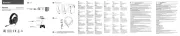
• Plug in the microphone by inserting into the Mic Port and aligning the flat sides. Press firmly to fully insert.
• Slide the Mic Mute Switch on Penrose’s left earcup to the UP position to unmute.
• Adjust headband size by sliding in/out above the Audeze A logo.
• Power-on Penrose by pressing the Power Button for about 3 seconds. 1 one-thousand, 2 one-thousand, 3 one-thousand...
• Connect to your source device using 2.4GHz Wireless, AUX or Bluetooth (BT). See below for instructions on each connection method.
• Adjust Headphone Volume and Microphone Volume by turning the corresponding adjustment wheels on the left earcup. Not too loud,
now, don’t hurt yourself.
• To fully charge Penrose’s battery, connect a USB-C cable between the port on the headphones and a 5V/1A charger.
• Further customize your Penrose experience with the Audeze HQ app for Windows, Mac and Android, available at
www.audeze.com/AudezeHQ
• Have fun storming the castle!
Charging, Adjusting Volume and Powering On/Off
You took the time to fully charge your Penrose after unpacking, right? Of course you didn’t, and we don’t blame you! There should be
sufficient charge in the battery to get you started, but if you find Penrose starting to misbehave, please pause to plug in to an approved
power source. We suggest a USB charger of 5V/1A, like the one you might use for your mobile communication device. In a pinch you can
use most computer USB ports (results may vary).
Penrose should charge automatically once connected to a power source: the LED on the left earcup will flash slowly while charging, then
stop flashing at full charge. Charging with a 1A charger should take about 3 hours with power off, from 0% to 100%. Speaking of full charge,
the battery inside Penrose should last about 15 hours before running out of juice. At that point, you should probably take a break, too. (Mom,
get outta here...) You can charge and play at the same time, so don’t fret, just plug in and carry on!