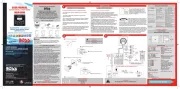
Boss MCBK634B Manual
Boss Bilradio MCBK634B

Læs gratis den danske manual til Boss MCBK634B (2 sider) i kategorien Bilradio. Denne vejledning er vurderet som hjælpsom af 6 personer og har en gennemsnitlig bedømmelse på 5.0 stjerner ud af 3.5 anmeldelser. Har du et spørgsmål om Boss MCBK634B, eller vil du spørge andre brugere om produktet?

Side 1/2
Installation
Connect all wiring harness and slide the head unit into the
mounting sleeve until it clicks into place.
Turn Unit on/off, Change the Source
Press the /SRC button to turn on the unit. Press and hold the /SRC
button to turn off the unit.
Press the /SRC button to select the different modes: Radio, USB(with
USB device inserted), AUX-IN(aux audio input) and BT(Bluetooth).
Adjust the volume (VOL)
Rotate the VOL knob to increase or decrease the volume level.
Wiring Connections
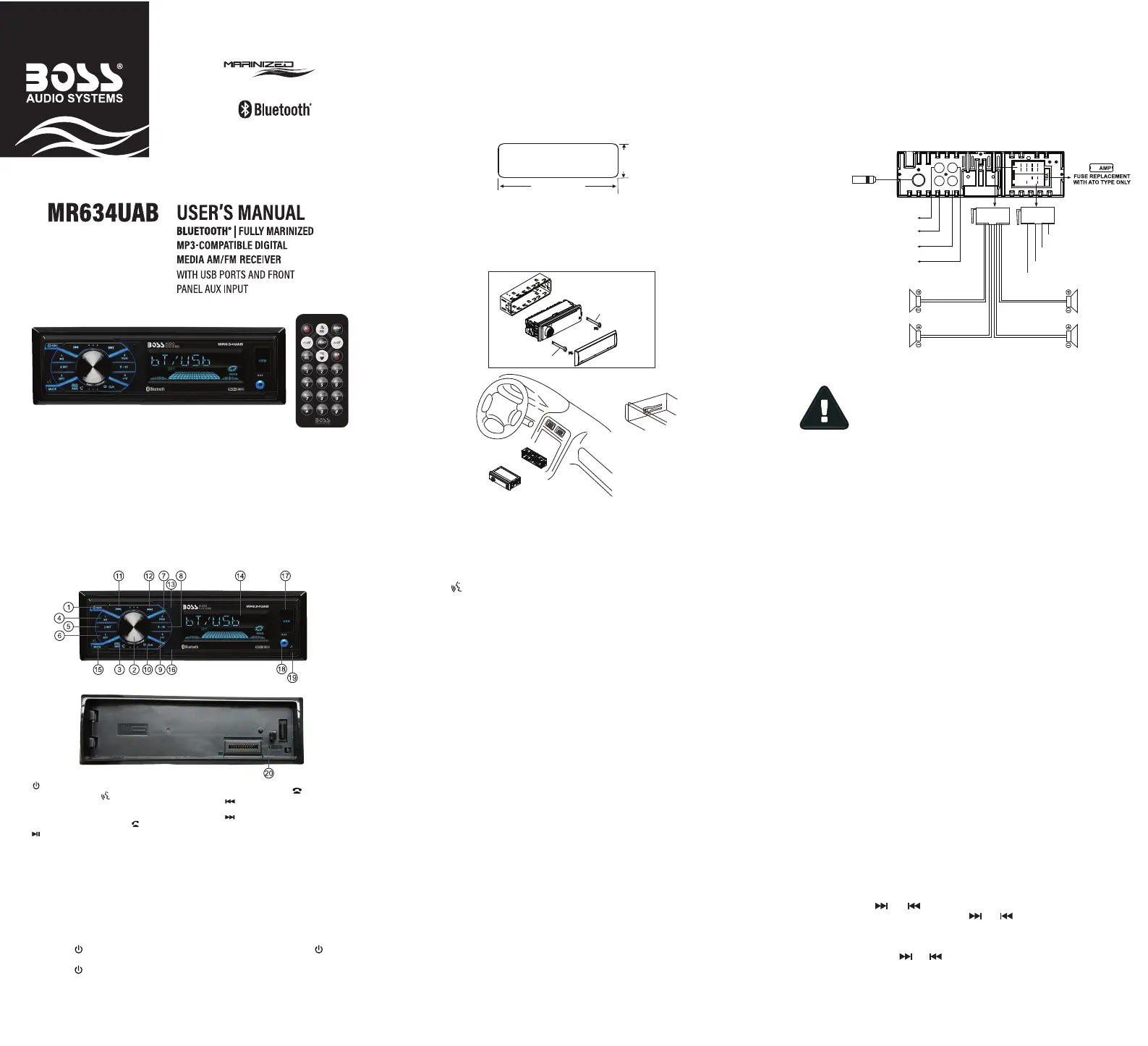
Overview of the Components
General Operation
General Operation General Operation
Radio Operation
Switch Between USA area and Europe area Frequency
In radio mode, press and hold the SEL button (volume knob) to enter into
setting menu, then press the SEL button (volume knob) repeatedly to access
the state of the USA and Europe frequency, then rotate the volume knob to
switch between USA and europe frequency. The system will change the
frequency setting in about 3 seconds.
Change Bands
In radio mode, shortly press the BND button to switch between the FM1
(F1), FM2(F2), FM3(F3) and AM1(A1), AM2(A2) bands.
To Store / Recall Preset Stations
The radio can be stored 6 preset stations for each band (FM1, FM2, FM3,
AM1 and AM2) for a total of 30 preset stations.
- To memorize a station:
Press and hold the desired preset buttons (1-6) to save a radio station.
- To recall a preset station:
Briefly press the respective station button (1-6) to recall the corresponding
preset station.
Manual Tuning
In the radio mode:
Press and hold the or button to enter the manual tuning mode.
In manual tuning mode, briefly press the or button to search the next
or previous frequency step by step.
Seek Tuning
In radio mode, press the or button, the automatic search will start, it
will search upward or downward for the strong signal radio station within the
current band. The auto searching will stop until find a station.
Automatic Store Station / preset station scan
Press and hold the AMS button to store 18 FM stations and 12 AM stations
automatically.
ANT
F-R R-R
F-L R-L
10
Radio Antenna
White
Front Left
Speaker
Rear Left
Speaker
Front Right
Speaker
Rear Right
Speaker
White/Black
ACC + (Red)
GND - (Black)
ANT + (Blue)
Power B+ (Yellow)
Gray/Black
Purple
Purple/Black
Green
Green/Black
Gray
Red: Front Right PRE-AMP Output
White: Front Left PRE-AMP Output
White: Rear Left PRE-AMP Output
Red: Rear Right PRE-AMP Output
Installation
Installation Procedures
First complete the electrical connections and then check for correctness of
connection.
Insert the mounting sleeve into the dashboard. Then bend the tabs
on the mounting sleeve with a screwdriver to achieve fastening of
the mounting sleeve.
Make sure that lock lever is flush with the mounting sleeve( not
projecting outward).
Installation Opening
This unit can be installed in any dashboard which has an opening as shown
below.
2.05 inches
7.20 inches
Bracket key
Mounting sleeve
Bracket key
Plastic trim out
Release the detachable front panel
Press the release button to detach the front panel.
Reset
Push the RESET button with a thin object with a pointed end to reset the unit.
This function may be used when the LCD does not display normally or
sound is distorted, or when any of controls are disabled.
(power on/off) / SRC (source) button
VOL (volume) knob, (Push-To-Talk) button,
SEL (select/menu) button
BND(BAND) / AMS(automatic store station,
automatic music search) and (answer call) button
(pause/play), Preset station 1 button
RPT (repeat), Preset station 3 button
-10(previous 10 tracks), previous folder,
Preset station 5 button
1.
2.
3.
4.
INT (intro), Preset station 2 button5.
6.
RDM (random), Preset station 4 button7.
8.
9. +10(next 10 tracks), next folder,
Preset station 6 button
10. CLK (clock setting), (end call) button
11. (tune/seek down, previous track,
fast reverse) button
12. (tune/ seek up, next track,
fast forward) button
13. Hands-free Microphone
14. LCD Display
15. MUTE button
16. IR remote sensor
17. USB Port
18. AUX IN (aux audio input) jack
19. Release button
20. Reset button
REMOVE PANEL
- Only support speakers of 4 ohms or above.
- +12V DC Negative Ground.
- The maximum current of the Amp remote trigger is 200mA.
- The equipment shall be protected by the circuit with max. 10
Amperes of the front end of DC source.
Push-To-Talk
Press the icon button (VOL knob) to access to smartphone voice
assistant capability via Bluetooth.
Adjust Menu Options (SEL)
• Press and hold the SEL button (volume knob) to enter into setting menu,
then press the SEL button (volume knob) repeatedly to select setting items:
- ILL MID/HI/LOW: This receiver is equipped with 3 brightness settings.
Rotate the volume knob to preset the illumination to middle, high or low.
- BASS/TREBLE:-7, -6, ~, 1, 0, +1,~, +6, +7
Note: BASS and TREBLE settings are only enabled when EQ setting is turned OFF.
- BALANCE:L7, L6,~, L1, 0, R1,~,R6, R7
- FADER:R7, R6, ~, R1, 0, F1, ~ ,F6, F7
- EQ(Equalizer) Setting: OFF, FLAT, CLASSIC, POP, ROCK, JAZZ
- Loudness: LOUD ON/OFF
- DX/LOCAL: Enables or disables the local broadcast mode (LOCAL).
- Stereo/Mono: Switches between MONO and STEREO reception mode
for radio frequencies.
- CLOCK 12/24: Select between 12 hours and 24 hours display.
- AREA US/EU: This car radio is equipped the USA / Europe frequency.
Rotate the volume knob to switch between USA and Europe frequency.
The system will change the frequency setting in about 3 seconds.
• Rotate the VOL knob to change values.
Mute On/Off
Briefly press the MUTE button to toggle mute on or off.
Clock Display/Settings
Press the CLK button to diplay clock time.
Press and hold the CLK button, the hours digits start flashing on the display,
Set hours by rotating the volume knob. Short press the CLK button, the
minute digits start flashing. Set minutes by rotating the volume knob.
USB Port
Connect to a USB storage device for audio play, or charging of a mobile
phone.
Hands-free Microphone
To receive your voice when you calling by using this bluetooth handsfree
system.
Aux Audio Input Jack
Connect to the headphone jack on an external device (e.g. a mobile phone
or MP3 player) for audio play.


Produkt Specifikationer

Mærke: Boss
Kategori: Bilradio
Model: MCBK634B

Har du brug for hjælp?

Hvis du har brug for hjælp til Boss MCBK634B stil et spørgsmål nedenfor, og andre brugere vil svare dig


Bilradio Boss Manualer

Boss

Boss MCBK634B Manual

4 December 2025
Boss

Boss MCK508WB.6 Manual

29 September 2025
Boss

Boss MCKGB450W.6 Manual

28 September 2025
Boss

Boss BCPA14 Manual

7 August 2025
Boss

Boss MCK508WB Manual

7 Juni 2025
Boss

Boss MR63UAB Manual

11 December 2024
Boss

Boss BCPA12 Manual

17 November 2024
Boss

Boss UTV4B Manual

3 September 2024
Boss

Boss BVD9988B Manual

1 September 2024
Boss

Boss BV6860BH Manual

1 September 2024

Bilradio Manualer

Nyeste Bilradio Manualer