Elecom EC-C10L Manual
Elecom PowerBank EC-C10L

Læs gratis den danske manual til Elecom EC-C10L (1 sider) i kategorien PowerBank. Denne vejledning er vurderet som hjælpsom af 4 personer og har en gennemsnitlig bedømmelse på 4.3 stjerner ud af 2.5 anmeldelser. Har du et spørgsmål om Elecom EC-C10L, eller vil du spørge andre brugere om produktet?

Side 1/1
低電流モ
Safety Precautions
Global Support
Power bank
Manual and Compliance with regulations, 2nd edition, January 24, 2024
©2024 ELECOM Co., Ltd. All Rights Reserved.
ELECOM CO., LTD.
Fushimimachi 4-1-1, Chuo-ku, Osaka City www.elecom.co.jp/global/
www.elecom.co.jp/global/certification/
This device complies with Part 15 of the FCC Rules.
Operation is subject to the following two conditions: (1) This
device may not cause harmful interference, and (2) this
device must accept any interference received, including
interference that may cause undesired operation.
In order to make improvements to this product, the design
and specifications are subject to change without prior notice.
Resp son ible party
ELE OMC USA Inc, .
elecomu .cosa m
2211 Michelson Dr. Suite 900, Irvine, CA 92612 USA
User Manual Power bank Model: EC-C10L
www.elecom.co.jp/r/s536
MC-EC-C10L_0111_ver.21_T2
EC-C10L series
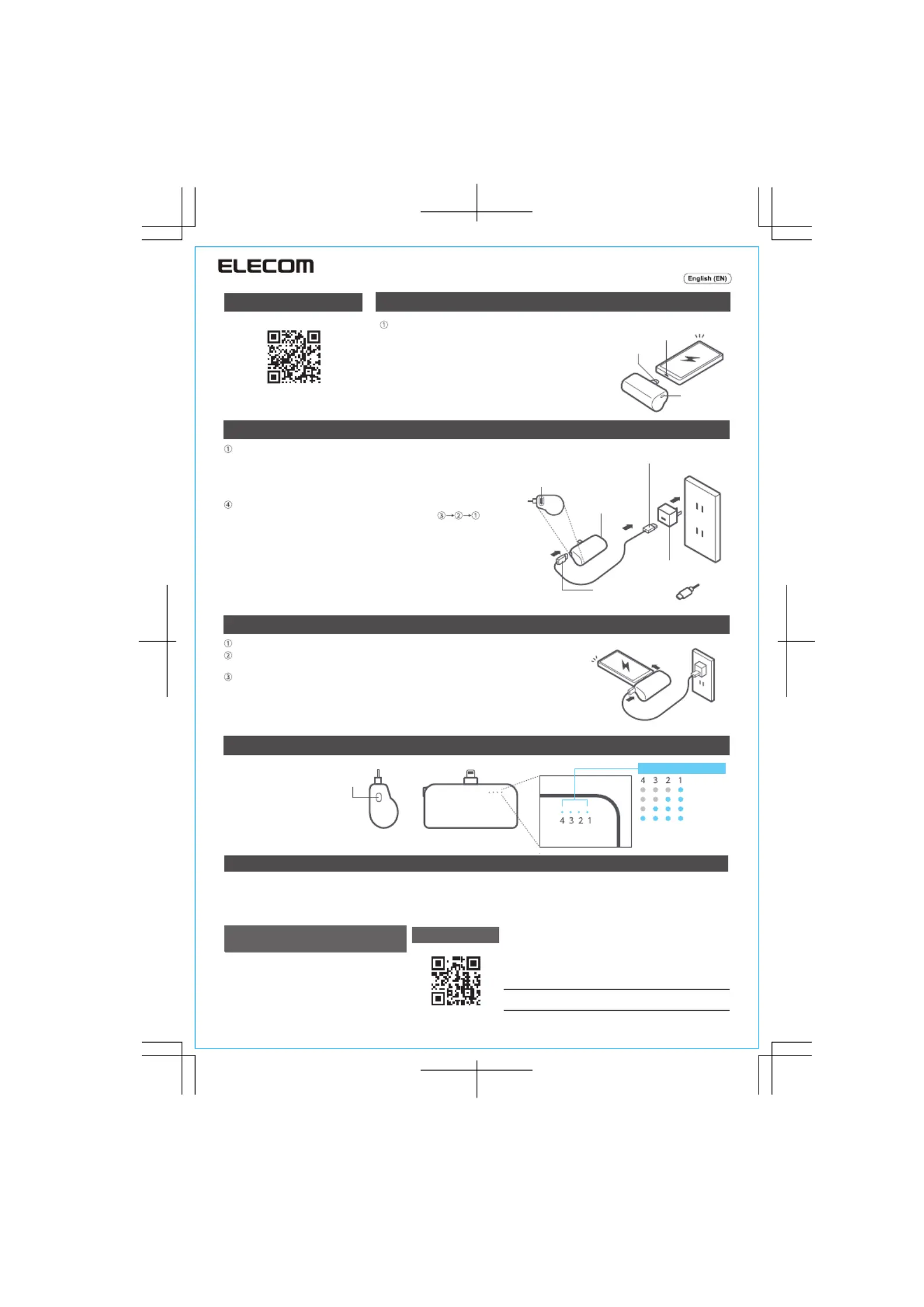
How to charge your smartphone or tablet
A customer who purchases outside Japan should contact the local retailer in the
country of purchase for inquiries. In “ELECOM CO., LTD. (Japan), no customer
support is available for inquiries about purchases or usage in/from any countries
other than Japan. Also, no foreign language other than Japanese is available.
Replacements will be made under stipulation of the Elecom warranty.
How to check the remaining charge
Power button
Lightning port
Lightning connector
Charging all at once
How to charge the portable power bank
USB Type-C connector
USB-A connector
AC adapter
USB Type-C port
Power button
Check the remaining charge
Power button
less than 25%
less than 50%
less than 75%
75% or more
Cycle life: Approx. 500 times
(Based on JIS C 8711)
Remaining charge indicator
Product Specifications
Connect the Lightning connector on this product to
the Lightning port on your device, such as an iPhone.
If charging does not begin automatically, short press
the button for around 1 second or less to begin charging.
* The battery capacity and the number of charging cycles may dier
from what is indicated if your smartphone is turned on or in use
during charging.
* Applying excessive force to the plug of this product may damage it.
Please stop using this product if it is damaged.
Connect the charging cable to the USB Type-C port of this product.
Connect the other end of the attached charging cable to an AC charging
adapter.
This product will start charging when the AC adapter is plugged into a
household power outlet.
Charging priority is given to connected devices such as smartphones.
When the connected device, such as a smartphone, is fully charged, charging to it stops.
When the connected device, such as a smartphone, is fully charged, charging priority
goes to this product.
Once charged, for your safety, remove the charging cable by following the
procedure shown in the illustration in reverse order, as in .
* AC adapter of 12 W and above is recommended. Using a PC, you may not be able to charge it
or it may take longer to charge.
* Please ensure that the cable is removed after charging. Leaving the cable attached may cause
damage to the connector.
* When charging, the LED indicators on this product will blink according to the remaining charge
in the battery.
* The device is fully charged when the LED indicators have fully lit up or gone dark.
* Other than a cable with a USB Type-C to USB Type-C connector, no other charging cable is
provided. Please purchase or prepare separately.
* AC charger and charging cable are not included. Please prepare your own.
The following indicates the power input and output when charging all at once.
Maximum input: 5 V / 2.4 A, maximum output: 5 V / 2.4 A
* If charging does not begin for the connected device when charging all at once, short press the power button
(for around 1 second or less).
Short press the power
button (around 1 second
or less), then the number
of lit up LED indicators
(14) corresponds to the
amount of charge left.
Compatible models
Specifications
Small electronic devices with Lightning port such as an iPhone
Lightning connector output: 5 V / 2.4 A USB Type-C output: 5 V / 2.4 A Rechargeable lithium-ion battery: 3.6 V / 5000 mAh × 1/18 Wh
Dimensions(W x D x H): approx. 79 x 27 x 51.5 mm / 3.1 x 1.1 x 2.0 in.
Full charging time: 3 hours 30 minutes * This is an estimate for when this product is being charged on its own. If a mobile device such as
a smartphone is connected, this product is unable to charge within the stated time.
www.elecom.co.jp/m/n908


Produkt Specifikationer

Mærke: Elecom
Kategori: PowerBank
Model: EC-C10L

Har du brug for hjælp?

Hvis du har brug for hjælp til Elecom EC-C10L stil et spørgsmål nedenfor, og andre brugere vil svare dig


PowerBank Elecom Manualer

Elecom

Elecom EC-C10L Manual

6 December 2025
Elecom

Elecom DE-C35L-5000 Manual

6 December 2025

PowerBank Manualer

Nyeste PowerBank Manualer

BLAVOR

BLAVOR PN-W05 Manual

6 December 2025
Hichain

Hichain T179LF Manual

5 December 2025
CUKTECH

CUKTECH PB100 Manual

4 December 2025
VRURC

VRURC T18 Manual

4 December 2025
Euker

Euker PB5 Manual

4 December 2025
CUKTECH

CUKTECH P23 Manual

4 December 2025
Orfeika

Orfeika K26F Manual

3 December 2025
MOVE SPEED

MOVE SPEED Light Pro Manual

3 December 2025
SunJack

SunJack SJB10000 Manual

2 December 2025
Sudrov

Sudrov PN-W33A Manual

1 December 2025