Brady 151149 Manual

Brady Printer 151149

Læs gratis den danske manual til Brady 151149 (2 sider) i kategorien Printer. Denne vejledning er vurderet som hjælpsom af 25 personer og har en gennemsnitlig bedømmelse på 4.7 stjerner ud af 13 anmeldelser. Har du et spørgsmål om Brady 151149, eller vil du spørge andre brugere om produktet?

Side 1/2
Intended Use
The external display panel is intended for the wired remote
control of the i5100 and i7100 printers.
Function
!
Attention!
For using the external display panel the printer
rmware version 5.25 or higher is needed.
The external display panel has the same functionality as the
on-board display panel of the printer. Users are free to choose
whether to operate the printer on the external display or on the
one integrated in the device. The contents of both displays are
identical and can be displayed in portrait or landscape mode.
The external display panel has a USB host port (1) to connect
a USB memory stick or the service key, and a USB device
port (4) to connect the printer.
!
Attention!
To access the USB memory stick on the external
display panel no other USB memory stick may
be connected to the printer.
Connecting the Display
For the connection, a USB cable is available separately:
151150 USB cable w/ Type A/Type B connectors - 1.8m
151151 USB cable w/ Type A/Type B connectors - 3m
151152 USB cable w/ Type A/Type B connectors - 5 m
!
Attention!
The use of other cables can cause loss
of function.
Use an approved USB cable (6) with USB Type A connec-
tor on one end and USB Type B connector on the other
end. Insert Type A connector to one of the USB host ports
(5) on the printer, and connect the Type B connector to
the USB device port (4) on the external display. The cable
may be connected during operation. The external display
will be detected by the printer and can be used after a few
seconds.
External Display Panel for BradyPrinter i5100/i7100 (Part No. 151149)
Edition: March 2020
1
2
3
4
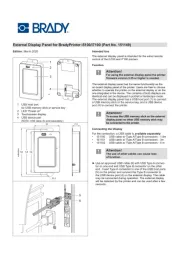
1 USB host port
for USB memory stick or service key
2 LED “Power on”
3 Touchscreen display
4 USB device port
(NOTE: USB cable (6) sold separately.)
5
6
mm
mm
millimeters
mm


Produkt Specifikationer

Mærke: Brady
Kategori: Printer
Model: 151149

Har du brug for hjælp?

Hvis du har brug for hjælp til Brady 151149 stil et spørgsmål nedenfor, og andre brugere vil svare dig


Printer Brady Manualer

Printer Manualer

Nyeste Printer Manualer

Kyocera

Kyocera LS-4020DN Manual

16 December 2025
Dascom

Dascom Tally 2610+ Manual

5 December 2025
Avision

Avision AP233QN Manual

5 December 2025
CUSTOM

CUSTOM P3X Manual

5 December 2025
Avision

Avision AM233QW Manual

5 December 2025
Avision

Avision AM240AW Plus Manual

5 December 2025
Avision

Avision AM3321w Manual

4 December 2025
Avision

Avision AM4021w Manual

4 December 2025