Corel Roxio Game Capture HD Pro Manual

Corel Ikke kategoriseret Roxio Game Capture HD Pro

Læs gratis den danske manual til Corel Roxio Game Capture HD Pro (2 sider) i kategorien Ikke kategoriseret. Denne vejledning er vurderet som hjælpsom af 44 personer og har en gennemsnitlig bedømmelse på 4.0 stjerner ud af 22.5 anmeldelser. Har du et spørgsmål om Corel Roxio Game Capture HD Pro, eller vil du spørge andre brugere om produktet?

Side 1/2
Go to Display Settings Select Display Settings/Video Output Settings
PlayStation3
Tips:
If you are not able to see the preview video in the Roxio Game Capture HD PRO software, power off and then power
on the console. The video signal should reset after you power back on.
If your Xbox 360 comes with a hybrid A/V cable, make sure the switch the cable toHD” mode.
If you change the display resolution with your console, restart Roxio Game Capture HD PRO application in case
you can't see preview video normally.
Xbox 360
Use the remote control for the TV
to change the input to either HDMI
or Component depending on the
cable connection you have
A B
D
C
E
GF H
Quick Start Guide available in French, German, Italian, Spanish & Dutch here:
Schnellstarthandbuch hier auf Französisch, Deutsch, Italienisch, Spanisch und Holländisch verfügbar:
Guía de inicio rápido disponible en francés, alemán, italiano, español y holandés aquí:
Guide de démarrage disponible en français, allemand, italien, espagnol et néerlandais ici :
Guida introduttiva disponibile qui in francese, tedesco, italiano e olandese.:
Handleiding Aan de slag hier beschikbaar in het Frans, Duits, Italiaans, Spaans en Nederlands:
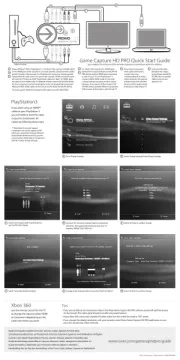
Game Capture HD PRO Quick Start Guide
Power off Xbox® 360 or PlayStation® 3. For Xbox® 360, connect a HDMI cable*
to the HDMI port of the console or a console specific Component AV cables*
to the A/V port of the console. For PlayStation3, connect a console specific
Component AV cable to the A/V port of the console. HDMI connection does
not work for PS3 due to HDCP (protected) video out. Next, for HDMI, plug
the other end of HDMI cable to HDMI IN of Roxio GameCAP HD PRO device.
For the Component connection,plug the color corresponding Component
Video and RCA Audio cables to the inputs on the Roxio GameCAP device.
*Console specific HDMI and Component AV cable(s) are NOT INCLUDED.
For Xbox® 360, connect the HDMI cable
between the output of Roxio GameCAP HD
PRO device and the HDMI input at the back
or side of your TV. For PlayStation® 3,
connect either HDMI cable or the color
corresponding Component Video Cables
between the outputs of Roxio GameCAP
HD PRO device and the HDMI or Component
Video inputs at the back or side of your TV.
If you were using an HDMI**
cable on your PlayStation 3
you will need to reset the video
output for Component AV
cables by following these steps:
** PlayStation 3 can only support
Component A/V out for capture. HDMI
video out is protected. However, between
Roxio GameCAP device and TV, you can
connect either HDMI cable or Component
with RCA cables for loop through.
If you have Component
video cable connection,
connect the color
corresponding RCA Audio
cables between the outputs
of Roxio GameCAP HD PRO
device and the audio inputs
at the back or side of your TV.
Connect USB cable
between the output
on the Roxio GameCAP
HD PRO device and the
USB2.0 port of your
laptop or PC.
GFD
E
C
B
A
www.roxio.com/gamecaphdpro/guide
©2012 Corel Corporation Printed in the USA. GSIRGCHDPR1MLAM
Select (X) Enter to confirm change
SelectSet Audio Output Settings”
Switch to Component/D-Terminal option
and confirm the change
Check ALL the supported resolutions that your TV
supports (480p/720p/1080i etc.)
Use your TVs remote to change input to Component
Change Audio to Audio Input Connector/SCART/AV MULTI
Select (X) Enter to confirm change
G
C
B
A
See complete instructions on DVD and video tutorials accessible from within the software
Cables not included
F
E
D


Produkt Specifikationer

Mærke: Corel
Kategori: Ikke kategoriseret
Model: Roxio Game Capture HD Pro
Vægt: - g
USB-port: Ja
Understøttede videotilstande: 480p, 576p, 720p, 1080i, 1080p
Format til analogt signal: NTSC
Komponentvideo (YPbPr/YCbCr) indgang: 1
Strømforsyningstype: USB
Hurtig installationsvejledning: Ja
Kabler inkluderet: USB
LED-indikatorer: Ja
Harmoniseret systemkode (HS): 85176990
USB version: 2.0
Antal USB-porte: 1
Medfølgende software: Roxio Game Capture
Værtsgrænseflade: USB 2.0
Intern: Ingen
Lyd (L, R) indgang: 2
Komponent video (YPbPr/YCbCr) udgang: 1
Lyd (L, R) udgang: 2
HSMI-indgang: 1
Antal HDMI-udgange: 1
Minimum processor: Intel Core 2 Duo 1.8 GHz, AMD Athlon x2 64 2.0 GHz
Minimum RAM: 2048 MB
Sprogversion: ENG, FRE
Minimum harddisk-plads: 10 GB
Optagelse fra: Spillekonsol
Understøttede importerede lydformater: AAC, MP3, WAV, WMA
Understøttede eksporterede lydformater: AAC, MP3, WAV, WMA
Understøttede eksporterede videoformater: AVI, DIVX, MP4, WMV
Understøttede importerede videoformater: AVI, DIVX, MOV, MP4, WMV
Understøttelse af importerede billedformater: BMP, GIF, JPG, PNG, TIF
Understøttelse af eksporterede billedformater: BMP, GIF, JPG, PNG, TIF

Har du brug for hjælp?

Hvis du har brug for hjælp til Corel Roxio Game Capture HD Pro stil et spørgsmål nedenfor, og andre brugere vil svare dig


Ikke kategoriseret Corel Manualer
Ikke kategoriseret Manualer

Nyeste Ikke kategoriseret Manualer

Waterstone

Waterstone 7800 Manual

11 December 2025
Kwikset

Kwikset 258 Manual

11 December 2025
Schlage

Schlage F170 Manual

11 December 2025
Moen

Moen Align 7565EV Manual

11 December 2025
ALNO

ALNO MC10244 Manual

11 December 2025
JET

JET TAK-ZX Manual

11 December 2025
Waterstone

Waterstone 1455 Manual

11 December 2025
Laica

Laica NE2015 Manual

11 December 2025